Introduction
Thank you for choosing the Strex 16MP Full HD Wildlife Camera. This versatile camera is designed for observing wildlife, monitoring specific areas, and providing 24/7 surveillance. Equipped with motion detection, night vision, audio recording, and a fast trigger speed, this camera offers comprehensive functionality for various outdoor applications. Capture high-quality photos with its 16MP camera and record 1080P Full HD videos of wildlife in their natural habitat, or utilize it as a security camera. The camera supports both motion-activated recording and time-lapse photography.
This manual provides detailed instructions on setting up, operating, and maintaining your Strex Wildlife Camera to ensure optimal performance and longevity.

The Strex Wildlife Camera is versatile, suitable for wildlife observation, hunting, security, and monitoring nests.
What's in the Box
Please check the package contents to ensure all items are present:
- 1x Strex Wildlife Camera
- 1x Mounting Strap
- 1x Micro-USB Cable
- 1x User Manual (NL/ENG)
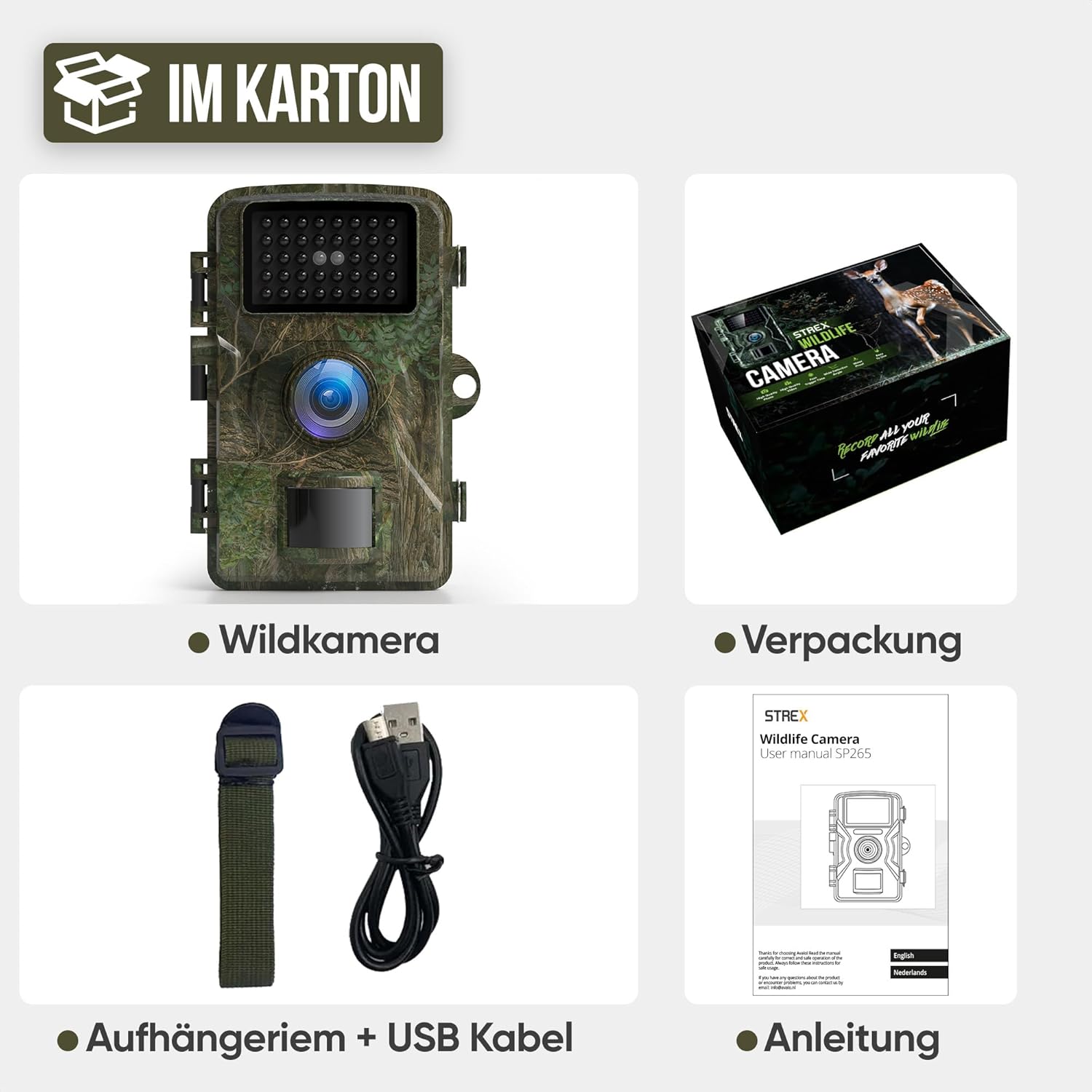
The package includes the Strex Wildlife Camera, its packaging, a mounting strap, a Micro-USB cable, and the user manual.
Setup
1. Power Supply
The camera operates on AA batteries (4x or 8x) or an external 6V/2A power supply (not included).
- Open the battery compartment on the side or back of the camera.
- Insert 4 or 8 AA batteries, ensuring correct polarity (+/-).
- Close the battery compartment securely to maintain waterproofing.
2. Micro SD Card Installation
A Micro SD card (up to 128GB) is required for storing photos and videos.
- Locate the Micro SD card slot, usually near the battery compartment.
- Insert the Micro SD card with the contacts facing down until it clicks into place.
- To remove, gently push the card in until it springs out.
3. Mounting the Camera
Use the included mounting strap to secure the camera to a tree or pole.
- Thread the mounting strap through the slots on the back of the camera.
- Wrap the strap around the desired mounting location (e.g., tree trunk).
- Pull the strap tight and secure it to ensure the camera is stable.
- Adjust the camera's angle to cover the desired area.

The camera can be easily mounted on a tree using the included strap, blending in with its surroundings.
Operating
Basic Operation
Turn the camera on using the power switch. The built-in LCD screen allows for immediate viewing of captured images and videos, as well as menu navigation.
Key Features
- Crisp Image Quality: The camera features 16 Megapixels and 1080P Full HD resolution, providing sharp and clear images and videos.
- High-Speed Motion Detection: With a sensitive motion detection system and a rapid 0.8-second trigger speed, the camera captures multiple photos instantly when motion is detected within 25 meters.
- 940Nm No-Glow Night Vision: Equipped with 3 infrared sensors and 36 special invisible 940Nm No-Glow LEDs, the camera offers clear night vision up to 20 meters without scaring animals.
- Audio Recording: The camera supports audio recording, adding another layer of detail to your video captures.
- Temperature Sensor: Records temperature data along with images/videos.
- Password Function: Protect your camera settings and data with a password.

Overview of the camera's main features: 16MP, 36IR night vision, IP66 waterproof, photo/video capabilities, and audio recording.

The camera features a 120-degree motion sensor for precise detection of movement up to 25 meters.

Advanced night vision is provided by 36 infrared low-glow LEDs, ensuring clear images in darkness.

The 16MP HD lens ensures crystal-clear image quality, superior to an 8MP lens.
Viewing Captured Media
You can view captured images and videos directly on the camera's built-in LCD screen. Alternatively, transfer files to your computer using the provided Micro-USB cable or by inserting the Micro SD card into a card reader.
Maintenance
Waterproof Design (IP66)
The Strex Wildlife Camera features an IP66 waterproof rating, making it fully resistant to dust and strong jets of water. This robust design protects the camera lens and housing from moisture damage, ensuring reliable operation in all weather conditions, including rain and snow.

The camera is IP66 rated, making it waterproof, dustproof, and snowproof for reliable outdoor use.
Cleaning
To clean the camera, wipe the exterior with a soft, damp cloth. Ensure the lens is free of dirt and smudges for optimal image quality. Do not use harsh chemicals or abrasive cleaners.
Battery Replacement
Replace batteries when the low battery indicator appears or when the camera fails to power on. Always use fresh, high-quality AA batteries.
SD Card Management
Regularly check the Micro SD card for available space. Format the card periodically (after backing up important data) to maintain optimal performance and prevent data corruption.
Troubleshooting
- Camera not turning on:
Check if batteries are inserted correctly and fully charged. Ensure the power switch is in the 'ON' position. If using external power, verify the connection and power source.
- Poor image/video quality:
Clean the camera lens. Ensure there is sufficient light (for daytime) or that night vision is enabled and functioning (for nighttime). Check camera settings for resolution and quality. Ensure the Micro SD card is not full or corrupted.
- Motion detection not working:
Verify that motion detection is enabled in the camera settings. Ensure the detection range is appropriate for the environment. Clear any obstructions in front of the sensor. Test with different sensitivity settings.
- Camera not recording:
Check if the Micro SD card is inserted, has sufficient free space, and is not corrupted. Ensure the camera mode is set to photo or video recording. Check battery level.
- Date/Time incorrect:
Access the camera's menu settings to adjust the date and time manually.
Specifications
| Feature | Specification |
|---|---|
| Image Resolution | 16MP / 12MP / 5MP / 1.3MP (adjustable) |
| Video Resolution | 1080P Full HD 30 FPS |
| Trigger Speed | 0.8 seconds |
| Motion Detection Range | Up to 25 meters |
| Night Vision Range | Up to 20 meters |
| IR LEDs | 36 invisible 940Nm IR-LEDs (No-Glow) |
| Water Resistance | IP66 (Waterproof and Dustproof) |
| Storage | Supports Micro SD (Max 128GB) |
| Power Supply | 4x or 8x AA batteries; External 6V/2A (not included) |
| Operating Temperature | -20 to +60 Degrees Celsius |
| Dimensions (L x W x H) | Approx. 13.5 x 10 x 5.5 CM |
| Connectivity | USB, AV |
| Special Features | Audio recording, Temperature sensor, Password function, Camouflaged housing |
Warranty and Support
This product comes with a standard manufacturer's warranty. For specific warranty terms and conditions, please refer to the documentation provided with your purchase or contact Strex customer support.
If you encounter any issues or have questions not covered in this manual, please visit the official Strex website or contact their customer service for assistance. The manual and menu are available in Dutch, English, and other languages.


