1. Introduction
The Strex wireless keyboard and mouse set is designed to enhance your productivity and comfort. Featuring silent keys and mouse clicks, it ensures a quiet working environment. The ergonomically shaped mouse provides a comfortable grip, while the spill-resistant keyboard offers durability. Being entirely wireless, this set provides ample freedom of movement, making it an ideal combination for various computing tasks.
Both the keyboard and mouse are ergonomically designed for extended comfortable use. The keyboard features silent touch technology, providing a smooth and quiet typing experience by reducing key noise and improving key structure for comfortable input.
The included mouse features a modern design with silent click buttons, mirroring the keyboard's quiet operation. This ergonomic mouse is suitable for both left and right-handed users and includes a DPI button for easy adjustment of cursor speed.
The keyboard and mouse feature a modern, smart design that complements any workspace. The keyboard is equipped with stable adjustable feet and a spill-resistant design. Each key is treated with a fade-resistant coating, ensuring the keyboard remains legible over time.
The Strex wireless keyboard features a standard QWERTY layout. In addition to standard keys, it provides access to 11 multimedia shortcut keys. These allow you to control media functions such as skipping songs, pausing videos, or adjusting volume with a single press.
The set offers plug-and-play functionality, making it compatible with any desktop or laptop computer without requiring complex installation. The optical mouse provides precise tracking.
2. Package Contents
Please check the box for the following items:
- Wireless Keyboard
- Wireless Mouse
- USB Receiver
- User Manual

Image: The package contents include the wireless keyboard, wireless mouse, a small USB receiver, and the user manual.
3. Setup
The Strex Wireless Keyboard and Mouse Set is designed for easy plug-and-play setup.
3.1. Battery Installation
The keyboard and mouse require AAA batteries for operation. Ensure correct polarity when inserting batteries.
- Keyboard: Locate the battery compartment on the underside of the keyboard. Insert 1x AAA battery, ensuring the positive (+) and negative (-) terminals align correctly. Close the battery compartment cover.
- Mouse: Locate the battery compartment on the underside of the mouse. Insert 1x AAA battery, ensuring the positive (+) and negative (-) terminals align correctly. Close the battery compartment cover.
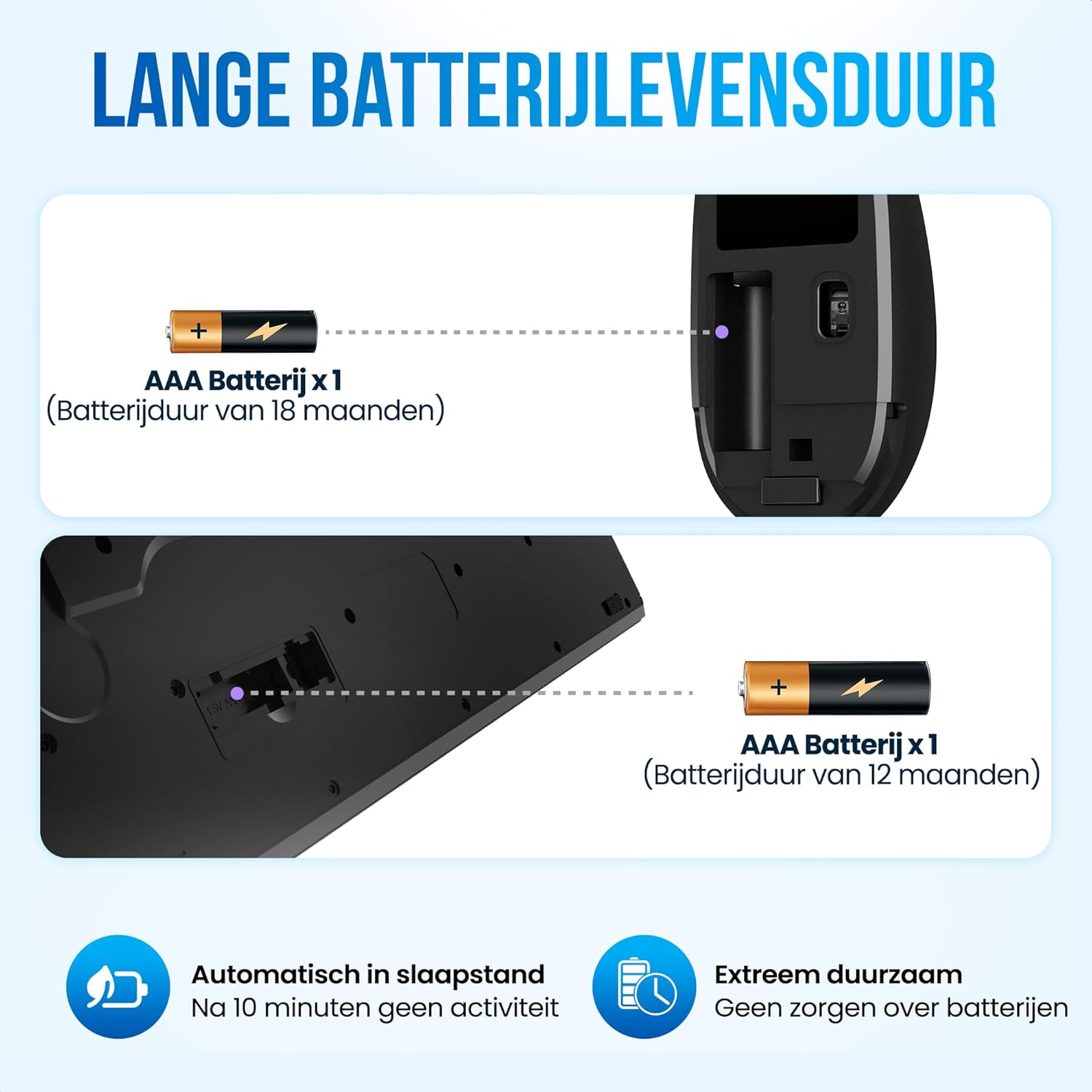
Image: This diagram illustrates how to install AAA batteries into both the keyboard and the mouse. It also highlights the approximate battery life: 18 months for the mouse and 12 months for the keyboard.
3.2. Connecting the USB Receiver
The set connects wirelessly via a single USB receiver.
- Locate the small USB receiver, typically stored within the mouse's battery compartment for safekeeping during transport.
- Plug the USB receiver into an available USB port on your computer (desktop or laptop).
- Your operating system (Windows, macOS, Linux) should automatically detect and install the necessary drivers. No additional software installation is required.

Image: This image demonstrates the plug-and-play nature of the Strex wireless keyboard and mouse set, showing the USB receiver and its compatibility with a range of devices including PCs, laptops, and tablets running Windows, Mac, or Linux operating systems.
4. Operating Instructions
4.1. Keyboard Usage
The keyboard features a standard QWERTY layout for familiar typing. Its silent keys ensure a quiet typing experience.

Image: This image focuses on the keyboard's design for comfortable typing, emphasizing features like extremely silent keys, accurate input, and a full numeric keypad, all contributing to an enhanced typing experience.
4.2. Multimedia Shortcuts
The keyboard includes 11 dedicated multimedia shortcut keys (F1-F12 functions, accessible via the 'Fn' key or directly depending on keyboard mode) for quick access to common functions:
- F1-F12: Control media playback (play/pause, stop, previous/next track), volume (mute, decrease, increase), web browser, email, and more. Refer to the key legends for specific functions.

Image: This diagram illustrates key features of the Strex keyboard, including its adjustable feet for ergonomic positioning, 12 multimedia shortcut keys for quick access to functions, a battery status indicator, a spill-resistant design for durability, and ergonomically shaped keys for comfortable typing.
4.3. Mouse Usage
The ergonomic mouse provides precise optical tracking and silent clicks.
- DPI Adjustment: Use the DPI button (located near the scroll wheel) to cycle through different cursor speeds to match your preference.
- Silent Clicks: The mouse buttons are designed to produce minimal noise, ensuring a quiet working environment.

Image: This image highlights the silent click functionality of the Strex mouse, visually representing how its design minimizes noise during use, ensuring a quiet operation for scrolling, clicking, and moving.
4.4. Power Saving Mode
To conserve battery life, both the keyboard and mouse will automatically enter a sleep mode after 10 minutes of inactivity. To wake them up, simply press any key on the keyboard or move/click the mouse.
5. Maintenance
5.1. Cleaning
The keyboard features a spill-resistant design, but regular cleaning is recommended to maintain hygiene and appearance.
- Disconnect the USB receiver from your computer before cleaning.
- Use a soft, damp cloth to wipe down the surfaces of the keyboard and mouse.
- For stubborn dirt, a small amount of mild soap solution can be used, but ensure no liquid enters the internal components.
- Allow the devices to dry completely before reconnecting the USB receiver.
5.2. Battery Replacement
When the battery indicator on the keyboard signals low power, or if the mouse responsiveness decreases, it's time to replace the batteries.
- Follow the battery installation steps outlined in Section 3.1.
- Dispose of old batteries responsibly according to local regulations.
6. Troubleshooting
If you encounter issues with your Strex Wireless Keyboard and Mouse Set, please refer to the following common solutions:
- No Response from Keyboard/Mouse:
- Ensure batteries are correctly installed and not depleted. Replace if necessary.
- Verify the USB receiver is securely plugged into a working USB port on your computer.
- Try plugging the USB receiver into a different USB port.
- Move the keyboard and mouse closer to the USB receiver to ensure they are within the 10-meter wireless range.
- Lagging or Intermittent Connection:
- Check for potential interference from other wireless devices (e.g., Wi-Fi routers, other 2.4 GHz devices). Try moving them further away.
- Ensure there are no large metal objects between the devices and the receiver that could block the signal.
- Replace batteries, even if the indicator doesn't show low power.
- Mouse Cursor Not Moving Smoothly:
- Clean the optical sensor on the underside of the mouse.
- Ensure you are using the mouse on a suitable surface (non-reflective, non-transparent).
- Adjust the DPI setting using the DPI button on the mouse.
- Multimedia Keys Not Working:
- Ensure you are pressing the correct function key (e.g., F1-F12) or using the 'Fn' key in combination if required by your system or keyboard mode.
- Check your operating system's settings for keyboard function key behavior.
7. Specifications
| Feature | Specification |
|---|---|
| Brand | Strex |
| Model Number | SP131 |
| Connectivity Technology | Wireless (2.4 GHz) |
| Compatible Devices | PC, Laptop |
| Operating System Compatibility | Windows, macOS, Linux |
| Keyboard Description | Membrane |
| Keyboard Layout | QWERTY |
| Motion Detection Technology (Mouse) | Optical |
| Power Source | Battery Powered (AAA) |
| Item Weight (Keyboard) | 405 Grams |
| Item Weight (Mouse) | 51 Grams |
| Keyboard Dimensions (Length x Width) | 43 cm x 13 cm |
| Mouse Dimensions (Length x Width) | 11 cm x 6 cm |
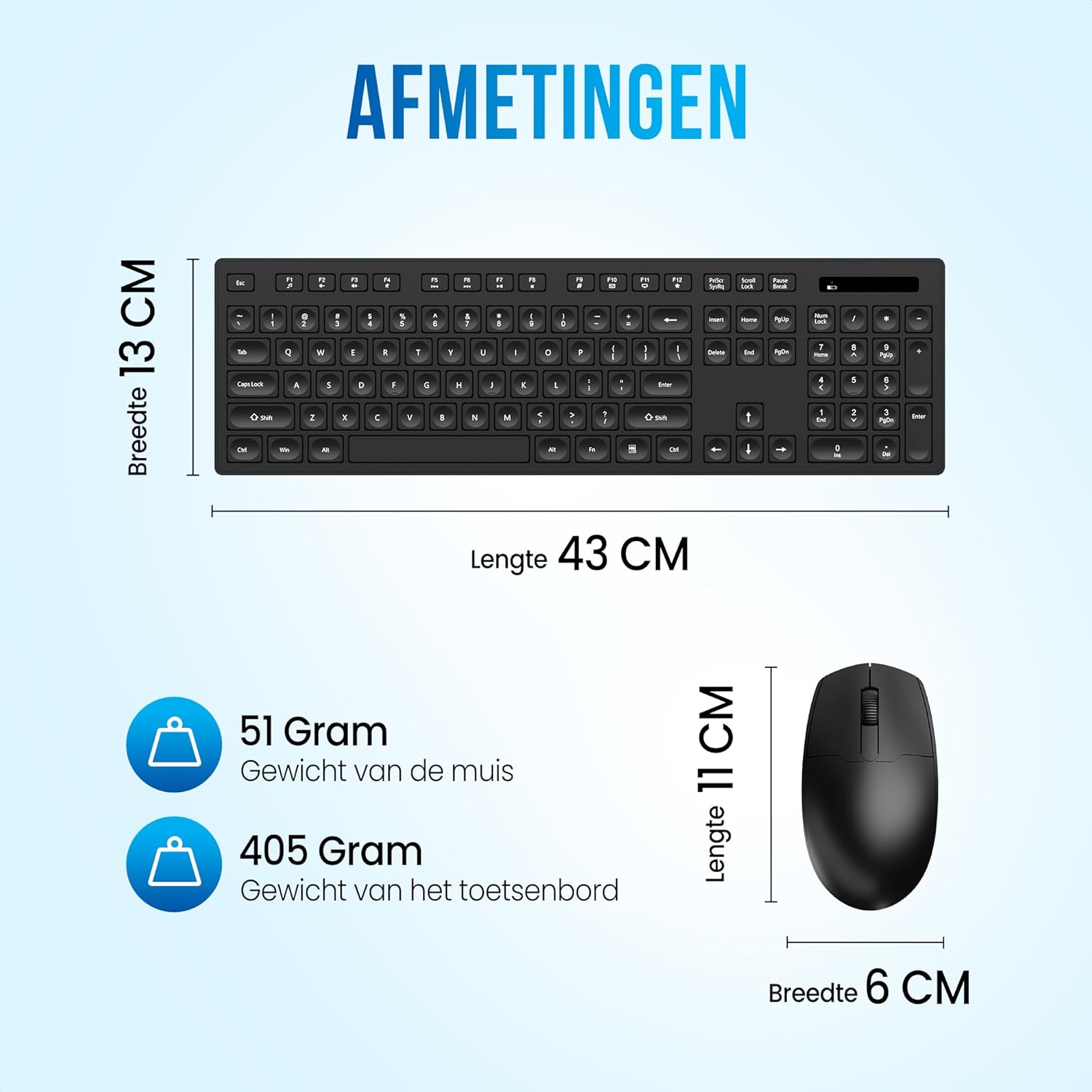
Image: This diagram provides the physical dimensions and weights of the Strex wireless keyboard and mouse. The keyboard measures 43 cm in length and 13 cm in width, weighing 405 grams. The mouse measures 11 cm in length and 6 cm in width, weighing 51 grams.
8. Warranty and Support
For warranty information or technical support, please refer to the contact details provided in the packaging or visit the official Strex website. Keep your purchase receipt as proof of purchase for any warranty claims.