1. Safety Information
Please read all safety instructions carefully before operating the Grennix Robot Pool Cleaner. Failure to follow these instructions may result in electric shock, fire, or serious injury.
- Always ensure the charging port is completely dry before connecting the charger.
- Do not operate the cleaner if it or the charger appears damaged.
- Keep the cleaner out of reach of children and pets when in operation or charging.
- Only use the original charger and accessories provided by Grennix.
- Do not attempt to disassemble or repair the cleaner yourself. Contact qualified personnel for service.
- Ensure the pool water chemistry is balanced before operating the cleaner.
- Remove large debris or objects from the pool before operating the cleaner to prevent damage.
2. Product Overview
2.1 Components
The Grennix GX-UFO-WH Robot Pool Cleaner package includes the following items:
- Grennix G900 Pool Cleaner Unit
- Battery Charger
- Filter Assembly
- Retrieval Hook
- Instruction Manual
- Quick Guide

Image: All essential accessories included with the Grennix Robot Pool Cleaner, such as the main unit, charger, filter, retrieval hook, and manuals.
2.2 Features
- Powerful Suction: Equipped with brushless dual-motors providing 6000Pa suction power for effective debris collection.
- Fine Filtration: Features an 80-micron filtering accuracy to capture leaves, dirt, and sand.
- Cordless Design: Offers real hands-free and fully automated cleaning without messy hoses or cluttered cords.
- Versatile Application: Suitable for both above-ground and in-ground pools up to 645 sq. ft. (60 m²) and flat pools with a depth of up to 3 meters.
- Long Battery Life: Powered by a 2600mAh battery, providing 60-75 minutes of operating time on a full charge.
- Fast Charging: Fully charges in approximately 2.3 hours.
- Self-Parking Function: Automatically parks near a wall when cleaning is complete or battery is low (<5%).
- LED Indicator: Provides clear status updates (Flashing blue: battery charging; Solid blue: charging complete; Flashing red: low battery; Solid white: cleaning in progress).
- Durable & Waterproof: IP68 waterproof rating with a USA-designed robust build.

Image: The Grennix Robot Pool Cleaner, a compact and efficient device designed for automated pool cleaning.

Image: Visual representation of the cleaner's robust battery life, showing 2600mAh capacity, 75 minutes running time, and 2.3 hours charging time.

Image: Highlighting the cordless design of the pool cleaner, eliminating the need for messy hoses or cluttered cords.

Image: An exploded view illustrating the dual-motors filtration system, showing how the filter and double suction ports work to capture various debris.

Image: Depiction of the cleaner's powerful 6000Pa suction, effectively pulling in debris from the pool floor.

Image: The automatic parking feature, showing the cleaner returning to the pool edge when its battery is low.
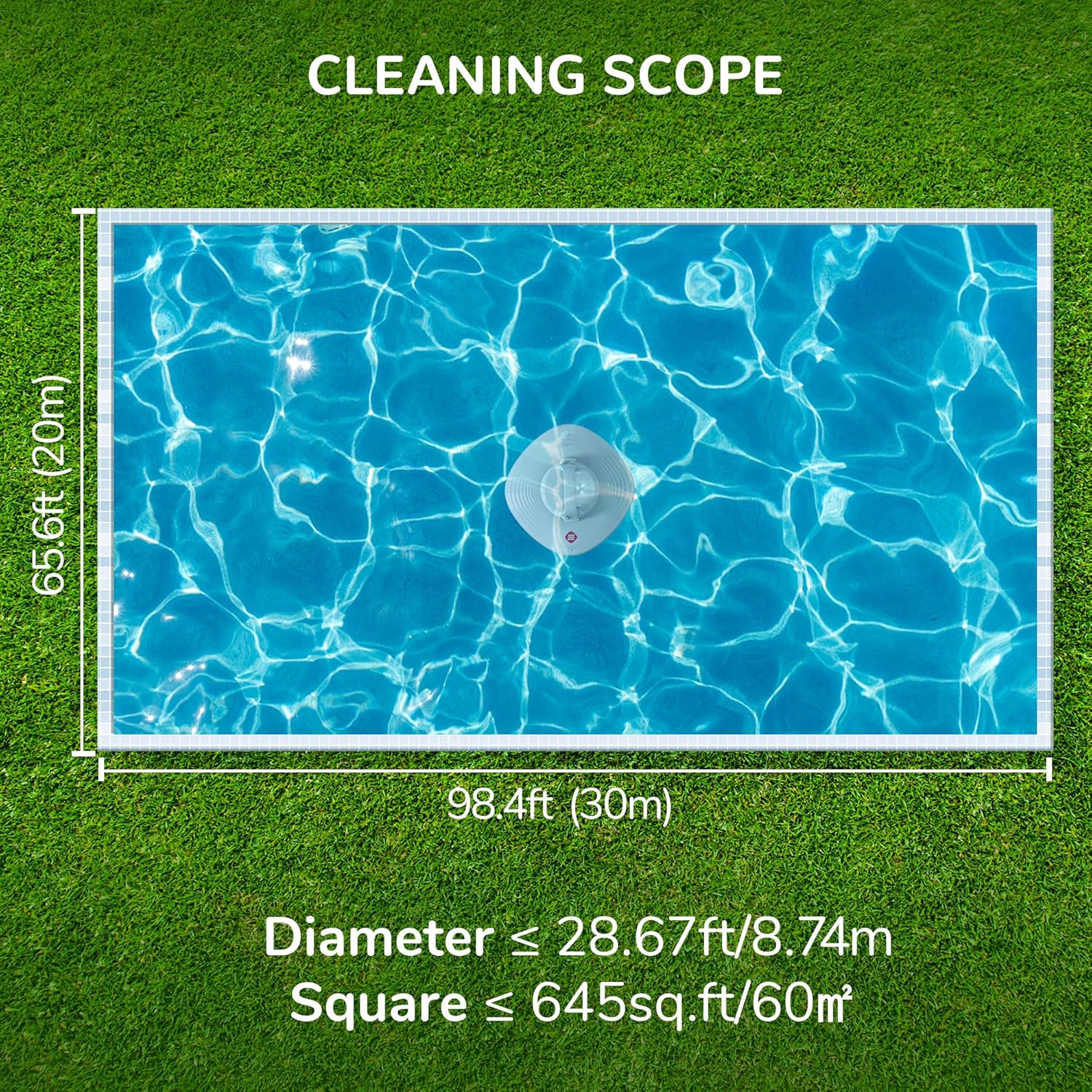
Image: Diagram illustrating the cleaning scope, indicating compatibility with pools up to 645 sq. ft. (60 m²) in size.
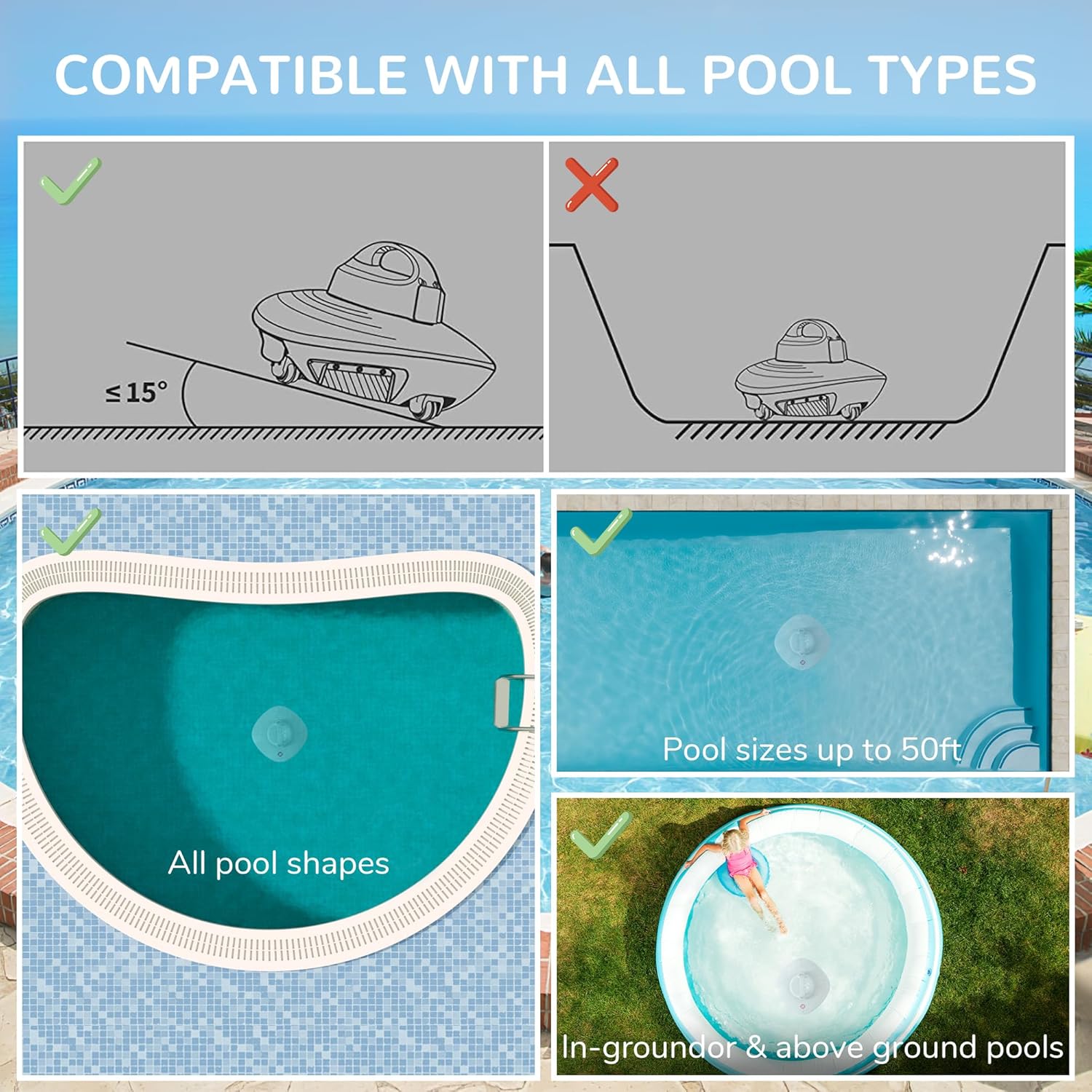
Image: Demonstrating the cleaner's compatibility with all pool shapes and both in-ground and above-ground flat pools.
2.3 Specifications
| Specification | Detail |
|---|---|
| Model Name | GX-UFO-WH |
| Power Source | AC/DC |
| Special Feature | Cordless |
| Control Method | Touch |
| Battery Type | Lithium-Ion (2600mAh) |
| Charging Time | 2.3 Hours |
| Operating Time | 60-75 minutes |
| Suction Power | 6000Pa |
| Filtering Accuracy | Up to 80 microns |
| Max Pool Size | 645 sq. ft. (60 m²) |
| Max Pool Depth | 3 meters |
| Product Dimensions | 13.5"L x 13.5"W x 8.2"H |
| Item Weight | 7.05 lbs (approx. 3.2 kg) |
| Waterproof Rating | IP68 |
| Material | Plastic, Acrylonitrile Butadiene Styrene (ABS) |
3. Setup
3.1 Initial Charging
- Ensure the cleaner unit and its charging port are completely dry before charging.
- Connect the provided charger to the cleaner's charging port.
- Plug the charger into a standard electrical outlet.
- The LED indicator will flash blue during charging.
- Charging is complete when the LED indicator turns solid blue (approximately 2.3 hours).
3.2 Assembly (if required)
The Grennix Robot Pool Cleaner comes largely pre-assembled. Ensure the filter assembly is correctly seated inside the unit before first use. Refer to the 'Maintenance' section for details on accessing and installing the filter.
4. Operation
4.1 Starting the Cleaner
- Ensure the cleaner is fully charged.
- Locate the power button on the underside of the unit. Press the button to turn the cleaner ON. The LED indicator will turn solid white, indicating it is ready for cleaning.
- Gently place the cleaner into the pool water. Allow it to slowly sink to the bottom.
- The cleaner will begin its cleaning cycle automatically, moving across the pool floor.
4.2 Cleaning Cycle
The Grennix Robot Pool Cleaner operates for 60-75 minutes on a full charge. It navigates the pool floor, collecting debris through its powerful suction and filtration system.
4.3 Automatic Parking
When the cleaning cycle is complete or the battery level drops below 5%, the cleaner will automatically move towards the nearest pool wall and park itself for easy retrieval.
4.4 Retrieving the Cleaner
- Once the cleaner has parked, use the provided retrieval hook (attached to a standard pool pole, not included) to gently lift the cleaner out of the water.
- Allow excess water to drain from the unit before removing it completely from the pool.
- Turn off the cleaner by pressing the power button.
5. Maintenance
Regular maintenance ensures optimal performance and extends the lifespan of your Grennix Robot Pool Cleaner.
5.1 Cleaning the Filter
- After each cleaning cycle, or as needed, remove the cleaner from the pool and turn it off.
- Locate the side tabs on the top cover of the cleaner. Pull up on these tabs to open the unit.
- Carefully lift out the filter assembly.
- Empty any collected debris from the filter.
- Rinse the filter thoroughly with a garden hose to remove fine particles and gunk.
- Ensure the filter is clean and free of debris before reinserting it.
- Place the clean filter assembly back into the unit, ensuring it is properly seated.
- Close the top cover, pressing down until the side tabs click into place.
5.2 Charging Port Care
Always ensure the charging port on the underside of the cleaner is completely dry before connecting the charger. Wipe it with a clean, dry cloth if necessary.
5.3 Storage
When not in use for extended periods, store the cleaner in a cool, dry place away from direct sunlight and extreme temperatures. Ensure the battery is fully charged before storage.
6. Troubleshooting
| Problem | Possible Cause | Solution |
|---|---|---|
| Cleaner does not turn on. | Battery is depleted. | Charge the cleaner fully (LED solid blue). |
| Cleaner not moving or moving slowly. | Filter is clogged with debris. | Clean the filter thoroughly. |
| Battery is low. | Retrieve and charge the cleaner. | |
| Obstruction in wheels or suction ports. | Inspect and clear any obstructions. | |
| Cleaner not picking up debris effectively. | Filter is full or dirty. | Clean the filter. |
| Large debris blocking suction. | Remove large debris from the pool manually before operation. | |
| Cleaner does not park at the wall. | Battery completely drained before reaching wall. | Ensure cleaner is fully charged before use. Retrieve manually if needed. |
7. Warranty and Support
The Grennix GX-UFO-WH Robot Pool Cleaner is backed by a 1-year warranty from the date of purchase.
For technical support, warranty claims, or replacement parts, please contact Grennix customer service through the retailer where the product was purchased or visit the official Grennix website for contact information.
Please retain your proof of purchase for warranty validation.


