
1. Important Safety Instructions
Please read all instructions carefully before using the Alpicool XD35 Portable Fridge. Retain this manual for future reference.
- Power Supply: Ensure the power supply voltage matches the specifications (12/24V DC or 100-240V AC).
- Ventilation: Always ensure adequate ventilation around the unit. Do not block air vents.
- Water Exposure: Do not immerse the unit in water or expose it to heavy rain.
- Cleaning: Unplug the unit from the power source before cleaning. Use a damp cloth; avoid abrasive cleaners.
- Children: Keep out of reach of children. Supervise children to ensure they do not play with the appliance.
- Handling: Handle with care. Avoid dropping or subjecting the unit to strong impacts.
- Flammable Materials: Do not store explosive substances such as aerosol cans with a flammable propellant in this appliance.
- Repairs: Do not attempt to repair or modify the unit yourself. Refer all servicing to qualified personnel.
2. Product Overview
The Alpicool XD35 is a versatile 25-quart portable car refrigerator designed for various outdoor activities, including fishing, camping, RV trips, and truck use. It features a digital panel with dual temperature control, allowing it to function as both a freezer and a refrigerator. Its robust design includes recessed handles for easy portability and a bottom drain plug for convenient cleaning.
2.1 Key Components and Features
- Main Unit: The primary refrigeration unit with two independent compartments.
- Digital Control Panel: Located on the lid, for temperature adjustment and settings.
- Power Cables: Includes both DC (12/24V) and AC (100-240V) power adapters.
- Recessed Handles: Integrated into the side for easy carrying.
- Detachable Lids: Two separate lids for each compartment, which can be reversed for flexible opening.
- Cup Holders: Two integrated cup holders on the lid for convenience.
- Drain Plug: Located at the bottom of the main compartment for easy water drainage during cleaning.

Figure 2.1: The Alpicool XD35 Portable Fridge with its dual compartments open.

Figure 2.2: Detailed view of key features such as the detachable door, cup holders, recessed handle, LED display, durable latch, and drain plug.
3. Setup
3.1 Unpacking and Placement
- Carefully remove the Alpicool XD35 from its packaging. Retain all packaging materials for future transport or storage.
- Place the unit on a stable, level surface. Ensure there is at least 10 cm (4 inches) of space around all sides for proper ventilation.
- Before initial use, allow the refrigerator to stand upright for at least 6 hours. This allows the refrigerant to settle, optimizing performance.
3.2 Power Connection
The Alpicool XD35 can be powered by either a 12/24V DC power source (e.g., car cigarette lighter) or a 100-240V AC power source (e.g., standard wall outlet).
- DC Power (12/24V): Connect the DC power cable to the DC input port on the side of the fridge and then to your vehicle's 12V or 24V power outlet.
- AC Power (100-240V): Connect the AC power adapter to the AC input port on the side of the fridge, then plug the adapter into a standard wall outlet.
Video 3.1: Demonstrates connecting the Alpicool XD35 to a power source and initial setup steps.

Figure 3.1: Various power supply modes for the Alpicool XD35, including outdoor (solar/power station), AC, and DC.
4. Operating Instructions
4.1 Control Panel Functions
The digital control panel allows you to manage the fridge's settings and monitor temperatures.
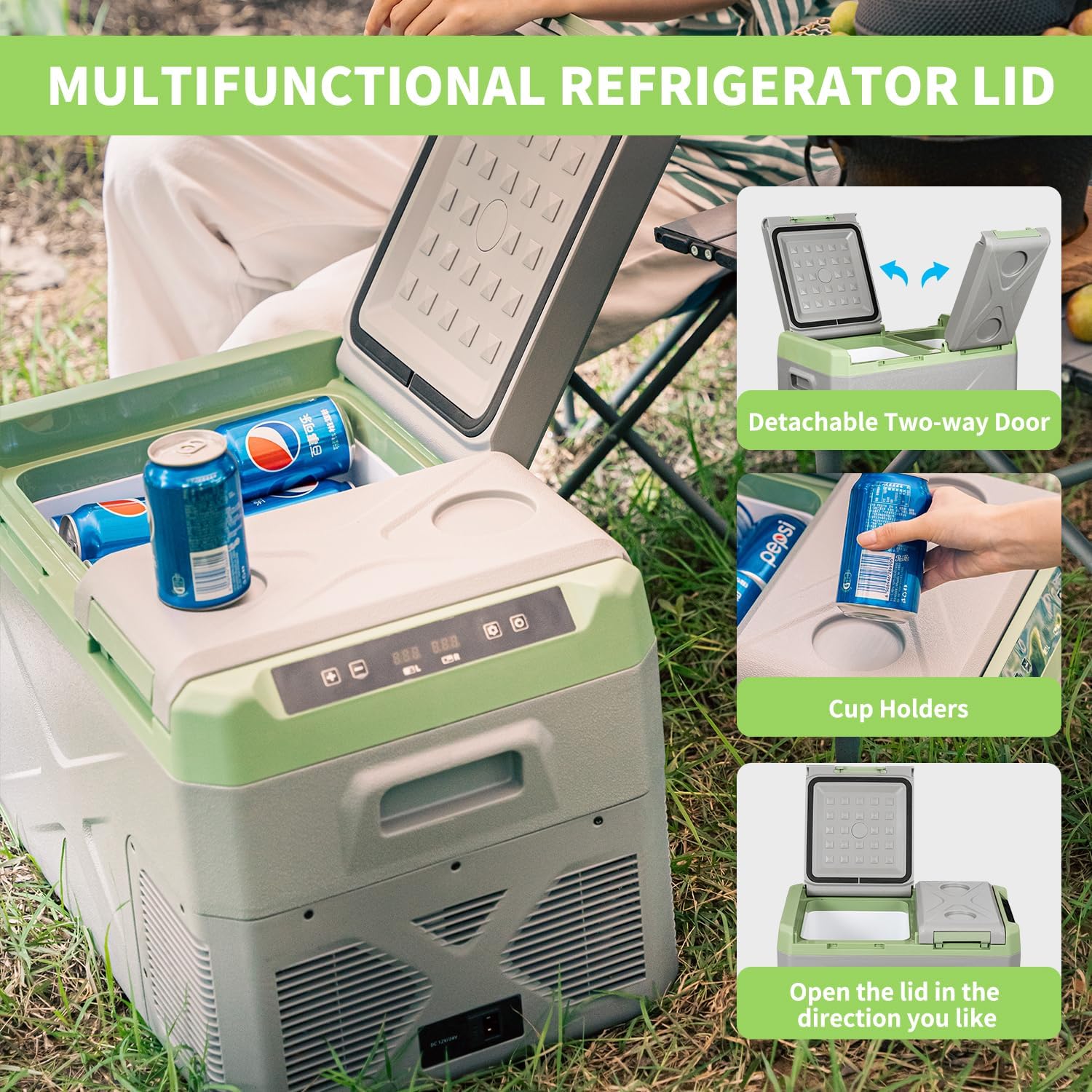
Figure 4.1: The LED display and control buttons on the Alpicool XD35.

Figure 4.2: Explanation of control panel buttons.
- Power Button (On/Off): Press to turn the unit on or off.
- Temperature Adjustment (+ / -): Use these buttons to increase or decrease the target temperature.
- Compartment Selection (L / R): Select the left or right compartment to adjust its temperature independently.
- Settings Button (Gear icon): Press to cycle through various settings, such as battery protection mode.
4.2 Temperature Setting
The Alpicool XD35 offers a temperature range from -4°F (-20°C) to 68°F (20°C).
- Turn on the fridge using the Power button.
- Press the 'L' or 'R' button to select the compartment you wish to adjust.
- Use the '+' or '-' buttons to set your desired temperature. The display will show the set temperature, then revert to the current internal temperature.

Figure 4.3: Recommended temperature settings for various items.
4.3 Battery Protection Mode
This feature protects your vehicle's battery from excessive discharge. There are three levels: Low, Medium (Med), and High.
- With the fridge on, press the 'Settings' button (gear icon) repeatedly until the battery icon appears.
- Use the '+' or '-' buttons to select the desired protection level (H for High, M for Medium, L for Low).
- High: Provides maximum battery protection, cutting off power at a higher voltage. Recommended for sensitive vehicle batteries.
- Medium: A balanced setting for most vehicles.
- Low: Allows the fridge to run longer, cutting off power at a lower voltage. Use with caution, especially if your vehicle battery is old or weak.

Figure 4.4: Battery protection levels and their cut-off voltages.
4.4 Lid Operation and Reversibility
The Alpicool XD35 features two independent lids that can be opened and detached for convenience. The lids can also be reversed to open from either the left or right side.
- Opening Lids: Simply lift the latch and open the desired lid.
- Detaching Lids: Open the lid fully, then gently pull upwards to detach it from its hinges.
- Reversing Lids: Detach the lid, then reattach it to the opposite set of hinges to change its opening direction. Ensure it clicks securely into place.

Figure 4.5: The reversible lid feature allows opening from either side.
5. Maintenance
5.1 Cleaning
Regular cleaning ensures optimal performance and hygiene.
- Disconnect Power: Always unplug the fridge before cleaning.
- Interior Cleaning: Use a soft cloth dampened with mild detergent and warm water to clean the interior. For stubborn stains, a small amount of baking soda mixed with water can be effective.
- Drain Plug: The bottom drain plug allows for easy drainage of water after cleaning. Simply unscrew the plug to release water.
- Exterior Cleaning: Wipe the exterior with a soft, damp cloth. Avoid harsh chemicals or abrasive materials that could damage the surface.
- Air Vents: Periodically check and clean the air vents to ensure they are free from dust and debris, which can impede cooling efficiency.
- Drying: After cleaning, ensure all surfaces are thoroughly dry before reconnecting power.
5.2 Defrosting
Frost buildup can reduce cooling efficiency. Defrost the unit when frost accumulation is visible.
- Turn Off and Unplug: Switch off the fridge and disconnect it from the power source.
- Empty Contents: Remove all food and beverages from the compartments.
- Open Lids: Leave the lids slightly ajar to allow the frost to melt naturally. You can place a towel inside to absorb melting water.
- Drain Water: Once defrosted, use the drain plug to remove any remaining water.
- Wipe Dry: Wipe the interior dry with a clean cloth before restarting the unit.
5.3 Storage
For long-term storage, follow these steps:
- Clean and dry the unit thoroughly as described above.
- Leave the lids slightly ajar to prevent odors and mold growth.
- Store the fridge in a dry, well-ventilated area, away from direct sunlight and extreme temperatures.
6. Troubleshooting
Before contacting support, please refer to the following table for common issues and their solutions.
| Problem | Possible Cause | Solution |
|---|---|---|
| Fridge not turning on. | No power supply; loose connection; blown fuse. | Check power cable connection. Ensure power outlet is functional. Check vehicle's fuse. |
| Fridge not cooling sufficiently. | Blocked vents; excessive ambient temperature; door not sealed properly; overfilled. | Ensure vents are clear. Move to a cooler environment. Check lid seal. Do not overfill. |
| Display shows an error code. | Specific internal fault. | Refer to the specific error code in the detailed manual (if available) or contact customer support. |
| Excessive noise. | Unit not level; fan obstruction. | Place on a level surface. Check for any obstructions around the fan. |
| Battery protection cuts off too soon. | Battery protection set to High. | Adjust battery protection mode to Medium or Low if safe for your vehicle battery. |
7. Specifications
| Feature | Detail |
|---|---|
| Model | XD35 |
| Capacity | 25 Quarts (approx. 23.6 Liters) |
| Temperature Range | -4°F to 68°F (-20°C to 20°C) |
| Power Input | DC 12V/24V; AC 100-240V |
| Rated Power | 45W (ECO mode), 60W (MAX mode) |
| Item Weight | Approximately 30 pounds (13.6 kg) |
| Product Dimensions (L x W x H) | 23.93 x 14.38 x 14.63 inches (60.78 x 36.53 x 37.16 cm) |
| Material | Plastic |
| Color | Green / Gray |
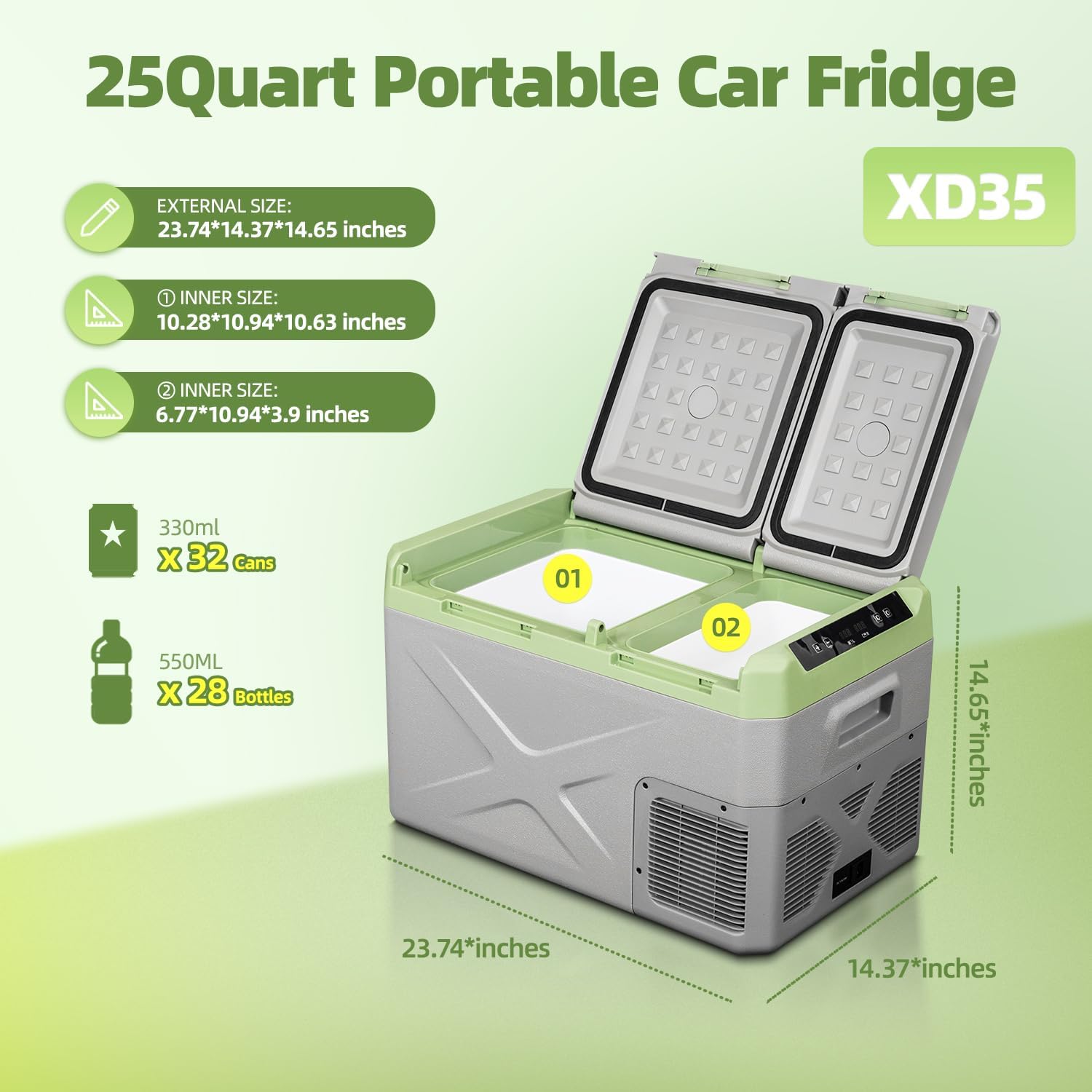
Figure 7.1: External and internal dimensions of the Alpicool XD35.
8. Warranty and Support
Alpicool products are manufactured to high-quality standards. For specific warranty details, including coverage period and terms, please refer to the warranty card included with your product packaging or visit the official Alpicool website.
If you encounter any issues that cannot be resolved using the troubleshooting guide, or for further assistance, please contact Alpicool customer support. Contact information can typically be found on the product packaging, the official Alpicool website, or through your point of purchase.
When contacting support, please have your product model (XD35) and purchase information readily available to expedite the process.


