
GODOX AD300 Pro
Godox AD300Pro Outdoor Strobe Flash Light User Manual
Model: AD300 Pro
1. Introduction
The Godox AD300Pro is a compact and powerful outdoor strobe flash light designed for professional photographers. It features a built-in 2.4G wireless X system, high-speed sync capabilities, and a rechargeable lithium battery, offering versatility and portability for various shooting environments. This manual provides essential information for the safe and effective operation of your AD300Pro.
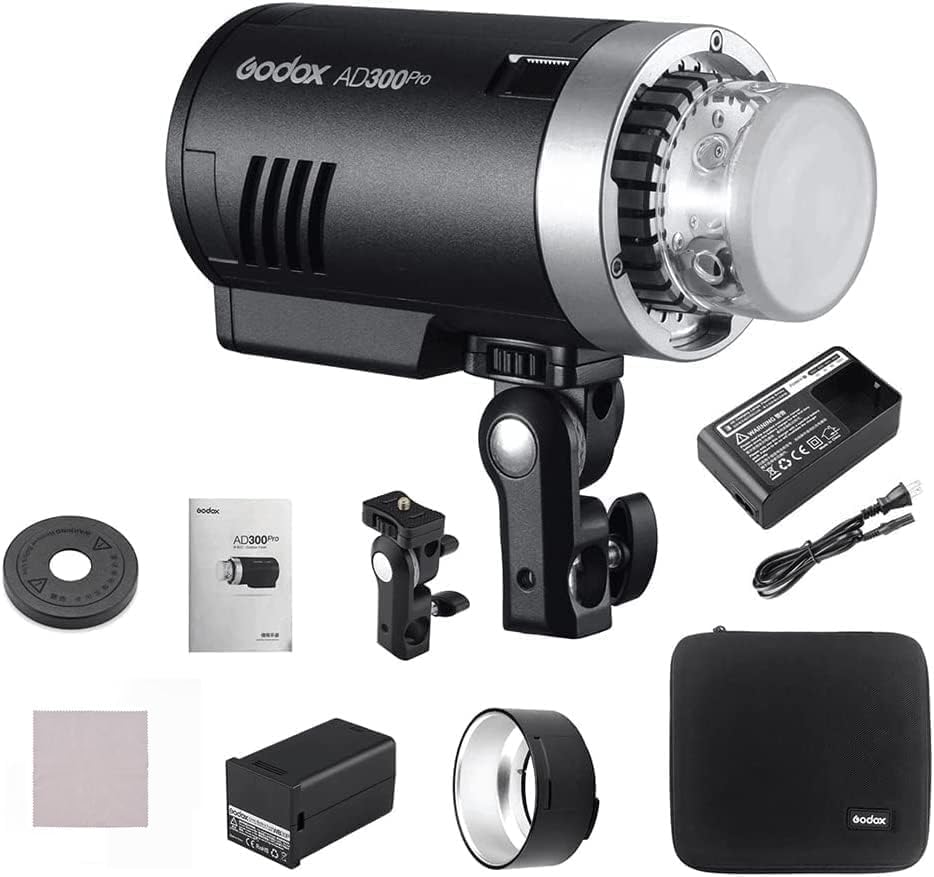
Image: The Godox AD300Pro flash unit along with its included accessories, such as the battery, charger, reflector, and carrying bag.
2. What's in the Box
Upon unboxing your Godox AD300Pro, please verify that all components are present:
- Godox AD300Pro Flash Unit
- Rechargeable Lithium Battery (14.4V/2600mAh)
- Battery Charger and Power Cable
- Flash Tube
- Standard Reflector
- AD-E2 Bracket (for angle adjustment)
- Carrying Bag
- Instruction Manual (this document)
Image: A comprehensive view of all items included in the Godox AD300Pro package, laid out for inspection.
3. Setup
3.1 Charging the Battery
Before first use, fully charge the lithium battery. The battery can be fully charged in less than 2.5 hours.
- Insert the rechargeable lithium battery into the provided charger.
- Connect the charger to a power outlet using the power cable.
- Monitor the charging indicator on the charger; it will typically change color or turn off when charging is complete.

Image: Close-up view of the Godox AD300Pro showing the battery compartment with the 14.4V/2600mAh lithium battery inserted.
3.2 Installing the Flash Tube and Reflector
- Carefully align the flash tube with the socket on the front of the AD300Pro unit.
- Gently push the flash tube into place until it clicks securely.
- Attach the standard reflector by aligning its mounting points with the flash head and twisting to lock it.

Image: A diagram illustrating the proper method for installing the flash tube into the Godox AD300Pro unit.
3.3 Mounting the Flash Unit
The AD300Pro can be mounted on a light stand using the included AD-E2 bracket.
- Attach the AD-E2 bracket to the bottom of the AD300Pro unit.
- Secure the bracket to a light stand.
- Adjust the angle of the flash using the knob on the AD-E2 bracket.

Image: The Godox AD300Pro flash unit shown mounted on a light stand, highlighting the flexible angle adjustment provided by the AD-E2 bracket.
4. Operating Instructions
4.1 Powering On/Off and Display
Press and hold the power button to turn the unit on or off. The large VA panel displays the current settings and status.

Image: A close-up of the Godox AD300Pro's control panel, showcasing the clear VA display and various control buttons for easy adjustment of settings.
4.2 Flash Modes and Settings
The AD300Pro supports TTL, Manual (M), and Multi (Stroboscopic) flash modes. Use the control panel buttons to navigate and adjust settings such as flash power, zoom, and modeling lamp intensity.
- TTL Mode: Automatic flash output based on camera metering.
- Manual Mode (M): Allows precise control over flash power output (1/1 to 1/256).
- Multi Mode: Fires a series of rapid flashes for stroboscopic effects.
4.3 Wireless Operation (2.4G X System)
The built-in Godox 2.4G wireless X system allows the AD300Pro to function as a slave unit, compatible with various camera systems including Canon, Nikon, Sony, FUJIFILM, Panasonic, and Pentax. It supports 32 channels and 5 groups (A, B, C, D, E).
- Ensure your Godox X-system transmitter (e.g., XPro, X2T, X1T, FT-16) is set to the same channel and group as the AD300Pro.
- The flash can also be triggered via a 3.5mm sync cord.
4.4 High-Speed Sync (HSS)
The AD300Pro supports high-speed sync up to 1/8000s, allowing you to use wider apertures in bright conditions or freeze fast motion.
4.5 Modeling Light
The bi-color LED modeling lamp aids in pre-visualization of lighting effects and can also be used for short-form video with its 12W continuous light output. Color temperature is adjustable from 3000K to 6000K.

Image: Two Godox AD300Pro units demonstrating the adjustable bi-color modeling light, set to 3000K (warm) and 6000K (cool) respectively.
5. Maintenance
5.1 Cleaning
- Use a soft, dry cloth to clean the flash unit.
- For stubborn marks, a slightly damp cloth with mild detergent can be used, followed by a dry wipe.
- Avoid using solvents or abrasive cleaners.
- Keep the flash tube clean and free of fingerprints, as oils can cause hot spots and reduce its lifespan.
5.2 Battery Care
- Store the battery in a cool, dry place when not in use.
- Do not expose the battery to extreme temperatures or direct sunlight.
- If storing for extended periods, charge the battery to approximately 50% capacity.
- Replace the battery if you notice a significant decrease in performance or capacity.
5.3 Storage
When not in use, store the AD300Pro in its carrying bag to protect it from dust and physical damage.
6. Troubleshooting
| Problem | Possible Cause | Solution |
|---|---|---|
| Flash does not fire. | Battery low or depleted. Flash not powered on. Incorrect wireless settings (channel/group). Flash tube not installed correctly. | Charge the battery. Press and hold the power button. Verify transmitter and flash settings. Reinstall flash tube securely. |
| Inconsistent flash output. | Battery low. Overheating protection activated. Dirty flash tube. | Charge the battery. Allow unit to cool down. Clean the flash tube. |
| Wireless trigger not working. | Incorrect channel or group. Distance too far. Interference. | Match channel and group settings. Move closer to the flash. Change channel to avoid interference. |
| Modeling light not working. | Modeling light turned off. Unit overheating. | Press the modeling light button. Allow unit to cool down. |
7. Specifications
| Feature | Detail |
|---|---|
| Model | AD300 Pro |
| Flash Power | 300Ws |
| Flash Modes | TTL / M / Multi |
| High-Speed Sync (HSS) | Up to 1/8000s |
| Recycling Time | 0.01 - 1.5s |
| Flash Duration | 1/220s - 1/10200s |
| Wireless System | Godox 2.4G X System |
| Wireless Channels | 32 |
| Wireless Groups | 5 (A, B, C, D, E) |
| Compatible Cameras | Canon, Nikon, Sony, FUJIFILM, Panasonic, Pentax, Olympus |
| Battery Type | 14.4V/2600mAh Lithium Battery |
| Full Power Flashes | Approx. 320 |
| Modeling Light | 12W Bi-color LED (3000K-6000K) |
| Display | High Contrast VA Panel |
| Dimensions (approx.) | 17.68 x 8.94 x 7.83 inches (Package) |
| Weight (approx.) | 9.61 pounds (Item) |
8. Warranty and Support
8.1 Warranty Information
Godox products typically come with a limited warranty covering manufacturing defects. Please refer to the warranty card included with your product or visit the official Godox website for detailed warranty terms and conditions specific to your region.
8.2 Customer Support
For technical assistance, troubleshooting beyond this manual, or service inquiries, please contact Godox customer support. Contact information can usually be found on the official Godox website or on the product packaging.
You can also visit the Official GODOX Store on Amazon for more product information and support resources.
Related Documents - AD300 Pro
 |
Godox AD300Pro Outdoor Flash Instruction Manual This document is the instruction manual for the Godox AD300Pro, a 300Ws TTL outdoor flash. It provides detailed information on product features, operation, settings, wireless functions, custom functions, protection mechanisms, technical specifications, firmware upgrades, and maintenance. The manual is designed for photographers seeking to understand and utilize the full capabilities of the AD300Pro for various shooting scenarios. |
 |
Godox AD300Pro User Manual User manual for the Godox AD300Pro, detailing its features, operation, included accessories, and safety precautions. This guide covers setup, flash tube installation, battery usage, and various shooting modes. |
 |
Godox AD300Pro Outdoor Flash Instruction Manual Comprehensive instruction manual for the Godox AD300Pro Outdoor Flash, covering features, operation, safety precautions, and technical specifications. Learn how to use TTL, Manual, and Multi flash modes, wireless settings, and maintenance. |
 |
Godox V100 Lithium Round TTL Flash Dome User Manual This user manual provides detailed instructions for the Godox V100 Lithium Round TTL Flash Dome, covering its features, operation, settings, and troubleshooting. It includes information on master/slave modes, wireless flash, TTL and manual flash modes, and compatibility with various camera models. |
 |
Godox AD300Pro Outdoor Flash Instruction Manual This manual provides detailed instructions for the Godox AD300Pro Outdoor Flash, covering its features, operation, maintenance, and technical specifications. Learn about TTL, manual, and stroboscopic flash modes, wireless control, and safety precautions. |
 |
Godox AD400 Pro All-in-One Outdoor Flash User Manual Explore the capabilities of the Godox AD400 Pro, an all-in-one outdoor flash designed for professional and enthusiast photographers. This manual details its advanced features, including TTL, HSS, 2.4G wireless control, and multiple flash modes, ensuring optimal use for various shooting scenarios. |
Ask a question about this manual
Ask about setup, troubleshooting, compatibility, parts, safety, or missing instructions. Manuals+ will review the question and use this page’s manual context to help answer it.