
Atomi Smart B0BSB3Y4TV
Atomi Power Cube 2-Pack Instruction Manual
Model: B0BSB3Y4TV
Product Overview
The Atomi Power Cube provides a compact, multi-charging solution for up to six devices simultaneously. It features 3 AC outlets and 3 Ai Smart Charging USB ports, designed to protect your devices with 400 joules of surge protection. The detachable 5-foot cable offers flexibility for use as a wall or desktop charger, allowing access in hard-to-reach areas.

Figure 1: Atomi Power Cube 2-Pack, illustrating its compact design and multiple charging options.
- Multi-Charge Capability: Charge and power up to six devices concurrently with 3 AC outlets and 3 USB ports.
- Smart USB Charging Ports: Ai Smart Charging technology identifies connected devices to deliver the quickest possible charge, up to 50% faster than standard 1-Amp wall chargers.
- 5-Foot Detachable Cable: Provides flexibility for placement as a wall charger or a desktop charger.
- Surge Protection: Integrated 400 joules of surge protection safeguards electronics from power fluctuations.
- Universal Design: Compatible with all USB-charged devices.
Setup
- Unpack: Carefully remove the Power Cube units and detachable cables from the packaging.
- Connect Cable: Attach the 5-foot detachable cable to the designated port on the Power Cube. Ensure a secure connection.
- Placement: Decide whether to use the Power Cube as a wall charger or a desktop charger.
- Wall Charger: Plug the Power Cube directly into a standard AC wall outlet.
- Desktop Charger: Place the Power Cube on a flat surface and plug the detachable cable into a wall outlet.
- Power On: Ensure the Power Cube is securely plugged into a live AC outlet. The indicator light (if present) should illuminate.

Figure 2: Power Cube configured as a wall charger, providing power to devices.
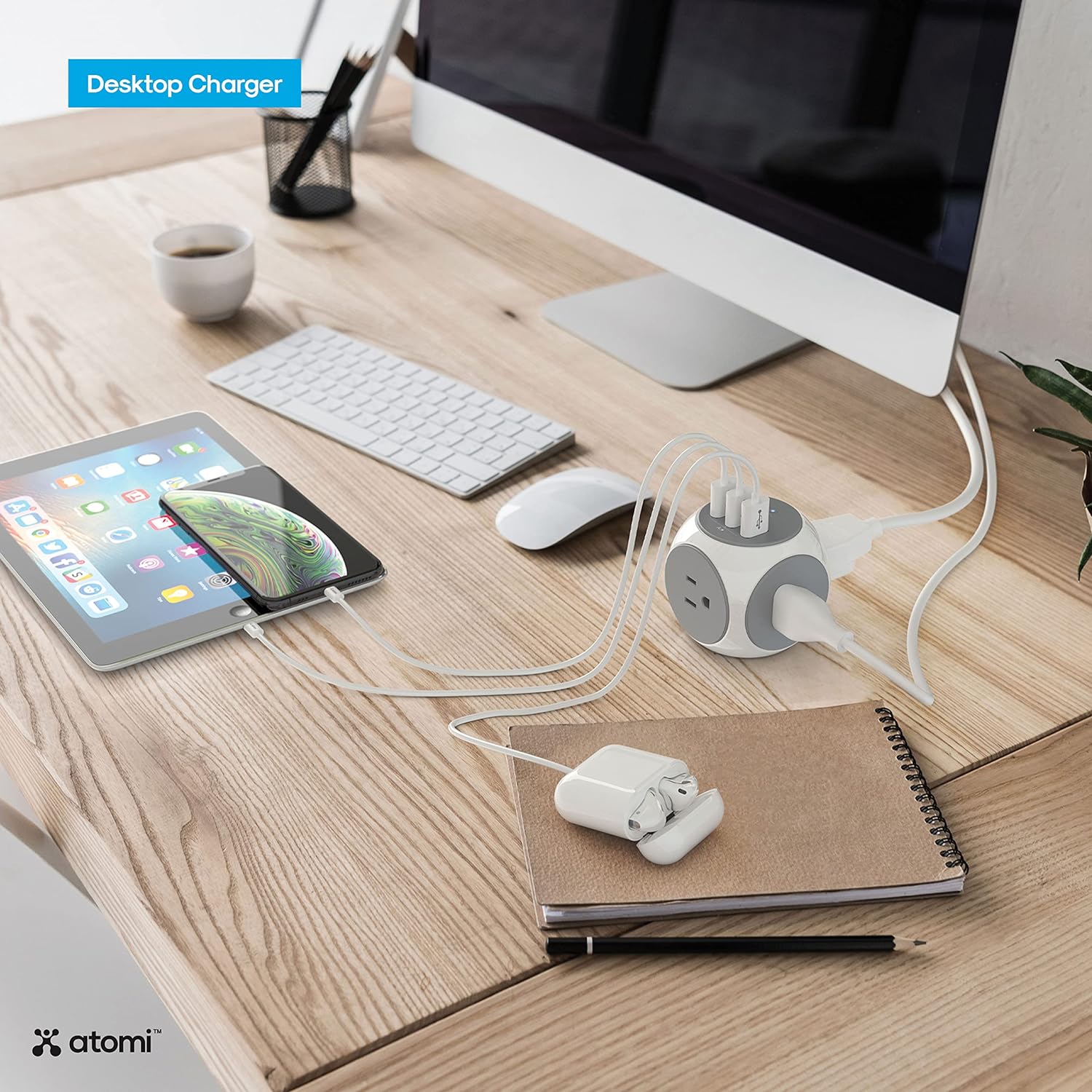
Figure 3: Power Cube configured as a desktop charger, centralizing power for desk devices.
Operating Instructions
The Atomi Power Cube is designed for straightforward operation. Simply plug in your devices to the appropriate ports.

Figure 4: Detailed view of the Power Cube's AC outlets and USB charging ports.
- Using AC Outlets: Plug any standard electrical device into one of the three AC outlets located on the sides of the cube.
- Using Smart USB Ports: Connect your USB-powered devices (smartphones, tablets, etc.) to any of the three USB ports. The Ai Smart Charging technology will automatically detect your device and deliver optimal charging speed.
- Surge Protection: The Power Cube includes a reset button for the 400 joules surge protector. In case of an overload or power surge, the unit may trip to protect connected devices. Press the 'Reset' button to restore power.
Official Product Video
Video 1: An overview of the Atomi Smart Power Cube, demonstrating its features and compact design.
Maintenance
- Cleaning: Disconnect the Power Cube from the power source before cleaning. Use a dry, soft cloth to wipe the exterior. Do not use liquid cleaners or abrasive materials.
- Storage: When not in use, store the Power Cube in a cool, dry place away from direct sunlight and moisture.
- Inspection: Periodically inspect the Power Cube and its cable for any signs of damage, such as frayed wires or cracked casing. Discontinue use if damage is found.
Troubleshooting
- No Power to Devices:
- Ensure the Power Cube is securely plugged into a working wall outlet.
- Check if the surge protection 'Reset' button has popped out. Press it firmly to reset.
- Verify that the connected devices are properly plugged into the Power Cube.
- Slow Charging:
- Ensure you are using a high-quality USB cable compatible with your device.
- The Ai Smart Charging ports automatically adjust output. If multiple devices are connected, the total power output is shared.
- Overload Protection: If the Power Cube stops providing power, it may have activated its overload protection. Disconnect some devices, press the 'Reset' button, and then reconnect devices one by one.
Specifications
| Feature | Specification |
|---|---|
| Brand | Atomi Smart |
| Model | B0BSB3Y4TV |
| Total Power Outlets | 3 AC Outlets |
| USB Ports | 3 Smart USB Ports |
| Cable Length | 5 feet |
| Surge Protection | 400 Joules |
| Voltage | 120V |
| Item Weight | 2.66 pounds |
| Package Dimensions | 9.8 x 7.6 x 4.37 inches |
Warranty & Support
For warranty information or technical support, please refer to the documentation included with your product or visit the official Atomi Smart website. You can also visit the Atomi Smart Store on Amazon for additional resources.
Related documentsB0BSB3Y4TV

Ask a question about this manual
Ask about setup, troubleshooting, compatibility, parts, safety, or missing instructions. Manuals+ will review the question and use this page’s manual context to help answer it.