
Hytera PD482i-Uv
Hytera PD482i-Uv Two-Way Radio User Manual
Model: PD482i-Uv
1. Introduction
The Hytera PD482i-Uv is a versatile two-way radio designed for reliable communication in various environments, including manufacturing, facility management, and education. It features an OLED screen, programmable keys, and supports both analog and digital modes. This manual provides essential information for the proper setup, operation, and maintenance of your PD482i-Uv radio.
Key features include:
- Dual-mode (analog & digital) operation
- Support for mixed (analog & digital) channel receive
- One-touch call/text message functionality
- Pre-programmable text message encoding (up to 64 characters)
- 256 channels across 16 zones
- Emergency Alarm, Radio Check, Alert Call, Basic Encryption, Scramble, and Scan functions
- 16-hour battery life
- IP54 compliant and MIL-STD-810 G standard certified for durability
2. Package Contents
Please check the package carefully to ensure all items are present:
- Hytera PD482i-Uv Two-Way Radio Unit
- UHF Stubby antenna 400-470MHz SMA (AN0435H13)
- Battery Li-ion 2000mAh (BL2010)
- Spring Belt Clip (BC08)
- Leather Hand Strap (RO03)
- Rapid-rate charger (li-ion / Ni-MH) with PS1014 transformer (CH10A07-PS1014)

Hytera PD482i-Uv Radio: The main communication unit with OLED screen and keypad.

UHF Stubby Antenna: For signal transmission and reception.

Li-ion 2000mAh Battery: Provides power to the radio unit.

Spring Belt Clip: For attaching the radio to a belt or clothing.
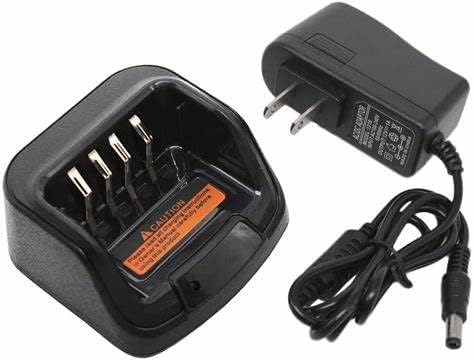
Rapid-rate Charger: For recharging the radio battery.
3. Initial Setup
3.1. Attaching the Antenna
- Align the antenna with the screw port on the top of the radio.
- Gently screw the antenna clockwise until it is firmly seated. Do not overtighten.
Image: Top view of the radio showing the antenna connection point.
3.2. Installing the Battery
- Ensure the radio is powered off.
- Align the battery with the battery compartment on the back of the radio.
- Press the battery down firmly until it clicks into place.
- To remove, slide the battery release latch (if present) and lift the battery.
Image: The Li-ion 2000mAh battery.
3.3. Attaching the Belt Clip
- Locate the screw holes on the back of the radio.
- Align the belt clip with these holes.
- Secure the belt clip using the provided screws.
Image: The spring belt clip for attachment.
3.4. Charging the Battery
- Connect the rapid-rate charger to a power outlet.
- Place the radio (with battery installed) or the battery alone into the charging slot.
- The charging indicator light will show the charging status (e.g., red for charging, green for fully charged).
- A full charge typically takes several hours.
Image: The rapid-rate charger and power adapter.
4. Operating Instructions
4.1. Powering On/Off
- To Power On: Rotate the Power/Volume knob clockwise until a click is heard and the display illuminates.
- To Power Off: Rotate the Power/Volume knob counter-clockwise until a click is heard and the display turns off.
4.2. Adjusting Volume
Rotate the Power/Volume knob clockwise to increase volume and counter-clockwise to decrease volume.
4.3. Channel Selection
The PD482i-Uv supports 256 channels across 16 zones. Use the Channel Selector knob or programmable keys to navigate through available channels and zones. The OLED screen will display the current channel and zone information.
4.4. Making a Call
- Select the desired channel.
- Press and hold the Push-to-Talk (PTT) button on the side of the radio.
- Speak clearly into the microphone.
- Release the PTT button to listen for a response.
4.5. Dual-Mode Operation (Analog & Digital)
The radio can operate in both analog and digital modes. It also supports mixed channel receive, allowing it to receive transmissions from both analog and digital radios on the same channel. The mode is typically configured during programming.
4.6. Special Features
- Emergency Alarm: Activates an alarm signal to pre-programmed contacts.
- Scan: Monitors multiple channels for activity.
- One-Touch Call/Text: Allows quick access to pre-programmed calls or text messages.
- Basic Encryption/Scramble: Provides basic voice privacy.
5. Maintenance and Care
5.1. Cleaning the Radio
- Wipe the radio surface with a soft, damp cloth.
- Do not use harsh chemicals, solvents, or abrasive cleaners.
- Ensure all ports and covers are sealed if cleaning with a damp cloth to maintain IP54 rating.
5.2. Battery Care
- Charge the battery fully before initial use.
- Avoid overcharging or completely draining the battery frequently to prolong its lifespan.
- Store the battery in a cool, dry place when not in use.
5.3. Environmental Considerations
The Hytera PD482i-Uv is IP54 compliant, meaning it is protected against dust ingress and splashing water. It also meets MIL-STD-810 G standards for durability. While robust, avoid exposing the radio to extreme temperatures, direct sunlight for extended periods, or immersion in water.
6. Troubleshooting
| Problem | Possible Cause | Solution |
|---|---|---|
| Radio does not power on. | Battery is low or not installed correctly. | Charge the battery or re-install it securely. |
| Cannot transmit or receive. | Incorrect channel selected; out of range; antenna loose. | Verify channel; move closer to other radios; check antenna connection. |
| Poor audio quality. | Low battery; weak signal; microphone/speaker obstructed. | Charge battery; check signal strength; clear obstructions. |
| Battery life is shorter than expected. | Frequent transmissions; battery aging; extreme temperatures. | Reduce transmission time; replace aging battery; operate in moderate temperatures. |
7. Specifications
| Feature | Detail |
|---|---|
| Model Number | PD482i-Uv |
| Brand | Hytera |
| Color | Black |
| Number of Channels | 256 |
| Frequency Range | 400 - 470 MHz |
| Talking Range Maximum | 9.98 Miles |
| Battery Type | 1 Lithium Ion battery (2000mAh) |
| Battery Life | Approximately 16 hours |
| Water Resistance Level | IP54 (Water Resistant) |
| Durability Standard | MIL-STD-810 G certified |
| Item Weight | 1 pound |
| Package Dimensions | 8.5 x 6.5 x 2.5 inches |
| Special Features | Battery Saver Mode, Battery Strength Indicator, Emergency Alarm, Keypad Lock, Long Range |
8. Warranty Information
The Hytera PD482i-Uv two-way radio comes with a 3-year manufacturer's warranty. Please retain your proof of purchase for warranty claims. For specific terms and conditions, refer to the warranty card included with your product or contact Hytera customer support.
9. Customer Support
If you encounter any issues not covered in this manual or require further assistance, please contact Hytera customer support. Visit the official Hytera website for contact details, FAQs, and additional resources.
Online Resources: www.hytera.com
Related documentsPD482i-Uv


Ask a question about this manual
Ask about setup, troubleshooting, compatibility, parts, safety, or missing instructions. Manuals+ will review the question and use this page’s manual context to help answer it.