
1. Introduction
This manual provides detailed instructions for the installation, operation, and maintenance of your Srihome SH037 5MP CCTV Camera. Please read this manual thoroughly before using the product to ensure proper functionality and safety. The Srihome SH037 is a 5MP 2K UHD outdoor IP camera featuring 5G WiFi connectivity, night color vision, motion tracking, two-way audio, and IP66 waterproofing for reliable home security.
2. Product Features
- 5MP 2K UHD Resolution: Captures clear video at 2560x1920 pixels, providing detailed surveillance.
- Dual-Band Wi-Fi (2.4G/5G): Supports both 2.4GHz and 5GHz Wi-Fi networks for flexible and stable connectivity.
- AP Hotspot Mode: Allows direct connection to a smartphone without a router for initial setup or local access.
- Night Color Vision: Starlight lens and warm light LEDs enable full-color video recording even in low-light conditions.
- Infrared Night Vision: Provides clear black and white video in complete darkness.
- Two-Way Audio: Built-in microphone and speaker allow for real-time communication through the camera.
- Motion Tracking & Detection: Automatically tracks moving objects and sends real-time alerts to your mobile device.
- IP66 Waterproof: Designed to withstand outdoor weather conditions, including rain and snow.
- Local Storage: Supports up to 128GB TF (MicroSD) card for video recording.
- Privacy Protection: System defaults the first user as administrator for secure access.

Image: Srihome SH037 5MP IP Camera showcasing its main features like Humanoid detection, Two-way Audio, Dual Band WiFi, and Color Night Vision.

Image: Visual comparison demonstrating the superior clarity of 5MP (2560x1920) resolution compared to 2MP and 3MP.

Image: Illustration of the camera's dual-band Wi-Fi capability (2.4G and 5G) and examples of its use in living rooms, schools, offices, and parking lots.
3. What's in the Box
Verify that all items are present in the package:
- Srihome SH037 5MP CCTV Camera
- Power Adapter
- Mounting Bracket
- Screws and Wall Plugs
- Waterproof Plug
- Quick User Manual
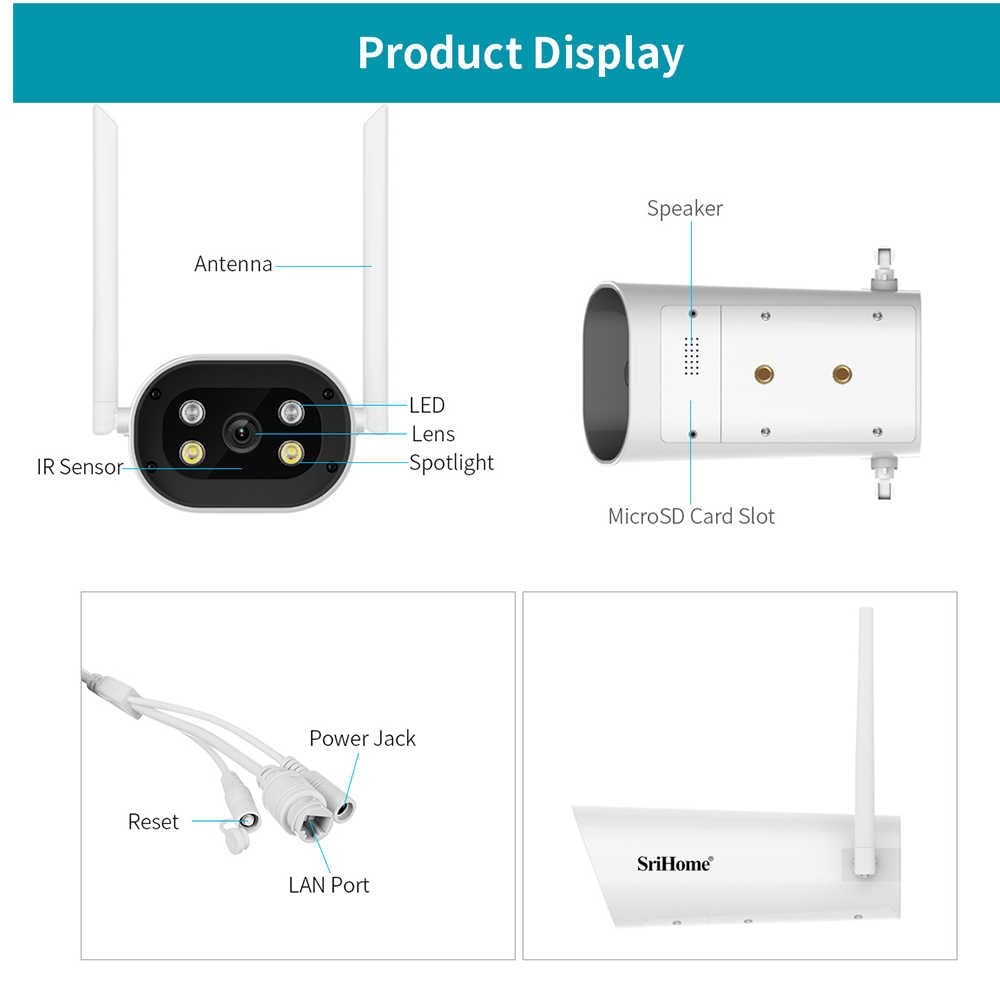
Image: Display of all components included in the product package: IP Camera, Power Supply, Bracket, Screws, Waterproof Plug, and Instructions.
4. Setup Guide
4.1 Camera Overview

Image: Labeled diagram showing the camera's components including Antenna, LED, Lens, Spotlight, IR Sensor, Speaker, MicroSD Card Slot, Power Jack, Reset button, and LAN Port.
4.2 Initial Installation
- Mounting: Choose a suitable outdoor location for the camera. Use the provided mounting bracket, screws, and wall plugs to securely attach the camera to a wall or ceiling. Ensure the camera has a clear field of view.
- Power Connection: Connect the power adapter to the camera's power jack and plug it into a power outlet. The camera will power on and initiate its startup sequence.
- MicroSD Card (Optional): If local storage is desired, insert a MicroSD card (up to 128GB, not included) into the designated slot. Ensure the camera is powered off before inserting or removing the card.
4.3 App Download and Connection
- Download App: Search for "SriHome" in your mobile app store (iOS or Android) and download the official application.
- Register Account: Open the SriHome app and follow the on-screen instructions to register a new account or log in if you already have one.
- Add Camera: Tap the "+" icon in the app to add a new device. Select your camera model or scan the QR code usually found on the camera or packaging.
- Wi-Fi Configuration: Follow the app's instructions to connect the camera to your Wi-Fi network. The camera supports both 2.4GHz and 5GHz bands. Ensure your phone is connected to the same Wi-Fi network during setup.
- AP Hotspot Mode: If direct connection is preferred, the camera can create its own Wi-Fi hotspot. Connect your phone to this hotspot and then configure the camera's settings via the app.
5. Operating Instructions
5.1 Live View and Playback
- Access Live Feed: Open the SriHome app and select your camera from the device list to view the live video feed.
- Video Playback: Navigate to the playback section in the app to review recorded footage stored on the MicroSD card or cloud storage (if subscribed).
5.2 Two-Way Audio
- Initiate Communication: While viewing the live feed, tap the microphone icon in the app to speak through the camera's speaker. Tap the speaker icon to hear audio from the camera's microphone.
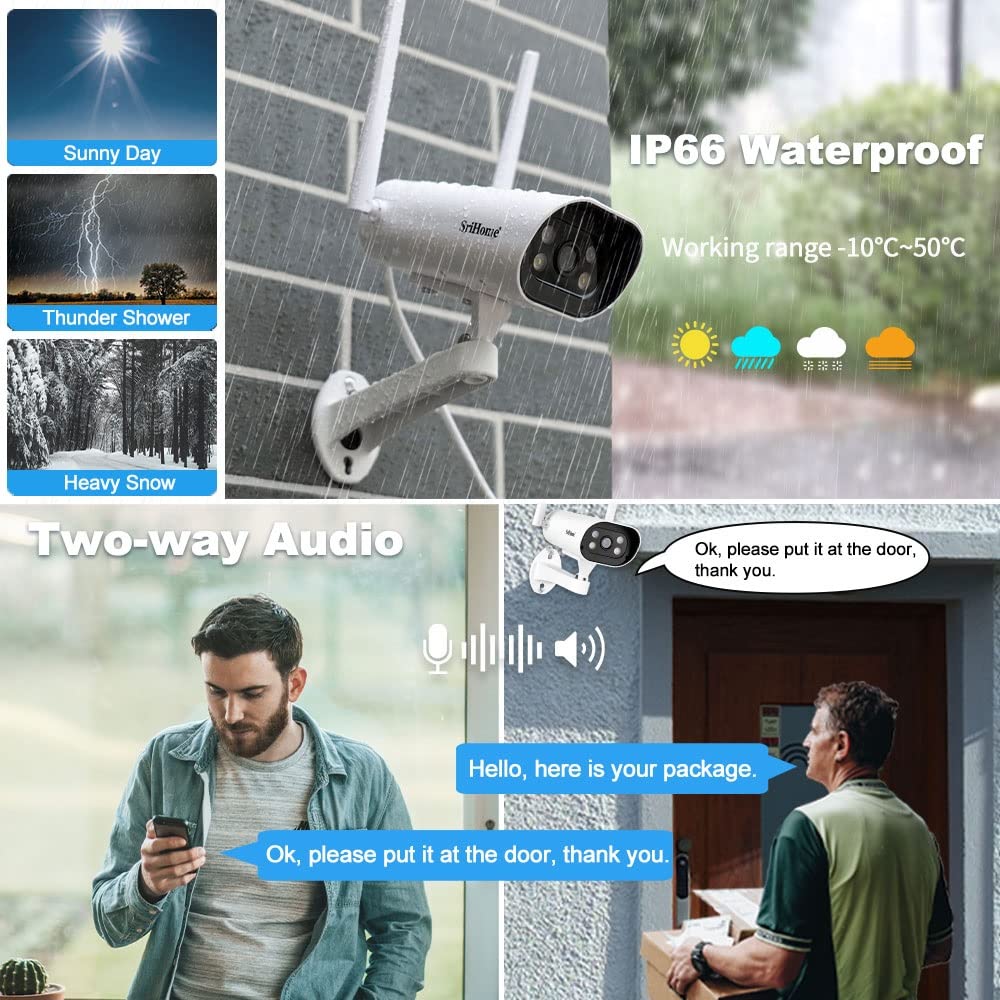
Image: Depiction of the two-way audio feature, allowing users to speak and listen through the camera, useful for interacting with visitors or delivery personnel.
5.3 Motion Detection and Alerts
- Enable Motion Detection: In the app settings for your camera, enable motion detection and configure sensitivity levels.
- Receive Alerts: When motion is detected, the camera will send real-time push notifications to your phone.
- Humanoid Detection: The camera can differentiate between human movement and other objects, reducing false alarms.

Image: Illustration of the camera's human detection capability, distinguishing human activity from other movements to prevent unnecessary alerts.
5.4 Night Vision Modes
- IR Mode (Black & White): In low light, the camera automatically switches to infrared night vision for clear black and white video. This can be manually set via the SriHome App.
- Smart Mode (Color Night Vision): The camera can automatically turn on its spotlight upon motion detection to capture full-color video at night.

Image: Comparison of the camera's visual modes: clear Day Vision, black and white IR Night Vision, and vibrant Night Color vision with spotlight activation.
6. Maintenance
- Cleaning: Regularly clean the camera lens with a soft, dry cloth to ensure clear image quality. Do not use harsh chemicals.
- Firmware Updates: Check the SriHome app periodically for available firmware updates. Keeping the firmware updated ensures optimal performance and security.
- Power Cycle: If the camera experiences issues, try power cycling it by unplugging and replugging the power adapter.
- MicroSD Card Management: If using a MicroSD card, periodically check its status in the app and format it if necessary to maintain recording performance.
7. Troubleshooting
| Problem | Possible Cause | Solution |
|---|---|---|
| Camera offline | No power, Wi-Fi disconnected, Router issue | Check power connection. Verify Wi-Fi signal strength. Restart router. Reconfigure Wi-Fi in app. |
| Poor video quality | Dirty lens, poor network, low light | Clean lens. Ensure stable Wi-Fi. Check night vision settings. |
| No motion alerts | Motion detection disabled, incorrect sensitivity, app notifications off | Enable motion detection in app. Adjust sensitivity. Check phone notification settings. |
| Two-way audio not working | Microphone/speaker muted, app permissions | Check mute settings in app. Grant microphone permissions to the app. |
| Cannot connect to 5G Wi-Fi | Router not broadcasting 5G, incorrect password | Ensure your router supports 5G and it's enabled. Double-check Wi-Fi password. |
8. Specifications
| Feature | Detail |
|---|---|
| Model | SH037 |
| Video Capture Resolution | 5MP (2560x1920p QHD) |
| Wireless Communication | Wi-Fi (2.4G/5G Dual Band) |
| International Protection Rating | IP66 (Waterproof) |
| Night Vision Range | 10 Metres |
| Low Light Technology | Night Color |
| Alert Type | Motion Only (Humanoid Detection) |
| Storage | Supports 128GB TF Card (MicroSD) |
| Two-Way Audio | Yes (Built-in Mic & Speaker) |
| Power Source | Corded Electric (5 Watts) |
| Item Weight | 500 Grams |
| Dimensions (LxWxH) | 20 x 10 x 6 Centimeters |
9. Warranty and Support
9.1 Warranty Information
The Srihome SH037 camera comes with a 1-year warranty on manufacturing defects. Accessories are covered by a 6-month warranty. Please note that physical damages and electrical damages are not covered under warranty.
9.2 Customer Support
For technical assistance or warranty claims, please contact Srihome customer support:
- Email: support@megaaelectronics.com or megaaelectronics@gmail.com
- WhatsApp: 8328671337