
1. Introduction
Thank you for purchasing the Technical Pro 15-inch Portable Bluetooth DJ Light Speaker System. This powerful and versatile speaker is designed for public events, karaoke, stage performances, and various entertainment needs. It features a robust 1600-watt output, Bluetooth connectivity, USB and SD card inputs, a wired microphone, a tripod stand, and dynamic LED party lights. This manual provides detailed instructions for setup, operation, maintenance, and troubleshooting to ensure optimal performance and longevity of your device.

Figure 1.1: Technical Pro 15-inch Portable Bluetooth DJ Light Speaker System with included accessories.
2. Product Components
The Technical Pro TLIT15PKG system includes the following components:
- 15-inch Portable Bluetooth Speaker Unit
- Wired Microphone
- Remote Control
- Tripod Speaker Stand
- Power Cable
- User Manual (this document)

Figure 2.1: Overview of speaker features and inputs.
3. Setup
3.1 Unpacking and Inspection
Carefully remove all components from the packaging. Inspect each item for any signs of damage. If any component is damaged or missing, contact customer support immediately.
3.2 Tripod Assembly
- Extend the legs of the tripod stand to form a stable base.
- Adjust the height of the stand to your desired level, ensuring the locking pin is securely engaged.
- Carefully place the speaker unit onto the pole mount of the tripod stand. Ensure it is seated firmly and stably.
3.3 Powering On and Charging
The speaker features a built-in rechargeable battery for portable use. Before first use, it is recommended to fully charge the battery.
- Connect the power cable to the speaker's power input and then to a standard AC outlet.
- The charging indicator light will illuminate. Allow sufficient time for a full charge.
- The speaker can be operated while charging.
3.4 Connecting the Wired Microphone
Insert the microphone cable into the 1/4" microphone input jack on the speaker's control panel.
3.5 Initial Audio Connections
The speaker supports various audio input methods:
- USB Drive: Insert a USB flash drive containing MP3 audio files into the USB port.
- SD Card: Insert an SD card containing MP3 audio files into the SD card slot.
- Auxiliary Input: Connect external audio devices (e.g., smartphone, tablet, laptop) using a 3.5mm or RCA auxiliary cable to the respective input jacks.
- Guitar Input: Connect a guitar or other instrument to the 1/4" guitar input jack.
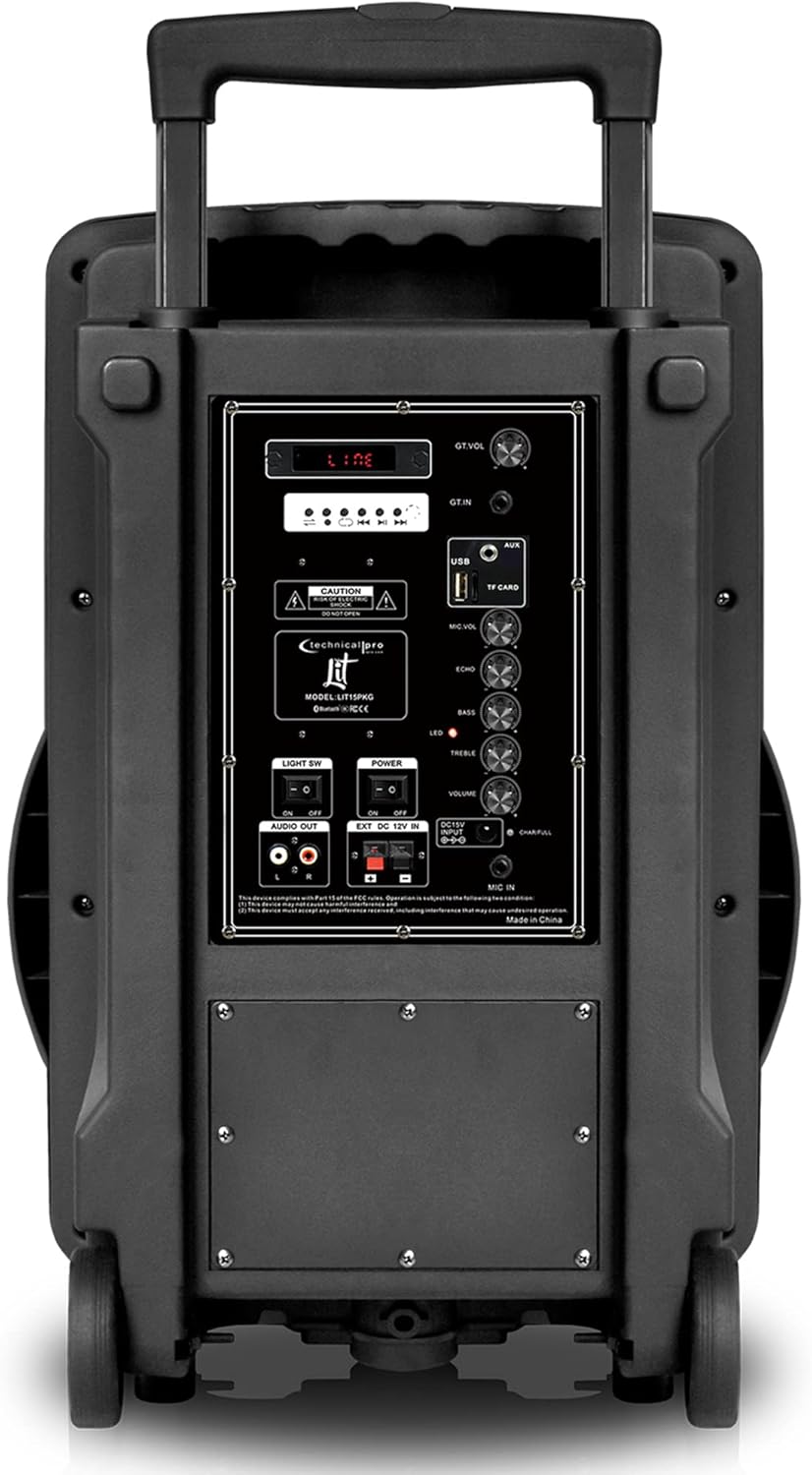
Figure 3.1: Rear control panel with input connections.
4. Operating Instructions
4.1 Power On/Off
Locate the power switch on the speaker's control panel. Flip the switch to the "ON" position to power on the unit. Flip to "OFF" to power down.
4.2 Bluetooth Pairing
To connect your device via Bluetooth:
- Ensure the speaker is powered on and in Bluetooth mode (usually indicated on the LCD screen or by a flashing Bluetooth indicator).
- Enable Bluetooth on your smartphone, tablet, or other Bluetooth-enabled device.
- Search for available devices. The speaker will appear as "Technical Pro" or a similar name.
- Select the speaker from the list to pair. Once paired, a confirmation sound may be heard, and the Bluetooth indicator will become solid.
- You can now stream audio wirelessly from your device to the speaker. The wireless range is up to 30 feet.

Figure 4.1: Bluetooth wireless ability with a range of up to 30 feet.
4.3 USB/SD Card Playback
Once a USB drive or SD card is inserted, the speaker will automatically switch to the corresponding mode and begin playing compatible MP3 audio files. Use the playback controls (Play/Pause, Next/Previous Track) on the speaker or remote control to manage your music.
4.4 Microphone Usage
After connecting the wired microphone, adjust the "MIC VOL" knob on the control panel to control the microphone's volume. The "ECHO" knob can be used to add an echo effect to the microphone's output.
4.5 Volume and Tone Controls
Use the main "VOLUME" knob to adjust the overall output level of the speaker. The "TREBLE" and "BASS" knobs allow you to fine-tune the audio's high and low frequencies, respectively, to suit your preference.
4.6 DJ Light Control
The speaker features multi-color flashing disco LED party lights. Locate the "LIGHT ON/OFF" switch on the control panel to activate or deactivate the lights. The lights will cycle through various colors and patterns automatically.
Blue LED Lights

Green LED Lights
Red LED Lights
4.7 Remote Control Usage
The included remote control allows for convenient operation from a distance. Functions typically include power on/off, mode selection (Bluetooth, USB, SD, Aux), volume control, track navigation, and play/pause.
5. Maintenance
5.1 Cleaning
To clean the speaker, use a soft, dry cloth. For stubborn dirt, a slightly damp cloth can be used, followed by a dry cloth. Do not use abrasive cleaners, waxes, or solvents as they may damage the finish.
5.2 Battery Care
To prolong the life of the built-in rechargeable battery:
- Avoid fully discharging the battery frequently.
- Charge the battery regularly, even if the speaker is not in frequent use.
- Store the speaker in a cool, dry place when not in use for extended periods.
5.3 Storage
When storing the speaker, ensure it is powered off and disconnected from the power source. Store it in a clean, dry environment, away from extreme temperatures and direct sunlight.
6. Troubleshooting
| Problem | Possible Cause | Solution |
|---|---|---|
| No power | Battery discharged; Power cable not connected; Power switch off. | Charge the battery; Ensure power cable is securely connected; Turn power switch to ON. |
| No sound output | Volume too low; Incorrect input mode selected; Audio cable loose/damaged; Bluetooth not paired. | Increase volume; Select correct input mode (Bluetooth, USB, SD, Aux); Check audio cables; Re-pair Bluetooth device. |
| Bluetooth not connecting | Speaker not in pairing mode; Device too far; Interference; Previously paired device connected. | Ensure speaker is in pairing mode; Move device closer; Avoid obstacles; Disconnect from other devices. |
| Microphone not working | Microphone not connected; MIC VOL too low; Microphone damaged. | Ensure microphone is securely connected; Increase MIC VOL; Test with another microphone if possible. |
| LED lights not working | Light switch off. | Ensure LIGHT ON/OFF switch is in the ON position. |
7. Specifications
| Feature | Detail |
|---|---|
| Model Number | TLIT15PKG |
| Output Wattage | 2000 Watts (Peak) |
| Speaker Size | 15 inches |
| Connectivity Technology | Bluetooth |
| Wireless Range | Up to 30 feet (Bluetooth) |
| Power Source | Battery Powered (Rechargeable) |
| Audio Inputs | Microphone (1/4"), Guitar (1/4"), Aux (3.5mm/RCA), USB, SD Card |
| Supported Media | USB Flash Drive, SD Card (up to 32GB, .mp3 playback) |
| Frequency Response | 40 Hz (minimum specified) |
| Impedance | 8 Ohm |
| Material | Acrylonitrile Butadiene Styrene (ABS), Steel |
| Item Weight | 16.75 pounds |
| Product Dimensions (L x W x H) | 15.94 x 13.19 x 25 inches |
| Mounting Type | Pole Mount |
| UPC | 610370152713 |
8. Warranty and Support
Technical Pro products are designed for reliability and performance. For information regarding warranty coverage, technical support, or service inquiries, please refer to the warranty card included with your product or visit the official Technical Pro website. Please retain your proof of purchase for warranty claims.
For additional assistance, you may visit the Technical Pro Store on Amazon: Technical Pro Store.


