
K&F Concept KF13.115US
K&F Concept 32mm Camera Neck Strap Instruction Manual
Model: KF13.115US
Introduction
This manual provides comprehensive instructions for the K&F Concept 32mm Camera Neck Strap. Designed for photographers, this versatile strap offers multiple carrying options and robust security features for your camera equipment. Please read this manual thoroughly before use to ensure proper handling and maximize the lifespan of your product.
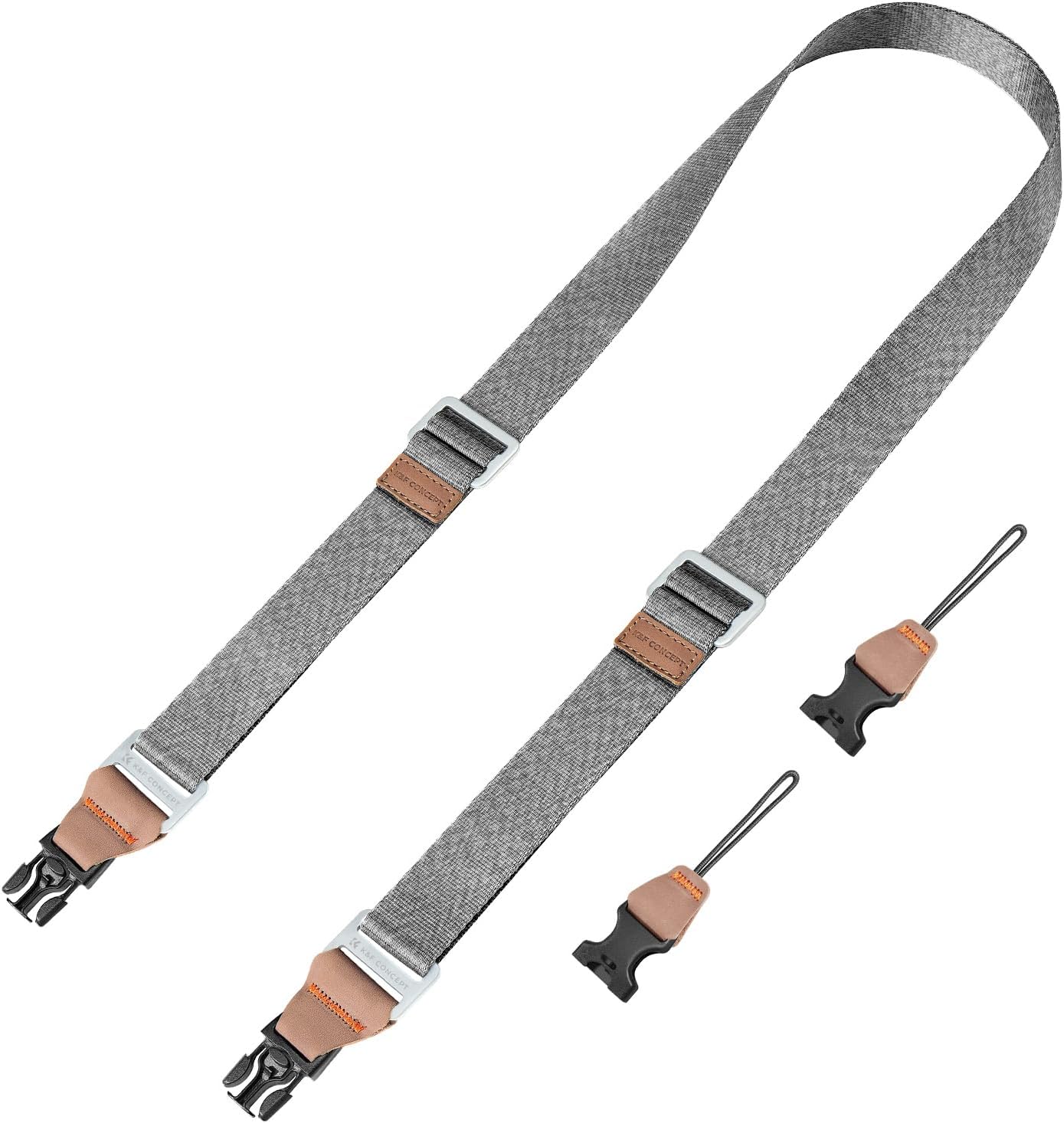
Figure 1: K&F Concept 32mm Camera Neck Strap (Silver 32mm variant)
Safety Information
Always ensure all connections are securely fastened before entrusting your camera to the strap. Regularly inspect the strap and its components for any signs of wear or damage. Discontinue use immediately if any part of the strap appears compromised. The strap is designed to support a maximum load capacity of 80 pounds. Do not exceed this limit.

Figure 2: Safety Warning System on Anchor Link. Black indicates normal use, yellow indicates wear and need for timely replacement, and red indicates immediate replacement is required.
Package Contents
Verify that all items are present in the package:
- 1 x K&F Concept 32mm Camera Neck Strap
- 2 x Quick Release Anchor Links (pre-attached)
- Additional Quick Release Anchor Links (if included in specific package variant)

Figure 3: Package contents and basic specifications.
Setup
Follow these steps to properly attach the camera strap to your camera:
- Attach Anchor Links: Thread the loop of each quick release anchor link through the strap lugs on your camera. Ensure the loop passes completely through and is secure.
- Connect Strap: Align the quick release buckle on the strap with the attached anchor link. Press firmly until you hear a click, indicating a secure connection. Repeat for the other side.
- Verify Connection: Gently pull on the strap to confirm that both quick release buckles are firmly attached to the anchor links and that the anchor links are secure on the camera lugs.

Figure 4: Double-headed connection for secure attachment.
For a visual guide on setup and usage, please refer to the official product video below:
Video 1: Official K&F Concept Camera Neck Strap demonstration, showing attachment and various carrying modes.
Operating
The K&F Concept Camera Neck Strap offers three primary carrying modes:
- Neck Strap Mode: Wear the strap around your neck, allowing the camera to rest comfortably on your chest.
- Shoulder Strap Mode: Drape the strap over one shoulder, letting the camera hang at your side.
- Crossbody Strap Mode: Wear the strap across your body, from one shoulder to the opposite hip, for enhanced stability and security.
Adjust the strap length using the integrated adjusters to achieve optimal comfort and camera positioning for your chosen mode. The maximum length is 160 cm, and the minimum length is 100 cm.

Figure 5: Three versatile carrying modes: Shoulder, Neck, and Crossbody.

Figure 6: Strap length adjustment mechanism.
Maintenance
To ensure the longevity and performance of your K&F Concept Camera Neck Strap, follow these maintenance guidelines:
- Cleaning: Wipe the strap with a damp cloth and mild soap if necessary. Avoid harsh chemicals or abrasive cleaners. Allow to air dry completely before re-use.
- Inspection: Periodically check the strap webbing, stitching, quick release buckles, and anchor links for any signs of fraying, cracks, or deformation. Pay close attention to the color-coded fibers on the anchor links as a wear indicator (refer to Figure 2).
- Storage: Store the strap in a cool, dry place away from direct sunlight and extreme temperatures when not in use.
Troubleshooting
| Problem | Possible Cause | Solution |
|---|---|---|
| Strap feels loose or insecure. | Quick release buckles not fully engaged or anchor links not properly threaded. | Ensure buckles click into place. Re-thread anchor links if necessary and pull to test security. |
| Strap is uncomfortable. | Incorrect length adjustment or carrying mode. | Adjust strap length for optimal fit. Experiment with neck, shoulder, or crossbody modes for best comfort. |
| Visible wear on anchor links (yellow/red fibers). | Normal wear and tear, or excessive load/abrasion. | Replace anchor links immediately. Contact K&F Concept support for replacement parts. |
Specifications
- Brand: K&F Concept
- Model Number: KF13.115US
- Material: Nylon belt + aluminum alloy buckle + UTX security buckle + leather + HPPE ultra-high molecular measuring polyethylene fiber rope
- Color: Grey (Silver 32mm variant)
- Maximum Length: 160 cm
- Minimum Length: 100 cm
- Bandwidth: 3.2 cm
- Item Weight: 7 ounces (approx. 200g)
- Maximum Load Capacity: 80 pounds (approx. 36 kg)
- Package Dimensions: 7.24 x 2.8 x 1.93 inches

Figure 7: Duraflex Safety Buckle, designed for high load capacity.
Warranty and Support
K&F Concept products are manufactured to high-quality standards. For warranty information, product registration, or technical support, please visit the official K&F Concept website or contact their customer service. Keep your purchase receipt as proof of purchase.
Related Documents - KF13.115US
 |
SmallRig Quick Release Neck Support for DJI Osmo Pocket 3 - User Manual Official user manual for the SmallRig Quick Release Neck Support designed for the DJI Osmo Pocket 3. Includes setup, safety guidelines, specifications, warranty information, and manufacturer details. |
 |
K&F CONCEPT 18L Backpack - Product Information and Care Guide Detailed product information, specifications, and care instructions for the K&F CONCEPT 18L Backpack, including material, dimensions, features, and warranty details. |
 |
How to Adjust Luminox Cut-to-Fit Watch Strap Length Step-by-step guide on how to measure, cut, and adjust the length of your Luminox cut-to-fit watch strap for a perfect fit. Includes instructions for re-assembly. |
 |
Xiaomi Quick Release Strap User Manual: Assembly, Care, and Warranty Comprehensive user manual for the Xiaomi Braided and Leather Quick Release Straps. Learn how to assemble, disassemble, care for, and understand the warranty for your Xiaomi strap. |
 |
ARMIYO Shoulder Strap / Multi-functional Mission Sling - Product Manual Detailed product manual for the ARMIYO Shoulder Strap / Multi-functional Mission Sling, covering material specifications, usage, and precautions. |
 |
PRONOMIC MU100 Instrument Microphone Set User Manual User manual for the PRONOMIC MU100 Instrument Microphone Set, detailing its features, specifications, and how to use the included clips for various instruments. |
Ask a question about this manual
Ask about setup, troubleshooting, compatibility, parts, safety, or missing instructions. Manuals+ will review the question and use this page’s manual context to help answer it.