1. Introduction
The SHIPMODUL MiniPlex-3E-N2K is an advanced NMEA 0183/2000 Multiplexer designed for marine electronic systems. It facilitates the integration and communication between various navigation and communication devices by converting and routing data between NMEA 0183 and NMEA 2000 networks. This device is essential for creating a cohesive and efficient marine electronics setup, ensuring seamless data exchange for optimal performance.
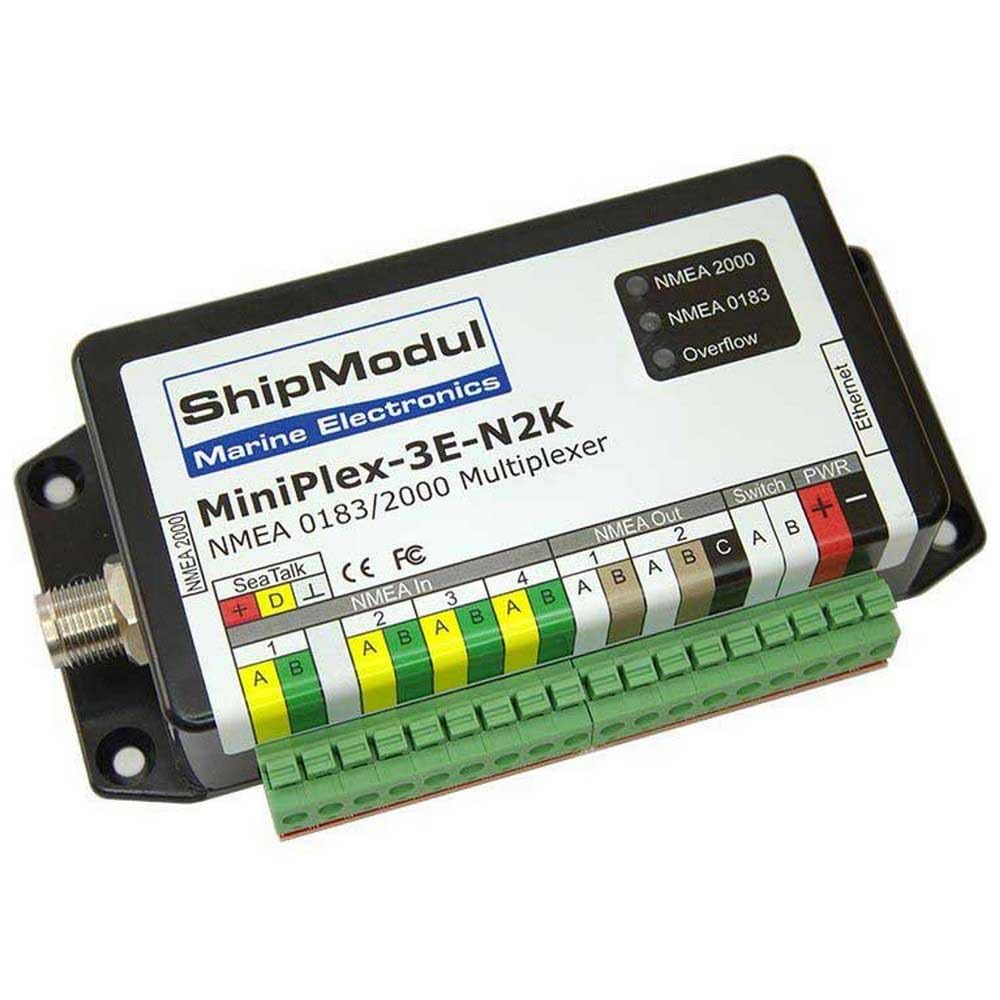
Figure 1: SHIPMODUL MiniPlex-3E-N2K NMEA 0183/2000 Multiplexer. This image displays the SHIPMODUL MiniPlex-3E-N2K NMEA 0183/2000 Multiplexer. The device is black with a white label detailing its model name and brand. It features multiple connection points including NMEA 2000, SeaTalk, NMEA In (4 ports), NMEA Out (2 ports), Ethernet, and PWR (power) terminals. Three LED indicators are visible for NMEA 2000, NMEA 0183, and Overflow status. Green terminal blocks are attached for wiring connections.
2. Setup
Proper installation is crucial for the reliable operation of your MiniPlex-3E-N2K. Follow these steps for setup:
- Mounting: Securely mount the device in a dry, protected location away from direct sunlight and excessive heat. Ensure adequate ventilation.
- Power Connection: Connect the power supply to the PWR terminals (+ and -) on the device. The MiniPlex-3E-N2K operates on a standard marine 12V DC power supply. Ensure correct polarity.
- NMEA 0183 Inputs (NMEA In 1-4): Connect your NMEA 0183 talkers (e.g., GPS, depth sounder, wind sensor) to the NMEA In ports. Each port typically has A and B terminals for differential signaling.
- NMEA 0183 Outputs (NMEA Out 1-2): Connect your NMEA 0183 listeners (e.g., chartplotter, autopilot) to the NMEA Out ports. These ports transmit the multiplexed data.
- NMEA 2000 Connection: Connect the device to your NMEA 2000 backbone using a standard NMEA 2000 drop cable and T-connector. The NMEA 2000 port is located on the side of the unit.
- SeaTalk Connection: If integrating with SeaTalk devices, connect them to the dedicated SeaTalk terminals (+, D, L).
- Ethernet Connection: For network connectivity and configuration, connect an Ethernet cable to the Ethernet port. This allows for advanced setup and monitoring via a computer.
- Switch: The function of the 'Switch' terminals may vary depending on the specific configuration or firmware. Refer to the detailed product documentation for its intended use.
3. Operating Instructions
Once properly installed and powered, the MiniPlex-3E-N2K will begin to process and multiplex data. Observe the LED indicators for operational status:
- NMEA 2000 LED: Illuminates when the device is successfully communicating on the NMEA 2000 network.
- NMEA 0183 LED: Indicates activity on the NMEA 0183 ports. This LED will flash or illuminate to show data being received or transmitted.
- Overflow LED: If this LED illuminates, it indicates that the device's internal buffer is overflowing due to an excessive amount of incoming data. This may require adjusting data rates or filtering messages.
The device automatically handles the conversion and routing of data between connected NMEA 0183 and NMEA 2000 devices. For advanced configuration, such as data filtering, routing rules, or baud rate adjustments, connect to the device via its Ethernet port and use the manufacturer's provided software interface.
4. Maintenance
The MiniPlex-3E-N2K is designed for low maintenance. To ensure longevity and optimal performance:
- Keep Clean: Periodically wipe the exterior of the device with a soft, dry cloth. Avoid using harsh chemicals or abrasive cleaners.
- Check Connections: Regularly inspect all cable connections to ensure they are secure and free from corrosion. Loose connections can lead to intermittent data loss.
- Software Updates: Check the SHIPMODUL website periodically for firmware updates. Keeping the firmware updated can provide performance improvements and new features.
5. Troubleshooting
If you encounter issues with your MiniPlex-3E-N2K, consider the following troubleshooting steps:
- No Power: Ensure the power supply is connected correctly and providing the correct voltage. Check fuses if applicable.
- No Data Flow:
- Verify all NMEA 0183 and NMEA 2000 connections are secure.
- Check the NMEA 0183 and NMEA 2000 LEDs for activity. If no activity, check the connected devices.
- Confirm baud rates for NMEA 0183 devices are correctly configured (if adjustable).
- Overflow LED On: This indicates too much data. Consider filtering unnecessary NMEA sentences or reducing the data output rate from connected devices if possible.
- Intermittent Connectivity: Check for loose or corroded connections. Ensure proper grounding of all marine electronics.
- Device Not Recognized on Network: For NMEA 2000, ensure the backbone is properly terminated. For Ethernet, check network settings on your computer.
If problems persist after attempting these steps, contact SHIPMODUL customer support for further assistance.
6. Specifications
| Feature | Detail |
|---|---|
| Model Name | Nn-094 |
| Brand | SHIPMODUL |
| Item Package Dimensions (L x W x H) | 14.69 x 6.61 x 1.89 inches |
| Package Weight | 0.1 Kilograms |
| Color | Multi-coloured |
| Material | Plastic |
| Suggested Users | Unisex Adult |
| Manufacturer | SHIPMODUL |
| Included Components | Components included in the description |
| Size | Standard |
| ASIN | B0BS6Q6CPV |
| Date First Available | January 3, 2025 |
7. Warranty and Support
The SHIPMODUL MiniPlex-3E-N2K comes with a 2-year manufacturer warranty. This warranty covers defects in materials and workmanship under normal use.
For warranty claims, technical support, or any questions regarding the operation or installation of your device, please contact SHIPMODUL customer service. Refer to the official SHIPMODUL website for the most current contact information and support resources.


