
1. Introduction
The Hama Ramble II Duo Carbon 160 Ball Tripod with Smartphone Holder is a versatile and lightweight support system designed for cameras, camcorders, and smartphones. This manual provides essential instructions for the safe and effective assembly, operation, and maintenance of your tripod.
2. Safety Instructions
- Do not exceed the maximum load capacity of 8000 grams (8 kg). Overloading can cause instability and damage to the tripod or attached equipment.
- Ensure all locking mechanisms, including leg locks and ball head adjustments, are securely fastened before placing equipment on the tripod and before use.
- Avoid placing the tripod on unstable, uneven, or slippery surfaces. Always ensure a firm and level base.
- Do not leave equipment unattended on the tripod, especially in windy conditions or near children.
- Keep hands and fingers clear of moving parts, especially when extending or retracting legs, to prevent pinching.
- Store the tripod in a dry, cool place away from direct sunlight and extreme temperatures.
3. Package Contents
Verify that all items are present in your package:
- Hama Ramble II Duo Carbon Tripod
- Ball Head with Quick Release Plate
- Smartphone Holder
- Allen Keys (for adjustments)
- Carry Bag
- Rubber Feet (for spiked feet)
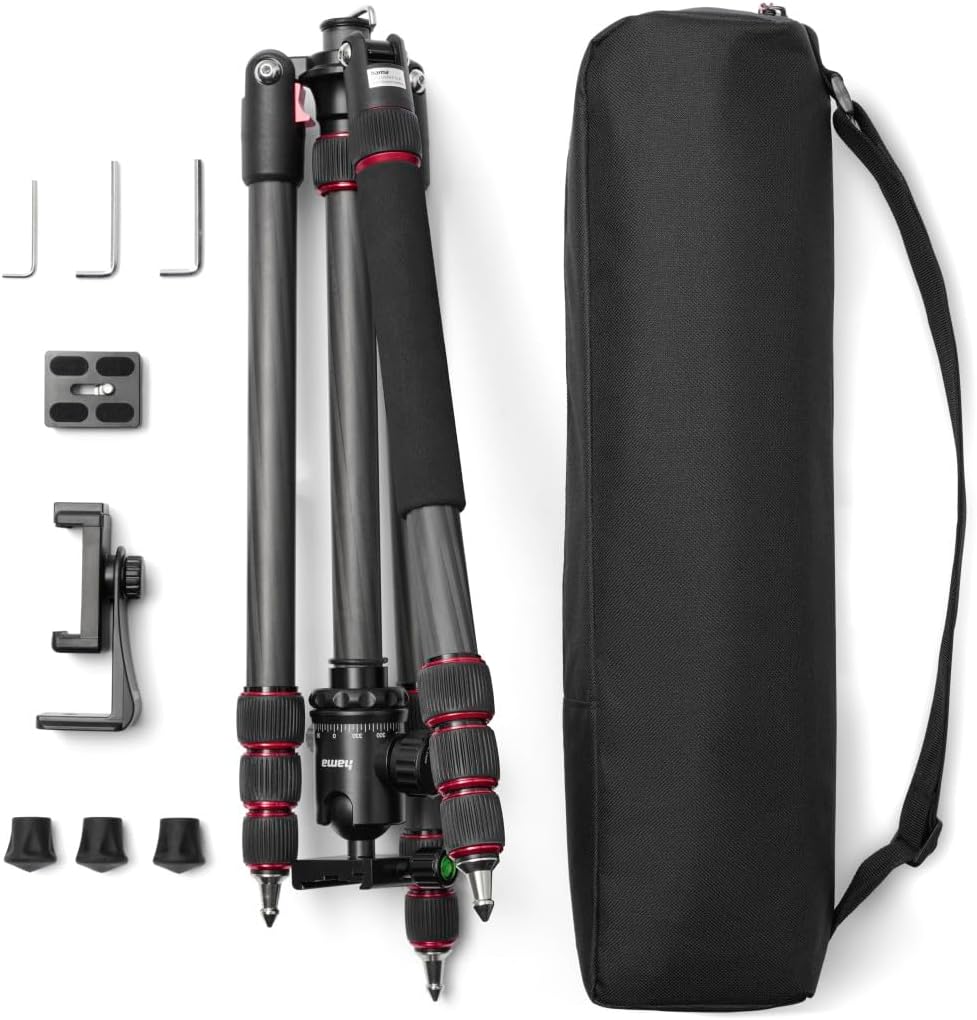
This image displays the complete contents of the Hama Ramble II Duo Carbon tripod package.
4. Setup
4.1 Unfolding the Tripod Legs
- Release the leg angle locks on each leg.
- Extend each leg section by twisting the leg locks counter-clockwise to loosen, pulling out the section, and then twisting clockwise to secure.
- Adjust the leg angles to achieve desired stability. Ensure all leg angle locks are fully engaged.

The tripod provides stable support for photography in various outdoor environments.
4.2 Attaching the Quick Release Plate
- Locate the quick release plate on the ball head.
- Unscrew the mounting screw on the quick release plate and attach it to the 1/4-inch or 3/8-inch tripod socket on your camera or smartphone holder. Tighten securely.
- Slide the quick release plate with your device into the ball head receiver until it clicks into place. Ensure the locking lever is engaged.

The quick release plate allows for fast and secure attachment and detachment of your camera or device to the ball head.
4.3 Mounting a Camera or Smartphone
- For Cameras: Attach the quick release plate directly to your camera's tripod socket as described above.
- For Smartphones: Attach the smartphone holder to the quick release plate. Expand the smartphone holder's jaws and carefully insert your smartphone, ensuring it is held firmly without obstructing buttons or ports.

The smartphone holder attaches directly to the ball head for mobile device photography.

The smartphone holder securely mounts your phone in portrait orientation.
4.4 Adjusting Height and Monopod Conversion
- Center Column: Loosen the center column lock, extend or retract the column to the desired height, and then tighten the lock. The center column can also be inverted for low-angle or macro photography.
- Monopod Conversion: One of the tripod legs can be detached and used as a monopod. Unscrew the designated leg from the tripod chassis and attach the ball head to its top.

The center column can be inverted, enabling extreme low-angle photography.

One of the tripod legs can be detached and used as a monopod.
4.5 Adjusting Feet
The tripod features spiked feet for stability on soft ground. For use on hard or delicate surfaces, attach the provided rubber caps over the spikes.

The tripod features interchangeable feet, offering spiked feet for soft ground and rubber caps for hard surfaces.
5. Operating
5.1 Ball Head Operation
The ball head allows for flexible positioning of your camera. Loosen the main locking knob to adjust the angle and tilt. Tighten the knob firmly once the desired position is achieved. Use the separate panning lock knob for horizontal rotation.

The ball head features spirit levels for precise horizontal alignment of your camera.
5.2 Smartphone Holder Features
The smartphone holder is adjustable to fit various phone sizes. It also includes a cold shoe mount on top, allowing you to attach accessories such as external microphones or LED lights for enhanced mobile content creation.

The smartphone holder includes a cold shoe mount for attaching accessories like LED lights or microphones.
6. Maintenance
- Cleaning: Use a soft, dry cloth to clean the tripod. For stubborn dirt, a slightly damp cloth can be used, followed by immediate drying. Avoid harsh chemicals or abrasive cleaners.
- Storage: Always store the tripod in its carry bag in a dry, dust-free environment when not in use.
- Lubrication: Do not apply lubricants to any parts of the tripod unless specifically instructed by the manufacturer. This can attract dust and impair function.
- Screw Tightness: Periodically check all screws and bolts for tightness. Use the provided Allen keys to gently tighten any loose connections.

The leg angle can be adjusted and secured using the provided Allen key for optimal stability.
7. Troubleshooting
- Tripod is unstable: Ensure all leg sections are fully extended and locked. Verify that leg angle locks are engaged. Check that the tripod is on a stable, level surface.
- Camera/Smartphone not secure: Confirm the quick release plate is properly attached to your device and fully seated in the ball head receiver. Ensure the ball head locking knob is tightened.
- Legs not extending/retracting smoothly: Check for any dirt or debris in the leg locks or inside the leg sections. Clean as described in the Maintenance section. Do not force the legs.
- Ball head movement is stiff: Ensure the main locking knob is sufficiently loosened. If stiffness persists after cleaning, contact Hama support.
8. Specifications
| Brand | Hama |
| Model Name | Hama Dreibeinstativ "Ramble II Duo Carbon", 160 - Ball, mit Smartphone-Halterung |
| Model Number | 00004486 |
| Material | Carbon |
| Item Weight | 1812.88 Grams |
| Weight Limit | 8000 Grams (8 kg) |
| Maximum Height | 160 Centimetres |
| Minimum Height | 45 Centimetres |
| Folded Size | 45 cm |
| Compatible Devices | Camcorder, Camera, Smartphone |
| Color | Schwarz (Black) |
9. Warranty and Support
For detailed warranty information, technical support, or service inquiries, please refer to the official Hama website or contact your local Hama distributor. Keep your proof of purchase for warranty claims.


