
Introduction
Thank you for choosing the Ariete 4629 Air Fryer Oven. This appliance combines the functionality of an air fryer and an electric oven, offering a versatile solution for your cooking needs. With a 25-liter capacity and 1700W power, it features 15 cooking functions to prepare a wide variety of dishes, from healthy air-fried meals to roasted and baked goods. Please read this manual carefully before use to ensure safe and efficient operation.
Important Safety Instructions
- Read all instructions before operating the appliance.
- Do not touch hot surfaces. Use handles or knobs.
- To protect against electrical shock, do not immerse the cord, plugs, or the appliance in water or other liquid.
- Close supervision is necessary when any appliance is used by or near children.
- Unplug from outlet when not in use and before cleaning. Allow to cool before putting on or taking off parts.
- Do not operate any appliance with a damaged cord or plug, or after the appliance malfunctions or has been damaged in any manner.
- The use of accessory attachments not recommended by the appliance manufacturer may cause injuries.
- Do not use outdoors.
- Do not let the cord hang over the edge of a table or counter, or touch hot surfaces.
- Do not place on or near a hot gas or electric burner, or in a heated oven.
- Extreme caution must be used when moving an appliance containing hot oil or other hot liquids.
- Always attach plug to appliance first, then plug cord into the wall outlet. To disconnect, turn any control to "off", then remove plug from wall outlet.
- Do not use the appliance for other than intended use.
- Oversized foods or metal utensils must not be inserted in a toaster oven as they may create a fire or risk of electric shock.
- A fire may occur if the oven is covered or touching flammable material, including curtains, drapes, walls, and the like, when in operation.
- Do not place any materials other than manufacturer's recommended accessories in this oven when not in use.
- Do not place any of the following materials in the oven: paper, cardboard, plastic, and the like.
- Do not cover the crumb tray or any part of the oven with metal foil. This will cause overheating of the oven.
Product Overview
The Ariete 4629 Air Fryer Oven is designed for versatile cooking. Familiarize yourself with its components and controls.
Main Components
- Control Panel: Digital display with function, temperature, and time controls.
- Oven Door: Hinged door with a viewing window.
- Interior Cavity: Spacious 25L cooking area.
- Heating Elements: Upper and lower heating elements for even cooking.
- Air Circulation Fan: For air frying function.
Control Panel
- Function Knob: Selects desired cooking program (e.g., Air Fry, Bake, Roast, Toast).
- Temp/Time Knob: Adjusts temperature and cooking time.
- Power/Start/Pause Button: Turns the appliance on/off and starts/pauses cooking.
- Light Button: Activates the interior light.
- Smart Temp Button: For specific temperature presets or functions.
Included Accessories
- Frying Basket: Ideal for air frying foods like fries, nuggets, and vegetables.
- Baking Tray: For baking, roasting, or collecting drips.
- Wire Rack: For baking, toasting, or supporting other accessories.
- Crumb Tray: Collects crumbs and food debris at the bottom of the oven for easy cleaning.
- Rotisserie Set: Includes spit, forks, and handle for roasting whole chickens or other meats.
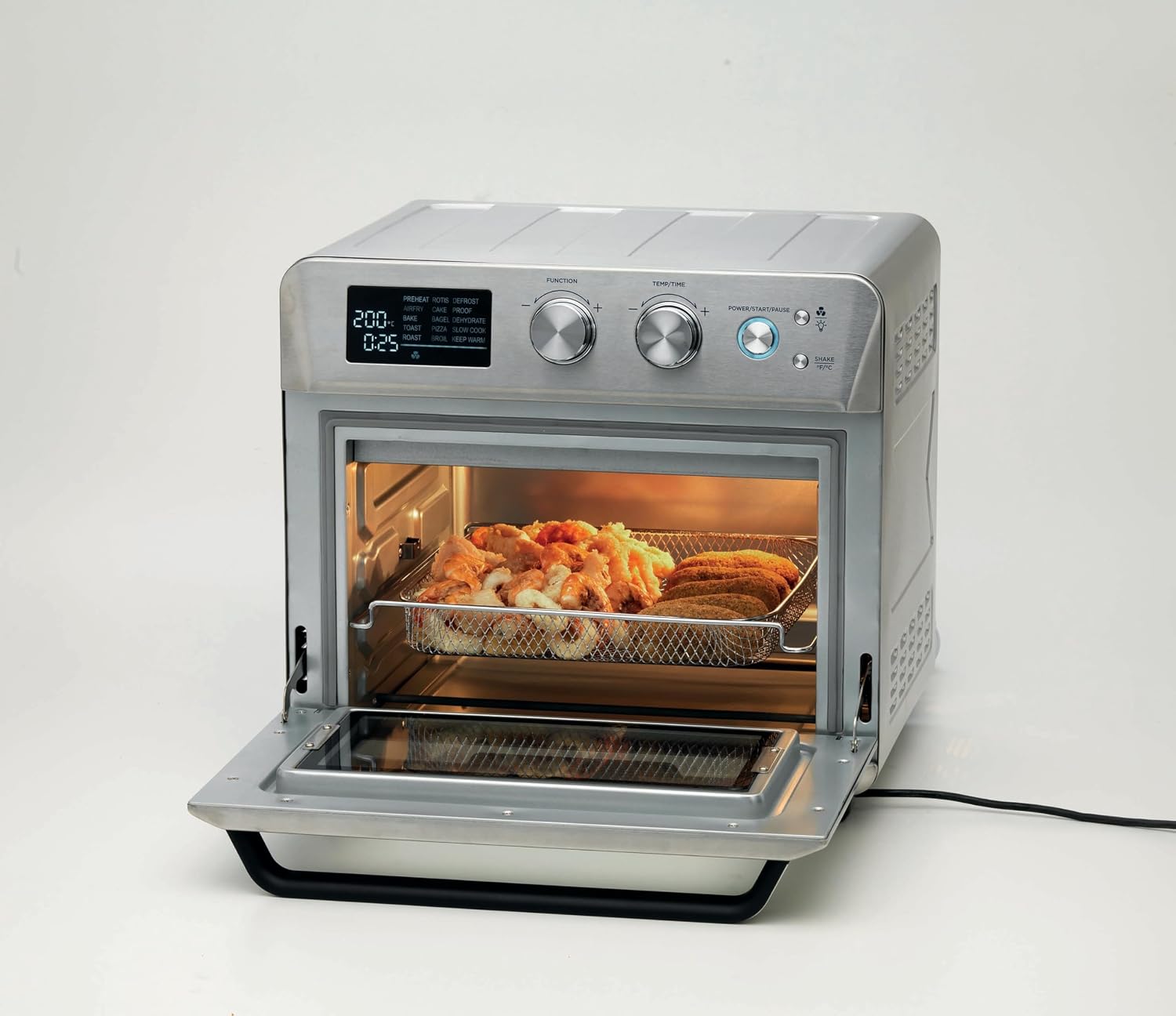
Figure 1: Front view of the Ariete 4629 Air Fryer Oven, showing the control panel, oven door, and interior.
Setup
Unpacking
- Carefully remove the appliance and all accessories from the packaging.
- Remove any protective films, stickers, or packaging materials from the appliance and accessories.
- Retain the packaging for future storage or transport.
Initial Cleaning
- Wipe the exterior of the oven with a damp cloth.
- Wash all accessories (frying basket, baking tray, wire rack, rotisserie set) in warm, soapy water. Rinse thoroughly and dry completely.
- Wipe the interior of the oven with a damp cloth. Ensure all surfaces are dry before plugging in.
Placement
- Place the oven on a stable, heat-resistant, and level surface.
- Ensure there is adequate space (at least 10-15 cm) around all sides of the oven for proper ventilation. Do not place it directly against a wall or under cabinets.
- Keep the oven away from flammable materials such as curtains, tablecloths, and paper.
- Plug the power cord into a grounded electrical outlet.
Operating Instructions
General Operation
- Power On: Plug in the appliance. The display will light up. Press the Power/Start/Pause button to turn on.
- Select Function: Turn the Function knob to choose your desired cooking program (e.g., Air Fry, Bake, Roast, Toast). The default temperature and time for the selected function will appear on the display.
- Adjust Temperature and Time: Turn the Temp/Time knob to adjust the temperature. Press the Temp/Time knob to switch to time adjustment, then turn the knob to set the desired cooking time.
- Start Cooking: Press the Power/Start/Pause button to begin the cooking cycle.
- Pause/Stop: During cooking, press the Power/Start/Pause button once to pause. Press again to resume. To stop cooking, press and hold the Power/Start/Pause button for a few seconds.
- Interior Light: Press the Light button to turn the interior light on or off to monitor cooking progress.
Air Frying
The air frying function uses rapid hot air circulation to cook food with little to no oil, resulting in crispy textures.
- Place food in the frying basket. Do not overcrowd the basket to ensure even cooking.
- Insert the frying basket into the oven on the appropriate rack level.
- Select the 'Air Fry' function using the Function knob.
- Adjust temperature and time as needed for your recipe.
- Press the Power/Start/Pause button to start. Shake the basket halfway through cooking for best results.

Figure 2: The air frying basket inside the oven, suitable for preparing various fried foods.
Baking and Roasting
Use the baking tray or wire rack for traditional oven cooking.
- Place food on the baking tray or wire rack.
- Insert the tray/rack into the oven at the desired level.
- Select the 'Bake' or 'Roast' function.
- Set the temperature and time according to your recipe. This oven can accommodate a 30 cm pizza.
- Press the Power/Start/Pause button to start.

Figure 3: A pizza baking on the wire rack inside the oven, demonstrating its baking capability.
Rotisserie Function
The rotisserie set allows for even roasting of whole poultry or meat.
- Secure the food onto the rotisserie spit using the forks.
- Insert the rotisserie spit into the designated slots inside the oven. Ensure the drip tray is placed underneath.
- Select the 'Rotisserie' function.
- Set the temperature and time.
- Press the Power/Start/Pause button to start.

Figure 4: A whole chicken roasting on the rotisserie spit, with potatoes cooking on a tray below.
Care and Maintenance
Regular cleaning and maintenance will prolong the life of your appliance.
Before Cleaning
- Always unplug the oven from the power outlet and allow it to cool completely before cleaning.
Cleaning the Interior
- Wipe the interior walls with a damp cloth and mild detergent. Avoid abrasive cleaners or scouring pads.
- For stubborn stains, a non-abrasive liquid cleaner can be used.
- Ensure the interior is completely dry before next use.
Cleaning the Exterior
- Wipe the exterior surfaces with a soft, damp cloth. Do not use abrasive cleaners or immerse the appliance in water.
Cleaning Accessories
- The frying basket, baking tray, wire rack, and rotisserie set can be washed in warm, soapy water. Rinse thoroughly and dry.
- The crumb tray should be emptied and cleaned regularly.

Figure 5: The removable crumb tray, essential for easy cleaning and maintenance.
Troubleshooting
If you encounter any issues, refer to the following table for common problems and solutions.
| Problem | Possible Cause | Solution |
|---|---|---|
| Appliance does not turn on. | Not plugged in; Power outlet malfunction; Power button not pressed. | Ensure the power cord is securely plugged into a working outlet. Press the Power/Start/Pause button. |
| Food not cooking evenly. | Overcrowding; Incorrect rack position; Uneven food distribution. | Do not overcrowd the basket/tray. Use the recommended rack position. Turn or shake food halfway through cooking. |
| White smoke coming from the oven. | Grease or food residue on heating elements; Excess oil on food. | Unplug and let cool. Clean the interior and heating elements. Reduce oil if adding to food. |
| Food is not crispy when air frying. | Too much moisture; Overcrowding; Incorrect temperature/time. | Pat food dry before cooking. Do not overcrowd the basket. Adjust temperature and time as per recipe. |
Specifications
| Feature | Specification |
|---|---|
| Brand | Ariete |
| Model Number | 4629/11 |
| Color | Silver |
| Capacity | 25 Liters |
| Power | 1700 Watts |
| Dimensions (L x W x H) | 40.5 x 43 x 39.5 cm |
| Weight | 13.4 Kilograms |
| Material | Stainless steel or metal |
| Control Type | Touch control (Digital display with knobs) |
| Special Feature | Timer |
| Included Components | Frying basket, baking tray, wire rack, crumb tray, rotisserie set |
Warranty and Support
For information regarding warranty coverage, product registration, or technical support, please refer to the warranty card included with your purchase or visit the official Ariete website. Do not attempt to repair the appliance yourself; contact qualified service personnel for assistance.