
Introduction
Thank you for choosing the ODK 40 Inch Small L Shaped Gaming Computer Desk. This manual provides essential information for the proper assembly, operation, and maintenance of your new desk. Designed for efficiency and versatility, this desk is ideal for home offices, gaming setups, and study areas, maximizing space with its L-shaped design and integrated features.
Key Features
- Power Outlets & Charging Ports: Equipped with 3 power outlets, 1 USB charging port, and 1 Type-C port for convenient device charging.
- Reversible Corner Design: L-shaped configuration maximizes space and can be customized for left or right-hand setup.
- Ample Storage Space: Features two-tier open shelves and a dedicated PC stand, plus a side storage bag for accessories.
- Sturdy & Stable Construction: Built with a premium metal frame and high-quality MDF board for durability, scratch, and water resistance. Adjustable non-slip foot pads ensure stability on uneven surfaces.
- Easy Assembly: Designed for quick and straightforward assembly, typically within 30 minutes.
Setup & Assembly
Before beginning assembly, ensure all parts are present and undamaged. It is recommended to assemble the desk on a soft, clean surface to prevent scratches. Follow the included instructions carefully.
The desk is designed for easy assembly, typically taking around 30 minutes. All necessary tools are included.

Image: The ODK L-Shaped Desk in a home office environment, highlighting its space-saving design and integrated storage shelves.
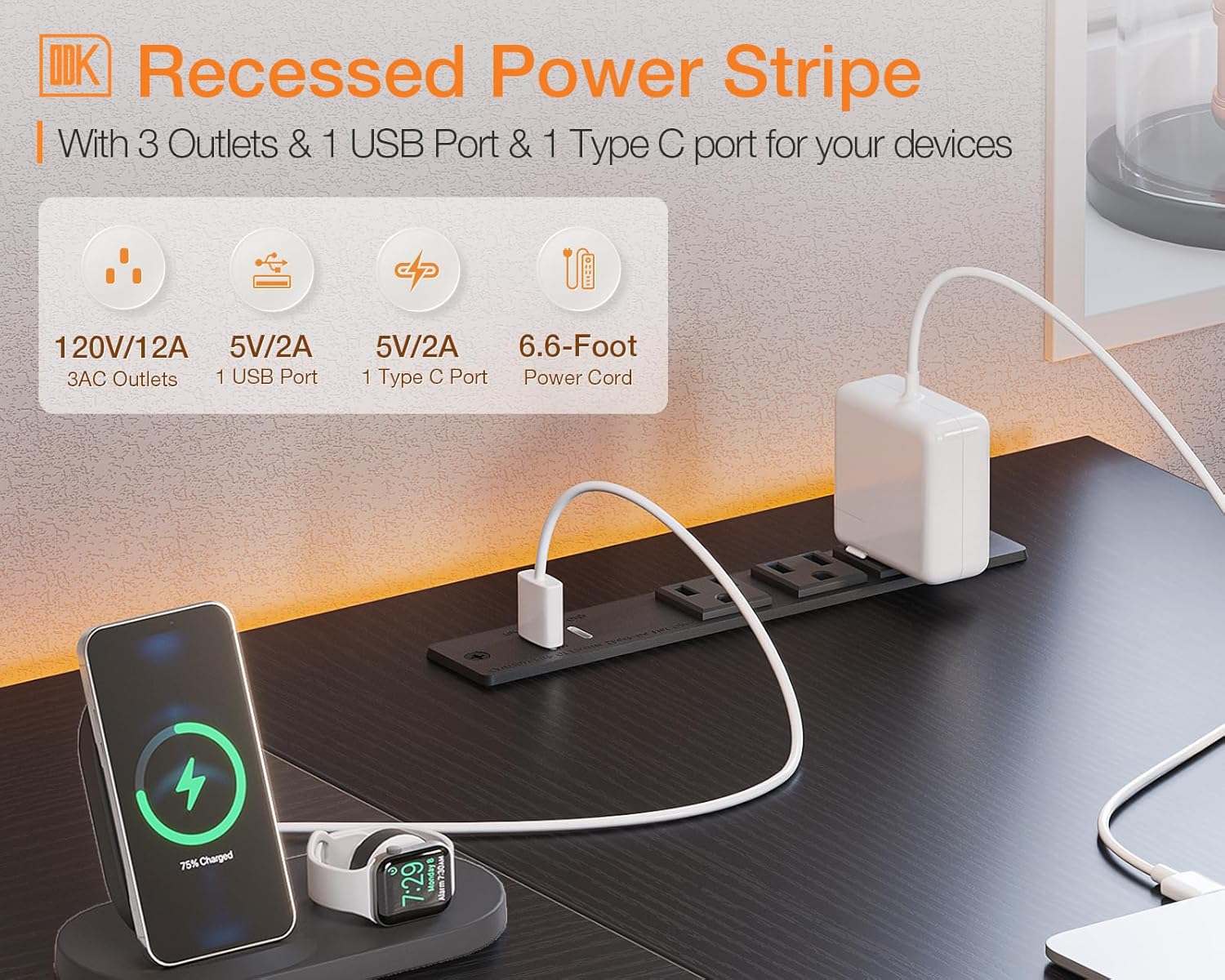
Image: Detailed diagram illustrating the dimensions of the ODK L-Shaped Desk, including overall length, width, and height, as well as shelf measurements.
Video: An official product video from ODK showcasing the features and assembly process of the 40-55 Inch L Shaped Gaming Computer Desk.
Operating Instructions
Power Outlets and Charging Ports
The desk is equipped with a recessed power strip for your convenience. It includes 3 standard 120V/12A AC outlets, 1 USB-A port (5V/2A), and 1 Type-C port (5V/2A). Use these ports to power your computer, monitor, and charge your smartphone, gaming gear, or other Bluetooth devices directly from your desk.

Image: A close-up view of the integrated recessed power strip on the desk, detailing the three AC outlets, one USB-A port, and one USB-C port for convenient power access.
Storage Management
Utilize the two-tier open shelves to store books, files, and other devices. The dedicated PC stand provides a secure spot for your computer tower. The side storage bag is perfect for organizing gaming accessories, office supplies, or personal items, helping to keep your workspace tidy and clutter-free.

Image: The ODK L-Shaped Desk configured for a gaming setup, illustrating the practical use of the PC stand, two-tier storage shelves, and the side storage bag.
Maintenance
- Cleaning: Wipe the desk surfaces with a soft, damp cloth. Avoid harsh chemicals or abrasive cleaners that may damage the finish.
- Stability Check: Periodically check all screws and connections to ensure they are tight. Re-tighten if necessary to maintain stability.
- Foot Pads: Adjust the non-slip foot pads as needed to ensure the desk remains level and stable on uneven flooring, protecting your floor from scratches.
- Environmental Conditions: Keep the desk away from direct sunlight, excessive heat, and moisture to prevent warping or damage to the engineered wood.
Troubleshooting
Power Outlets Not Working
- Ensure the desk's power cord is securely plugged into a functional wall outlet.
- Check if the power strip's circuit breaker (if present) has tripped. Reset if needed.
- Verify that the devices plugged into the desk are functioning correctly by testing them in another outlet.
Desk Wobbles
- Inspect all assembly screws and bolts. Tighten any loose fasteners.
- Adjust the non-slip foot pads on each leg until the desk is stable and level.
- Ensure the desk is placed on a flat, even surface.
Damaged Parts
If any parts are damaged upon arrival or during assembly, please contact ODK Customer Service immediately for assistance. Do not attempt to assemble or use the desk with damaged components.
Specifications
| Feature | Detail |
|---|---|
| Brand | ODK |
| Product Dimensions | 40"D x 29.1"W x 29.5"H |
| Color | Black |
| Style | Modern |
| Base Material | Metal |
| Top Material Type | Engineered Wood |
| Special Feature | Reversible, Built-In USB Outlet |
| Maximum Weight Recommendation | 110 Pounds |
| Number Of Shelves | 2 |
| Included Components | Built-in USB Port |
Important Safety Information
- Always assemble the desk on a flat, stable surface.
- Be cautious when adjusting the non-slip foot pads to avoid injury.
- Never overload the power outlets or use them with damaged cords to prevent electrical hazards.
- Keep the desk away from heat sources and liquids to prevent damage and potential safety risks.
Warranty & Support
ODK provides 24-hour online professional pre and after-sale service for your convenience. For any questions, concerns, or warranty claims, please contact ODK Customer Service directly.
For further assistance, please visit the ODK Store on Amazon.