
DEPSTECH 7.9mm Dia Compatible with Dual lens+2MP borescope
DEPSTECH Accessories User Manual
For 7.9mm Dia Probe Dual Lens Inspection Cameras
Introduction
This manual provides detailed instructions for the use and maintenance of your DEPSTECH accessory kit. This kit is designed to enhance the functionality of compatible DEPSTECH dual-lens inspection cameras, allowing for greater versatility in various inspection and retrieval tasks. Please read this manual thoroughly before using the accessories to ensure proper operation and to maximize their utility.
Compatibility
These accessories are specifically designed for use with DEPSTECH dual-lens endoscope camera series featuring a 7.9mm diameter probe. Compatibility is confirmed for the following models:
- DEPSTECH WF028-DL
- DEPSTECH DS300-DL
- DEPSTECH DS520-DL
- DEPSTECH DS350-DL
- DEPSTECH DS500-DL
- DEPSTECH DS600-DL
- DEPSTECH DS450-DL
Please note that these accessories are not compatible with other endoscope models or probe diameters. Ensure your endoscope model matches one of the listed compatible devices before attempting to attach these accessories.

Image: Visual representation of compatible DEPSTECH endoscope models and the accessory kit.
Package Contents
The DEPSTECH accessory kit includes the following items:
- 1x Magnet attachment
- 1x Hook attachment
- 1x Protective Cap
- 1x Reset Pin (for specific endoscope models, refer to your endoscope's manual)
Note: The compatible endoscope camera is sold separately and is not included in this accessory package.

Image: The complete accessory kit including the hook, magnet, protective cap, and reset pin.
Setup and Installation
Follow these steps to properly attach the accessories to your DEPSTECH endoscope probe:
- Remove Protective Cap: Before attaching any accessory, ensure you unscrew and remove the existing protective cap from the end of your endoscope probe. This cap protects the probe's threads during storage and transport.
- Select Accessory: Choose the desired accessory (magnet or hook) based on your task.
- Attach Accessory: Carefully screw the chosen accessory onto the threaded tip of the endoscope probe. Turn clockwise until it is securely fastened. Do not overtighten.
- Protective Cap Usage: The included protective cap is designed to protect the threads of the endoscope probe when no other accessory is attached. Always keep the cap on when not using the hook or magnet to prevent damage to the threads.
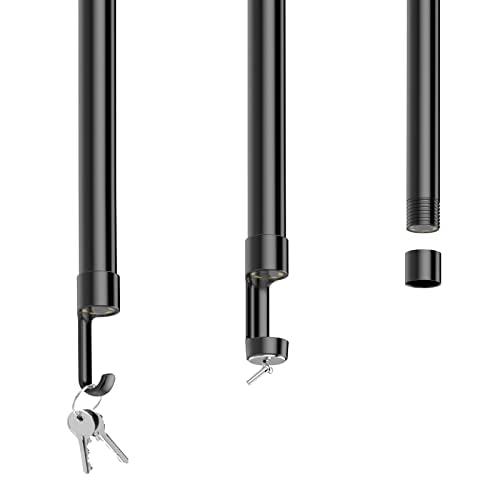
Image: Step-by-step illustration of attaching an accessory to the endoscope probe.
Operating Instructions
These accessories extend the utility of your DEPSTECH endoscope for various applications:
Using the Magnet Attachment
The magnet attachment is ideal for retrieving small metallic objects from hard-to-reach areas. Common uses include:
- Retrieving dropped screws, nuts, or bolts from engine compartments or machinery.
- Locating and picking up metallic items from drains or confined spaces.
- Inspecting and retrieving items in plumbing or automotive applications.
Procedure: Attach the magnet to the endoscope probe. Guide the probe into the desired area using the endoscope's display. Once the metallic object is located, maneuver the magnet close to it until it attaches. Carefully retract the endoscope to retrieve the object.
Using the Hook Attachment
The hook attachment is designed for snagging, pulling, or retrieving non-metallic or irregularly shaped objects. Common uses include:
- Retrieving keys, rings, or other small items from narrow pipes or crevices.
- Maneuvering wires or cables in tight spaces.
- Inspecting and clearing minor obstructions.
Procedure: Attach the hook to the endoscope probe. Guide the probe to the object. Carefully maneuver the hook to snag or loop around the object. Gently pull the endoscope back to retrieve the item.
Using the Reset Pin
The reset pin is a specialized tool primarily used for resetting certain electronic devices or accessing recessed buttons on compatible endoscope models. Refer to your specific endoscope's user manual for instructions on when and how to use the reset pin.
Maintenance
Proper maintenance ensures the longevity and performance of your DEPSTECH accessories:
- Cleaning: After each use, especially in dirty or oily environments, wipe the accessories clean with a soft, dry cloth. For stubborn grime, a slightly damp cloth can be used, followed by thorough drying.
- Storage: Store the accessories in a clean, dry place, preferably in their original packaging or a protective case, to prevent loss or damage.
- Inspection: Periodically inspect the threads of the accessories and the endoscope probe for any signs of wear or damage. Do not use damaged accessories.
- Protective Cap: Always use the protective cap when the hook or magnet is not attached to safeguard the probe's threads.
Troubleshooting
| Problem | Possible Cause | Solution |
|---|---|---|
| Accessory does not screw on properly. | Incorrect probe diameter; threads are damaged or dirty; protective cap not removed. | Verify endoscope model compatibility (7.9mm Dia dual-lens). Clean threads on both accessory and probe. Ensure the original protective cap is fully removed. |
| Magnet not strong enough to retrieve object. | Object is too heavy or not ferrous. | Confirm the object is metallic and within the magnet's lifting capacity. Consider using the hook if the object is not ferrous or too heavy for the magnet. |
| Hook cannot grasp the object. | Object shape is unsuitable for hooking; insufficient maneuverability. | Attempt to reposition the endoscope for a better angle. If the object is smooth or too large, the hook may not be suitable. |
| Accessories appear worn or damaged. | Normal wear and tear; improper handling or storage. | Discontinue use of damaged accessories. Replace with new accessories if necessary. Store properly to prevent future damage. |
Specifications
- Product Type: Endoscope Accessories Kit
- Compatibility: DEPSTECH 7.9mm Dia Dual-Lens Endoscope Probes (WF028-DL, DS300-DL, DS520-DL, DS350-DL, DS500-DL, DS600-DL, DS450-DL)
- Included Accessories: Magnet, Hook, Protective Cap, Reset Pin
- Material: Durable metal and plastic components
- Color: Black
- Water Resistance: Not Water Resistant (accessories themselves are not rated for water immersion, rely on endoscope probe's rating)
- Connectivity: Threaded connection
- Package Dimensions: Approximately 3.78 x 3.46 x 0.87 inches
- Package Weight: Approximately 0.63 ounces
Customer Support
For further assistance, technical support, or inquiries regarding replacement parts, please contact DEPSTECH customer service. You can typically find contact information on the official DEPSTECH website or through the retailer where you purchased the product.
Online Resources: Visit the official DEPSTECH website for FAQs, product updates, and additional support resources. Visit DEPSTECH Store on Amazon
Related documents7.9mm Dia Compatible with Dual lens+2MP borescope


Ask a question about this manual
Ask about setup, troubleshooting, compatibility, parts, safety, or missing instructions. Manuals+ will review the question and use this page’s manual context to help answer it.