1. Introduction
This manual provides detailed instructions for the installation, operation, and maintenance of the QttyElok Bluetooth Tuya Access Control System Kit. This system offers multiple access methods including fingerprint, RFID card, password, NFC, and control via the Tuya mobile application. It is designed for secure and convenient access management in various environments.
2. Package Contents
Verify that all components listed below are included in your package:
- Access Control Keypad (Waterproof RFID Keypad Fingerprint Biometrics)
- 180KG Electric Magnetic Lock
- Power Supply Control Unit
- Door Exit Button
- 10pcs 13.56MHz Keyfobs

Image 2.1: Overview of the QttyElok Access Control System Kit components.
3. Safety Information
Please read and understand all safety instructions before installation and operation. Failure to follow these instructions may result in electric shock, fire, or other hazards.
- Ensure the power supply is disconnected before performing any wiring or installation.
- All electrical connections should be performed by a qualified professional if you are unsure.
- Do not expose the power supply unit to moisture or extreme temperatures.
- The access control keypad is IP68 waterproof, suitable for outdoor use, but avoid submerging it in water.
4. Setup and Installation
4.1 Wiring Diagram
Follow the wiring diagram carefully to connect the access controller, power supply, magnetic lock, and exit button.
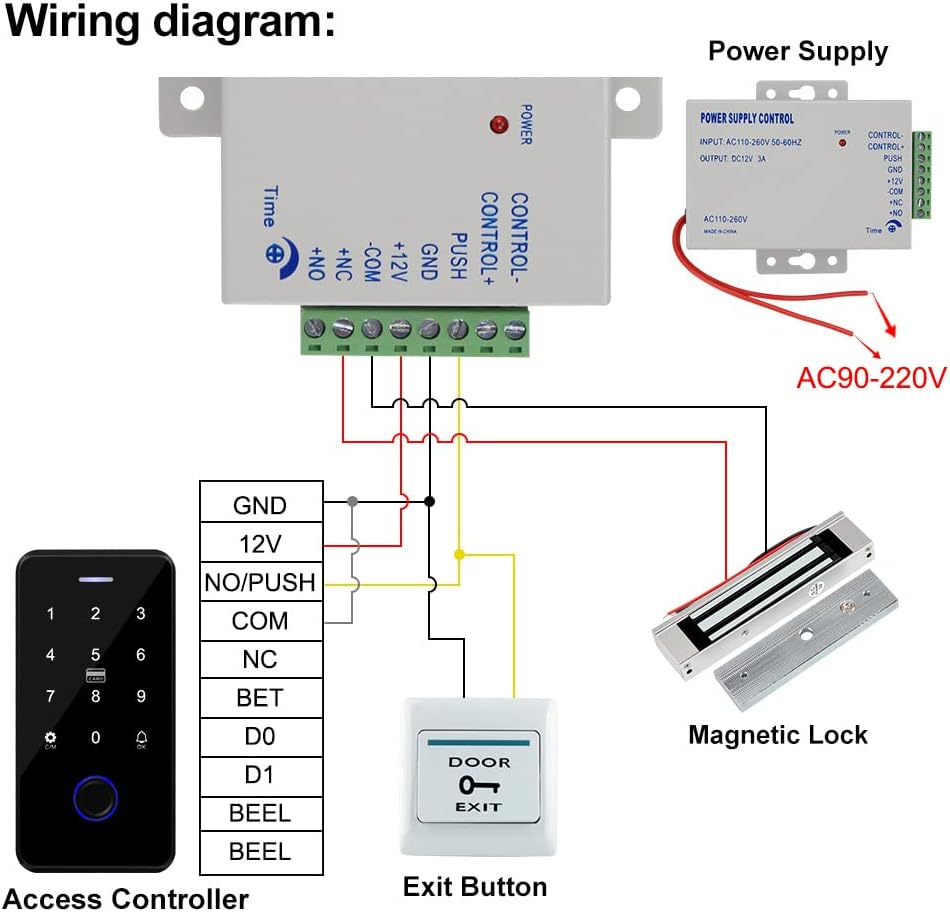
Image 4.1: Detailed wiring diagram for connecting all components of the access control system.
4.2 Component Installation
Access Controller Keypad: Mount the keypad at a convenient height near the door. The keypad is IP68 waterproof and features a touch screen panel with backlight for visibility in low light conditions.

Image 4.2: Dimensions of the access control keypad (70mm x 140mm x 16mm).
Magnetic Lock: Install the 180KG (350lbs holding force) magnetic lock on the door frame and the armature plate on the door. This is a fail-safe (NC type) lock, meaning it locks when powered on and unlocks when power is off. It is suitable for wooden, metal, security, and glass doors.

Image 4.3: Dimensions of the 180KG magnetic lock (172mm x 40mm x 21mm for the lock, 130mm x 32mm x 11mm for the armature plate).
Power Supply Control Unit: Mount the power supply unit in a secure, dry location. Ensure proper ventilation.

Image 4.4: Dimensions of the power supply control unit (105mm x 68mm x 34mm) and its specifications.
Door Exit Button: Install the exit button on the inside of the door for convenient egress. It supports both Normally Closed (NC) and Normally Open (NO) modes.

Image 4.5: Dimensions of the door exit button (86mm x 86mm) and the included RFID keyfobs.
5. Operating Instructions
5.1 Access Methods
The system supports multiple methods for unlocking the door:
- Fingerprint: Place a registered finger on the biometric sensor.
- RFID Card: Present a registered 13.56MHz RFID card or keyfob to the keypad.
- Password: Enter a registered password on the touch keypad.
- NFC: Use a mobile phone with NFC functionality to unlock.
- Tuya APP: Control the lock remotely via the Tuya Smart application on your smartphone.

Image 5.1: Visual representation of different access methods supported by the system.
5.2 Tuya App Integration
The access control keypad can be paired with the Tuya Smart app for remote control and advanced user management via Bluetooth. A gateway is not required for this functionality.
Download the Tuya Smart App: Scan the QR code provided or visit http://smart.tuya.com/download to download the Tuya Smart application.

Image 5.2: Instructions for downloading the Tuya Smart app and examples of its interface.
Remote Control: Once paired, you can unlock the door remotely using the Tuya app on your mobile phone.

Image 5.3: Demonstrates remote unlocking of the keypad using the Tuya Smart app via Bluetooth.
5.3 User Management and Programming
The Tuya app allows for comprehensive management of users, including adding fingerprints, RFID cards, and passwords. You can also generate temporary access codes and view access logs.

Image 5.4: Screenshots of the Tuya app showing options for temporary password sharing, managing user settings, adding new users (fingerprint, code, card), and reviewing access logs.
6. Maintenance
To ensure optimal performance and longevity of your access control system, follow these maintenance guidelines:
- Regularly clean the keypad surface with a soft, damp cloth. Avoid abrasive cleaners.
- Keep the magnetic lock and armature plate free from dirt and debris to ensure proper contact and holding force.
- Periodically check all wiring connections for tightness and signs of wear.
7. Troubleshooting
If you encounter issues with your access control system, refer to the following common problems and solutions:
- System not powering on: Check all power connections, ensure the power supply unit is receiving input voltage (AC110-260V), and verify the output DC12V.
- Magnetic lock not engaging/disengaging: Verify wiring to the magnetic lock. Ensure the power supply is providing consistent DC12V. Check for any obstructions between the lock and armature plate.
- Keypad unresponsive: Check power to the keypad. Ensure all data wires are correctly connected as per the wiring diagram.
- Fingerprint/RFID/Password not working: Ensure the user is properly registered in the system or via the Tuya app. Re-register if necessary.
- Tuya App connectivity issues: Ensure Bluetooth is enabled on your phone and the keypad is within range. Restart the app and try pairing again.
If problems persist, contact customer support for further assistance.
8. Specifications
| Brand | QttyElok |
| Model Number | F20tuya Kit |
| Power Source | Corded Electric, DC |
| Input Voltage (Power Supply) | 110~240VAC |
| Output Voltage (Power Supply) | DC12V |
| Momentary Current (Power Supply) | 3A |
| Time Delay (Power Supply) | 0~15 seconds delay locks |
| Access Controller Dimensions | 70 x 140 x 16 mm |
| Magnetic Lock Holding Force | 180KG / 350lbs |
| RFID Frequency | 13.56MHz (Mi-fare 1k) |
| User Capacity | 100 users |
| Waterproof Rating (Keypad) | IP68 |
| Connectivity Technology | Wireless (Bluetooth) |
| Compatible Devices | Smartphone (Tuya App) |
9. Warranty and Support
For warranty information or technical support, please refer to the product packaging or contact the seller directly. Keep your purchase receipt as proof of purchase.


