
1. Introduction
Thank you for choosing the SEAFRONT AUA28U 4-in-1 Fiber Optic OTDR Tester. This device is a versatile tool designed for the installation, maintenance, and troubleshooting of fiber optic networks. It integrates multiple functions including Optical Time Domain Reflectometer (OTDR), Visual Fault Locator (VFL), Optical Power Meter (OPM), and Optical Light Source (OLS), along with Ethernet cable testing capabilities. Its compact design, 3.97-inch touch screen, and user-friendly interface make it suitable for both indoor and outdoor field operations.
This manual provides essential information for the safe and efficient use of your AUA28U tester. Please read it thoroughly before operation and keep it for future reference.
2. Safety Information
To ensure safe operation and prevent damage to the device or injury to personnel, please observe the following safety precautions:
- Laser Safety: This device emits laser radiation. Avoid direct eye exposure to the laser output. Never look directly into the optical ports when the device is active. Use appropriate laser safety eyewear if required by local regulations.
- Power Supply: Use only the specified charger (DC 5V, 1A) provided with the device. Using an incompatible charger may damage the battery or the device.
- Battery Handling: Do not disassemble, puncture, or expose the battery to extreme temperatures or fire. Dispose of batteries according to local regulations.
- Environmental Conditions: Operate the device within the specified temperature and humidity ranges. Avoid exposure to water, dust, or corrosive substances.
- Maintenance: Refer to the maintenance section for cleaning instructions. Do not attempt to repair the device yourself. Contact authorized service personnel for repairs.
3. Product Overview
3.1 Key Features
- 4-in-1 Functionality: Integrates OTDR, VFL, OPM, and OLS.
- OTDR Range: 0-60 km measurement capability.
- Visual Fault Locator (VFL): 10mW red light source for identifying fiber breaks.
- Optical Power Meter (OPM): Supports 6 types of wavelengths.
- Optical Light Source (OLS): 1550nm wavelength.
- Ethernet Cable Testing: Includes distance and sequence testing for RJ45 cables.
- Display: 3.97-inch HD touch screen for intuitive operation.
- Data Management: USB interface for data transfer and analysis, supports printable test reports.
- Portability: Lightweight and compact design with a 4400mAh large capacity lithium battery.
3.2 Device Layout and Components
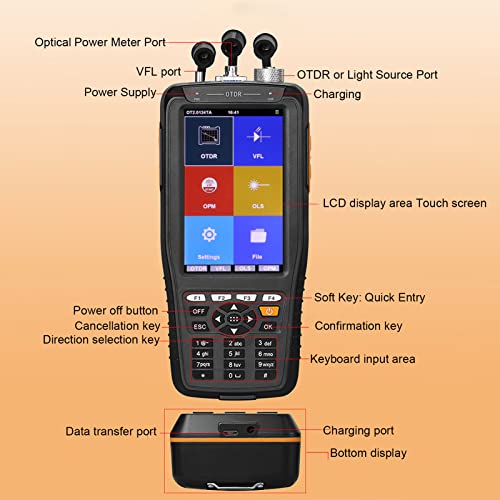
This diagram provides a comprehensive overview of the AUA28U tester's physical layout. It identifies the various ports such as the Optical Power Meter Port, VFL port, and the combined OTDR/Light Source Port. The diagram also labels the charging port, data transfer port, the 3.97-inch LCD touch screen, and all control buttons including power, navigation keys, soft keys, and the alphanumeric keyboard.
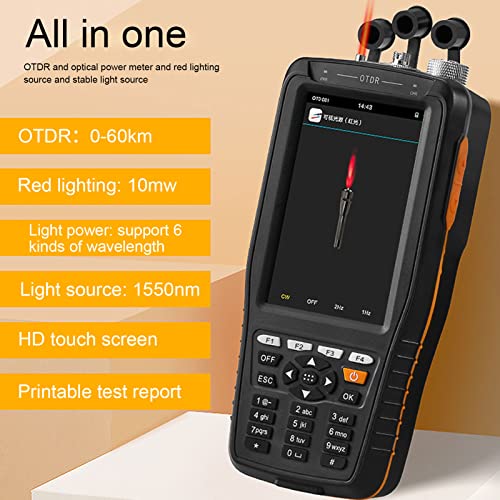
This image showcases the multi-functional design of the AUA28U tester. Key features highlighted include an OTDR measurement range of 0-60km, a 10mW red light source, support for 6 types of wavelengths, a 1550nm light source, a high-definition touch screen, and the ability to generate printable test reports.

This image shows the back panel of the AUA28U tester with the battery compartment cover in place. Visible labels include the model number AUA28U, serial number, and CE certification, indicating compliance with European safety standards.
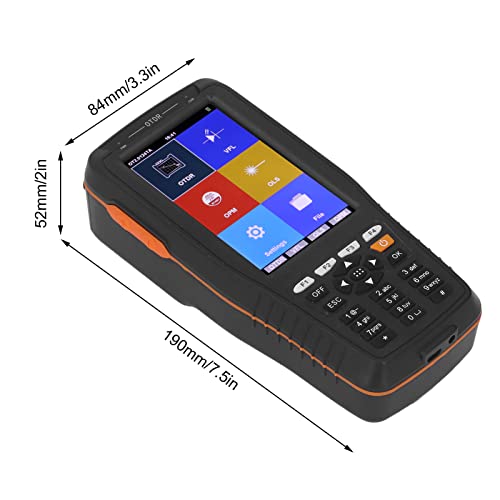
This image provides a clear visual representation of the AUA28U tester's physical dimensions. It indicates a length of 190mm (7.5 inches), a width of 84mm (3.3 inches), and a thickness of 52mm (2 inches), highlighting its compact and portable design.
4. Setup
4.1 Battery Installation and Charging
- Install Battery: Open the battery compartment cover on the back of the device. Insert the provided 4400mAh lithium battery, ensuring correct polarity. Close the cover securely.
- Charge Battery: Connect the provided charger to the charging port on the device and plug it into a power outlet. The charging indicator will illuminate. A full charge typically takes several hours. Ensure the device is fully charged before first use.
This image displays the back of the AUA28U tester, highlighting the removable 4400mAh lithium battery. A label provides essential information regarding charging requirements (DC 5V, 1A) and laser safety warnings, advising against direct eye exposure to the laser radiation.
4.2 Powering On/Off
- Power On: Press and hold the power button (usually labeled 'OFF' or with a power icon) until the screen illuminates.
- Power Off: Press and hold the power button until a power-off prompt appears, then confirm.
4.3 Connecting Optical Adapters
The AUA28U tester is equipped with standard SC/UPC and FC/UPC adapters. The red lighting source is universally compatible with 2.5mm (0.1in) interfaces.
- Select the appropriate adapter (SC/UPC or FC/UPC) for your fiber connector.
- Carefully screw the adapter onto the desired optical port (OTDR/OLS, VFL, or OPM).
- Ensure the adapter is clean and free of dust before connecting.

This image illustrates the versatility of the AUA28U tester's optical interfaces. It shows the device compatible with standard SC/UPC and FC/UPC adapters, which are included. The red light source is noted to be universally compatible with 2.5mm (0.1in) interfaces, ensuring broad connectivity options.
5. Operating Instructions
5.1 Navigating the User Interface
The AUA28U features a 3.97-inch touch screen and a physical keypad for navigation. You can interact with the device by tapping icons on the screen or using the directional keys and 'OK' button on the keypad.
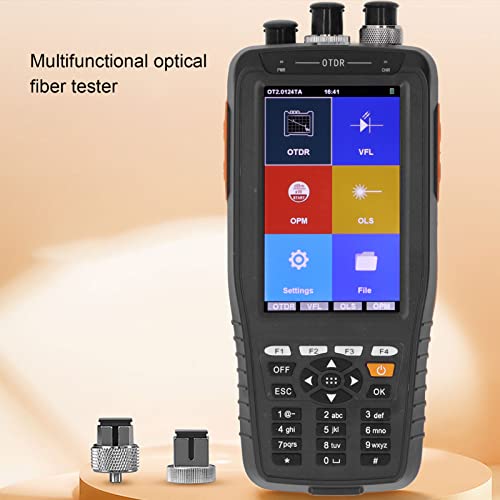
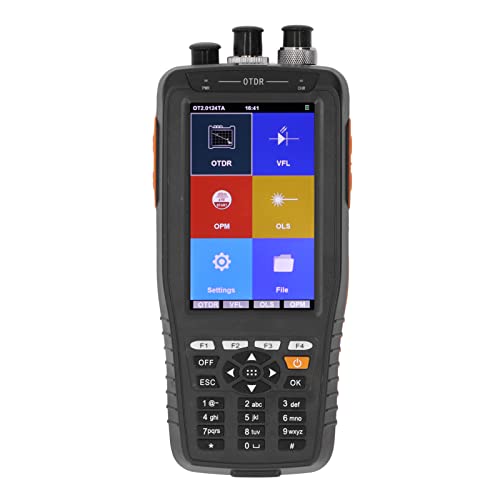
This image captures the user interface of the AUA28U tester, showing the main menu on its 3.97-inch touch screen. The menu presents clear, icon-based access to the device's primary functions: OTDR (Optical Time Domain Reflectometer), VFL (Visual Fault Locator), OPM (Optical Power Meter), OLS (Optical Light Source), Settings, and File management.
5.2 OTDR (Optical Time Domain Reflectometer) Function
The OTDR function is used to characterize optical fibers, measure length, attenuation, and identify events like splices, connectors, and breaks.
- From the main menu, select the 'OTDR' icon.
- Configure test parameters such as wavelength, range, pulse width, and measurement mode (e.g., Auto, Manual).
- Connect the fiber under test to the OTDR port using the appropriate adapter.
- Initiate the test. The device will display the OTDR trace and event table.
- Analyze the trace for fiber characteristics and fault locations.
5.3 VFL (Visual Fault Locator) Function
The VFL emits a visible red laser light into the fiber to quickly locate breaks, bends, or poor connections over short distances.
- From the main menu, select the 'VFL' icon.
- Connect the fiber to the VFL port.
- Activate the VFL. Observe the fiber for any visible red light leakage, indicating a fault.
- Deactivate the VFL after use to conserve battery and ensure safety.
5.4 OPM (Optical Power Meter) Function
The OPM measures the optical power of a fiber optic signal, essential for verifying signal strength and loss.
- From the main menu, select the 'OPM' icon.
- Select the desired wavelength for measurement.
- Connect the fiber to the OPM port.
- The device will display the measured optical power in dBm or mW.
5.5 OLS (Optical Light Source) Function
The OLS provides a stable optical signal at a specific wavelength, typically used in conjunction with an OPM for attenuation measurements.
- From the main menu, select the 'OLS' icon.
- Select the desired output wavelength (e.g., 1550nm).
- Connect the fiber to the OLS port.
- Activate the light source. The device will emit a stable optical signal.
5.6 Ethernet Cable Testing
The AUA28U can test Ethernet cable distance and RJ45 cable sequence.
- Connect the Ethernet cable to the designated RJ45 ports on the device.
- Navigate to the Ethernet test function from the main menu or utilities.
- Select either 'Cable Distance' or 'Cable Sequence' test.
- Follow on-screen prompts to perform the test and view results.
5.7 Data Transfer and Report Generation
Test results can be saved internally and transferred to a computer for further analysis and report generation.
- Saving Results: After completing a test, use the on-screen options to save the data.
- Data Transfer: Connect the device to a computer using the provided USB cable. The device will appear as a removable storage device. Copy the saved test files.
- Report Generation: Use compatible software on your computer to open and generate printable reports from the transferred data.
6. Maintenance
6.1 Cleaning
- Optical Ports: Always keep optical ports clean. Use lint-free cleaning swabs and optical-grade cleaning solution to clean the fiber connectors and ports before each use. Contaminated connectors can lead to inaccurate measurements and damage.
- Device Exterior: Wipe the exterior of the device with a soft, damp cloth. Do not use abrasive cleaners or solvents.
- Screen: Use a soft, dry, lint-free cloth to clean the touch screen. Avoid excessive pressure.
6.2 Storage
- Store the device in a cool, dry place, away from direct sunlight and extreme temperatures.
- When not in use, ensure all optical ports are covered with protective caps to prevent dust and contamination.
- If storing for an extended period, ensure the battery is partially charged (around 50%) and recharge it every few months to maintain battery health.
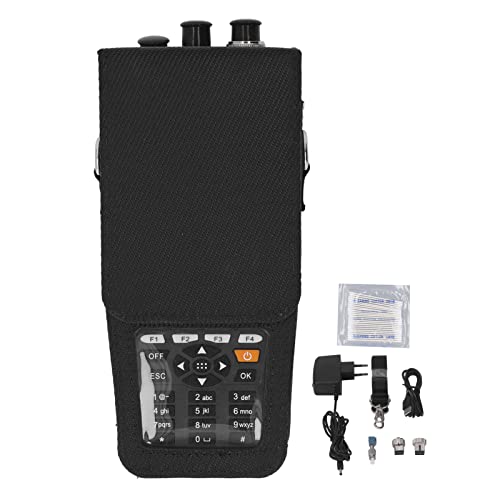
This image displays the AUA28U tester securely housed within its black protective carrying case. Adjacent to the device, the essential accessories are shown: a power adapter for charging, a USB cable for data transfer, and cleaning swabs for maintaining optical connectors.
7. Troubleshooting
- Device not powering on: Ensure the battery is correctly installed and fully charged. Connect the charger and try again.
- Inaccurate measurements: Clean all optical connectors and ports thoroughly. Ensure correct test parameters (wavelength, range) are selected. Check for damaged fiber cables.
- Touch screen unresponsive: Try restarting the device. If the issue persists, contact customer support.
- Data transfer issues: Ensure the USB cable is securely connected to both the device and the computer. Check if the device is recognized by the computer's operating system.
- VFL light not visible: Ensure the VFL function is activated and the fiber is properly connected. Check for severe fiber breaks or bends that might block the light.
8. Specifications
| Feature | Specification |
|---|---|
| Model | AUA28U (Manufacturer Part No: SEAFRONTrxmn56gzkg) |
| OTDR Measurement Range | 0 - 60 km |
| VFL Output Power | 10 mW |
| OLS Wavelength | 1550 nm |
| OPM Wavelength Support | 6 types of wavelengths |
| Display | 3.97-inch HD Touch Screen |
| Battery | 4400mAh Lithium Battery |
| Charging Input | DC 5V, 1A |
| Connectivity | USB Data Interface |
| Optical Connectors | SC/UPC, FC/UPC (adapters included) |
| VFL Interface Compatibility | Universal 2.5mm (0.1in) |
| Product Dimensions | 190mm x 84mm x 52mm (7.5in x 3.3in x 2in) |
| Weight | 840 grams (approx.) |
| Manufacturer | SEAFRONT |
9. Warranty and Support
For warranty information, technical support, or service inquiries, please contact your retailer or the manufacturer directly. Keep your purchase receipt as proof of purchase.