
Introduction
Thank you for choosing the FEZIBO Electric L-Shaped Standing Desk. This manual provides detailed instructions for the setup, operation, maintenance, and troubleshooting of your new desk. Please read this manual carefully before assembly and use to ensure proper function and safety.
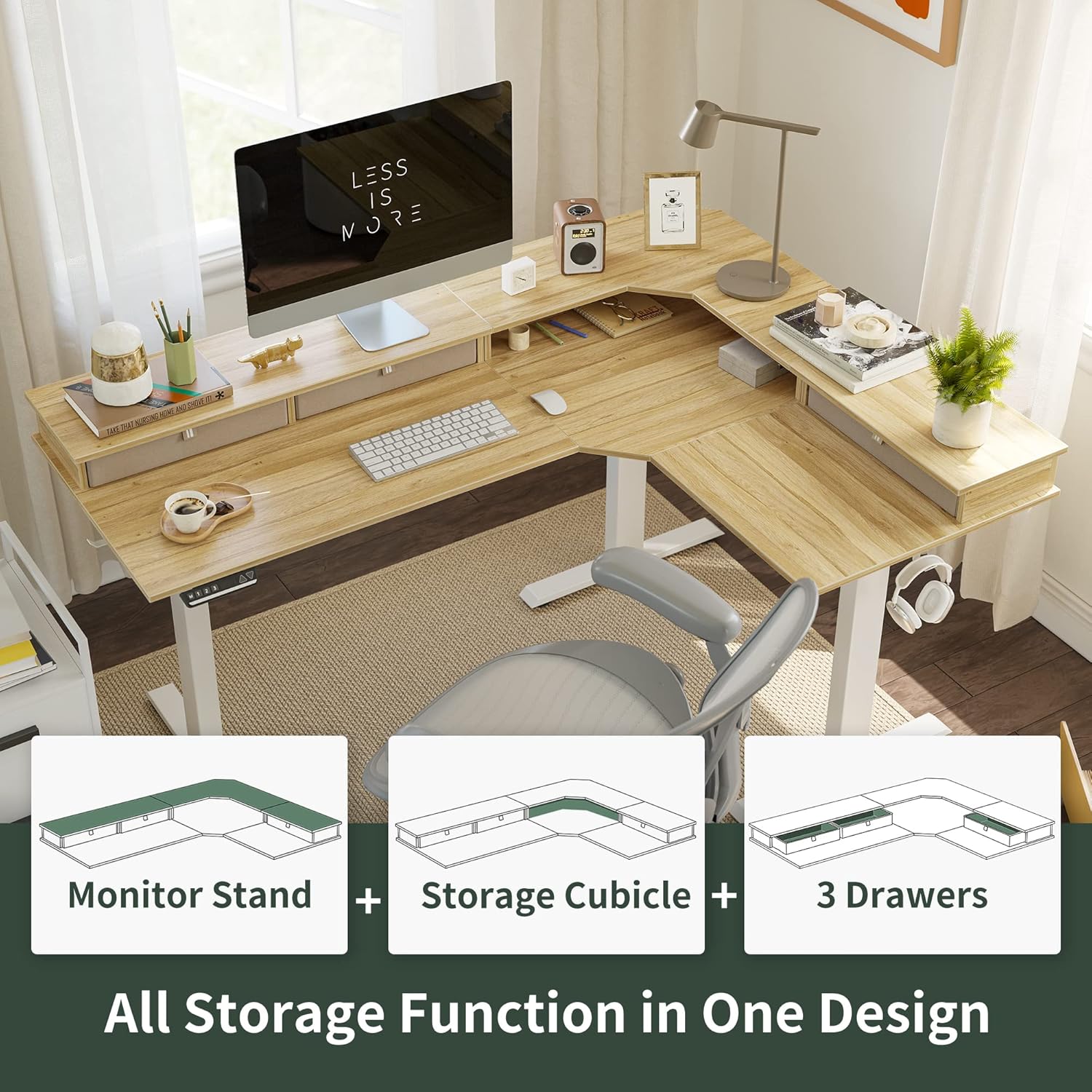
Image: FEZIBO L-Shaped Standing Desk highlighting dimensions, load capacity (330lbs), height range (27" to 48"), and rock-solid stability (100-240V / 35mm/s).
Important Safety Information
WARNING:
- Do not exceed the maximum weight limit of 150 kg (330 lbs). Exceeding this limit can cause damage to the desk and potential injury.
- Improper use of the anti-collision technology may lead to damage or injury. Ensure the sensor is correctly calibrated.
- Keep children and pets away from the desk during operation.
- Ensure all cables are properly managed to prevent tripping hazards or damage during height adjustments.
Setup and Assembly
Your FEZIBO L-Shaped Standing Desk is designed for straightforward assembly, typically taking less than an hour. The product is delivered in two packages. Please ensure all components are present before beginning assembly.
Assembly Steps Overview
- Unpack all components and verify against the parts list provided in your package.
- Assemble the desk frame according to the detailed instructions in your physical manual.
- Attach the desktop panels securely to the assembled frame.
- Connect all electrical components, including the motors and control panel.
- Install any accessories such as cable grommets, desk hooks, and casters.
Assembly Video Guide
Video: A detailed assembly guide for the Dripex L-Shaped Standing Desk, demonstrating step-by-step installation of the frame, desktop, and electrical components. This video is provided by a seller and is relevant for understanding the assembly process of similar L-shaped standing desks.

Image: Diagram illustrating the reversible L-shaped design, allowing for left or right-side installation to suit your workspace.
Operating Instructions
Your FEZIBO standing desk features an advanced electric lifting system and smart control panel for effortless height adjustment and personalized settings.
Electric Height Adjustment
- The motorized lifting mechanism allows for smooth height adjustments from 70 cm to 120 cm (with desktop).
- Adjustments occur at a maximum speed of 3.5 cm/second.
- The desk operates with a low noise level of less than 50 dB, ensuring a quiet work environment.
Smart Memory Control Panel

Image: Multi-function intelligent keypad featuring Up/Down buttons for momentary control, 3 height memory preset buttons (1, 2, 3), a child-friendly memory/screen lock button (S), and automatic anti-collision technology.
- The advanced LED control panel offers 3 memory preset buttons (1, 2, 3).
- To save a height setting: Adjust the desk to your desired height, then press the 'S' button followed by a number button (1, 2, or 3) to save.
- To recall a height setting: Press the corresponding number button (1, 2, or 3).
- Use the Up (^) and Down (v) arrows for momentary height adjustments.
Anti-Collision Technology
The integrated anti-collision technology protects the desk from bumps and scratches. If an obstacle is detected during upward or downward movement, the desk will automatically stop and then move slightly in the opposite direction. You can adjust the sensor sensitivity via the control panel (refer to your physical manual for specific steps).
Product Features Overview

Image: The FEZIBO L-Shaped Standing Desk featuring an integrated monitor stand, a storage cubicle, and three spacious drawers for organized storage.

Image: A close-up view of one of the three large, spacious drawers, designed to help keep your desk clean and organized while providing ample storage space.

Image: Illustration of various accessories included with the desk, such as a cable grommet for wire management, a set of two desk hooks for headphones or bags, and replaceable 360-degree swivel lockable casters for mobility and stability.
Product in Use Video
Video: This video showcases the FEZIBO L-Shaped Standing Desk in various professional and creative settings, highlighting its ergonomic benefits, spacious design, and ease of height adjustment. It demonstrates how the desk adapts to different user needs and work styles.
Maintenance
To ensure the longevity and optimal performance of your FEZIBO Electric L-Shaped Standing Desk, please follow these maintenance guidelines:
- Regular Cleaning: Wipe down the desktop and frame with a soft, damp cloth. Avoid harsh chemicals or abrasive cleaners that could damage the finish.
- Cable Management: Periodically check and reorganize cables to prevent tangling or interference with the lifting mechanism.
- Motor Inspection: Listen for any unusual noises during height adjustment. If you notice any issues, refer to the troubleshooting section or contact customer support.
- Weight Distribution: Distribute weight evenly across the desktop to prevent strain on the lifting mechanism.
Troubleshooting
If you encounter any issues with your FEZIBO Electric L-Shaped Standing Desk, please refer to the following common problems and solutions. If the problem persists, contact customer support.
Common Lifting Problems and Solutions
- Right Table Leg Higher than Left:
To fix this, first lower the table to its lowest height by continuously pressing the "v" (downward) button until "RST" appears on the controller. Then, loosen the nut on the hexagonal rod. Insert the long hexagonal rod into the table leg fully. Connect the two hexagonal rods and tighten the nut. After this adjustment, both table legs should raise and lower simultaneously. - Left Table Leg Higher than Right:
Similar to the previous issue, lower the table to its lowest height by continuously pressing the "v" (downward) button until "RST" appears on the controller. Loosen the nut on the hexagonal rod and push the short hexagonal rod into the motor fully (if difficult, gently shake it). Connect the two hexagonal rods and tighten the nut. After this adjustment, both table legs should operate in sync. - Short Hexagonal Rod Cannot Be Fully Pushed into the Motor:
If the short hexagonal rod cannot be fully inserted into the motor, follow these steps: First, remove the screws from the motor. Then, push the hex rod into the motor fully. You can rotate the motor slightly to ensure the hex rod is aligned with the portion on the table leg, allowing the hex rod to go inside. Insert the hexagonal rod into the table leg. Finally, install the screws on the motor and secure the motor to the table leg. Reconnect the two hexagonal rods and tighten the nut.
Force Reset Procedure
After installation is completed, or if you experience issues with height synchronization, perform a force reset:
- Press and hold down the downward key "v" on the control panel.
- Continue holding until the digital tube displays "RST".
- Release the button. The desk will then move to its lowest actual height.
- The reset is successful, and normal operation is resumed.
Specifications
| Attribute | Detail |
|---|---|
| Brand | FEZIBO |
| Model Number | Drei Motoren |
| Color | Natural/White |
| Product Dimensions (L x W x H) | 160 x 120 x 120 cm |
| Item Weight | 20 Kilograms |
| Features | Adjustable, Electric |
| Shape | L-Shape |
| Desk Design | Standing Desk |
| Base Material | Alloy Steel |
| Top Material Type | Wood |
Warranty and Support
FEZIBO is committed to providing excellent customer service. When you purchase from FEZIBO, you receive:
- 30-Day Risk-Free Guarantee: Enjoy a 30-day return policy for your peace of mind.
- Professional Service: We offer professional support before and after your purchase.
- Specialized Customer Support: Our dedicated team is available to assist with any questions or concerns you may have.
If you have any questions or require assistance, please do not hesitate to contact us through the seller's contact information on the platform where you made your purchase.