
TOZO X1
TOZO Golden X1 Wireless Earbuds User Manual
Model: X1
Introduction
This manual provides detailed instructions for the use and maintenance of your TOZO Golden X1 Wireless Earbuds. Please read this manual thoroughly before using the product to ensure proper operation and to maximize your listening experience.

Image: The TOZO Golden X1 Wireless Earbuds shown with their charging case, illustrating the product's design and compact form factor.
What's in the Box
Verify that all components are present upon unboxing:
- TOZO Golden X1 Wireless Earbuds
- Wireless Charging Case
- Multiple Sizes of Eartips
- USB-C (A to C) Charging Cable (30cm)
- User Manual
Product Overview

Image: An exploded view diagram of the TOZO Golden X1 earbud, highlighting the Balanced Armature Drivers and 12mm Dynamic Driver components.
The TOZO Golden X1 earbuds feature a hybrid driver system, combining a Balanced Armature Driver for clear treble and a 12mm Dynamic Driver for rich bass. They support advanced audio technologies like LDAC and Hi-Res Audio Wireless, ensuring a high-fidelity listening experience.
Setup
1. Charging the Earbuds and Case
Before first use, fully charge the earbuds and charging case.
- Wired Charging: Connect the provided USB-C cable to the charging case and a power adapter. The LED digital display on the case will show the battery percentage.
- Wireless Charging: Place the charging case on a compatible wireless charging pad. The LED display will indicate charging status.
A full charge typically takes approximately 2 hours. The case provides up to 32 hours of total listening time with multiple charges for the earbuds.

Image: The TOZO Golden X1 charging case displaying battery percentage, indicating its capacity to provide up to 32 hours of total battery life.
2. Eartip Selection and Fit
Proper eartip selection is crucial for optimal sound quality and noise cancellation. Experiment with the included eartips to find the best fit for your ears.
- Choose eartips that create a snug seal in your ear canal.
- A good seal enhances bass response and improves passive noise isolation.

Image: A visual guide demonstrating the various sizes of silicone eartips included with the TOZO Golden X1, emphasizing the importance of selecting the correct size for a comfortable and secure fit.
3. Pairing with a Bluetooth Device
- Open the charging case. The earbuds will automatically enter pairing mode.
- On your device (smartphone, tablet, laptop), enable Bluetooth.
- Search for 'TOZO Golden X1' in the list of available Bluetooth devices and select it to connect.
- Once connected, a voice prompt will confirm successful pairing.
4. TOZO App Installation
For enhanced features and customization, download the TOZO App from your device's app store.
- The app allows for EQ adjustments, noise cancellation mode selection, and firmware updates.
- Utilize the EarTune AI Technology within the app for personalized sound profiles based on a hearing test.
Image: Screenshot of the TOZO App's EarTune AI Technology interface, showing a hearing test in progress to customize audio output.
Operating Instructions
Touch Controls
The TOZO Golden X1 earbuds feature touch-sensitive controls on each earbud. The functions are as follows:
Image: A diagram illustrating the touch control functions for the left and right TOZO Golden X1 earbuds, detailing single, double, triple tap, and long press actions for various commands.
| Action | Left Earbud (L) | Right Earbud (R) |
|---|---|---|
| Single Press (X1) | Play/Pause, Answer Call | Play/Pause, Answer Call |
| Double Press (X2) | Previous Song | Next Song |
| Triple Press (X3) | Hang Up Call | Voice Assistant |
| Hold (2 seconds) | Reject Call, Volume Down | Reject Call, Volume Up |
| Single Press (X1) | ANC/Transparency Mode Toggle | N/A |
Active Noise Cancellation (ANC) and Transparency Mode
The earbuds feature Active Noise Cancellation (ANC) to reduce ambient noise and Transparency Mode to allow you to hear your surroundings.
- Toggle between ANC, Transparency Mode, and Normal Mode by single-pressing the left earbud.
- ANC can reduce ambient noise by up to 42dB.
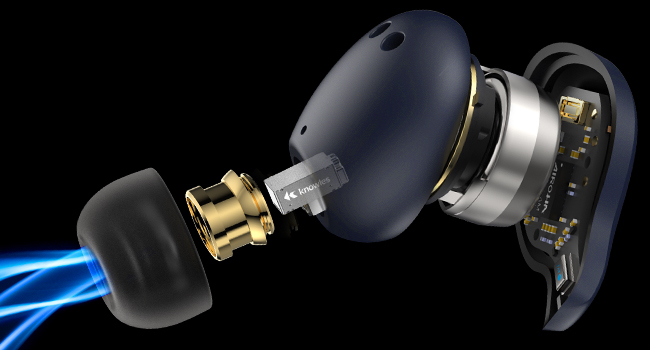
Image: An illustration demonstrating the Active Noise Cancellation capability of the TOZO Golden X1 earbuds, showing a reduction of up to 42dB in ambient noise.
EQ Modes and Customization
The TOZO App provides 16 preset EQ modes and allows for custom sound settings.
- Access the EQ settings via the TOZO App to select presets like Rock, Classical, Jazz, Hip-Pop, or create your own.
- The app also allows for customization of noise reduction intensity.

Image: Screenshots of the TOZO App, showcasing the interface for selecting 16 preset EQ modes and 6 noise reduction modes, along with options for customized touch controls and firmware updates.
Maintenance
Cleaning
- Regularly clean the earbuds and charging case with a soft, dry, lint-free cloth.
- Remove eartips and clean them with mild soap and water, then dry thoroughly before reattaching.
- Ensure charging contacts on both earbuds and case are free of debris.
Storage
- Store the earbuds in their charging case when not in use to protect them and keep them charged.
- Avoid storing in extreme temperatures or high humidity.
Water Resistance
The TOZO Golden X1 earbuds are waterproof. However, this does not mean they are suitable for swimming or prolonged submersion. They are designed to withstand sweat and light splashes.
- Do not charge the earbuds or case if they are wet.
- Dry them completely before placing them back in the charging case or connecting a charging cable.
Image: The TOZO Golden X1 earbuds shown with water droplets, illustrating their water-resistant design suitable for protection against sweat and splashes.
Troubleshooting
| Issue | Possible Solution |
|---|---|
| Earbuds not pairing | Ensure earbuds are charged. Place them back in the case, close, then reopen to re-enter pairing mode. Check your device's Bluetooth settings. |
| Only one earbud working | Ensure both earbuds are charged. Try resetting the earbuds (refer to the TOZO App or full user manual for specific reset instructions). |
| Poor sound quality/low volume | Check eartip fit for a secure seal. Clean earbuds and eartips. Ensure your device's volume is up. Disable ANC if not needed. |
| Charging case not charging | Check USB-C cable connection and power source. Ensure wireless charging pad is compatible and correctly aligned. |
| Touch controls unresponsive | Ensure earbuds are clean and dry. Restart the earbuds by placing them in the case and taking them out. |
Specifications
| Feature | Detail |
|---|---|
| Model Name | TOZO Golden X1 |
| Noise Control | Active Noise Cancellation (up to 42dB) |
| Audio Driver Type | Hybrid Driver (Balanced Armature & 12mm Dynamic) |
| Frequency Range | 12Hz to 44.1kHz |
| Connectivity | Bluetooth 5.3 |
| Bluetooth Range | Up to 12 meters |
| Audio Decoding | LDAC, Hi-Res Audio Wireless |
| Battery Life (Earbuds) | Approx. 8 hours (single charge) |
| Battery Life (with Case) | Up to 32 hours |
| Charging Time | Approx. 2 hours |
| Charging Interface | USB-C, Wireless Charging |
| Water Resistance Level | Waterproof (sweat and splash resistant) |
| Control Type | Touch Control, TOZO APP |
| Item Weight | 193.4 Grams (total package) |
| Case Battery Capacity | 500 mAh |
Warranty and Support
TOZO products are designed for reliability and performance. For warranty information and customer support, please refer to the official TOZO website or contact their customer service directly.
- Online Support: Visit the TOZO Brand Store for FAQs and product information.
- Contact: Refer to the contact details provided in the product packaging or on the official TOZO website for technical assistance.
Related documentsX1


Ask a question about this manual
Ask about setup, troubleshooting, compatibility, parts, safety, or missing instructions. Manuals+ will review the question and use this page’s manual context to help answer it.