
Ingenuity 13101
Ingenuity InLighten 2-in-1 Soothing Baby Swing & Rocker User Manual
Model: 13101 (Remy)
1. Introduction
This manual provides essential instructions for the safe assembly, operation, and maintenance of your Ingenuity InLighten 2-in-1 Soothing Baby Swing & Rocker. Please read all instructions carefully before use and retain this manual for future reference.

The Ingenuity InLighten 2-in-1 Soothing Baby Swing & Rocker, designed for infant comfort and entertainment.
2. Safety Information
WARNING: Failure to follow these warnings and instructions could result in serious injury or death.
- Always use the restraint system. Ensure it is correctly fitted and adjusted.
- Never leave the child unattended.
- Do not use this product once your child can sit up unaided or weighs more than 20 lbs (9 kg), whichever comes first.
- This product is not intended for prolonged periods of sleep.
- Never use this product on an elevated surface (e.g., a table).
- Always check that the product is stable and securely assembled before each use.
- Keep children away from the product during assembly and disassembly.
- Do not use accessories or replacement parts other than those approved by the manufacturer.
- Keep the product away from open flames and other strong heat sources.

Ensure the 5-point harness is securely fastened for your child's safety.
3. Setup and Assembly
Assembly of the Ingenuity InLighten Swing & Rocker is designed to be straightforward. Follow the instructions provided in the packaging for detailed steps. Ensure all components are securely connected before use.
- Unpack all components and verify against the parts list (refer to your product packaging).
- Assemble the frame according to the visual instructions.
- Attach the seat pad and ensure the harness is correctly threaded.
- Install the mobile arm and toys.
- For vibration function, insert 1 C battery (not included) into the designated compartment.
- Power the swing using the included USB cord. A wall AC adapter is not included and must be supplied separately.
4. Operating Instructions
4.1. 2-in-1 Functionality: Swing to Rocker
The product easily transitions between a swing and a portable rocker. To convert:
- Ensure the child is removed from the seat.
- Locate the release buttons on the sides of the seat where it connects to the swing frame.
- Press the buttons and lift the plush seat off the swing frame.
- Place the seat on a flat, stable surface to use as a rocker.
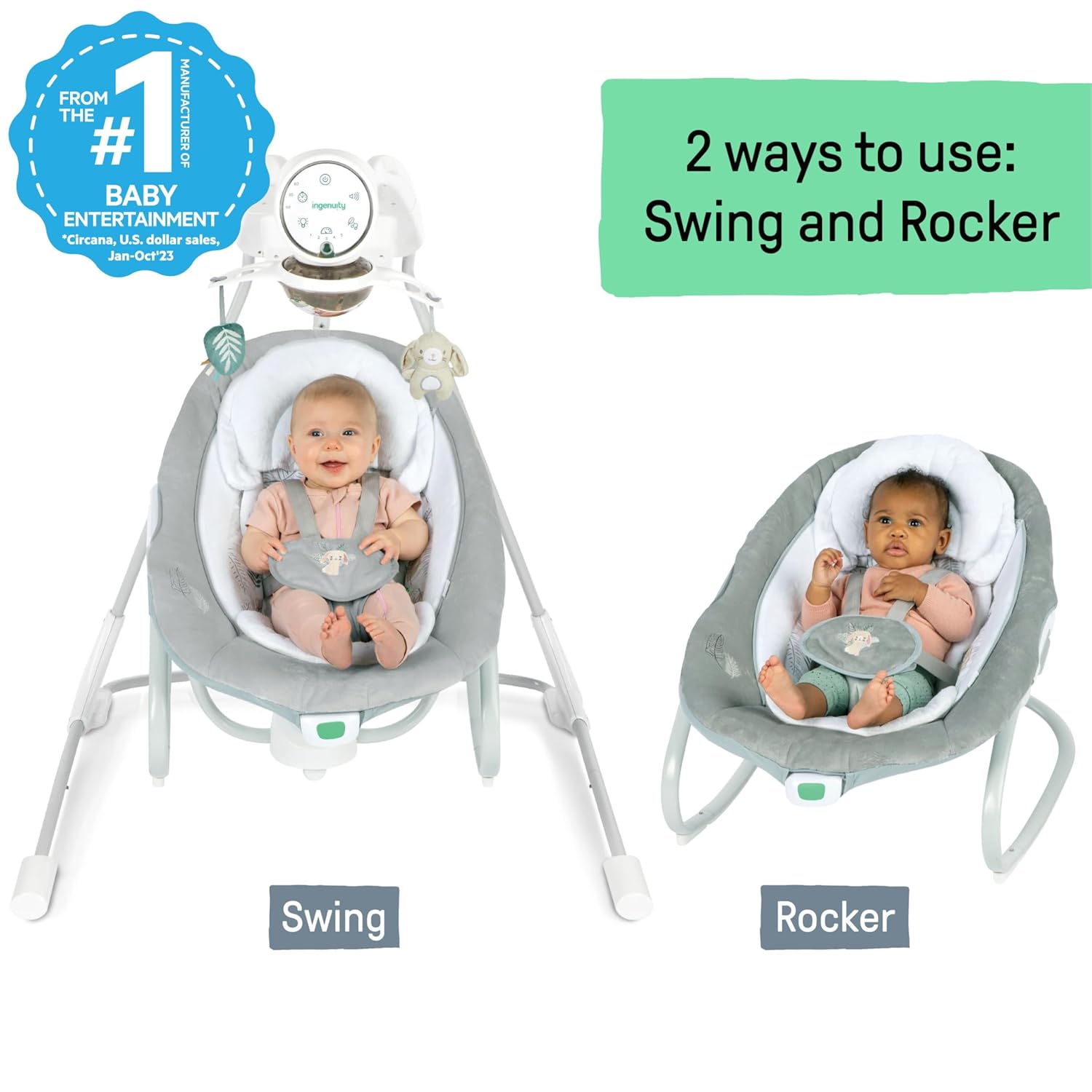
The versatile design allows for use as a swing or a portable rocker.
4.2. Control Panel and Remote Control
The GentleTouch control pad and remote control allow you to manage all functions.

Overview of the control panel features for easy operation.
- Power Button: Press to turn the unit on or off.
- Swing Speeds: Select from 5 automatic swing speeds.
- Swing Directions: The seat rotates 180 degrees and swings in 3 directions. Adjust as desired.
- Timer Options: Set the swing to operate for 30, 60, or 90 minutes.
- Vibrations: Activate soothing vibrations. Requires 1 C battery (not included).
- Melodies & Sounds: Choose from 20 preloaded soothing melodies, white noise, or nature sounds. Adjust volume as needed.
- Light-Up Mobile: Activate the mobile for a light show and spinning toys.
- Recline Positions: Adjust the seat to one of 2 recline positions for comfort or playtime.

The light-up mobile provides engaging visual stimulation for the baby.
4.3. Portability
The swing features an easy folding frame, incorporated handle, and wheels for convenient movement around the house.

Easily move the swing from room to room with its integrated handle and wheels.
5. Maintenance and Care
Proper care ensures the longevity and hygiene of your product.
- Frame: Wipe the metal frame with a soft, clean cloth and mild soap.
- Seat Pad: Remove from frame. Fasten buckles on seat restraint and seat pad. Fasten all hook-and-loop patches to the corresponding patch. Machine wash with cold water, gentle cycle. No bleach. Tumble dry, using low heat.
- Storage: When storing the swing, always keep it in a dry location, away from any heat sources, and out of direct sunlight.
- Toy Bar and Toys: Wipe clean with a damp cloth and mild soap. Air dry. Do not immerse in water.

The seat pad features machine-washable fabrics for easy cleaning.
6. Troubleshooting
If you encounter issues with your Ingenuity InLighten Swing & Rocker, refer to the following common solutions:
| Problem | Possible Cause / Solution |
|---|---|
| Swing does not turn on or operate. | Ensure the USB cord is securely connected to a power source and the swing. Check if the wall adapter (not included) is functioning correctly. |
| Vibration function is not working. | Verify that a fresh 1 C battery is correctly installed in the vibration unit. |
| Music or sounds are not playing. | Check the volume settings on the control panel. Ensure the unit is powered on. |
| Swing motion is erratic or stops. | Ensure the swing is on a flat, level surface. Check for any obstructions. Verify the child's weight does not exceed 20 lbs (9 kg). |
| Seat is difficult to remove or attach. | Ensure release buttons are fully pressed. Align the seat correctly with the frame connectors. |
7. Specifications
- Model Number: 13101
- Product Dimensions: 35.83"D x 32.68"W x 39.17"H (91.01 cm D x 83.01 cm W x 99.49 cm H)
- Item Weight: 9.53 pounds (4.32 kg)
- Maximum Weight Recommendation: 20 pounds (9 kg)
- Maximum Age Recommendation: 9 months
- Material Composition: 64% Metal, 31% Plastic, 5% Fabric
- Batteries Required: 1 C battery for vibration (not included)
- Power Source: USB cord (included), wall AC adapter not included
- Features: 5 swing speeds, 3 timer options, 2 recline positions, 20 melodies/sounds/white noise, light-up mobile with 2 toys, soothing vibrations, 5-point harness, portable folding frame with handle and wheels, remote control.

Key dimensions and weight/age limits for the Ingenuity InLighten Swing & Rocker.
8. Warranty and Support
For warranty information or customer support, please refer to the documentation included with your purchase or visit the official Ingenuity website. Contact their customer service for assistance with product issues, replacement parts, or further inquiries.
Online Support: www.kids2.com/ingenuity
Related documents13101

Ask a question about this manual
Ask about setup, troubleshooting, compatibility, parts, safety, or missing instructions. Manuals+ will review the question and use this page’s manual context to help answer it.