1. Introduction and Overview
The LenelS2 BlueDiamond LNL-R11330-05TB is a multi-technology, mobile-ready access control reader designed to provide a secure and flexible credentialing experience. This reader supports various card technologies and mobile credentials, allowing organizations to integrate advanced access control solutions at their own pace. This manual provides essential information for the proper installation, configuration, operation, and maintenance of your BlueDiamond reader.
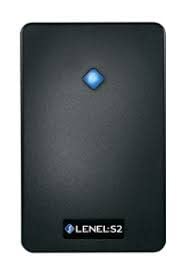
Figure 1: LenelS2 BlueDiamond Multi-Technology Mobile-Ready Reader (LNL-R11330-05TB)
This image displays the front view of the LenelS2 BlueDiamond reader, a rectangular black device with a subtle blue indicator light at the top center and the 'LENEL:S2' logo at the bottom.
2. Key Features
- Mobile Credential Support: Compatible with BlueDiamond mobile credentials via Bluetooth technology.
- Multi-Technology Capability: Offers simultaneous support for 125kHz proximity cards and 13.56MHz smart cards.
- Mobile-Ready Upgrade Path: Readers are designed for future mobile credential support through a license purchase (BDC-UNLOCK and BDC-BLUETOOTH configuration cards sold separately) without requiring hardware replacement.
- Flexible Communication: Supports Wiegand, SF/2F, or OSDP communication protocols, with or without secure channel encryption.
- Seamless Integration: Auto-configures with LenelS2 access panels.
- Advanced Management: Facilitates firmware updates, custom key loading, and configuration changes via OSDP file transfer when paired with OnGuard access control system version 7.5 or greater, Mercury xSeries Controllers, and Mercury Series 3 I/O boards.
- Compact Design: Features a slim profile for versatile installation.
3. Setup and Installation
Proper installation is crucial for optimal performance. It is recommended that installation be performed by a qualified technician.
3.1 Mounting the Reader
- Select a suitable mounting location, ensuring adequate space and environmental conditions.
- Drill pilot holes for the mounting screws according to the provided template (if applicable).
- Secure the reader base to the mounting surface using appropriate hardware.
3.2 Wiring Connections
Connect the reader to the access control panel following the wiring diagram provided with your specific access control system. Ensure correct polarity for power connections and proper data line connections for Wiegand, SF/2F, or OSDP.
- Power: Connect to a stable 12V DC power source.
- Data: Connect data lines (e.g., Data 0, Data 1 for Wiegand) to the corresponding inputs on the access panel.
- Ground: Ensure a proper ground connection.
3.3 Enabling Bluetooth (for Mobile Credentials)
The Bluetooth radio for mobile credentials is disabled by default. To enable this feature, the BDC-UNLOCK and BDC-BLUETOOTH configuration cards must be purchased and applied to the reader. Refer to the BlueDiamond Mobile Credential Configuration Guide for detailed instructions on this process.
4. Operating the Reader
The BlueDiamond reader provides access based on presented credentials.
4.1 Using Physical Credentials
- Proximity Cards (125kHz): Present the proximity card within the reader's field of detection. The reader will emit an audible beep and/or illuminate an indicator light upon successful read.
- Smart Cards (13.56MHz): Present the smart card within the reader's field of detection. The reader will process the card and provide feedback similar to proximity cards.
4.2 Using Mobile Credentials
Once Bluetooth is enabled and mobile credentials are provisioned, users can gain access using their smartphone with the BlueDiamond mobile app.
- Ensure the BlueDiamond mobile app is installed and configured on your smartphone.
- Activate the mobile credential within the app (if required by your system configuration).
- Present your smartphone near the reader. The reader will detect the mobile credential via Bluetooth and process the access request.
5. Maintenance
The BlueDiamond reader is designed for minimal maintenance.
- Cleaning: Periodically wipe the reader's surface with a soft, dry cloth. Avoid abrasive cleaners or solvents.
- Firmware Updates: Firmware updates can be performed via OSDP file transfer when the reader is paired with compatible LenelS2 access control systems (OnGuard 7.5+, Mercury xSeries Controllers, Mercury Series 3 I/O boards). Consult your system administrator for update procedures.
- Custom Key Loading: Custom key loading and configuration changes can also be managed via OSDP file transfer.
6. Troubleshooting
If you encounter issues with your BlueDiamond reader, consider the following common troubleshooting steps:
- Reader Not Responding:
- Verify power supply to the reader and access control panel.
- Check all wiring connections for security and correct polarity.
- Ensure the access control panel is functioning correctly.
- Credential Not Reading:
- Ensure the credential is valid and properly enrolled in the access control system.
- Confirm the credential type (proximity, smart card, mobile) is supported by the reader and enabled.
- For mobile credentials, verify Bluetooth is enabled on the reader and your smartphone, and the mobile app is active.
- Test with a known working credential.
- Incorrect Access Granted/Denied:
- Review access control panel logs for error messages or access events.
- Verify the user's access rights and schedules in the access control software.
If issues persist, contact your system administrator or LenelS2 technical support.
7. Specifications
| Attribute | Value |
|---|---|
| Model Number | LNL-R11330-05TB |
| Brand | Lenel |
| Manufacturer | LENEL |
| Connectivity Technology | Bluetooth |
| Supported Card Technologies | 125kHz proximity, 13.56MHz smart cards |
| Mobile Credential Support | BlueDiamond mobile credentials (requires license) |
| Communication Protocols | Wiegand, SF/2F, OSDP (with/without secure channel) |
| Color | Black |
| Item Weight | 4.8 ounces |
| Package Dimensions | 5 x 4 x 2 inches |
| UPC | 643690810469 |
8. Warranty Information
This product is covered by a manufacturer's limited warranty. For specific details regarding warranty terms, duration, and claim procedures, please refer to the official warranty documentation provided with your purchase or visit the LenelS2 official website. Keep your proof of purchase for warranty claims.
9. Support and Contact
For technical assistance, product inquiries, or further support, please contact LenelS2 customer service or your authorized LenelS2 dealer. Support resources, including FAQs and additional documentation, may be available on the official LenelS2 website.
- LenelS2 Official Website: www.lenels2.com
- Customer Support: Refer to the website for regional contact information.


