
1. Introduction
Thank you for choosing the ODK L-Shaped Corner Desk. This manual provides essential information for the assembly, operation, and maintenance of your new desk. Please read it thoroughly before beginning assembly and keep it for future reference. This desk is designed to maximize your workspace with its reversible L-shaped design, integrated power solutions, and dedicated storage.
2. Safety Information
- Ensure all parts are present and undamaged before assembly. Do not use if any parts are missing or broken.
- Assemble the desk on a soft, clean surface to prevent scratches.
- Follow the assembly instructions carefully. Incorrect assembly may lead to instability or damage.
- Do not overload the desk or shelves beyond their stated weight capacity.
- Keep children and pets away during assembly. Small parts can be a choking hazard.
- Ensure the power outlet and USB ports are used with compatible devices and within specified electrical ratings.
- Regularly check all fasteners to ensure they remain tight.
3. Package Contents
Please verify that all components listed below are included in your package:
- Desk panels (main desktop, L-shaped extension, monitor stand, shelves)
- Metal frame components
- Integrated power strip with 2 AC outlets and 2 USB ports
- Adjustable foot pads
- Side storage bag
- Assembly hardware (screws, bolts, Allen wrench)
- Instruction manual
4. Setup and Assembly
The ODK L-Shaped Corner Desk is designed for straightforward assembly. All parts are clearly labeled. Please follow the step-by-step instructions provided in the included assembly guide. The desk's L-shape is reversible, allowing you to configure the longer side to either the left or right, depending on your space requirements.

Figure 4.1: Desk Dimensions and Reversible Configuration. Note the overall dimensions of 120cm x 80cm x 88cm (Length x Width x Height).

Figure 4.2: Dedicated PC Tower Shelf. This shelf provides convenient storage for your computer tower, keeping it off the floor and saving space.

Figure 4.3: Adjustable Foot Pads. These pads protect your floor from scratches and allow for stability on uneven surfaces.
Assembly Tips:
- Identify all parts and hardware using the provided list before starting.
- Do not fully tighten all screws until the entire desk frame is assembled, then tighten them securely.
- Pay attention to the orientation of each piece, especially for the reversible L-section.
5. Operating Instructions
Integrated Power Outlet and USB Charging Ports:
The desk is equipped with a built-in power strip featuring 2 standard AC outlets and 2 USB charging ports. This allows for convenient power access for your electronic devices directly on your desktop.
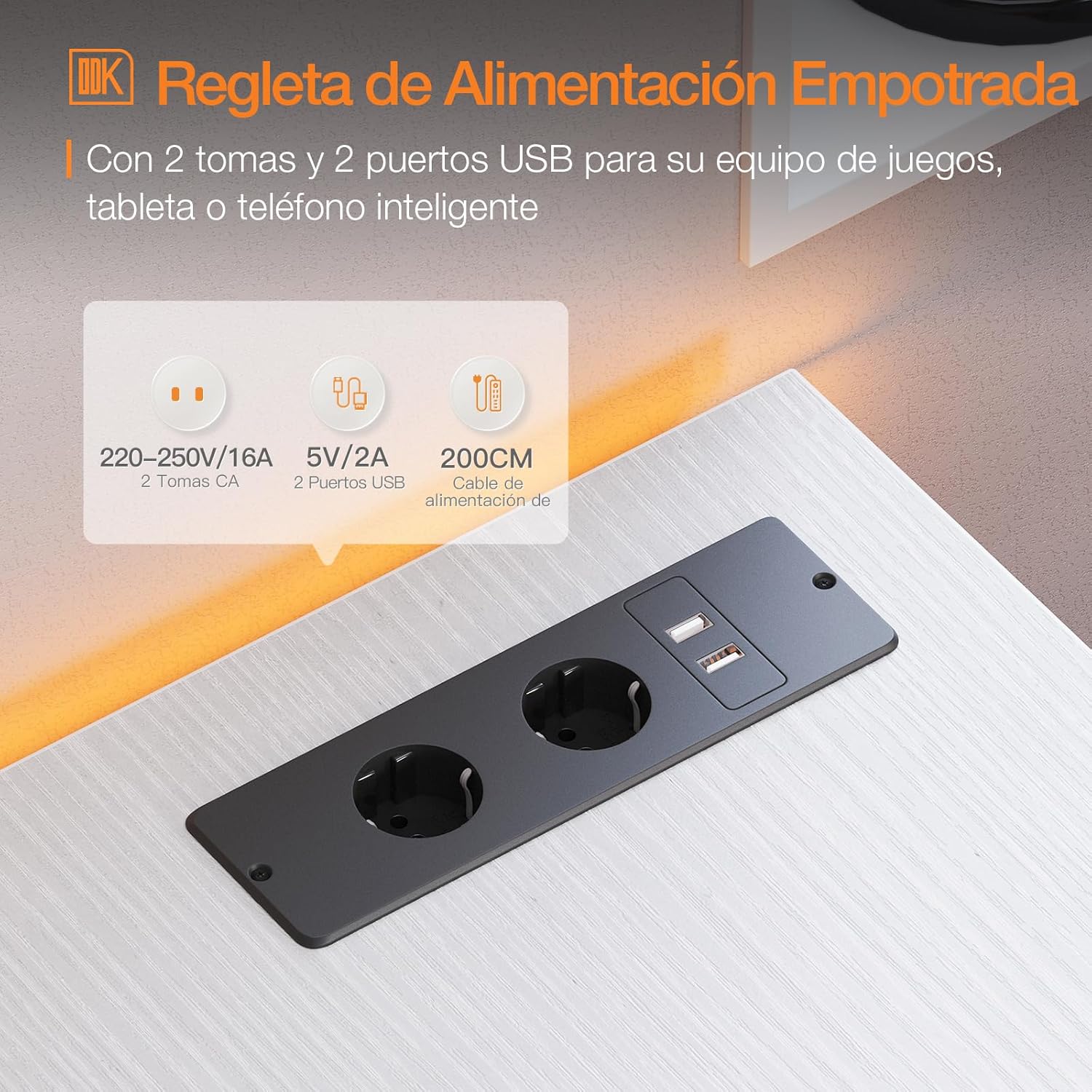
Figure 5.1: Integrated Power and USB Hub. Provides easy access to power for your devices.
- Connect the desk's power cord to a grounded wall outlet.
- Use the AC outlets for devices requiring standard power (e.g., monitors, lamps).
- Use the USB ports (5V/2A) to charge smartphones, tablets, or other USB-powered devices.
- Do not exceed the maximum power rating of the integrated strip.
Monitor Stand:
The elevated monitor stand helps improve your posture by raising your screen to an ergonomic viewing height.

Figure 5.2: Ergonomic Monitor Stand. Positions your monitor at an optimal viewing height to reduce neck strain.
Storage Features:
- The open shelves provide ample space for books, files, and decorative items.
- The side storage bag is ideal for small office supplies, headphones, or other accessories, keeping your desktop clutter-free.

Figure 5.3: Convenient Side Storage Bag. Perfect for organizing small items and keeping your workspace tidy.
6. Maintenance
- Cleaning: Wipe the desk surfaces with a soft, damp cloth. Avoid harsh chemicals or abrasive cleaners.
- Spills: Clean up spills immediately to prevent staining or damage to the wood and metal components.
- Inspection: Periodically check all screws and connections to ensure they are tight. Retighten if necessary.
- Placement: Avoid placing the desk in direct sunlight or near heat sources to prevent material degradation.
7. Troubleshooting
| Problem | Possible Cause | Solution |
|---|---|---|
| Desk is wobbly/unstable | Loose screws; uneven floor | Tighten all assembly screws. Adjust the leveling foot pads on the bottom of the legs. |
| Power outlets/USB ports not working | Desk power cord not plugged in; tripped circuit breaker; faulty device | Ensure the desk's power cord is securely plugged into a working wall outlet. Check your home's circuit breaker. Test with a different device. |
| Difficulty during assembly | Incorrect part orientation; missing hardware | Refer to the assembly manual for correct part orientation. Verify all hardware is present. Contact customer support if parts are missing. |
8. Specifications
- Brand: ODK
- Model Number: USBDBFZ
- Color: White
- Dimensions (L x W x H): 120 x 80 x 88 cm (47.2 x 31.5 x 34.6 inches)
- Weight: Approximately 16.7 kg (36.8 lbs)
- Material: Engineered Wood, Metal
- Special Features: Reversible L-shape, Integrated USB Charging Ports and Power Outlets, Monitor Stand, PC Tower Shelf, Side Storage Bag, Adjustable Foot Pads
- Power Outlet Rating: 220-250V/16A (AC)
- USB Port Rating: 5V/2A
9. Warranty and Support
ODK provides a warranty for this product against defects in materials and workmanship. For specific warranty terms, duration, and to register your product, please refer to the warranty card included in your package or visit the official ODK website. If you encounter any issues or have questions regarding your ODK L-Shaped Corner Desk, please contact ODK customer support:
- Customer Support: Refer to the contact information provided in your product packaging or on the official ODK website.
- Online Resources: ODK Brand Page on Amazon


