Introduction
Thank you for choosing the podoru 10000mAh Magnetic Power Bank. This portable charger is designed to provide convenient and efficient power for your devices, featuring MagSafe compatibility, built-in USB-C cables, 22.5W PD fast charging, and an intuitive LED display. Its compact design makes it ideal for travel and daily use. Please read this manual carefully to ensure proper use and maintenance of your device.
Product Overview
Familiarize yourself with the components of your podoru Magnetic Power Bank:
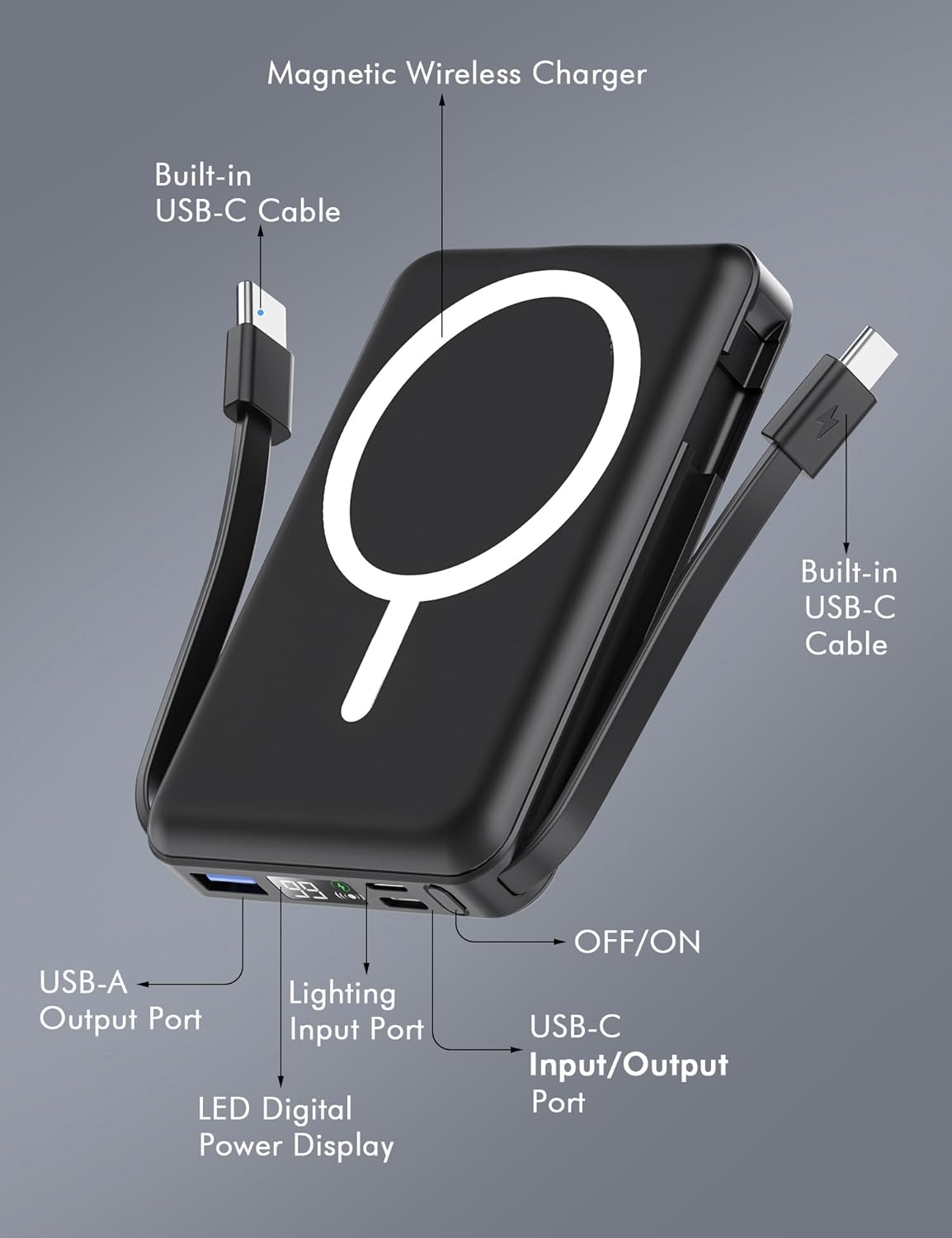
Image: Front and side view of the power bank with labels pointing to its features: magnetic wireless charging area, two built-in USB-C cables, USB-A output port, Lightning input port, LED digital power display, power button, and a multi-functional USB-C input/output port.
- Magnetic Wireless Charging Area: For MagSafe-compatible devices.
- Built-in USB-C Cables: Two integrated USB-C cables for convenient wired charging.
- USB-A Output Port: For charging devices via a standard USB-A cable.
- Lightning Input Port: For recharging the power bank using a Lightning cable.
- LED Digital Power Display: Shows exact remaining battery percentage and charging status.
- OFF/ON Button: To activate/deactivate the power bank and check battery level.
- USB-C Input/Output Port: For recharging the power bank or charging devices via an external USB-C cable.
- Integrated Kickstand: A foldable stand for hands-free viewing while charging.
Setup
1. Initial Charging of the Power Bank
Before first use, fully charge your power bank. You have two options:
- Via USB-C: Connect a USB-C cable to the USB-C Input/Output port on the power bank and to a power adapter (not included).
- Via Lightning: Connect a Lightning cable to the Lightning Input port on the power bank and to a power adapter (not included).

Image: The power bank illustrating two methods of recharging: one side shows a Lightning cable plugged in, and the other side shows a USB-C cable plugged in, both indicating the power bank is charging.
The LED Digital Power Display will show the charging progress. Once it reaches 100%, the power bank is fully charged.
Operating Instructions
1. Wireless Charging (MagSafe Compatible)
- Ensure your device is MagSafe compatible (iPhone 12 series or newer).
- Press the power button once to activate the power bank.
- Align your MagSafe-compatible device with the magnetic charging area on the power bank. The magnets will snap into place, and your device will begin charging wirelessly.

Image: An iPhone is shown magnetically attached to the power bank, displaying a charging icon. Text highlights strong magnetic connection and 10000mAh capacity.
2. Wired Charging (Using Built-in Cables or Ports)
- Using Built-in USB-C Cables: Pull out one of the integrated USB-C cables and connect it directly to your USB-C compatible device.
- Using USB-A Output Port: Connect your device's USB-A charging cable to the USB-A Output port on the power bank.
- Using USB-C Input/Output Port: Connect your device's USB-C charging cable to the USB-C Input/Output port on the power bank.
- Press the power button once to initiate charging.
3. Simultaneous Multi-Device Charging
The power bank supports charging up to 5 devices simultaneously:
- One device via wireless (MagSafe) charging.
- Two devices via built-in USB-C cables.
- One device via USB-A output port.
- One device via USB-C input/output port.

Image: The power bank is shown actively charging five different devices (smartphones and a tablet) simultaneously using its various output options, including wireless, built-in USB-C, and external USB ports.
4. Using the Integrated Kickstand
The power bank features a foldable kickstand for hands-free viewing:
- Gently pull out the kickstand from the back of the power bank.
- Place your phone (attached to the power bank) on a flat surface using the kickstand for vertical or horizontal viewing.
Specifications
| Feature | Detail |
|---|---|
| Model Number | KT-D011 |
| Battery Capacity | 10000mAh |
| Product Dimensions | 4.13 x 2.79 x 0.74 inches |
| Item Weight | 8.4 ounces |
| Wireless Charging Output | Up to 15W |
| USB-C PD Output | Up to 20W |
| USB Output | Up to 22.5W |
| Lightning Input | Up to 12W |
| USB-C Input | Up to 20W |
| Special Features | Built-in Cables, Digital Display, Fast Charging, Pocket Size, Wireless Charging, Kickstand |
Safety Information
The podoru Magnetic Power Bank is equipped with a comprehensive multi-protect safety system, including 8 built-in low-temperature ice cores, to ensure safe operation. This system specifically includes:
- Temperature Control
- Overcharge Protection
- Short Circuit Protection
- Overcurrent Protection
- Overvoltage Protection
Always use the device as instructed and avoid exposing it to extreme temperatures or moisture.
Troubleshooting
- Device not charging: Ensure the power bank is charged. Press the power button to activate it. Check cable connections or proper alignment for wireless charging.
- Slow charging: Verify that your device supports fast charging and that the cables/ports used are capable of delivering the required power.
- Magnetic attachment weak: Ensure your phone case is MagSafe compatible. Non-magnetic cases may interfere with the magnetic connection.
- Power bank not recharging: Try a different charging cable or power adapter. Ensure the cable is securely connected to the correct input port.
Warranty and Support
This product is Verified by Transparency, ensuring authenticity. For any product inquiries, technical support, or warranty claims, please refer to the contact information provided with your purchase or visit the official podoru store on Amazon.
Official Product Video: Azmuth Magnetic Power Bank 10000mAh
Video Description: This video provides an overview of the Azmuth Magnetic Power Bank, highlighting its 10000mAh capacity and various features, including its magnetic attachment and multiple charging options. It demonstrates the product's functionality and design.