
GODOX VL200 II
Contents
Godox VL200 II LED Video Light Instruction Manual
Model: VL200 II Daylight
1. Introduction
This manual provides detailed instructions for the safe and effective use of your Godox VL200 II LED Video Light. The VL II series offers a lightweight and compact light source with high performance and accurate color rendition, suitable for various photographic and videographic applications.
2. Key Features
- High Performance Output: Delivers up to 88900 Lux at 1m with the included reflector.
- Accurate Color Rendition: 5600K daylight-balanced light with CRI and TLCI ratings of 96+.
- Adjustable Brightness: Stepless dimming from 0% to 100%.
- Built-in FX Effects: Includes 8 customizable light effects such as Flash, Storm, Broken Bulb, and TV.
- Flexible Power Options: Supports both AC power supply and DC power via V-mount battery (sold separately).
- Wireless Control: 2.4GHz wireless control (16 groups, 32 channels) and Bluetooth connectivity for control via Godox Light APP.
- Quiet Operation: Ultra-silent cooling fan design, operating at less than 30dB.
- Versatile Mounting: Rotating yoke allows for 360° rotation when mounted on a stand or 340° when suspended from a grid.
- Bowens Mount Compatibility: Compatible with a wide range of Bowens mount accessories for light shaping.
3. What's in the Box
Upon opening the package, please verify that all listed items are present and in good condition.
- VL200 II LED Video Light
- Controller
- Reflector
- Power Adapter
- Power Cable
- Connecting Cable
- Carrying Bag
- BD-04 Barndoor Kit
- LETWING 8 Color Filters

Image: Godox VL200 II LED Video Light with all standard accessories, including the light unit, controller, cables, reflector, barndoors, color filters, and carrying bag.
4. Setup
4.1 Mounting the Light
- Attach the VL200 II LED Video Light to a compatible light stand using its rotating yoke. Secure the light by tightening the locking knob on the stand.
- Adjust the angle of the light using the rotating yoke. The yoke allows for 360° rotation when mounted on a stand or 340° when suspended from a grid.
- Attach the reflector or any other Bowens mount light shaping accessory to the front of the light head by aligning the mount and twisting until it locks into place.

Image: Close-up of the Godox VL200 II's U-type bracket, illustrating its 360° rotation capability for flexible positioning.
4.2 Powering the Light
The VL200 II offers two power options:
- AC Power: Connect the power adapter to the controller, then connect the controller to the light head using the connecting cable. Plug the power cable into a standard AC outlet.
- DC Power (V-mount battery): For portable operation, attach a compatible V-mount battery (sold separately) to the controller. Ensure the battery is securely locked.
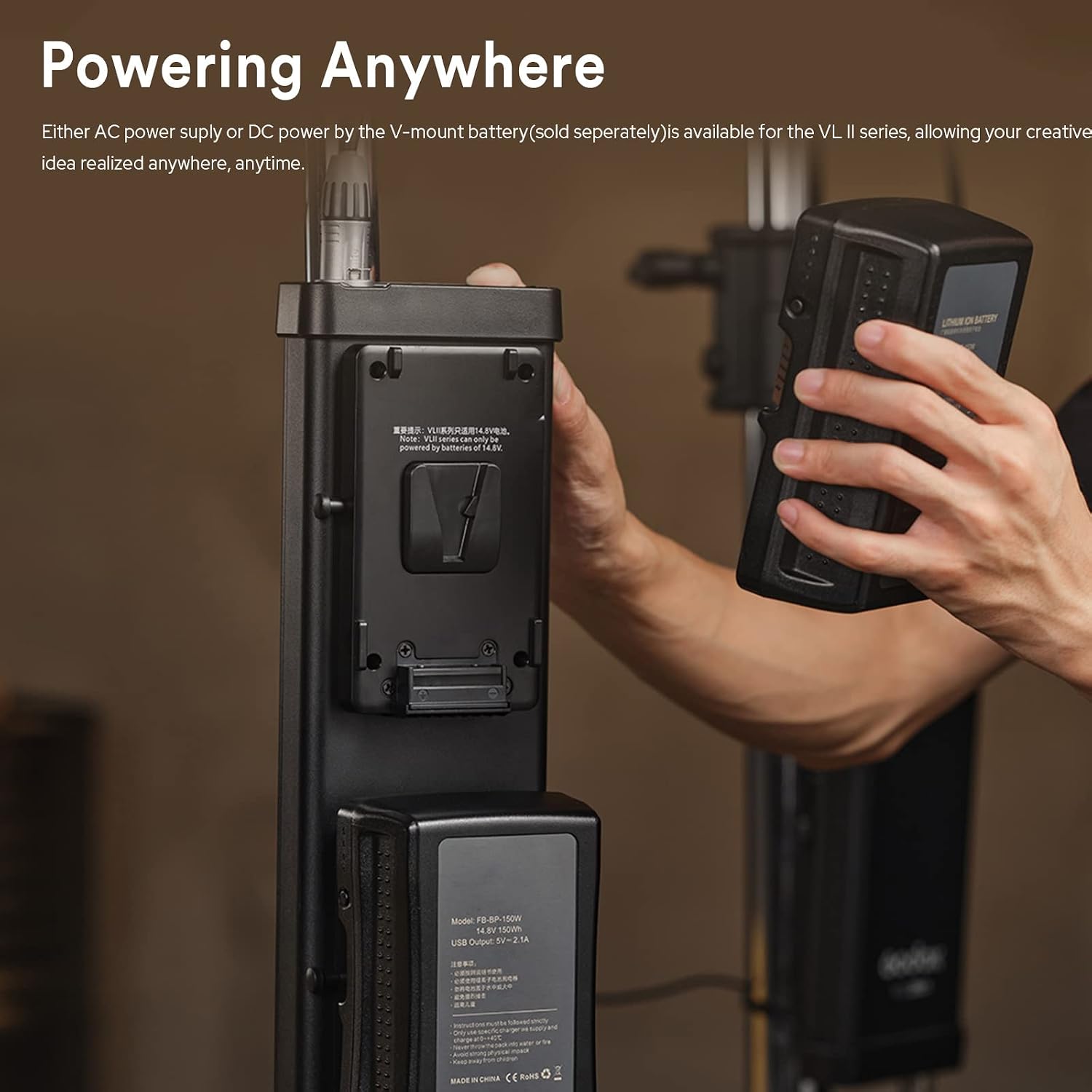
Image: A hand inserting a V-mount battery into the Godox VL200 II controller, demonstrating the DC power option for mobile use.
5. Operating Instructions
5.1 Power On/Off
Press the power button on the controller to turn the light on or off.
5.2 Adjusting Brightness
Use the dimming knob on the controller to adjust the light output from 0% to 100%. The current brightness level will be displayed on the controller's screen.
5.3 Special Effects (FX Modes)
The VL200 II includes 8 built-in special effects. Refer to the controller's menu to select and activate effects such as Flash, Storm, Broken Bulb, and TV. Adjust parameters for each effect as needed.

Image: Icons representing the various built-in FX effects available on the Godox VL200 II, including Storm, Flash, and Broken Bulb.
5.4 Wireless Control
- 2.4GHz Wireless Remote: The light can be controlled wirelessly using a compatible 2.4GHz remote control (sold separately). Set the light and remote to the same group and channel for operation.
- Bluetooth App Control: Download the Godox Light APP on your iPhone or Android smartphone/tablet. Enable Bluetooth on your device and pair it with the VL200 II. The app allows for comprehensive control over brightness, effects, and group settings.

Image: A smartphone screen displaying the Godox Light app, illustrating the interface for controlling the VL200 II's settings wirelessly via Bluetooth.
6. Maintenance
- Keep the device dry. Do not handle with wet hands.
- Clean the light body and reflector with a soft, dry cloth. Avoid using harsh chemicals or abrasive materials.
- Ensure proper ventilation during operation to prevent overheating. The VL200 II features an ultra-silent cooling fan for optimal performance.
- Store the light in its carrying bag in a cool, dry place when not in use.

Image: Rear view of the Godox VL200 II, highlighting the advanced air outlet design and ultra-silent cooling fan, which operates at less than 30dB.
7. Troubleshooting
| Problem | Possible Cause | Solution |
|---|---|---|
| Light does not turn on. | No power supply; loose cable connection; faulty power adapter/battery. | Check power cable and adapter connections. Ensure V-mount battery is charged and properly seated. Try a different power source if available. |
| Cannot control light wirelessly. | Incorrect group/channel settings; Bluetooth not enabled; remote/app not paired. | Verify that the light and remote/app are set to the same group and channel. Ensure Bluetooth is active on your smart device and the light is paired. |
| Light output is inconsistent or flickers. | Unstable power supply; overheating; internal malfunction. | Ensure a stable power source. Check for proper ventilation. If the issue persists, contact customer support. |
8. Specifications
| Feature | Detail |
|---|---|
| Model | VL200 II Daylight |
| Power Output | 215W |
| Color Temperature | 5600K ± 200K |
| CRI | ≥96 |
| TLCI | ≥96 |
| Dimming Range | 0% - 100% (Stepless) |
| Illuminance (with reflector) | 88900 Lux @ 1m |
| FX Effects | 8 types (Flash, Storm, Broken Bulb, TV, etc.) |
| Wireless Control | 2.4GHz (16 Groups, 32 Channels), Bluetooth App Control |
| Mount | Bowens Mount |
| Cooling | Ultra-silent fan (<30dB) |
| Power Supply | AC (100-240V ~ 50/60Hz) or DC (V-mount battery, sold separately) |
| Package Dimensions | 20.75 x 12 x 10.55 inches |
| Item Weight | 20.4 pounds |
Note: Specifications are subject to change without prior notice.
9. Warranty and Support
For warranty information, technical support, or service inquiries, please refer to the warranty card included with your product or visit the official Godox website. Keep your purchase receipt as proof of purchase for warranty claims.
Additional protection plans may be available for purchase separately. Please consult your retailer for details.
Ask a question about this manual
Ask about setup, troubleshooting, compatibility, parts, safety, or missing instructions. Manuals+ will review the question and use this page’s manual context to help answer it.