
Introduction
Thank you for choosing the DEWENWILS Wireless Remote Control Outlet. This system provides a convenient way to control your indoor appliances remotely. It includes one remote transmitter and three receiver outlets, designed for ease of use and energy efficiency. This manual will guide you through the setup, operation, and maintenance of your new device.

Image: The DEWENWILS Wireless Remote Control Outlet kit, featuring one remote and three receiver outlets.
Package Contents
Please verify that all items are present in your package:
- 1 x Wireless Remote Transmitter (with keychain)
- 3 x Wireless Receiver Outlets
- 1 x CR2032 Battery (pre-installed in remote)
Specifications
| Specification | Value |
|---|---|
| Model Number | HRS103L1 (IT104) |
| Operating Voltage | 125 Volts |
| Current Rating | 15 Amps |
| Wattage | 1875 Watts (Resistive) |
| RF Remote Range | Up to 100 feet (open areas) |
| Remote Battery | 1 x CR2032 (included) |
| Product Dimensions | 11.43 x 8.64 x 4.57 cm (Outlet) |
| Material | Plastic, Copper |
| Connectivity Protocol | RF (Radio Frequency) |
| Certification | FCC |
Setup
1. Install/Check Remote Battery
The remote transmitter comes with a CR2032 battery pre-installed. If the remote does not respond, you may need to check or replace the battery. To do so, gently slide open the battery compartment on the back of the remote and insert a new CR2032 battery with the positive (+) side facing up.
2. Plug in the Receiver Outlets
Plug each receiver outlet into a standard 125V wall socket. The compact design ensures that the second outlet on a standard duplex wall plate remains accessible.
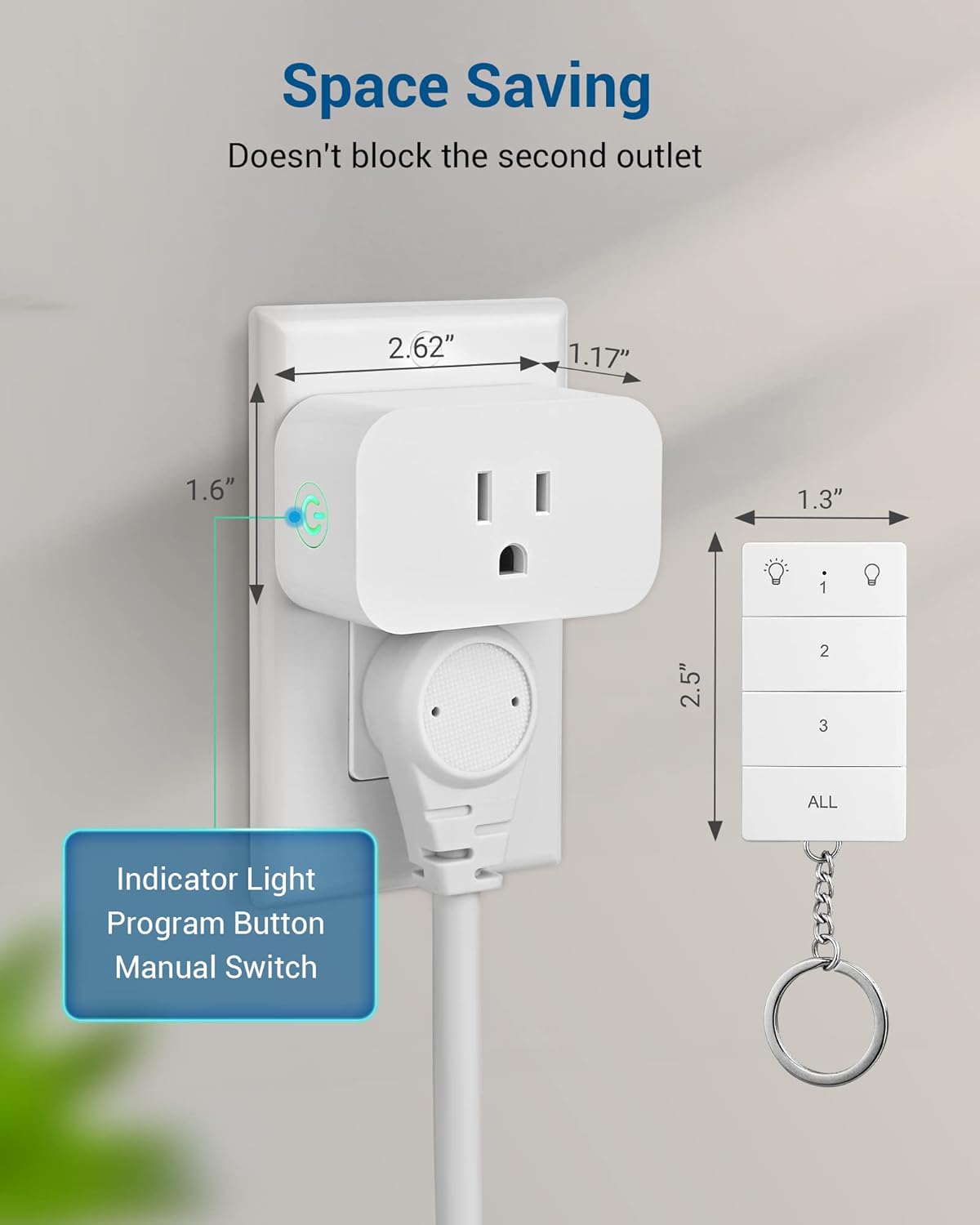
Image: A DEWENWILS receiver outlet plugged into a wall socket, highlighting its space-saving design and the indicator light/program button.
3. Initial Pairing (Pre-programmed)
The remote and outlets are pre-programmed for immediate use. Each outlet is assigned a number (1, 2, 3) corresponding to the buttons on the remote. The 'ALL' button controls all three outlets simultaneously.
If you wish to add additional DEWENWILS remotes or sockets (same model only) or re-program existing ones, follow these steps:
- Plug the receiver outlet into a wall socket.
- Press and hold the program button on the side of the receiver outlet until the indicator light flashes slowly.
- While the light is flashing, press the desired ON or OFF button on the remote for the channel you wish to assign (e.g., '1 ON' or '1 OFF').
- The indicator light on the receiver will stop flashing and remain solid, indicating successful pairing.
Operating Instructions
1. Remote Control Operation
Use the remote transmitter to control your connected appliances:
- Individual Control: Press the 'ON' or 'OFF' button corresponding to the numbered outlet (1, 2, or 3) you wish to control.
- All Control: Press the 'ALL ON' or 'ALL OFF' button to turn all three connected outlets on or off simultaneously.
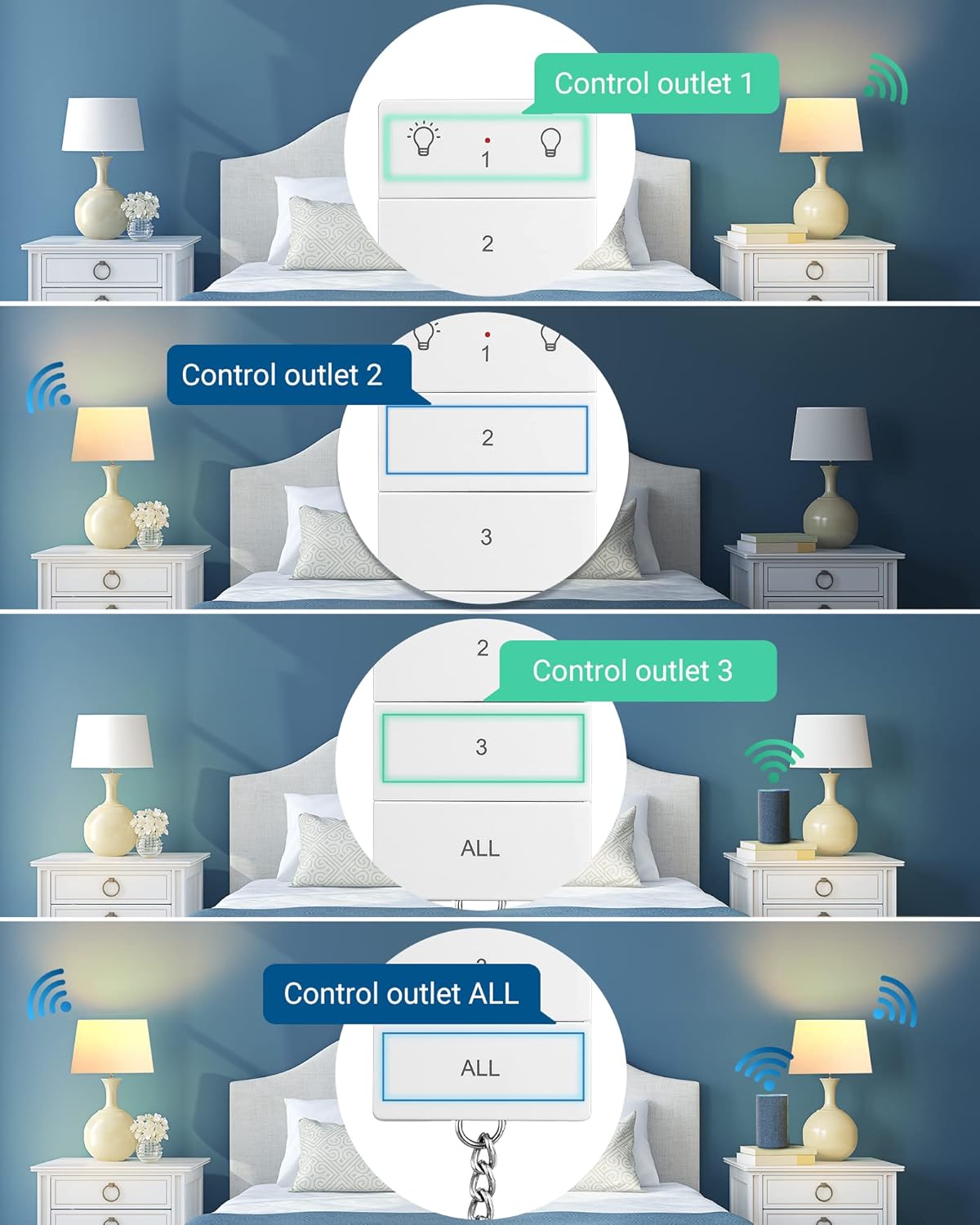
Image: A hand using the remote to control multiple lights connected to the outlets in a bedroom.
The strong RF signal allows control through walls and doors, with a range of up to 100 feet in open areas.

Image: An illustration demonstrating the 100-foot RF remote range, capable of controlling devices across multiple rooms and floors.
2. Manual Control
Each receiver outlet features a manual ON/OFF button on its side. Press this button to toggle the power of the connected appliance directly at the outlet.
3. Video Demonstration
Watch this video for a visual guide on using the DEWENWILS Wireless Remote Control Outlet.
Video: A short demonstration of the DEWENWILS Wireless Remote Control Outlet, showing its components and basic plug-and-play functionality.
Expandability and Customization
The DEWENWILS Wireless Remote Control Outlet system is designed to be expandable. You can add more DEWENWILS remote transmitters and receiver outlets (of the same model) to create a customized control system for your home. This allows for flexible control of various appliances from multiple locations.

Image: A visual representation of how different DEWENWILS remote control products can be freely paired and integrated into a larger system.
Troubleshooting
- Outlet not responding to remote:
a. Ensure the receiver outlet is properly plugged into a live wall socket.
b. Check the remote control battery. Replace the CR2032 battery if it is low or depleted.
c. Verify that the remote and outlet are paired correctly. If not, follow the re-pairing instructions in the 'Setup' section.
d. Ensure the appliance connected to the outlet is functioning correctly and is within the maximum wattage limit (1875W). - Remote range issues:
a. While the system has a 100ft range, thick walls or metal objects can reduce signal strength. Try moving closer to the outlet.
b. Ensure there are no other strong RF interference sources nearby. - Indicator light on outlet not working:
a. If the outlet is plugged in but the light is off, it may indicate no power to the outlet or a malfunction. Try plugging another device into the wall socket to confirm power.
b. If the light does not flash during pairing, repeat the pairing process carefully.
Maintenance
1. Battery Replacement
The remote control uses one CR2032 lithium coin cell battery. When the remote's performance degrades, replace the battery by sliding open the battery cover on the back of the remote and inserting a new CR2032 battery with the positive (+) terminal facing up.
2. Cleaning
To clean the remote and outlets, wipe them with a soft, dry cloth. Do not use liquid cleaners or abrasive materials, as this may damage the devices.
Safety Information
- For indoor use only. Do not expose to water or damp conditions.
- Do not exceed the maximum load capacity of 15A, 1875W. Overloading may cause overheating and fire risk.
- Do not disassemble or attempt to repair the device. Refer all servicing to qualified personnel.
- Keep out of reach of children and pets.
- Ensure the outlet is fully inserted into the wall socket.
Warranty and Support
DEWENWILS products are designed for reliability and performance. For warranty information or technical support, please refer to the contact details provided with your purchase or visit the official DEWENWILS website. Please have your model number (HRS103L1) and purchase date ready when contacting support.


