
1. Introduction
Thank you for choosing Hapadif Motorized Blackout Roller Shades. This manual provides essential information for the safe and efficient installation, operation, and maintenance of your new smart blinds. Please read these instructions carefully before use and retain them for future reference.
2. Product Features
- Wireless Remote & Smart Control: Operate your blinds wirelessly with the included 1-channel remote. For advanced control, an optional 15-channel remote is available, or integrate with a matching hub for app and voice commands.
- Battery-Powered Convenience: The blinds are powered by AA batteries (included), eliminating the need for charging. Batteries typically last 4-6 months and are easily accessible via the top-mounted compartment.
- 100% Blackout & Upgraded Fabric: Featuring a three-layer fabric design, these shades provide complete blackout, UV protection, heat insulation, energy efficiency, and enhanced privacy. The elegant texture complements any room decor.
- Quiet Motor Operation: The integrated motor operates quietly, ensuring a peaceful environment for undisturbed sleep or work.
- Easy Installation: Designed for straightforward installation, the blinds come with mounting brackets and expansion anchors. Simply drill holes at the desired wall positions and mount the blinds effortlessly.
3. What's Included
Your Hapadif Motorized Blackout Roller Shades package includes the following components:
- Roller Shades (x1)
- Single Channel Remote Controller (x1)
- Classic Installation Bracket (x2)
- Screws Set (x6)
- AA Batteries (included)
4. Installation
Before beginning installation, ensure you have the necessary tools: a drill, screwdriver, measuring tape, and pencil. The blinds can be installed using either an inside mount or an outside mount method.
4.1. Measuring Your Window
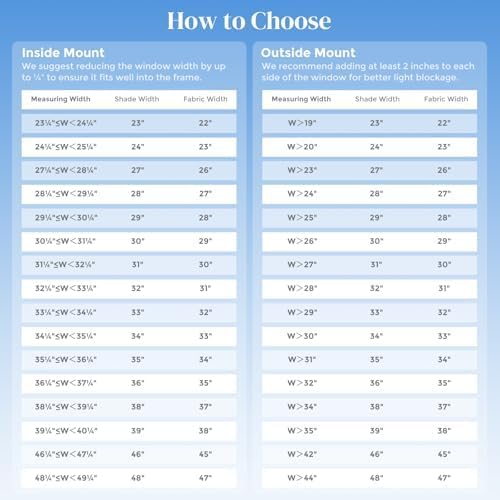
Accurate measurements are crucial for proper fit and function. Refer to the diagrams below for guidance.

4.2. Inside Mount Installation
For an inside mount, the blinds fit within the window frame. Take the minimum window width measurement. We recommend reducing the order width by 1/4 inch to ensure a proper fit. The window depth should be at least 2 inches.

- Measure the minimum window width at the top, middle, and bottom. Use the smallest measurement.
- Ensure your window depth is at least 2 inches.
- Mark the positions for the installation brackets inside the window frame.
- Drill pilot holes and secure the brackets with the provided screws.
- Carefully attach the roller shade unit to the installed brackets.
4.3. Outside Mount Installation
For an outside mount, the blinds are installed outside the window frame, typically on the wall. Take the maximum window width measurement. We recommend adding at least 4 inches to the window width for better light blockage.

- Measure the maximum window width.
- Mark the positions for the installation brackets on the wall above the window frame.
- Drill pilot holes and secure the brackets with the provided screws.
- Carefully attach the roller shade unit to the installed brackets.
4.4. Visual Installation Guide
Watch this video for a visual demonstration of the installation process.
Video 4.1: Installation and Operation of Motorized Roller Shades
5. Operation
Your Hapadif Motorized Blackout Roller Shades offer convenient operation via remote control and smart home integration.
5.1. Using the Remote Control
The included 1-channel remote allows you to raise and lower a single blind. An optional 15-channel remote (sold separately) can control up to 15 blinds individually or in groups.


5.2. Smart Control (Optional Hub Required)
For app and voice control, a compatible smart hub (sold separately) is required. Once connected, you can control your blinds using applications like Tuya APP or voice assistants such as Alexa.


6. Maintenance
To maintain the appearance and functionality of your Hapadif Motorized Blackout Roller Shades, follow these simple care instructions:
- Cleaning: Spot clean only. Use a soft, damp cloth with mild soap and water to gently clean any soiled areas. Do not immerse the blinds in water or use harsh chemicals.
- Battery Replacement: Replace AA batteries every 4-6 months or when the motor operation becomes sluggish. The battery compartment is located at the top of the unit for easy access.
7. Troubleshooting
If you encounter issues with your motorized blinds, refer to the following common problems and solutions:
| Problem | Possible Cause | Solution |
|---|---|---|
| Blinds do not respond to remote control. | Dead batteries in remote or blinds, remote not paired, obstruction. | Replace batteries in remote and blinds. Ensure remote is correctly paired (refer to remote pairing instructions, usually a small button on the motor or remote). Check for any physical obstructions. |
| Blinds move slowly or inconsistently. | Low batteries. | Replace the AA batteries in the blind unit. |
| Blinds stop halfway or do not reach full extension/retraction. | Limit settings need adjustment. | Refer to the remote control's specific instructions for adjusting upper and lower travel limits. |
| Difficulty pairing a new remote or smart hub. | Incorrect pairing procedure, incompatible remote/hub. | Ensure you are using the correct pairing procedure for your specific remote or smart hub model. Verify compatibility with Hapadif blinds. Contact customer support if issues persist. |
8. Specifications
| Feature | Detail |
|---|---|
| Brand | Hapadif |
| Model Number | M100 |
| Material | Polyester |
| Product Dimensions (Current Model) | 72"L x 23"W |
| Color (Current Model) | Grey |
| Opacity | Blackout |
| Operation Mode | Automatic |
| Control Type | Automatic (Remote, App/Voice with optional hub) |
| Mounting Type | Inside Mount, Outside Mount |
| Additional Features | Fade Resistant, Motorized, Thermal Insulation, UV Protection, Wrinkle Resistant |
| Product Care Instructions | Spot Clean Only |
| Power Source | AA Batteries (included) |
9. Warranty and Customer Support
Hapadif values your satisfaction. If you have any questions, concerns, or require assistance with your product, please do not hesitate to contact our customer service team. We are committed to providing a satisfactory solution.
For product support, please refer to the contact information provided with your purchase or visit the official Hapadif website.