
1. Introduction
Thank you for choosing the eLinkSmart C3-Blue Fingerprint & App Cable Lock. This advanced keyless lock offers enhanced security and convenience for various applications. It features biometric fingerprint recognition, smartphone application control, and remote authorization capabilities. Designed with durability in mind, it is waterproof and built to withstand significant force, making it ideal for securing bicycles, scooters, motorcycles, and other valuables.
This manual provides detailed instructions for setting up, operating, and maintaining your eLinkSmart C3-Blue lock to ensure optimal performance and longevity.
2. Product Features
- Fingerprint & Phone App Biometric Lock: Supports up to 20 fingerprint users and over 500 phone app users.
- Remote Authorization: Authorize family, friends, or colleagues to unlock the device remotely via the app.
- Waterproof Design: Covered with thickened PVC material and a sliding cover to protect the fingerprint area, suitable for outdoor use in rainy conditions.
- Long Battery Life & Low Battery Alarm: Rechargeable 110MAH lithium battery provides up to 6 months of standby time or over 2000 unlocks. The app provides voice prompts and a red light indicator for low battery.
- Sturdy & Durable: Features a 12mm diameter, 1.5m (59-inch) stainless steel cable with PVC rubber cover. IP67 rated for water and dust resistance, capable of withstanding over 2600 pounds of pulling force.
3. Setup Guide
3.1 App Installation and Initial Pairing
- Download the eSmartLock App from your smartphone's app store (available for Android and iOS).
- Create an account and log in.
- Follow the in-app instructions to pair your eLinkSmart C3-Blue lock via Bluetooth. Ensure the lock is awake (press the fingerprint sensor cover to activate).
3.2 Fingerprint Registration
Registering your fingerprint allows for quick, keyless unlocking.
- In the eSmartLock App, navigate to the 'Fingerprint Management' section.
- Select 'Add Fingerprint' and follow the on-screen prompts.
- Place your finger on the fingerprint sensor of the lock, lifting and repositioning it as instructed by the app until registration is complete.
- You can register up to 20 unique fingerprints.

Figure 3.2.1: eSmartLock App Interface for Fingerprint Management
3.3 Mounting the Lock (Optional)
The eLinkSmart C3-Blue comes with a bracket for convenient mounting on your bicycle.

Figure 3.3.1: Bicycle Mounting Bracket Installation
- Attach the two halves of the bracket around your bicycle's seat post or frame.
- Secure the bracket using the provided screws and a screwdriver.
- Slide the lock into the mounted bracket for secure storage while riding.
4. Operating Instructions
4.1 Unlocking with Fingerprint
- Ensure the fingerprint sensor cover is open.
- Place a registered finger firmly on the sensor.
- The lock will unlock instantly if the fingerprint is recognized.
Video 4.1.1: Fingerprint Unlock Demonstration
A demonstration of the fingerprint unlock feature of the eLinkSmart C3-Blue cable lock, highlighting keyless operation for quick and secure access.
4.2 Unlocking with Phone App
- Open the eSmartLock App on your smartphone.
- Ensure Bluetooth is enabled and the lock is within range.
- Tap the 'Unlock' button within the app. The lock will connect and unlock.

Figure 4.2.1: Fingerprint vs. App Unlock
This image illustrates the two primary methods of unlocking the eLinkSmart C3-Blue cable lock: fingerprint recognition and smartphone application control. It also highlights common issues with traditional locks like forgotten passwords, lost keys, or broken keys, emphasizing the convenience of the smart lock.
Video 4.2.2: Fingerprint or Phone App Unlock
This video demonstrates both fingerprint and phone app unlocking methods for the eLinkSmart C3-Blue bicycle lock, providing a comprehensive overview of its smart access options.
4.3 Remote Authorization
You can grant temporary or permanent access to others through the app.
- In the eSmartLock App, go to 'Authorization Management'.
- Select 'Add Friend' or 'Share to one account'.
- Enter the shared account details and set the desired unlock times (e.g., specific days/times or permanent access).
- Confirm the authorization.
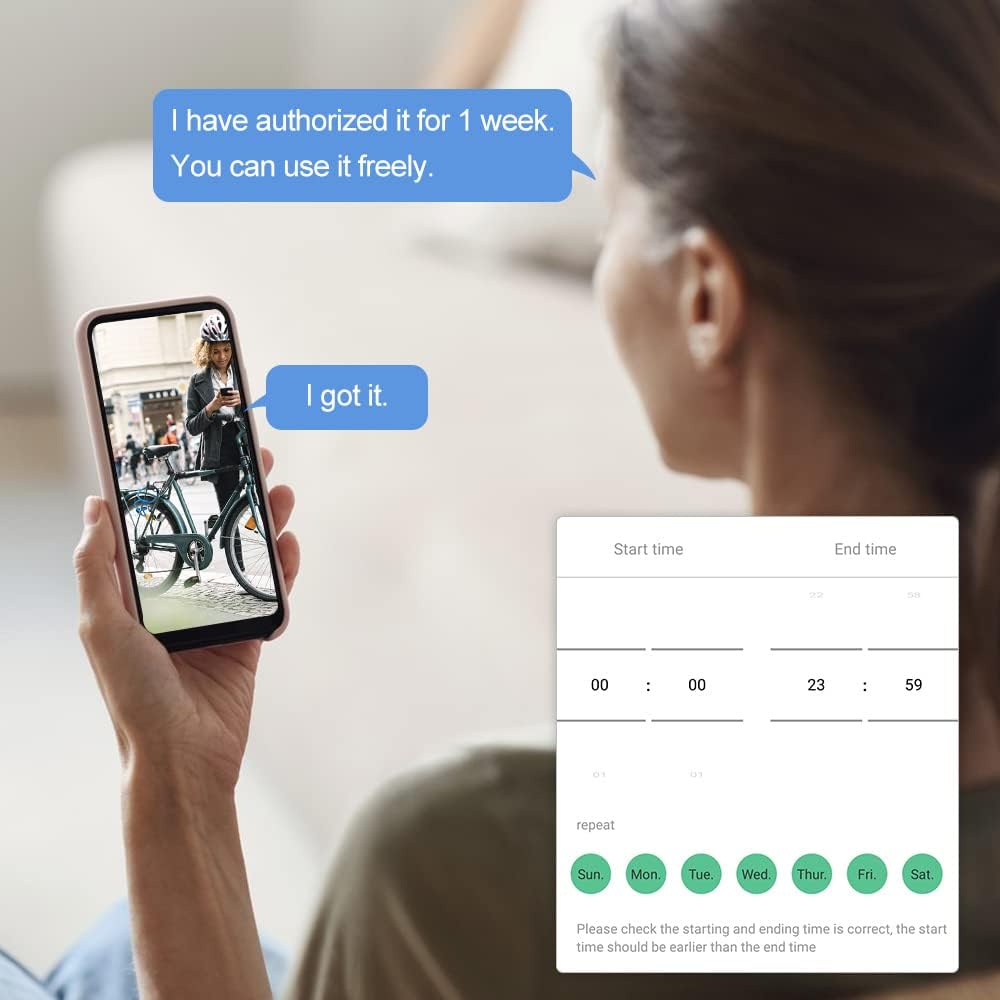
Figure 4.3.1: Remote Authorization Interface
The eLinkSmart app allows for remote authorization, enabling users to grant temporary or permanent access to family, friends, or colleagues. This image shows the interface for setting unlock times and authorizing users.
4.4 Unlocking with Apple Watch
For iOS users, the lock can also be controlled via Apple Watch.
- Ensure your Apple Watch is paired with your iPhone and the eSmartLock App is installed on both devices.
- Open the eSmartLock App on your Apple Watch.
- Select your lock and tap the 'Unlock' icon.
Video 4.4.1: Unlock via Apple Watch
This video demonstrates how to unlock the eLinkSmart C3-Blue cable lock using an Apple Watch, showcasing the seamless integration with iOS devices for convenient access.
5. Maintenance
5.1 Battery Life and Charging
- The lock is equipped with a rechargeable 110MAH lithium battery.
- A full charge supports approximately 6 months of standby time or over 2000 unlocks.
- When the battery is low, the app will provide voice prompts, and the lock will show a red light.
- To charge, plug in a USB power source or use a power bank. The charging port is located under the fingerprint sensor cover.
5.2 Waterproofing
The eLinkSmart C3-Blue lock is IP67 rated, making it resistant to water and dust. The thickened PVC material and sliding cover protect internal components, allowing for reliable outdoor use.
6. Troubleshooting
- Lock not responding: Check battery level. If low, charge the device. Ensure the fingerprint sensor is clean and dry.
- App connection issues: Ensure Bluetooth is enabled on your phone and the lock is within range. Try restarting the app or your phone.
- Fingerprint not recognized: Ensure your finger is clean and dry. Try different angles or re-register your fingerprint if issues persist.
- Cannot unlock after returning the item: As per the quality guarantee, if you return the item, you must remove the device from the app and complete a reset. Otherwise, there is no other way to open the lock.
7. Specifications
| Brand | eLinkSmart |
| Model Name | US-C3bf-blue |
| Lock Type | Biometric |
| Special Feature | 150CM/59 inches stainless steel cable, Fingerprint, Phone App, iOS Watch |
| Material | PVC, Rubber, Stainless Steel |
| Item Dimensions (L x W x H) | 7.09 x 2.36 x 8.66 inches |
| Item Weight | 0.71 Kilograms (1.57 pounds) |
| Control Method | App |
| Connectivity Protocol | Bluetooth |
| Water Resistance | IP67 |
8. Applications
The eLinkSmart C3-Blue cable lock is versatile and can be used to secure a wide range of items:
- Bicycles
- Scooters
- Motorcycles
- Strollers
- School lockers
- Office equipment
- Garage doors
- Fences and gates

Figure 8.1.1: Diverse Applications of the Cable Lock
A collage illustrating the versatility of the eLinkSmart C3-Blue cable lock across multiple scenarios, including securing a scooter, a motorcycle, a bicycle, and a garden gate, demonstrating its broad utility.
Video 8.1.2: Keyless, Anti-Theft Cable Lock in Use
This video showcases the keyless, anti-theft features of the 150cm eLinkSmart C3-Blue bicycle cable lock, demonstrating its security and ease of use.
Video 8.1.3: Locking a Bike with Fingerprint Lock
A practical demonstration of securing a bicycle using the eLinkSmart C3-Blue fingerprint bike lock, illustrating the locking mechanism.
9. Quality Guarantee & Support
eLinkSmart provides a quality guarantee for this product. If you have any questions or require assistance, please contact our customer support team. We are committed to providing 24-hour service.
Important Note for Returns: If you intend to return the item, please ensure you remove the device from the app and complete a factory reset. This is crucial because there is no other method to open the lock once it is disassociated from your account.


