
SOWO Shower Speaker
SOWO Shower Bluetooth Speaker User Manual
Model: Shower Speaker
1. Introduction
Thank you for choosing the SOWO Shower Bluetooth Speaker. This portable, waterproof wireless speaker is designed to deliver high-quality audio with powerful bass and vibrant colorful lights, making it perfect for various environments including showers, camping, kayaking, and boating. This manual provides detailed instructions on how to set up, operate, and maintain your speaker to ensure optimal performance and longevity.
2. Product Overview
The SOWO Shower Bluetooth Speaker combines robust sound performance with a durable, waterproof design. Its compact and lightweight form factor, along with an integrated clip, allows for easy portability and versatile placement. Enjoy dynamic music with enhanced bass and a captivating RGB light show that pulsates with your audio.
Key Features:
- Amazing Big Sound: SOWO's portable audio processing technology delivers higher volume and clearer sound, increasing volume by 32% while maintaining quality.
- Powerful Bass: Features low-frequency processing technology for explosive bass.
- Lightweight & Portable: Weighing only 6.5 ounces, it can be operated with one hand and easily fits into a pocket. Includes a buckle for convenient carrying.
- Long-lasting Battery: Built-in 1500 mAh battery provides up to 8 hours of continuous music playback (playback time varies with volume).
- RGB Colorful Light Show: Integrated LED lights offer seven-color light shows and music rhythm synchronization. Lights pulsate with sound and can be turned off.
- Wireless Stereo Pairing (TWS): Supports pairing of two SOWO speakers for stereo surround sound.
- Dustproof and Waterproof (IP67): Can be used in the bathroom, shower, or float on water. Ensure the charging port rubber plug is closed when exposed to water.
- Versatile Use: Ideal for outdoor sports such as skiing, golfing, biking, hiking, and more.

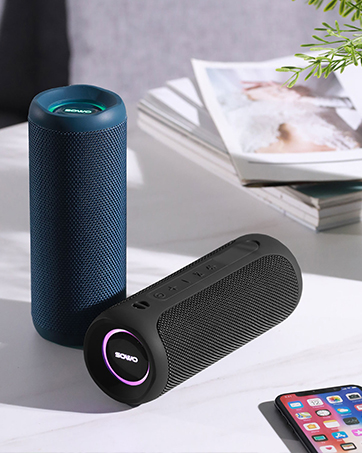
The SOWO Shower Bluetooth Speaker, showcasing its compact design and vibrant LED lights.
3. Package Contents
Please check the package for the following items:
- SOWO Shower Bluetooth Speaker
- Charging Cable
- Buckle (Carabiner clip)
- User Manual (this document)

Included components: the speaker, charging cable, and buckle.
4. Controls and Indicators
Familiarize yourself with the buttons and LED indicators on your SOWO speaker for easy operation.
| Button/Indicator | Function |
|---|---|
| Power Button (⏻) | Long press to power on/off. Double-click to switch LED mode or turn off LED. |
| Volume Up (+) | Press to increase volume. |
| Volume Down (-) | Press to decrease volume. |
| Interconnect Button (TWS) | Press once to initiate TWS pairing (on primary speaker). Press again to disconnect TWS. |
| LED Indicator | Indicates power status, charging status, Bluetooth pairing status, and TWS connection status. |
| Charging Port | USB charging port. Ensure rubber plug is sealed for waterproofing. |
5. Setup
5.1 Charging the Speaker
Before first use, fully charge your SOWO speaker. The charging time is approximately 3 hours.
- Locate the charging port on the side of the speaker.
- Gently open the rubber plug covering the charging port.
- Connect the provided charging cable to the speaker's charging port and the other end to a USB power source (e.g., wall adapter, computer USB port).
- The LED indicator will show charging status (e.g., solid red while charging, off when fully charged).
- Once charging is complete, disconnect the cable and firmly close the rubber plug to maintain waterproofing.

Ensure the charging port is securely sealed after charging to maintain waterproofing.
5.2 Power On/Off
- To Power On: Long press the Power button (⏻) for approximately 3 seconds until you hear an audible prompt and the LED indicator lights up.
- To Power Off: Long press the Power button (⏻) for approximately 3 seconds until you hear an audible prompt and the LED indicator turns off.
5.3 Bluetooth Pairing
Pair your SOWO speaker with your Bluetooth-enabled device (e.g., smartphone, tablet, laptop) to play audio wirelessly.
- Ensure the speaker is powered on and the LED indicator is flashing, indicating it's in pairing mode.
- On your device, go to Bluetooth settings and turn on Bluetooth.
- Search for available devices. Select "Soundwave Mini" from the list.
- Once connected, the speaker's LED indicator will turn solid white, and you will hear a confirmation sound.
Connecting the speaker to your phone via Bluetooth.
5.4 True Wireless Stereo (TWS) Pairing
For an immersive stereo experience, you can pair two SOWO Shower Bluetooth Speakers together.
- Turn on both SOWO speakers. Ensure they are not currently paired with any other devices.
- On one of the speakers (this will be your primary speaker), press the Interconnect button once. The sub-speaker's display light will turn blue and stay on, while the primary speaker's light will turn white and stay on.
- Wait approximately 5 seconds for the connection to be successful. You will hear a confirmation sound.
- Now, pair your phone's Bluetooth with the primary speaker ("Soundwave Mini"). Once connected, both speakers will play audio in stereo.
- To disconnect TWS, click the Interconnect button on the primary speaker. The display light will turn white and flash, indicating disconnection.
Video demonstrating how to connect two SOWO Soundwave Mini speakers for True Wireless Stereo (TWS) pairing and how to disconnect them. It also shows how to change and turn off the LED light modes.

Enjoying music with two speakers paired for a stereo experience.
6. Operating Instructions
6.1 Playing Audio
Once your speaker is connected via Bluetooth, you can play audio from your paired device. Use your device's media controls to play, pause, skip tracks, etc.
6.2 Adjusting Volume
- Increase Volume: Press the Volume Up button (+).
- Decrease Volume: Press the Volume Down button (-).
6.3 Controlling LED Lights
The SOWO speaker features colorful LED lights that can be customized.
- Change Light Mode: Double-click the Power button (⏻) to cycle through different light modes (e.g., solid colors, pulsating with music, multi-color).
- Turn Off Lights: Double-click the Power button (⏻) until the lights turn off.

The speaker's vibrant LED lights enhance the listening experience.
7. Maintenance
- Cleaning: Wipe the speaker with a soft, damp cloth. Do not use harsh chemicals or abrasive cleaners.
- Waterproofing: Always ensure the rubber plug for the charging port is securely closed when using the speaker near water or in wet environments to maintain its IP67 waterproof rating.
- Storage: Store the speaker in a cool, dry place away from direct sunlight and extreme temperatures when not in use for extended periods.
- Battery Care: To prolong battery life, avoid fully discharging the battery frequently. Charge it regularly, even if not in constant use.

The speaker is designed to be waterproof and can float, but always ensure the charging port is sealed.
8. Troubleshooting
| Problem | Possible Cause | Solution |
|---|---|---|
| Speaker does not power on. | Low battery. | Charge the speaker fully. |
| Cannot pair via Bluetooth. | Speaker is not in pairing mode; device Bluetooth is off; too far from device; already connected to another device. | Ensure speaker is on and LED is flashing. Turn on device Bluetooth. Move closer to speaker. Disconnect from other devices. |
| No sound or low volume. | Volume too low on speaker or device; speaker not connected; audio source issue. | Increase volume on both speaker and device. Re-pair Bluetooth. Check audio source. |
| TWS pairing fails. | Speakers are already paired with other devices; incorrect pairing steps. | Ensure both speakers are disconnected from other devices. Follow TWS pairing steps carefully. |
| LED lights not working. | Lights are turned off; malfunction. | Double-click the Power button to cycle through light modes or turn them on. If still not working, contact support. |
9. Specifications
| Feature | Detail |
|---|---|
| Brand | SOWO |
| Model Name | Shower Speaker |
| Connectivity Technology | Bluetooth |
| Wireless Communication Technology | Bluetooth |
| Bluetooth Range | 40 Feet |
| Speaker Type | Outdoor |
| Speaker Maximum Output Power | 12 Watts |
| Frequency Response | 20 KHz |
| Signal-to-Noise Ratio | 72 dB |
| Battery Life | 8 Hours |
| Battery Capacity | 1500 Milliamp Hours |
| Charging Time | 3 Hours |
| Water Resistance Level | Waterproof (IP67) |
| Item Weight | 6.4 ounces |
| Product Dimensions | 1"D x 4"W x 5"H |
| Material | Plastic and PCB |
| Included Components | Charging cable, buckle |
| Compatible Devices | iPhone, PC, laptop, phone, iPad, iOS, Android |
10. Warranty and Support
The SOWO Shower Bluetooth Speaker comes with a limited warranty. For detailed warranty information, please refer to the official SOWO website or contact customer support.
For further assistance, troubleshooting, or to access the full user guide in PDF format, please visit:
- Official User Guide (PDF): Download PDF
- SOWO Brand Store: Visit Store
Related documentsShower Speaker

Ask a question about this manual
Ask about setup, troubleshooting, compatibility, parts, safety, or missing instructions. Manuals+ will review the question and use this page’s manual context to help answer it.