
MiLESEEY TR256B
MiLESEEY TR256B Thermal Imaging Camera User Manual
Model: TR256B | Brand: MiLESEEY
Introduction
The MiLESEEY TR256B is a high-resolution thermal imaging camera designed for accurate temperature measurement and analysis in various indoor and outdoor applications. It features a 256x192 IR resolution, a 2MP visual light camera, and a 2.8-inch LCD for real-time display. This manual provides essential information for setting up, operating, and maintaining your device.

Figure 1: Front and back view of the MiLESEEY TR256B Thermal Imaging Camera, highlighting its ergonomic design and display.
The TR256B is suitable for a wide range of professional and home uses, including electrical inspections, boiler inspections, HVAC testing, circuit board analysis, and general house maintenance. Its robust design with IP54 waterproof rating and 2m drop resistance ensures durability in demanding environments.

Figure 2: Common applications for the thermal imager, including electrical, boiler, HVAC, and circuit board inspections.
What's in the Box
Upon unboxing your MiLESEEY TR256B, please verify that all the following components are included:
- MiLESEEY TR256B Thermal Imager
- 16GB Memory Card
- USB Data Cable
- Storage Bag
- Lens Cleaning Cloth
- User Manual
- Packing Box

Figure 3: All items included in the retail packaging of the thermal imager.
Setup
1. Charging the Device
The MiLESEEY TR256B comes with a built-in 5000mAh rechargeable Li-ion battery. Before first use, ensure the device is fully charged. Connect the provided USB data cable to the USB-C port on the device and to a compatible USB power adapter (not included). A full charge takes approximately 4 hours and provides up to 12 hours of continuous operation.

Figure 4: The thermal camera connected to a laptop, illustrating charging and data transfer capabilities.
2. Inserting the Memory Card
Locate the SD card slot on the device. Insert the included 16GB memory card into the slot. This card is essential for storing captured images and videos. The storage is expandable if needed.
3. Initial Power On
Press and hold the power button to turn on the device. The 2.8-inch LCD screen will illuminate, displaying the thermal image. Allow a few moments for the device to initialize.
Operating Instructions
1. Basic Operation
The device is designed for handheld use with an ergonomic handle. Point the infrared lens towards the area you wish to inspect. The screen will display the thermal image in real-time, showing temperature variations.
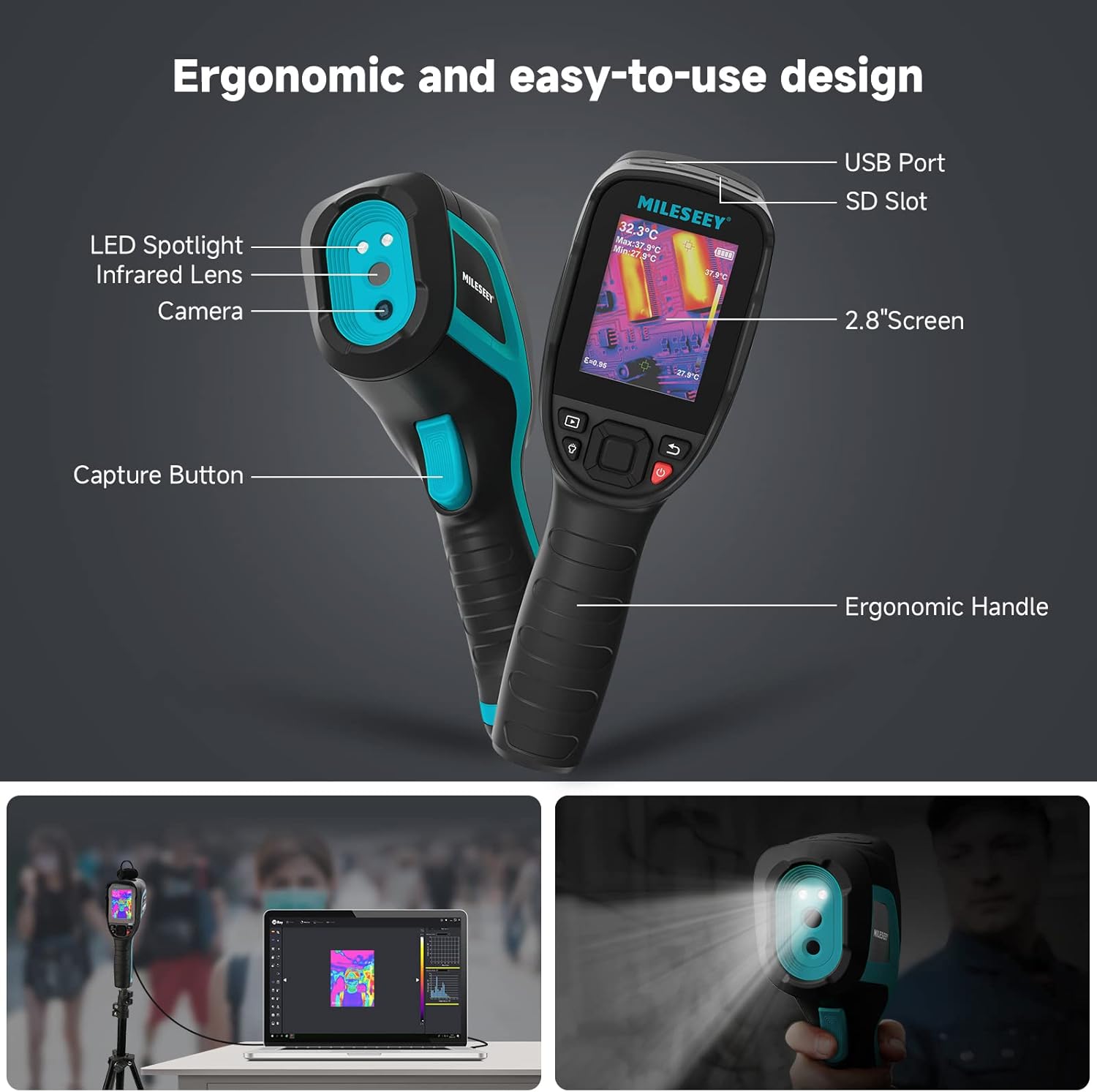
Figure 5: Key components of the thermal imager, including the USB port, SD slot, 2.8" screen, ergonomic handle, capture button, LED spotlight, infrared lens, and camera.
2. Capturing Images and Videos
To capture a still image, press the capture button (trigger). To record a video, press and hold the capture button for a second or two to initiate recording. The device supports real-time photo capturing and video recording.
3. Imaging Modes and Color Palettes
The MiLESEEY TR256B offers 4 viewing modes and 7 color palettes to optimize imaging effects for different scenarios. Navigate through the menu options on the device to select your preferred mode and palette. Available palettes include Iron, Lava, Rainbow, RainbowHC, RDGY, White Hot, and Black Hot. Viewing modes include Visible, Picture-in-Picture (PIP), Fuse, and IR.

Figure 6: Examples of the 4 imaging modes (Visible, PIP, Fuse, IR) and 7 color palettes available on the device.
4. Temperature Measurement and Alarms
The device measures temperatures from -20°C to +550°C (-4°F to +1022°F) with an accuracy of +/- 2°C (2%°C). It can display minimum, maximum, and center temperatures. You can set temperature alarms for high or low thresholds to be notified of critical temperature points.

Figure 7: The wide temperature measurement range and high temperature resolution of the TR256B.
5. PC Connectivity and Data Analysis
Connect the thermal imager to your PC via the USB cable to transfer data, analyze images, and generate reports. The device supports real-time temperature analysis and 3D imaging through compatible software. This allows for in-depth investigation and data export.

Figure 8: The thermal camera connected to a computer, demonstrating its capability for detailed data analysis and report generation.
Maintenance
1. Cleaning the Lens and Screen
Regularly clean the infrared lens and the 2.8-inch LCD screen using the provided lens cleaning cloth. Avoid using abrasive materials or harsh chemicals that could damage the surfaces. A clean lens ensures accurate thermal readings.
2. Battery Care
To prolong battery life, avoid fully discharging the device frequently. Store the device in a cool, dry place when not in use for extended periods. The auto shut-off feature helps conserve battery during operation.
3. Storage
When not in use, store the thermal imager in its storage bag to protect it from dust and physical damage. Keep it away from extreme temperatures and direct sunlight.
Troubleshooting
This section addresses common issues you might encounter with your MiLESEEY TR256B thermal imager. For problems not listed here, please contact customer support.
| Problem | Possible Cause | Solution |
|---|---|---|
| Device does not power on. | Low battery; Power button not pressed correctly. | Charge the device fully. Ensure the power button is pressed and held until the screen illuminates. |
| Image appears blurry or unclear. | Dirty lens; Incorrect focus (if applicable); Environmental factors. | Clean the infrared lens with the provided cloth. Adjust focus if your model supports manual focus. Ensure there are no obstructions or extreme atmospheric conditions. |
| Cannot save images/videos. | Memory card full or not inserted correctly; Corrupted memory card. | Check if the 16GB memory card is properly inserted. Delete unnecessary files to free up space or replace the card if corrupted. |
| PC does not recognize the device. | Faulty USB cable; Driver issues; Incorrect connection mode. | Try a different USB port or cable. Ensure the device is powered on when connected. Check your PC's device manager for driver issues. |
Specifications
| Feature | Detail |
|---|---|
| IR Resolution | 256 x 192 pixels |
| Visual Light Camera | 2 MP Effective Video Resolution |
| Thermal Sensitivity | <40mk |
| Temperature Range | -20°C to +550°C (-4°F to +1022°F) |
| Temperature Accuracy | +/- 2°C (2%°C) |
| Frame Rate | 50Hz |
| Display | 2.8" LCD |
| Battery Capacity | 5000mAh Li-ion (up to 12 hours operation) |
| Storage | 16GB memory card (included), expandable |
| Connectivity | USB (for PC connection) |
| Drop Resistance | 2m |
| IP Rating | IP54 |
| Item Weight | 1.69 pounds |
| Product Dimensions | 22.44 x 11.02 x 18.5 inches |
Warranty and Support
The MiLESEEY TR256B Thermal Imaging Camera comes with a 1-year warranty from the date of purchase. MiLESEEY also provides lifetime technical support for this product.
For technical assistance, warranty claims, or any other inquiries, please refer to the contact information provided in the original product packaging or visit the official MiLESEEY website.