1. Introduction
Thank you for purchasing the VOSTERIO Bluetooth Record Player. This 3-speed belt-driven turntable with external speakers offers a premium audio experience and versatile connectivity options, including Bluetooth input and output, and Aux-in. Its retro walnut design complements any home decor, making it an ideal choice for vinyl enthusiasts.
2. Important Safety Instructions
Please read and understand all safety instructions before using this product. Keep this manual for future reference.
- Do not install near any heat sources such as radiators, heaters, or other devices that generate heat.
- Unplug this unit from the A/C mains socket during lightning storms or when unused for long periods of time.
- To reduce the risk of fire or electric shock, do not expose the unit to rain, moisture, dripping or splashing, and no objects filled with liquids, such as vases, must be placed on the unit.
- DO NOT overload wall outlets or extension cords beyond their rated capacity as this can cause an electric shock or fire.
- No naked flame sources, such as lit candles, should be placed on the unit.
- The ventilation openings should not be blocked by covering them with items such as newspapers, tablecloths, curtains, etc.

Figure 2.1: Product Safety Warnings as printed on the manual.
3. Package Contents
Ensure all items are present and in good condition upon unboxing:
- VOSTERIO Bluetooth Record Player Unit
- Two (2) 15W External Stereo Speakers
- Power Adapter
- 45 RPM Adapter
- User Manual (this document)

Figure 3.1: Main components of the record player system.
4. Product Overview
Familiarize yourself with the main parts of your record player:
- Turntable Platter: Where the vinyl record rests. Designed for stable and anti-shaking performance.
- Tone Arm: Holds the stylus and tracks the record grooves.
- Stylus (Needle): The part that reads the grooves of the record.
- Dust Cover: Protects the turntable from dust and grime.
- Speed Selector: Allows selection of 33⅓, 45, or 78 RPM.
- Power/Volume Knob: Turns the unit on/off and adjusts volume.
- Mode/BT TX Button: Switches between modes and initiates Bluetooth transmission.
- External Speakers: Two 15W stereo speakers for rich sound.
- Aux-in Port: For connecting external audio devices.
- Bluetooth Input/Output: Wireless connectivity for streaming music to and from the unit.

Figure 4.1: Key features and components of the record player.

Figure 4.2: Product dimensions for the turntable and speakers.
5. Setup
- Unpack: Carefully remove all components from the packaging. Retain packaging for future transport or storage.
- Place Speakers: Position the two external speakers on a stable surface, ensuring they are connected to the corresponding SP-R (Right) and SP-L (Left) RCA ports on the back of the turntable unit.
- Connect Power: Plug the power adapter into the DC 12V port on the back of the turntable, then plug the adapter into a wall outlet.
- Remove Stylus Protector: Gently remove the clear plastic protector from the stylus (needle) before first use.
- Place Mat: Place the felt mat onto the turntable platter.

Figure 5.1: Illustration of the powerful external speakers.
6. Operating Instructions
6.1 Playing Vinyl Records
- Power On: Turn the Power/Volume knob clockwise to turn on the unit.
- Select Speed: Set the speed selector to the appropriate RPM (33⅓, 45, or 78) for your record. Use the included 45 RPM adapter for 7-inch singles.
- Place Record: Carefully place your vinyl record on the turntable platter.
- Lift Tone Arm: Gently lift the tone arm using the cueing lever.
- Position Tone Arm: Move the tone arm over the desired starting groove of the record.
- Lower Tone Arm: Slowly lower the tone arm onto the record using the cueing lever. The record will begin to play.
- Adjust Volume: Adjust the volume using the Power/Volume knob.
- Auto-Stop Function: The auto-stop function will automatically stop the platter when the record reaches its end, protecting your records.
- Stop Playback: To stop playback, lift the tone arm using the cueing lever and return it to the tone arm rest. Turn the Power/Volume knob counter-clockwise to turn off the unit.
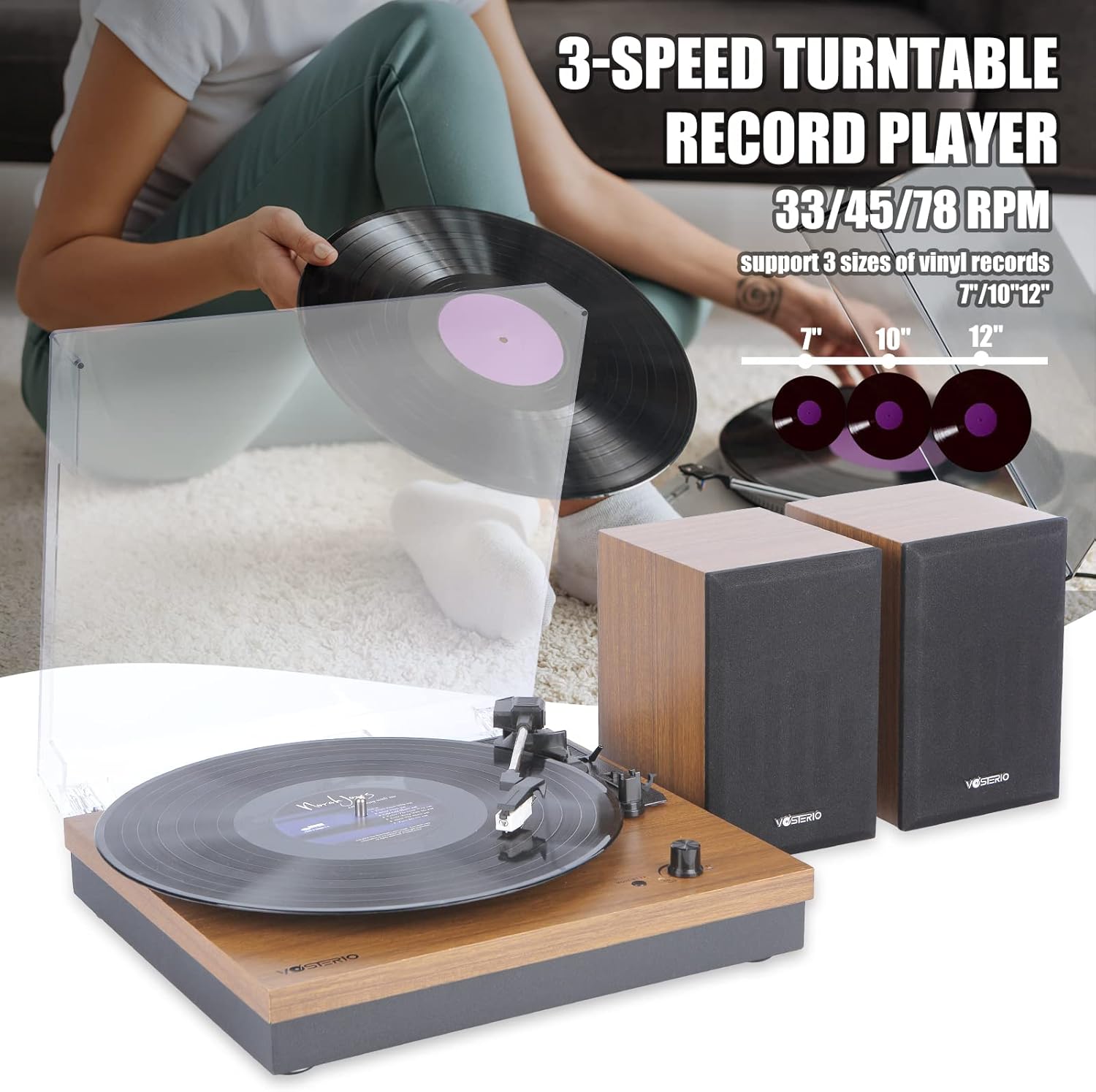
Figure 6.1: The 3-speed belt-driven turntable in action.
6.2 Bluetooth Input (Receiving Audio)
Use the external speakers to play music from your Bluetooth-enabled devices (e.g., smartphone, tablet, laptop).
- Power On: Turn the Power/Volume knob clockwise to turn on the unit.
- Select Bluetooth Input Mode: Press the "MODE/BT TX" button until the Bluetooth indicator light flashes, indicating pairing mode.
- Pair Device: On your Bluetooth device, search for "VOSTERIO" in the Bluetooth settings and select it to pair. Once connected, the indicator light will stop flashing.
- Play Music: Start playing music on your connected device. Audio will play through the VOSTERIO external speakers.

Figure 6.2: Enjoying wireless music playback via Bluetooth input.
6.3 Bluetooth Output (Transmitting Audio)
Connect the turntable to your own Bluetooth headphones, speakers, or soundbar to play vinyl records wirelessly.
- Power On: Turn the Power/Volume knob clockwise to turn on the unit.
- Enable Pairing on External Device: Put your Bluetooth headphones, speaker, or soundbar into pairing mode.
- Select Bluetooth Output Mode: Press and hold the "MODE/BT TX" button on the turntable until the Bluetooth indicator light flashes rapidly, indicating transmission pairing mode.
- Connect: The turntable will automatically search for and connect to nearby Bluetooth audio devices in pairing mode. Once connected, the indicator light will stop flashing.
- Play Vinyl: Start playing a vinyl record as described in Section 6.1. Audio will transmit to your connected Bluetooth device.

Figure 6.3: Wireless audio transmission from the record player.
6.4 Aux-in Connection
Connect external audio sources (e.g., MP3 player, CD player) via the Aux-in port.
- Connect Cable: Plug a 3.5mm audio cable (not included) into the Aux-in port on the back of the turntable and the other end into your external audio device's headphone or audio output jack.
- Power On: Turn the Power/Volume knob clockwise to turn on the unit.
- Play Audio: Start playing audio on your external device. Sound will be routed through the VOSTERIO external speakers.
7. Maintenance
- Cleaning the Unit: Wipe the unit with a soft, dry cloth. Do not use abrasive cleaners or solvents.
- Cleaning the Stylus: Use a soft brush (not included) to gently brush the stylus from back to front to remove dust and debris. Do not touch the stylus with your fingers.
- Cleaning Records: Use a dedicated record cleaning brush and solution to keep your vinyl records clean and free of dust, which can prolong stylus life and improve sound quality.
- Dust Cover: Keep the dust cover closed when not in use to prevent dust accumulation.
- Stylus Replacement: The stylus has a limited lifespan (typically 300-500 hours of play). If sound quality degrades, consider replacing the stylus. Consult the manufacturer for compatible replacement styli.
8. Troubleshooting
| Problem | Possible Cause | Solution |
|---|---|---|
| No power | Power adapter not connected; Power knob off | Ensure power adapter is securely plugged in; Turn Power/Volume knob clockwise to ON. |
| No sound from speakers | Speakers not connected; Volume too low; Incorrect mode selected | Check speaker connections (SP-R, SP-L); Increase volume; Ensure correct mode (Phono, BT, Aux) is selected. |
| Record skips or sounds distorted | Dirty record; Dirty or worn stylus; Turntable not level | Clean record; Clean or replace stylus; Ensure turntable is on a flat, stable surface. |
| Bluetooth pairing fails | Device too far; Not in pairing mode; Interference | Ensure devices are within 10m (33ft); Re-enter pairing mode on both devices; Move away from other electronic devices. |
| Record plays too fast/slow | Incorrect speed selected | Adjust the speed selector to 33⅓, 45, or 78 RPM as appropriate for the record. |
9. Specifications
| Feature | Detail |
|---|---|
| Brand | VOSTERIO |
| Model Number | B-661-UB |
| Product Dimensions | 5 x 5 x 5 inches |
| Item Weight | 13.52 pounds |
| Connectivity Technology | Auxiliary, Bluetooth |
| Maximum Rotational Speed | 78 RPM (Supports 33⅓, 45, 78 RPM) |
| Special Feature | Aux-in, Bluetooth Input & Output, Auto-stop |
| Material | Plastic (with Walnut finish) |
| Color | Walnut |
| Compatible Devices | Speaker, Bluetooth Headphones/Speakers |
| Motor Type | AC Motor (Belt-Driven) |
| Power Consumption | 15 Watts |
10. Warranty and Support
VOSTERIO products are designed and manufactured to the highest quality standards. For specific warranty information and customer support, please refer to the warranty card included with your product or visit the official VOSTERIO website. You can also contact VOSTERIO customer service for assistance with product setup, troubleshooting, or general inquiries.
Visit the VOSTERIO Store on Amazon for more information and products.


