1. Introduction
Thank you for choosing the JCROBOT iSleeky L7C Pro, a 3-axis foldable gimbal stabilizer designed to enhance your smartphone video recording experience. This manual provides detailed instructions to help you get the most out of your device, ensuring smooth, professional-grade footage.
The iSleeky L7C Pro is compatible with both Android and iPhone devices, offering features like AI smart tracking, gesture control, and various creative shooting modes. Its portable and foldable design makes it an ideal companion for travel, vlogging, and everyday use.
2. What's in the Box
- JCROBOT iSleeky L7C Pro × 1
- Grip Tripod × 1
- USB-C Charging Cable × 1
- Wrist Strap × 1
- User manual × 1

Image: All components included with the JCROBOT iSleeky L7C Pro gimbal stabilizer.
3. Setup Guide
3.1 Charging the Gimbal
Before first use, fully charge the gimbal using the provided USB-C charging cable. The gimbal supports fast charging, taking approximately 80 minutes for a full charge. You can also charge it while in use, ensuring you don't miss any important shots.

Image: The gimbal being charged via USB-C while a smartphone is mounted and in use.
3.2 Attaching the Tripod
The iSleeky L7C Pro comes with a detachable grip tripod. To attach, simply screw it onto the bottom of the gimbal handle. This provides a stable base for tabletop use or can be used as an extended grip for handheld shooting.
Video: Demonstrates attaching and detaching the tripod base from the gimbal, and how it can be used for stable placement.
3.3 Mounting Your Smartphone
Carefully extend the phone clamp and securely place your smartphone in the holder. Ensure the phone is balanced as centrally as possible to optimize gimbal performance and battery life. The gimbal is designed to accommodate various smartphone sizes.
Image: A smartphone securely mounted on the gimbal stabilizer.
3.4 App Installation and Bluetooth Pairing
Download the 'Gimbal Pro' app from your smartphone's app store. Once installed, enable Bluetooth on your phone and open the app. The app will guide you through the pairing process with your iSleeky L7C Pro. This connection unlocks advanced features like remote shutter control, zoom, and intelligent tracking.
4. Operating the Gimbal
4.1 Controls Overview
Familiarize yourself with the main controls on the gimbal handle:
- Power Button: Press and hold to power on/off.
- Mode Button (M): Press to cycle through different gimbal modes (Pan Follow, Lock Mode, FPV Mode, All Follow).
- Joystick: Controls the pan and tilt of the smartphone.
- Shutter/Record Button: Press once to take a photo, press and hold to start/stop video recording (requires app connection).
- Zoom Slider: Controls digital zoom in/out (requires app connection).
- Bluetooth Indicator: Shows Bluetooth connection status.

Image: Detailed view of the gimbal's control panel with labels for each function.
4.2 Gimbal Modes
The iSleeky L7C Pro offers four distinct modes to suit various shooting scenarios:
- Pan Follow (PF): The camera pans left/right following your hand movements, while tilt and roll axes are locked.
- Lock Mode (LF): All three axes (pan, tilt, roll) are locked, keeping the camera pointing in a fixed direction.
- First Person View (FPV): All three axes follow your hand movements, providing a dynamic, immersive perspective.
- All Follow (AF): The camera follows both your pan and tilt movements, with the roll axis locked.
4.3 AI Smart Tracking and Gesture Control
Utilize the AI smart tracking feature through the 'Gimbal Pro' app to automatically follow a subject (face or object), keeping them in sharp focus. Gesture control allows for hands-free photo and video capture (start/stop recording) by performing specific hand gestures in front of the camera.

Image: AI face-tracking in action, keeping the subject centered in the frame.
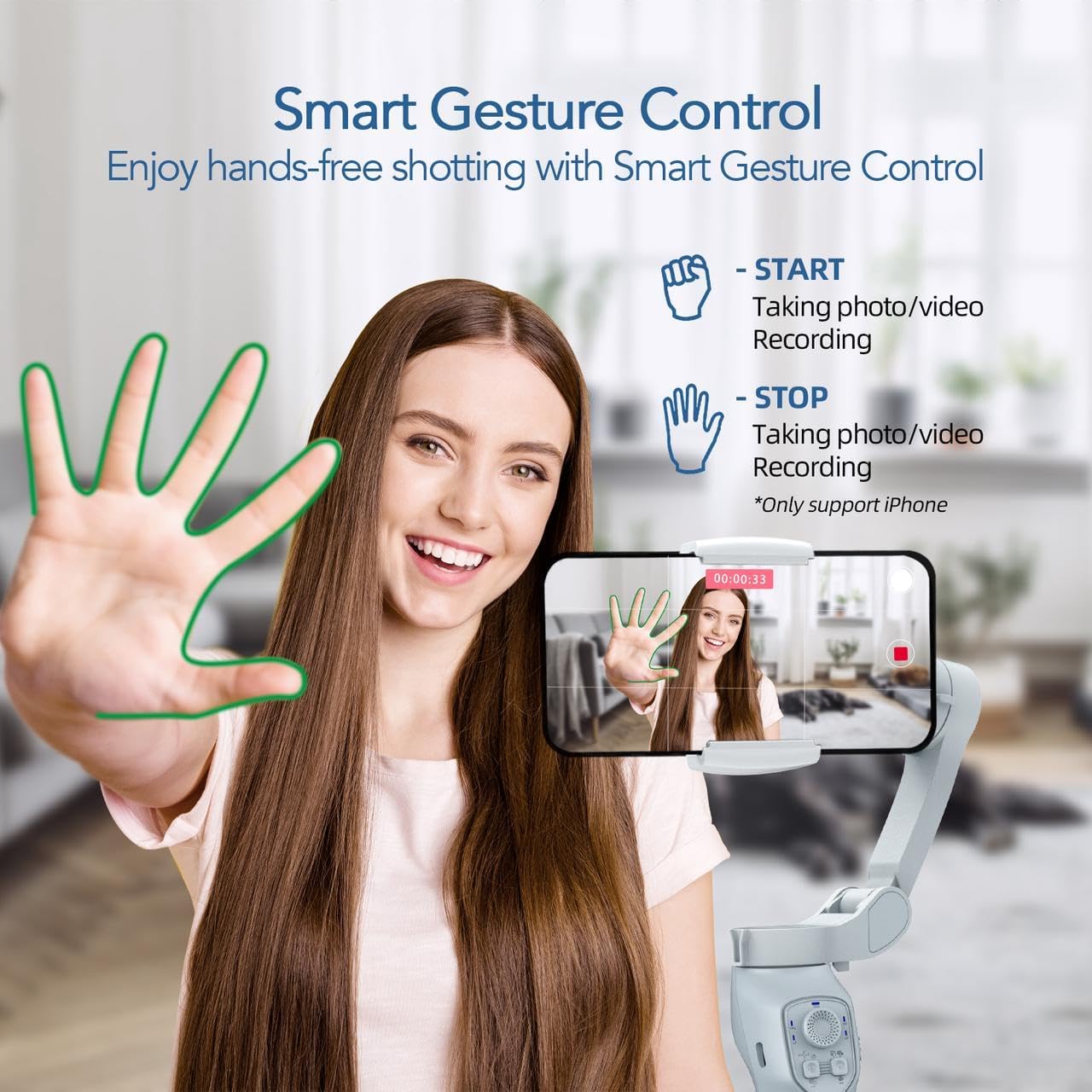
Image: Smart Gesture Control for hands-free photo/video recording.
4.4 Creative Shooting Modes
The 'Gimbal Pro' app offers various creative templates and modes to elevate your content:
- Inception: Creates a spinning camera effect.
- Dolly Zoom: Achieves the classic 'Vertigo effect' by zooming while moving the camera.
- Motion Timelapse: Captures time-lapse videos with dynamic camera movement.
- Panoramas: Automatically stitches multiple photos into a wide panoramic image.
Inception: Easily customize your dreamy filming style and take breathtaking footage with your smartphone. The gimbal's designed to provide smooth and stable video, even in the most challenging conditions.
Dolly Zoom: Dolly zoom enables you to move the dolly toward or away from a subject while zooming in the opposite direction. It makes the video you take appear more cinematic and create a feeling of unbelievable and unreality.

Panorama: Take panoramic landscape photos with a gimbal stabilizer for smartphone. You can capture the most spectacular view of the moment and get a wide, sweeping view.

Smart Motion Timelapse: Use the gimbal stabilizer motion time-lapse techniques to add motion to still images and achieve higher quality photography. Shoot your every treasured moment and hours of recording are focused on a few seconds, making everyday life into remarkable moments.
4.5 Portability and Foldable Design
The iSleeky L7C Pro is designed for ultimate portability. It weighs only 0.78 lbs and folds down to 5.98 inches, making it easy to carry in your pocket or bag for spontaneous shooting opportunities.

Image: The compact and foldable design of the gimbal, demonstrating its portability.
5. Maintenance
To ensure the longevity and optimal performance of your JCROBOT iSleeky L7C Pro, follow these maintenance guidelines:
- Cleaning: Use a soft, dry cloth to wipe the gimbal. Avoid using liquid cleaners or solvents.
- Storage: Store the gimbal in a cool, dry place, away from direct sunlight and extreme temperatures. When not in use for extended periods, ensure it is fully charged before storage and recharge every 3 months to maintain battery health.
- Handling: Avoid dropping or subjecting the gimbal to strong impacts, as this can damage the internal components and motors.
6. Troubleshooting
If you encounter issues with your iSleeky L7C Pro, refer to the following common problems and solutions:
| Problem | Possible Cause | Solution |
|---|---|---|
| Gimbal not powering on | Low battery; Power button not held long enough. | Charge the gimbal fully. Press and hold the power button for 3 seconds. |
| Shaky or unstable footage | Phone not balanced correctly; Gimbal not calibrated. | Ensure phone is centered and balanced. Calibrate the gimbal via the 'Gimbal Pro' app. |
| Bluetooth connection issues | Bluetooth off on phone; App not open; Interference. | Ensure Bluetooth is on. Restart app and gimbal. Move away from other wireless devices. |
| AI tracking not working | Poor lighting; Subject too far/close; App not updated. | Ensure adequate lighting. Maintain optimal distance (1-3 meters). Update the 'Gimbal Pro' app. |
If the issue persists, please refer to the official user manual PDF or contact JCROBOT customer support.
7. Specifications
| Feature | Detail |
|---|---|
| Product Dimensions | 4.33 x 1.83 x 5.98 inches (folded) |
| Item Weight | 12.5 ounces (0.78 lbs) |
| Model Number | L7C Pro |
| Batteries | 1 Lithium Ion battery (included) |
| Compatible Devices | Cellphone |
| Maximum Weight Recommendation | 0.66 Pounds |
| Color | Grey |
| Manufacturer | JCROBOT |
| Date First Available | February 6, 2023 |
8. Warranty and Support
For detailed warranty information and customer support, please refer to the official JCROBOT website or the provided user manual PDF.
- Official User Manual (PDF): Download Here
- Visit the JCROBOT Store: JCROBOT Amazon Store
Protection plans are also available for extended coverage:
- 2-Year Protection Plan: Available for $4.99
- 3-Year Protection Plan: Available for $6.99
- Complete Protect: Monthly plan for $16.99


