
QIIZCP K88-A01
HINYCOM K88-A01 Wireless Earbuds User Manual
Model: K88-A01 | Brand: QIIZCP
Introduction
Welcome to the user manual for your HINYCOM K88-A01 Wireless Earbuds. These Bluetooth headphones are designed for comfort, durability, and high-quality audio, perfect for sports, workouts, and daily use. This manual provides detailed instructions on setup, operation, maintenance, and troubleshooting to ensure you get the most out of your new earbuds.

Figure 1: HINYCOM K88-A01 Wireless Earbuds and Charging Case
The image displays the HINYCOM K88-A01 wireless earbuds, featuring an over-ear hook design, alongside their charging case. Both earbuds and the case show an LED power display indicating a full charge (100%). The earbuds are black with a circular touch control area highlighted by blue light, suggesting active status or touch functionality.
1. Setup
1.1. Package Contents
Before you begin, please ensure all items are present in your package:
- HINYCOM K88-A01 Wireless Earbuds (Left and Right)
- 2500mAh Charging Case
- USB-C Charging Cable
- Multiple Sizes of Ear Tips (S, M, L)
- User Manual
1.2. Initial Charge
For optimal performance, fully charge the earbuds and the charging case before first use.
- Connect the provided USB-C cable to the charging case and a power source. The LED display on the case will show the charging progress.
- Alternatively, place the charging case on a compatible wireless charging pad for convenient wireless charging.
- Ensure the earbuds are properly seated in the charging case. The individual earbud indicators on the case's LED display will show their charging status.
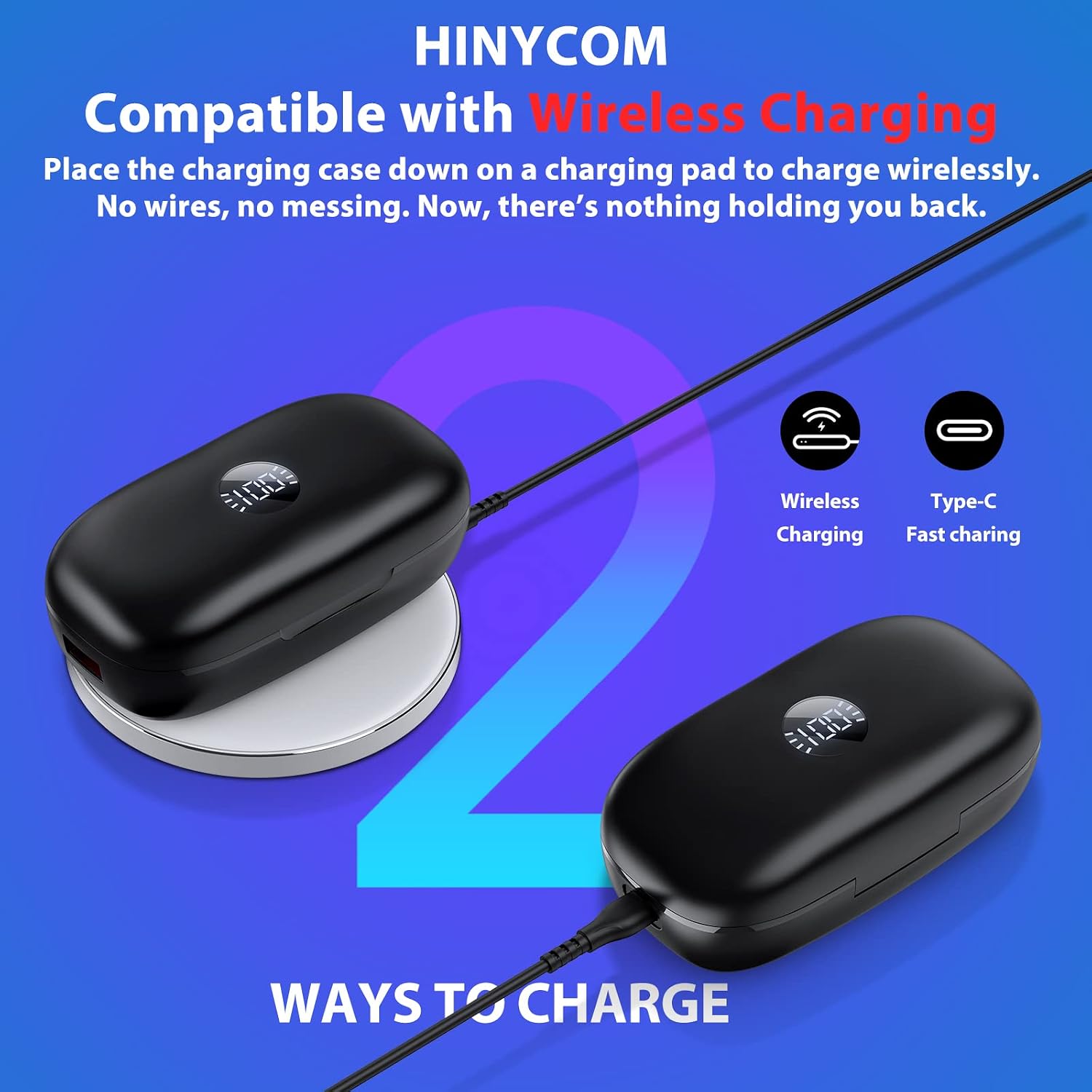
Figure 2: Charging Options for HINYCOM K88-A01
This image illustrates the two charging methods for the HINYCOM K88-A01 earbuds: wireless charging by placing the case on a charging pad, and wired charging via a Type-C cable. Both methods are shown with the charging case displaying its battery percentage.

Figure 3: 2500mAh Charging Case Functionality
The image highlights the 2500mAh capacity of the charging case, which can also serve as an emergency power bank for other devices like smartphones. It shows a smartphone being charged via a cable connected to the earbud case, with text indicating "2500mAh Uninterrupted Power Supply" and "Charge your phone and earbuds anytime, anywhere."
1.3. Pairing with Your Device
The earbuds utilize Bluetooth 5.3 for a stable and efficient connection.
- Ensure Bluetooth is enabled on your smartphone or other audio device.
- Open the charging case and remove both earbuds. They will automatically power on and enter pairing mode.
- On your device, search for Bluetooth devices and select "K88" from the list.
- Once connected, you will hear an audible "connected" prompt. The earbuds will automatically reconnect to the last paired device when taken out of the charging case.

Figure 4: Correct Wearing and Pairing
This image provides a visual guide for correctly wearing the HINYCOM K88-A01 earbuds. It shows a side profile of an ear with the earbud properly inserted and the earhook secured behind the ear, ensuring a stable and comfortable fit for optimal sound experience.
2. Operating Instructions
2.1. Wearing Your Earbuds
For the best sound quality and secure fit, ensure the earbuds are worn correctly.
- Choose the correct ear tip size for a snug fit in your ear canal.
- Insert the eartip into your ear.
- Put the earhook over the back of your ear.
- Adjust the earbuds inside your auricle snugly by twisting for comfort and a secure fit.
Figure 5: Visual Guide for Correct Earbud Placement
This image provides a visual guide for correctly wearing the HINYCOM K88-A01 earbuds. It shows a side profile of an ear with the earbud properly inserted and the earhook secured behind the ear, ensuring a stable and comfortable fit for optimal sound experience.
Video 1: Experience Good Sound Quality Through Correct Wearing
This video demonstrates the proper way to wear the HINYCOM K88-A01 earbuds to achieve the best sound quality and a secure fit. It shows how to select the right ear tip size, insert the earbud, and adjust the earhook for comfort and stability.
2.2. Touch Controls
The K88-A01 earbuds feature intuitive touch controls for managing your audio and calls without needing to access your phone.
| Action | Control |
|---|---|
| Power On/Off | Long tap MFB for 4 seconds |
| Play/Pause | Single tap MFB |
| Volume Up | Press "+" button |
| Volume Down | Press "-" button |
| Next Track | Long press "+" button |
| Previous Track | Long press "-" button |
| Answer/End Call | Single tap MFB |
| Reject Call | Long tap MFB for 3 seconds |
| Activate Siri/Voice Assistant | Long tap MFB for 2 seconds |
Note: MFB refers to the Multi-Function Button, which is the circular touch area on the earbud.

Figure 6: Dual LED Battery Display and Touch Controls
This image displays the HINYCOM K88-A01 earbuds and their charging case, highlighting the dual LED battery display on the case that shows both the case's and individual earbud's power levels. It also visually indicates the touch control functions on the earbuds, such as 4s ON/OFF, 3s Reject, and 2s Siri activation.

Figure 7: Detailed Earbud Control Functions
This graphic provides a comprehensive overview of the touch control functions on the HINYCOM K88-A01 earbuds. It details actions like volume adjustment, track skipping, play/pause, answering/ending calls, rejecting calls, and activating voice assistants, all controlled directly from the earbuds.
2.3. Battery Life and Power Display
The K88-A01 earbuds offer extended playback time with their high-capacity charging case.
- Up to 10 hours of playback on a single charge.
- The 2500mAh charging case provides an additional 10 full charges, totaling up to 100 hours of playtime.
- The charging case features an intuitive LED power display, showing the remaining battery percentage of the case and the individual charge levels of each earbud.

Figure 8: Extended Playtime with Charging Case
This image emphasizes the impressive 100 hours of playtime achievable with the HINYCOM K88-A01 earbuds when combined with their charging case. It visually represents the earbuds and the open charging case, highlighting the extended battery life feature.

Figure 9: Long-lasting Battery and LED Display
This graphic highlights the long-lasting battery life of the HINYCOM K88-A01 earbuds and the intuitive LED power display on the charging case. It shows the case charging a phone and indicates 10 hours of single charge playback, 10 times charging from the case, 100 hours total playtime, and 50% power back for phone charging.
Video 2: K88 Bluetooth Headphones for Sport or Work
This comprehensive video showcases the HINYCOM K88-A01 Bluetooth headphones, demonstrating their suitability for both sports and work environments. It highlights features such as secure fit, long battery life, and ease of use, making them ideal for active lifestyles and professional settings.
Video 3: K88 Bluetooth Headphones for Sports and Music
This video highlights the HINYCOM K88-A01 Bluetooth headphones' capabilities for both sports activities and music enjoyment. It demonstrates their secure fit during movement and emphasizes the audio quality for an immersive listening experience.
3. Maintenance
3.1. Cleaning
Regular cleaning helps maintain optimal performance and longevity of your earbuds.
- Use an alcohol pad to clean the earbuds' charging contacts and the charging pins on the charging case.
- Gently wipe the ear tips and earhooks with a soft, damp cloth. Ensure they are completely dry before placing them back in the case.
3.2. Storage
When not in use, store the earbuds in their charging case to protect them and keep them charged.
- Store in a cool, dry place away from extreme temperatures and direct sunlight.
- Avoid exposing the earbuds or case to liquids or excessive moisture.
4. Troubleshooting
If you encounter any issues with your HINYCOM K88-A01 earbuds, please refer to the following solutions:
4.1. Connection Issues (Resetting Your Earbuds)
If only one earbud connects or the two earbuds cannot pair together, try resetting them:
- Before Reset:
- Clean the earbuds' charging contacts and the charging pins on the charging cases with an alcohol pad.
- Charge for 10 minutes with both earbuds in the charging case. Ensure the marks on the digital panel of the earbuds LED display are flashing and the earbuds indicator light is constantly on.
- Start Reset:
- Turn off Bluetooth on all devices close to the earbuds.
- Pick up one earbud from the charging case; it will automatically turn on.
- Reset the earbud: Hold down the MFB button for 10 seconds. You will hear "di" at 2 seconds, "power off" at 4 seconds, "power on" at 8 seconds, and "di" again at 10 seconds. This indicates a successful reset.
4.2. Charging Issues
If your earbuds or case are not charging:
- Clean the earbuds' charging contacts and the charging pins on the charging cases with an alcohol pad.
- Ensure both earbuds are correctly placed in the charging case. The LED display should show flashing marks and the earbud indicator light should be constantly on.
- Try a different USB-C cable or power adapter.
4.3. Volume Adjustment Issues
- iPhone Users: Ensure your earbuds are connected. Try reconnecting the earbuds to your phone or resetting your phone to factory defaults if issues persist.
- Android Users: Some older Android versions may have compatibility issues preventing direct volume adjustment from the earbuds.
- PC Users: Be aware of potential incompatibilities between earbuds and PC systems. Ensure your PC's Bluetooth drivers are up to date.
5. Specifications
Key technical specifications for the HINYCOM K88-A01 Wireless Earbuds:
| Feature | Specification |
|---|---|
| Model Name | K88-A01 |
| Connectivity Technology | Bluetooth 5.3 |
| Battery Life (Earbuds) | Up to 10 Hours |
| Charging Case Capacity | 2500mAh (provides 10 additional charges) |
| Total Playtime (with case) | Up to 100 Hours |
| Charging Interface | USB-C, Wireless Charging |
| Bluetooth Range | 10 Meters |
| Audio Driver Size | 10 Millimeters |
| Earpiece Shape | Over-Ear Hook |
| Control Type | Touch, Media Control, Voice |
| Noise Control | Active Noise Cancellation |
| Item Weight | 7 ounces |
| UPC | 791684646072 |

Figure 10: Product Dimensions and Auto-Pairing Feature
This image provides the dimensions of the HINYCOM K88-A01 charging case (4.13 in / 10.5 cm length, 1.96 in / 5 cm width, 1.37 in / 3.5 cm height) and highlights the earbuds' ultra-light design (0.26lb total). It also confirms the auto-pairing feature, where earbuds connect to the last paired device when removed from the case.
6. Warranty and Support
6.1. Warranty Information
The HINYCOM K88-A01 Wireless Earbuds come with a Lifetime Warranty. For any assistance, please contact customer support.
6.2. Customer Support
For any assistance, please contact HINYCOM customer support via email at support@hinycom.club. They aim to respond within 24 hours.
Ask a question about this manual
Ask about setup, troubleshooting, compatibility, parts, safety, or missing instructions. Manuals+ will review the question and use this page’s manual context to help answer it.