
1. Important Safety Instructions
Please read all instructions carefully before using the Strex Cordless Air Duster. Keep this manual for future reference.
- Do not operate the device near flammable liquids or gases.
- Keep the device away from water and moisture. Do not immerse in water.
- Do not point the air duster directly at people or animals.
- Avoid blocking the air intake or outlet during operation.
- Do not disassemble, repair, or modify the device yourself. Contact qualified service personnel for assistance.
- Use only the provided charging cable and a compatible power adapter (not included) for charging.
- Store the device in a cool, dry place, away from direct sunlight and high temperatures.
- Keep out of reach of children.
- The battery is rechargeable. Do not expose to fire or extreme heat.
2. Package Contents
Verify that all items listed below are included in your package:
- Strex Cordless Air Duster Unit
- Various Nozzles and Brushes (5 pieces)
- USB Charging Cable
- User Manual

Image: Contents of the Strex Air Duster package, showing the main unit, multiple attachments, and the user manual.
3. Product Overview
The Strex Cordless Air Duster is designed for efficient and convenient cleaning of electronics, keyboards, car interiors, and other delicate surfaces. It features a powerful motor, a long-lasting rechargeable battery, and multiple speed settings.

Image: Strex Cordless Air Duster highlighting its key features such as adjustable power, high RPM, and battery life.
4. Setup
4.1 Charging the Device
Before first use, fully charge the air duster. The device is equipped with a 6000mAh rechargeable lithium battery.
- Connect the provided USB charging cable to the charging port on the air duster.
- Connect the other end of the USB cable to a compatible USB power source (e.g., computer, wall adapter, car charger, power bank).
- The charging indicator light will illuminate during charging.
- A full charge typically takes approximately 2 hours. The indicator light will change or turn off once charging is complete.

Image: Charging the Strex Air Duster, illustrating various compatible charging methods and battery specifications.
4.2 Attaching Nozzles
The air duster comes with multiple nozzles for different cleaning tasks.
- Select the appropriate nozzle for your cleaning needs.
- Align the nozzle with the air outlet of the duster.
- Gently push and twist the nozzle until it is securely attached.
- To remove, twist and pull the nozzle off.
5. Operating Instructions
5.1 Powering On/Off
- To turn on the device, press and hold the power button for a few seconds until the motor starts.
- To turn off the device, press and hold the power button again until the motor stops.
5.2 Adjusting Speed
The Strex Air Duster features three adjustable speed settings:
- Speed 1 (43000 RPM): Ideal for sensitive electronics and light dust.
- Speed 2 (47000 RPM): Suitable for general cleaning, such as laptop keyboards.
- Speed 3 (51000 RPM): For stubborn dirt and heavier debris.
To cycle through the speeds, short press the power button while the device is on. The indicator light may change to show the current speed setting.
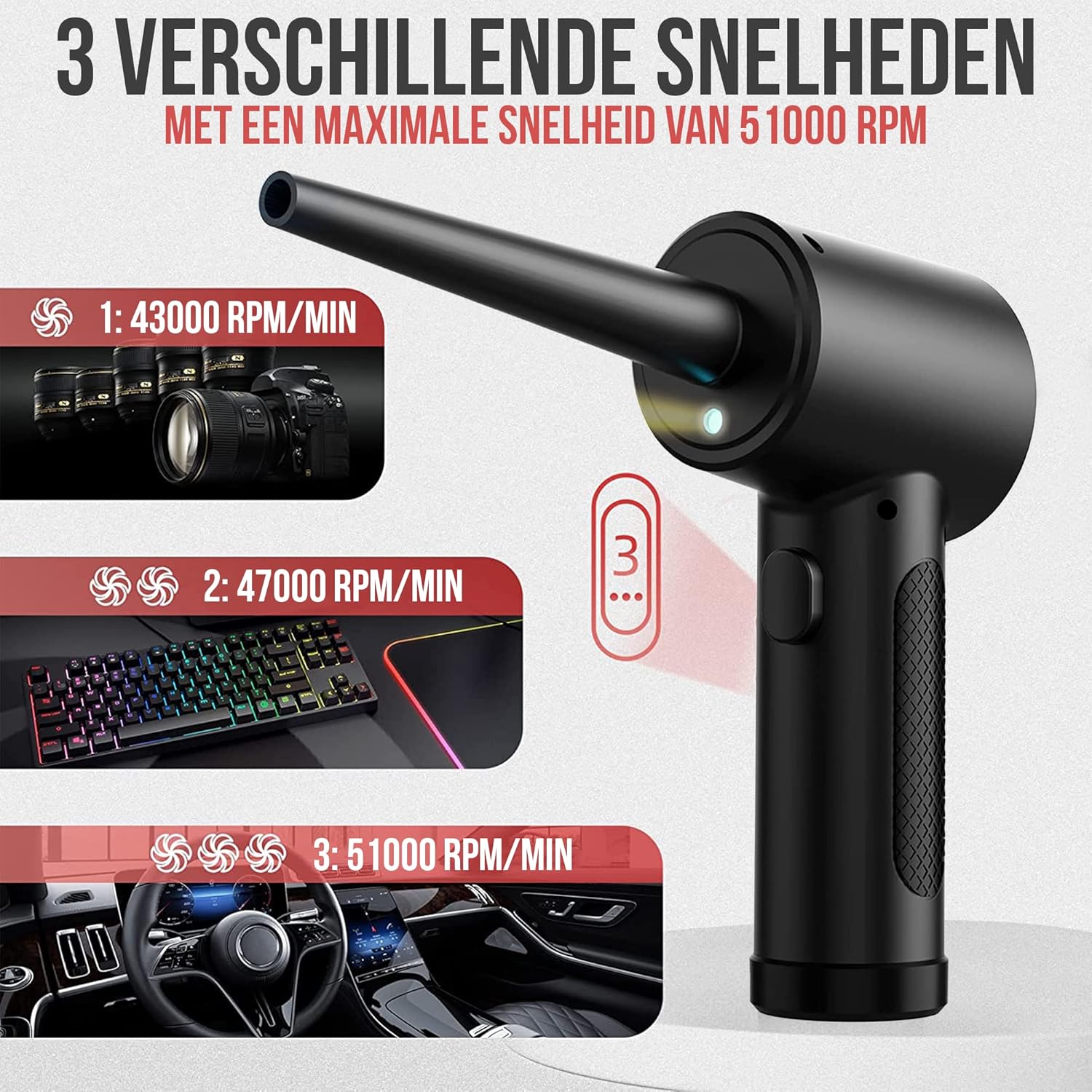
Image: Illustration of the three speed settings and their recommended uses for the Strex Air Duster.
5.3 Using the LED Light
The integrated LED light illuminates dark areas, ensuring thorough cleaning.
- The LED light typically activates automatically when the duster is turned on.
- Use the light to clearly see dust and debris in crevices and hard-to-reach spots.

Image: The integrated LED light in action, providing visibility for cleaning in various dark or confined spaces.
5.4 Application Examples
The Strex Air Duster is versatile and can be used for:
- Cleaning computer keyboards, cases, and components.
- Dusting office equipment like printers and copiers.
- Detailing car interiors, vents, and dashboards.
- Removing dust from household items, plants, and furniture.
- Cleaning pet hair from surfaces.

Image: Examples of the Strex Air Duster's multi-purpose applications across different environments.
6. Maintenance
To ensure optimal performance and longevity of your Strex Air Duster, follow these maintenance guidelines:
- Cleaning the Exterior: Wipe the exterior of the device with a soft, dry cloth. Do not use abrasive cleaners or solvents.
- Nozzle Cleaning: Detach nozzles and clean them with a soft brush or cloth if they become clogged with debris. Ensure they are dry before reattaching.
- Storage: When not in use, store the air duster in a clean, dry place at room temperature.
- Battery Care: For long-term storage, it is recommended to charge the battery to about 50% every few months to maintain battery health.
7. Troubleshooting
If you encounter issues with your Strex Cordless Air Duster, refer to the following common problems and solutions:
| Problem | Possible Cause | Solution |
|---|---|---|
| Device does not turn on. | Battery is depleted. | Charge the device fully. |
| Device does not turn on. | Power button not pressed correctly. | Press and hold the power button for a few seconds. |
| Low air pressure. | Battery is low. | Recharge the device. |
| Low air pressure. | Incorrect speed setting. | Cycle through speed settings to select a higher speed. |
| Nozzle is loose or falls off. | Nozzle not securely attached. | Ensure the nozzle is pushed and twisted firmly onto the air outlet. |
If the problem persists after trying these solutions, please contact customer support.
8. Specifications
- Model Number: SP238
- Motor Speed: 43000 - 47000 - 51000 RPM (3 speeds)
- Battery Capacity: 6000 mAh
- Operating Time: Up to 60 minutes (on lowest speed)
- Charging Time: Approximately 2 hours
- Dimensions (L x W x H): 9 x 9 x 6.5 cm
- Weight: 335 grams
- Material: ABS + PP
- Input: USB (charging cable included)
9. Warranty Information
Strex products are manufactured to high-quality standards. This product is covered by a standard manufacturer's warranty against defects in materials and workmanship from the date of purchase. Please retain your proof of purchase for warranty claims. The warranty does not cover damage caused by misuse, accident, unauthorized modification, or normal wear and tear.
10. Customer Support
For any questions, technical support, or warranty inquiries regarding your Strex Cordless Air Duster SP238, please contact our customer service team. Refer to the contact information provided on the product packaging or the official Strex website.
