
Tower T513008
Tower VL35 Cordless 3-in-1 Vacuum Cleaner User Manual
Model: T513008
Important Safety Instructions
Please read and understand all instructions before using this appliance. Retain this manual for future reference.
- This appliance is intended for domestic use only. Do not use outdoors or on wet surfaces.
- Do not allow children to operate the vacuum cleaner. Close supervision is necessary when used near children.
- Do not pick up flammable or combustible liquids, such as gasoline, or use in areas where they may be present.
- Do not pick up anything that is burning or smoking, such as cigarettes, matches, or hot ashes.
- Do not use without the dust cup and/or filters in place.
- Always turn off the appliance before connecting or disconnecting the motorized brush, extension tube, or charging.
- Use only the charger supplied by the manufacturer to recharge.
- Store the appliance indoors in a cool, dry place.
- If the power cord is damaged, it must be replaced by the manufacturer or its service agent to avoid a hazard.
Product Overview
The Tower VL35 Cordless 3-in-1 Vacuum Cleaner is designed for versatile cleaning across various surfaces and hard-to-reach areas.
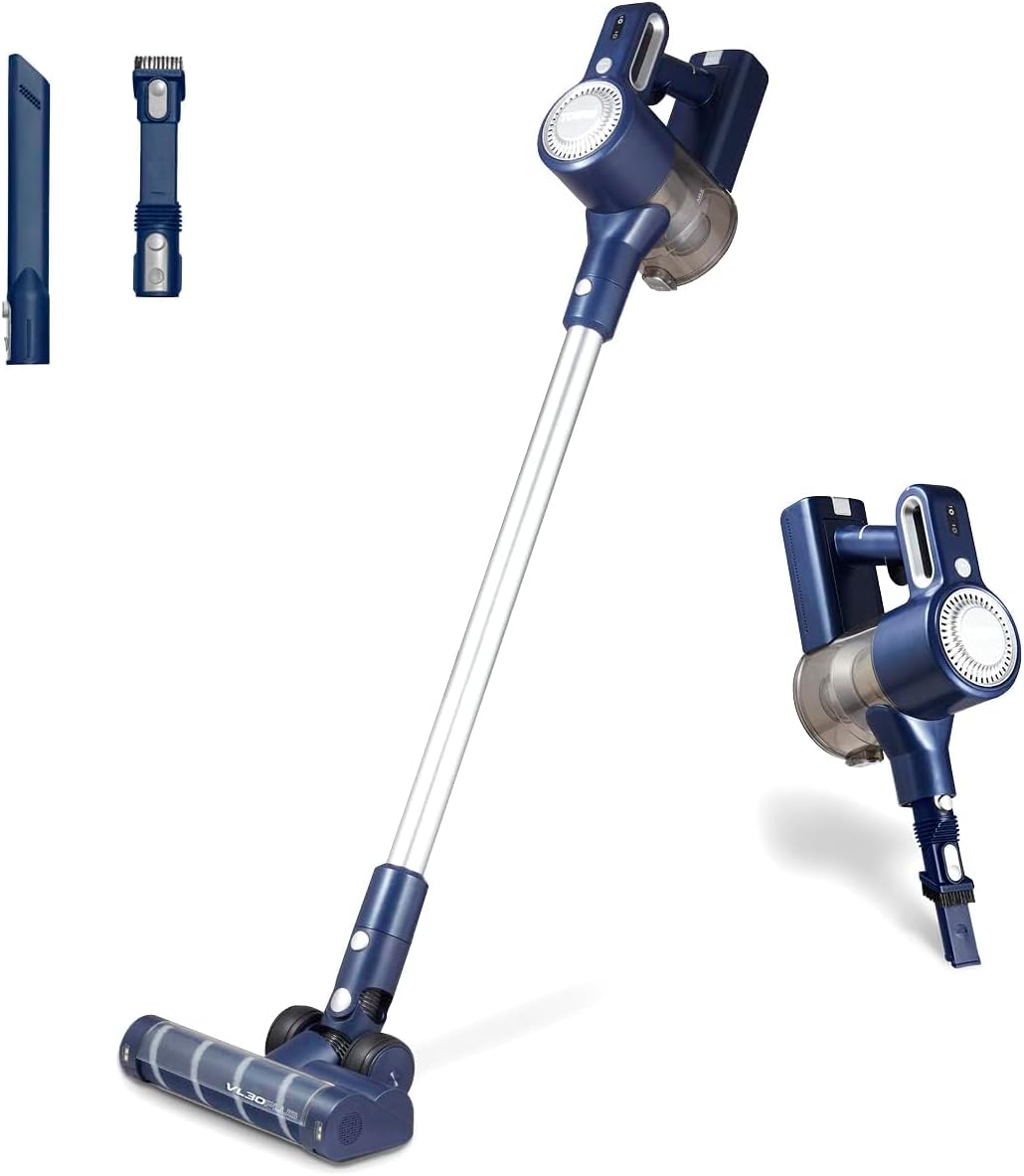
Figure 1: Tower VL35 Cordless 3-in-1 Vacuum Cleaner showing its stick and handheld modes.
Components:

Figure 2: What's in the Box? Components include the 3-in-1 vacuum, brush tool, crevice tool, wall mount, 5-meter power cord with UK plug, and instruction manual.
- Main Unit: Contains the motor, dust tank, and controls.
- Extension Tube: Connects the main unit to the floor head for stick vacuuming.
- Motorised Anti-Tangle Floor Head: Designed for efficient cleaning on various floor types, preventing hair and debris build-up.
- 2-in-1 Brush & Crevice Tool: Versatile attachment for tight spaces and delicate surfaces.
- AC Adapter: For charging the battery.
- Wall Mounting Kit: For convenient storage.
- HEPA 13 Filter: Advanced filtration system.
Setup
Assembly:
- Stick Vacuum Assembly:
- Insert the extension tube into the main unit until it clicks securely.
- Attach the motorised floor head to the other end of the extension tube, ensuring it clicks into place.
- Handheld Vacuum Assembly:
- Detach the extension tube and floor head from the main unit.
- Attach the desired accessory (e.g., 2-in-1 brush & crevice tool) directly to the main unit.

Figure 3: The vacuum cleaner's versatile 3-in-1 functionality, demonstrating handheld, extended, and floor cleaning configurations.
Initial Charging:
Before first use, fully charge the vacuum cleaner's 22.2V Li-ion battery. This typically takes approximately 4 hours.
- Connect the AC adapter to the charging port on the main unit or the separate battery charging dock (if applicable).
- Plug the adapter into a suitable wall outlet.
- The charging indicator lights will illuminate during charging and turn off or change color when fully charged.

Figure 4: The 22.2V Li-ion rechargeable battery provides up to 35 minutes of runtime, and the cyclonic suction ensures thorough cleaning.
Wall Mount Installation:
For convenient storage, the included wall mount can be installed:
- Choose a suitable location near a power outlet.
- Mark the drilling points using the wall mount as a template.
- Drill holes and insert wall plugs (if necessary).
- Secure the wall mount with screws.
Operating Instructions
Powering On/Off:
Press the power button on the main unit to turn the vacuum cleaner on or off.
Using Different Modes:
- Stick Mode: Ideal for cleaning carpets and hard floors. The motorised floor head provides effective suction and agitation.
- Handheld Mode: Perfect for cleaning stairs, upholstery, car interiors, and small spills.
- Extended Mode: Use the extension tube with an attachment for reaching high areas like ceilings or curtain tops.
Using Attachments:
The 2-in-1 brush & crevice tool can be used for various tasks:
- Crevice Tool: For narrow gaps, corners, and edges.
- Brush Tool: For dusting delicate surfaces, blinds, or pet hair on upholstery.
Boost Turbo Speed Setting:
For tougher dirt and debris, activate the Boost Turbo Speed setting. This provides maximum suction power for a limited duration.
Video 1: Demonstration of the Tower VL35 Pro Anti Tangle vacuum cleaner's features, including its 3-in-1 functionality, anti-tangle technology, powerful cyclonic suction, and long battery life.
Maintenance
Emptying the Dust Tank:
Empty the 1-liter dust tank regularly to maintain optimal suction performance. It is recommended to empty it after each use or when the MAX fill line is reached.
- Press the dust tank release button to detach it from the main unit.
- Open the dust tank lid and empty contents into a waste bin.
- Close the lid and reattach the dust tank to the main unit.

Figure 5: The HEPA 13 filter captures fine particles, and the dust tank is easily emptied for convenient disposal of collected debris.
Cleaning the HEPA 13 Filter:
The HEPA 13 filter is washable and should be cleaned regularly to ensure efficient filtration and prevent loss of suction. It is recommended to clean the filter every 3 months or as needed.
- Remove the filter from the dust tank.
- Tap the filter gently over a bin to remove loose dust.
- Rinse the filter under cold running water until the water runs clear.
- Allow the filter to air dry completely for at least 24 hours before reinserting it. Do not use a dryer or direct heat.
Cleaning the Motorised Anti-Tangle Floor Head:
Periodically check the brush bar for tangled hair or debris. The anti-tangle design minimizes this, but occasional cleaning may be necessary.

Figure 6: The motorised anti-tangle floor head features combing technology to prevent hair and debris build-up, optimizing vacuuming performance.
- Ensure the vacuum is turned off and disconnected from power.
- Remove the brush bar from the floor head (refer to the diagram in the physical manual for specific release mechanisms).
- Carefully cut and remove any tangled hair or fibers using scissors.
- Reinsert the brush bar securely.
Troubleshooting
| Problem | Possible Cause | Solution |
|---|---|---|
| Vacuum cleaner does not turn on. | Battery is not charged. | Charge the battery fully. |
| Power button not pressed correctly. | Ensure the power button is pressed firmly. | |
| Low suction power. | Dust tank is full. | Empty the dust tank. |
| Filter is clogged. | Clean or replace the HEPA filter. | |
| Hose or nozzle is blocked. | Check for and remove any blockages in the extension tube, floor head, or attachments. | |
| Brush bar not spinning. | Brush bar is tangled with hair/debris. | Clean the brush bar as per maintenance instructions. |
| Floor head is not properly attached. | Ensure the floor head is securely clicked into place. | |
| Battery runtime is short. | Battery not fully charged. | Ensure the battery is fully charged before use. |
| Using Boost Turbo Speed setting excessively. | The Boost mode consumes more power; use it only when necessary. |
If the problem persists after attempting these solutions, please contact customer support.
Specifications
- Brand: Tower
- Model Number: T513008
- Colour: Dark Blue & Silver
- Product Dimensions: 30 x 11.3 x 21 cm
- Item Weight: 2.52 kg
- Capacity: 1 Litre (Dust Tank)
- Power / Wattage: 120 watts
- Noise Level: 80 dB
- Runtime: Up to 35 minutes (on a single charge)
- Special Features: Lightweight, Bagless, Washable Filter, HEPA, Anti-Tangle Floor Head
- Filter Type: HEPA Filter
- Cordless: Yes
Warranty and Support
The Tower VL35 Cordless 3-in-1 Vacuum Cleaner comes with a standard 1-year manufacturer's guarantee. An optional 2-year extension is available upon product registration online, providing a total of 3 years of coverage.

Figure 7: Tower offers a 3-year guarantee, subject to online product registration.
For warranty claims, technical support, or spare parts, please contact Tower customer service. Ensure you have your model number (T513008) and proof of purchase ready.
Visit the official Tower website for more information and to register your product: www.towerhousewares.co.uk
Related documentsT513008


Ask a question about this manual
Ask about setup, troubleshooting, compatibility, parts, safety, or missing instructions. Manuals+ will review the question and use this page’s manual context to help answer it.