
1. Introduction
This manual provides detailed instructions for the installation, operation, and maintenance of your AutoSky Reverse Backup Camera, Model ABC-100. This universal camera is designed to enhance vehicle safety by providing a clear view of your surroundings, whether used as a rear, front, or side camera. It features high-definition imaging, wide-angle visibility, and robust weather resistance.

Figure 1: AutoSky Reverse Backup Camera showing both flush and bracket mounting configurations.
2. Package Contents
Verify that all items listed below are included in your package:
- AutoSky Reverse Backup Camera (Model ABC-100)
- Power Cable
- Video RCA Cable (26ft)
- Mounting Bracket
- Flush Mount Housing
- Drill Bit (for flush mount)
- Installation Tools (e.g., trim removal tool, screws)
- User Manual

Figure 2: All components included in the AutoSky Reverse Backup Camera package.
3. Product Features
- Dual Installation Options: Choose between bracket mounting or flush mounting to suit your vehicle's aesthetics and requirements.
- Versatile Use: Configurable for use as a rear-view backup camera, front camera, or side camera.
- Ultra-Wide View Angle: Provides a 170-degree real angle of view to minimize blind spots.
- HD Night Vision: Delivers clear, high-definition images in both day and low-light conditions.
- IP69 Waterproof Rating: Designed to withstand harsh weather conditions, including rain, snow, and extreme temperatures (-22°F to 158°F).
- Removable Parking Lines: Features on-screen parking guidelines that can be enabled or disabled.
- Mirror/Non-Mirror Image: Adjustable image orientation for front or rear camera applications.
- Universal Compatibility: Works with most factory or aftermarket LCD/TFT displays with standard RCA input.

Figure 3: AutoSky Mini Backup Camera (Model ABC-100) with key features and dimensions.

Figure 4: The camera's IP69 waterproof rating ensures functionality in various weather conditions.

Figure 5: Day and night vision comparison demonstrating the camera's clarity in different lighting.
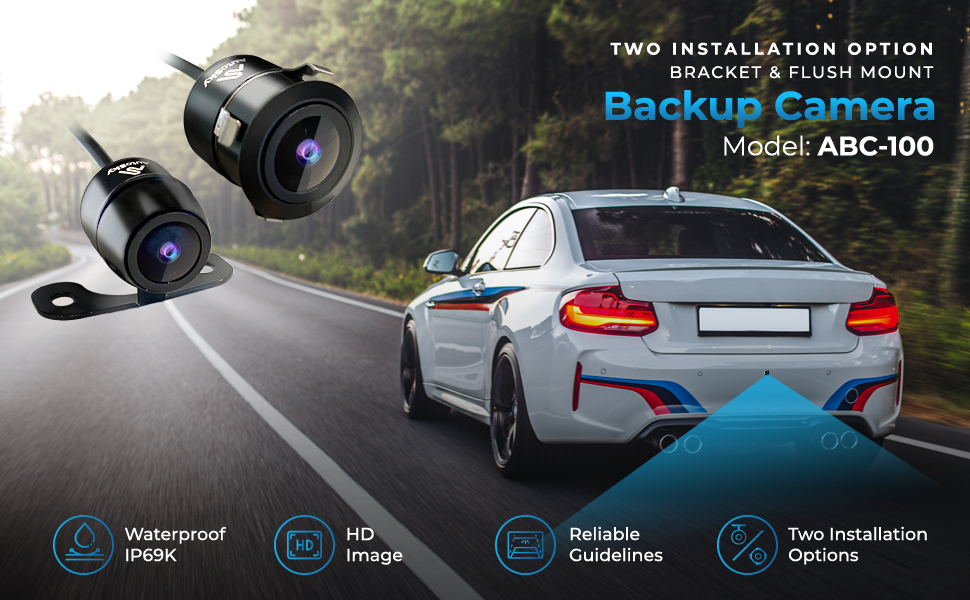
Figure 6: Overview of AutoSky Backup Camera features including HD image, waterproof design, and installation options.
Video 1: An informational video showcasing the features and benefits of AutoSky Backup Cameras, including safety aspects and different models.
4. Setup & Installation
4.1. Choosing an Installation Option
The AutoSky Reverse Backup Camera offers two primary installation methods:
- Flush Mounting: For a discreet, integrated look, requiring drilling a hole into the vehicle surface.
- Bracket Mounting: For external mounting, typically above the license plate or on a flat surface, using the provided bracket.

Figure 7: Visual representation of the two installation options: flush mount and bracket mount.
4.2. Wiring Diagram
Follow the wiring diagram carefully for proper connection. Ensure all connections are secure to prevent signal loss or power issues.
- Connect the red cable of your new AutoSky backup camera to the black cable.
- Connect the black wire of the backup lights to ground or to metal.
- Connect the red wire of the black cable to the positive (+) power of the backup lights.
- Connect one end of the video cable to your new AutoSky backup camera and the other to your car radio's reversing input.
- Connect the first red small trigger wire of the video cable to the positive power of the backup lights, so that it completes the circuit.
- Connect the other red trigger wire of the video cable to your car radio's reversing input.
Note: The color of wires can vary between vehicles. Always check the name tags or vehicle manual before connecting.

Figure 8: Comprehensive wiring diagram for the AutoSky Backup Camera installation.
4.3. Image Customization (Parking Lines & Mirror Image)
The camera features adjustable settings for parking guidelines and image mirroring. These adjustments are made by cutting specific wires on the camera cable:
- Green Wire: Cut this wire if you intend to use the camera at the front of your car, as it will reflect the image (mirror image).
- White Wire: Cut this wire if you do not want the parking guide lines to appear on the display.

Figure 9: Instructions for cutting the green and white wires to customize camera image settings.
5. Operating Instructions
Once properly installed, the AutoSky Reverse Backup Camera operates automatically when connected to your vehicle's reverse light circuit. When the vehicle is shifted into reverse, the camera will activate and display the rear view on your connected monitor.
- Rear View: When connected to the reverse lights, the camera automatically displays the rear view with parking lines (if enabled) when reversing.
- Front/Side View: If configured as a front or side camera (green wire cut for mirror image), it will require a separate power source or switch to activate manually, depending on your vehicle's setup.
- Parking Guidelines: The on-screen parking lines assist in judging distance and alignment. These can be removed by cutting the white wire during installation.
6. Maintenance
To ensure optimal performance and longevity of your AutoSky Reverse Backup Camera, follow these maintenance guidelines:
- Cleaning: Regularly clean the camera lens with a soft, damp cloth to remove dirt, dust, or water spots that may obstruct the view. Avoid abrasive cleaners.
- Connection Check: Periodically inspect all wiring connections to ensure they remain secure and free from corrosion.
- Weather Resistance: The camera is designed for all-weather use, with an IP69 waterproof rating and resistance to extreme temperatures. No special weather-related maintenance is typically required beyond regular cleaning.

Figure 10: The camera maintains performance across a wide range of temperatures, from -22°F to 158°F.
7. Troubleshooting
If you encounter issues with your AutoSky Reverse Backup Camera, refer to the following common problems and solutions:
| Problem | Possible Cause | Solution |
|---|---|---|
| No image on display | Loose or incorrect wiring connection; no power to camera/monitor; faulty camera/monitor. | Check all power and video connections (refer to Section 4.2). Ensure the monitor is powered on and set to the correct input. Test camera with another monitor if possible. |
| Image is distorted or unclear | Dirty camera lens; loose video connection; interference; low light conditions. | Clean the camera lens. Secure video cable connections. Check for sources of electrical interference. Ensure adequate lighting for night vision. |
| Parking lines not appearing | White wire was cut during installation. | If the white wire was cut, the parking lines are permanently disabled. If not, check camera settings or connections. |
| Image is mirrored (when used as rear camera) | Green wire was cut during installation. | If the green wire was cut, the mirror image function is enabled. If not, check camera settings or connections. |
If the problem persists after attempting these solutions, please contact AutoSky customer support.
8. Specifications
- Model: ABC-100
- Product Dimensions: 0.88 x 0.69 x 0.82 inches
- Item Weight: 10.5 ounces
- Compatible Devices: Monitor (with RCA input)
- Installation Type: Flush Mount and Butterfly Mount
- Voltage: 12 Volts
- Optical Sensor Technology: CMOS
- Lens Type: Wide Angle
- Real Angle of View: 170 Degrees
- Connector Type: RCA
- Optical Sensor Size: 1/3 inch
- Waterproof Rating: IP69
- Operating Temperature: -22°F to 158°F
9. Warranty & Support
AutoSky is a US-based company committed to providing high-quality products and customer satisfaction. While specific warranty details are not provided in this manual, AutoSky stands behind its products.
For any questions, concerns, or support needs regarding your AutoSky Reverse Backup Camera, please do not hesitate to reach out directly to our customer service team. We are here to help ensure you get the most out of your product.
You can also visit the AutoSky Store on Amazon for more information and products.
