
1. Introduction
Thank you for choosing the ZIPRO Colt Treadmill. This manual provides essential information for the safe and efficient operation, assembly, and maintenance of your new treadmill. Please read this manual thoroughly before first use and keep it for future reference.
The ZIPRO Colt is a foldable home treadmill designed for effective cardiovascular training. It features adjustable speed, multiple pre-defined programs, and a compact design for easy storage.
2. Important Safety Instructions
To reduce the risk of serious injury, read all instructions before using the ZIPRO Colt Treadmill. Keep these instructions in a safe place for future reference.
- Always place the treadmill on a level surface. Ensure adequate clear space (at least 2 meters behind and 0.6 meters on each side) for safe operation.
- Keep children and pets away from the treadmill during operation.
- Wear appropriate athletic footwear and clothing. Avoid loose clothing that could get caught in moving parts.
- Always attach the safety key clip to your clothing before starting the treadmill. In case of an emergency, the safety key will detach, stopping the machine.
- Do not operate the treadmill if it has a damaged cord or plug, if it is not working properly, or if it has been dropped or damaged.
- Consult a physician before starting any exercise program, especially if you have pre-existing health conditions.
- Do not exceed the maximum user weight of 110 kg (242 lbs).
- Ensure the treadmill is unplugged before cleaning or performing any maintenance.
3. Package Contents
Carefully unpack all components and verify that you have received the following items:
- 1 x ZIPRO Colt Foldable Treadmill unit
- User Manual (this document)
- Safety Key
- Assembly Tools (if required, typically included)
If any parts are missing or damaged, please contact customer support immediately.
4. Setup and Assembly
The ZIPRO Colt Treadmill features a Quick Fold system for easy setup and storage. Follow these steps to prepare your treadmill for use:
4.1 Unfolding the Treadmill
- Place the treadmill on a flat, stable surface.
- Gently lower the running deck from its folded position until it locks into place. Ensure the deck is fully flat and stable before proceeding.
- Adjust the console and handlebars to your desired position, if applicable, and secure them.

Image: The ZIPRO Colt Treadmill fully unfolded and ready for use. This shows the main unit with the running deck lowered and the console upright.

Image: Side view of the ZIPRO Colt Treadmill, illustrating its profile when fully assembled and ready for operation.
4.2 Connecting Power
Plug the power cord into a grounded electrical outlet. Ensure the power switch (usually located near the front of the treadmill) is in the "ON" position.
4.3 Attaching the Safety Key
The safety key is a crucial safety feature. Attach the clip end of the safety key to your clothing, and insert the magnetic end into the designated slot on the console. The treadmill will not operate without the safety key in place.

Image: Close-up of the treadmill console, showing the display, control buttons, and the red safety key attached to its slot.
5. Operating Instructions
Familiarize yourself with the control panel before beginning your workout.
5.1 Console Overview
Image: The main control console of the ZIPRO Colt Treadmill, featuring an LCD display and various control buttons.
The LCD display shows key workout metrics such as Speed, Distance, Time, Calories Burned, and Heart Rate (if applicable). The console also includes quick speed buttons and program selection.

Image: The treadmill console featuring a dedicated holder for mobile devices, allowing users to place a tablet or smartphone during workouts.
5.2 Starting a Workout
- Ensure the safety key is properly inserted.
- Press the START button. The belt will begin to move at a low speed.
- Gradually increase the speed using the SPEED + button on the console or handlebars.
- To stop, press the STOP button or pull the safety key.

Image: Close-up of the handlebar controls, showing buttons for adjusting speed during a workout.
5.3 Adjusting Speed and Incline
- Speed: Adjust speed from 0.8 to 12 km/h using the SPEED + / - buttons on the console or handlebars. Quick speed buttons (e.g., 2, 4, 6, 8, 10, 12 km/h) are also available on the console.
- Incline: The treadmill offers 3 levels of manual incline. To adjust the incline, you must stop the treadmill, manually adjust the incline mechanism located at the rear of the running deck, and then restart your workout.

Image: Detail of the treadmill's base, showing transport wheels and the manual incline adjustment mechanism.
5.4 Using Pre-defined Programs
The ZIPRO Colt Treadmill includes 12 pre-defined workout programs. Press the PROGRAM button to cycle through the available programs. Each program has varying speed and incline profiles to challenge your workout. Once a program is selected, press START to begin.
5.5 Media Features
The treadmill is equipped with integrated speakers and a mobile device holder. Connect your device to the treadmill's audio input (if available) or use the holder to enjoy music or videos during your workout.
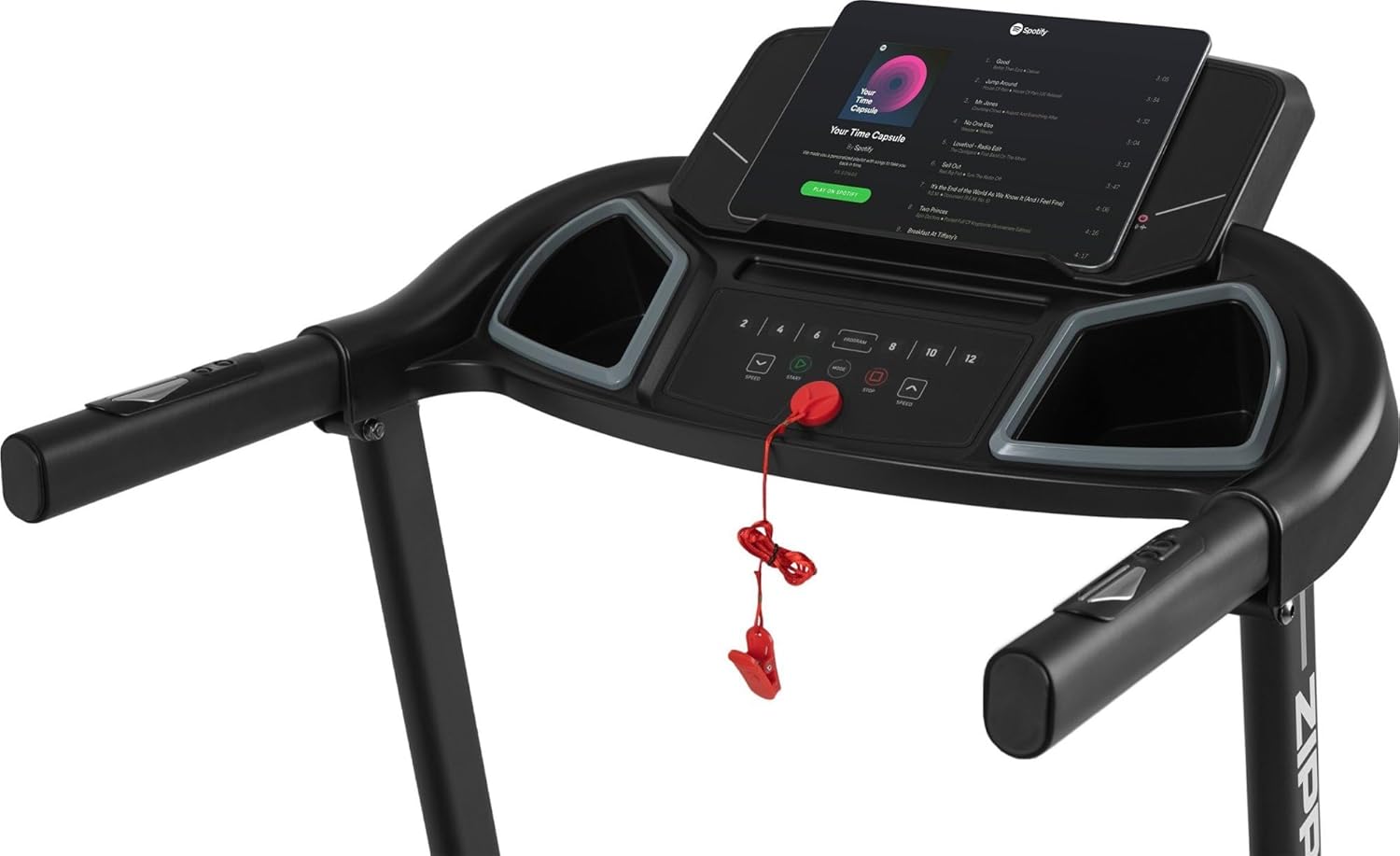
Image: The treadmill console with a tablet placed in the holder, displaying a music streaming application, demonstrating the media integration feature.
6. Maintenance
Regular maintenance ensures the longevity and optimal performance of your treadmill.
- Cleaning: Wipe down the treadmill after each use with a damp cloth to remove sweat and dust. Do not use abrasive cleaners or solvents.
- Lubrication: The running belt requires periodic lubrication to reduce friction. Refer to the specific instructions provided with your lubricant or contact customer support for guidance.
- Belt Adjustment: Over time, the running belt may become misaligned or loose. Consult the troubleshooting section or contact support for instructions on how to adjust belt tension and centering.
- Storage: When not in use, the treadmill can be folded for compact storage. Ensure it is unplugged before folding.

Image: The ZIPRO Colt Treadmill shown in its upright, folded position, demonstrating its compact storage capability.
7. Troubleshooting
If you encounter any issues with your ZIPRO Colt Treadmill, refer to the following common problems and solutions:
| Problem | Possible Cause | Solution |
|---|---|---|
| Treadmill does not start | Power cord unplugged, safety key not inserted, power switch off. | Check power connection, ensure safety key is fully inserted, turn power switch ON. |
| Running belt slips or hesitates | Belt too loose, belt needs lubrication, motor overload. | Adjust belt tension, lubricate the belt, reduce user weight or speed. |
| Unusual noise during operation | Loose components, belt misalignment, motor issue. | Inspect for loose bolts, adjust belt centering, contact customer support if noise persists. |
| Display not working | Loose cable connection, power issue. | Check all cable connections to the console, ensure stable power supply. |
If the problem persists after attempting these solutions, please contact ZIPRO customer support.
8. Specifications
Detailed technical specifications for the ZIPRO Colt Treadmill:
- Model: Colt
- Model Number: 11709309
- Dimensions (Unfolded): 150 cm (L) x 70 cm (W) x 121 cm (H)
- Dimensions (Folded): 82 cm (L) x 69.5 cm (W) x 121 cm (H)
- Weight: 38.8 kg
- Maximum User Weight: 110 kg
- Speed Range: 0.8 - 12 km/h
- Incline Levels: 3 (Manual)
- Motor Horsepower: 1 HP
- Programs: 12 Pre-defined
- Display Type: LCD (shows Distance, Heart Rate/Calories Burned, Time, Speed)
- Special Features: Easy Run cushioning system, Quick Fold mechanism, Integrated speakers, Mobile device holder.
- Frame Material: Aluminum
- Main Material: Polyethylene (PE)
9. Warranty and Support
ZIPRO products are designed for durability and performance. For warranty information, please refer to the documentation included with your purchase or visit the official ZIPRO website.
For technical assistance, spare parts, or any questions regarding your ZIPRO Colt Treadmill, please contact ZIPRO customer support:
- Website: www.zipro.pl (or relevant regional website)
- Email: Refer to your purchase documentation
- Phone: Refer to your purchase documentation
When contacting support, please have your model number (11709309) and purchase date available.
