
Philips Walita RI9252/91
Philips Walita Airfryer Digital 3000 Series User Manual
Model: RI9252/91
Introduction
This manual provides comprehensive instructions for the safe and efficient use of your Philips Walita Airfryer Digital 3000 Series. Please read this manual thoroughly before first use and retain it for future reference. This appliance is designed to prepare healthy and delicious meals with significantly less oil.
Important Safety Information
Always follow basic safety precautions when using electrical appliances to reduce the risk of fire, electric shock, and injury to persons.
- Do not immerse the appliance, cord, or plug in water or other liquid.
- Ensure the voltage indicated on the appliance corresponds to your local mains voltage before you connect the appliance.
- Do not use the appliance if the plug, the mains cord, or the appliance itself is damaged.
- Keep the appliance and its cord out of reach of children.
- Do not let the mains cord hang over the edge of a table or worktop.
- Do not place the appliance against a wall or against other appliances. Leave at least 10 cm free space on the back and sides and 10 cm free space above the appliance.
- Always unplug the appliance after use and before cleaning.
- The surfaces may become hot during use. Do not touch hot surfaces. Use handles or knobs.
Product Overview
The Philips Walita Airfryer Digital 3000 Series is designed for convenient and healthy cooking. It features a digital display for easy control and a removable basket for simple food handling.

Figure 1: Front view of the Philips Walita Airfryer Digital 3000 Series with the food basket partially extended, showing cooked fries inside.

Figure 2: Close-up front view of the airfryer, highlighting the digital display with temperature and various cooking icons.
Key Components:
- Digital Control Panel: Touch-sensitive display for setting temperature, time, and selecting presets.
- Food Basket: Removable non-stick basket for holding food during cooking.
- Pan: Collects oil and food particles, holds the food basket.
- Handle: For safely pulling out the pan and basket.
- Air Inlet/Outlet: For proper air circulation during operation.
Setup
- Unpacking: Carefully remove all packaging materials from the appliance.
- Initial Cleaning: Before first use, clean the food basket and pan with hot water, dish soap, and a non-abrasive sponge. Wipe the inside and outside of the appliance with a damp cloth.
- Placement: Place the airfryer on a stable, horizontal, and level surface. Ensure there is at least 10 cm of free space around the appliance for proper ventilation.
- Power Connection: Plug the power cord into a grounded wall outlet. Ensure the voltage matches the appliance's specifications (127V for this model).
Operating Instructions
Basic Operation:
- Prepare Food: Place the ingredients into the food basket. Do not exceed the MAX indication.
- Insert Basket: Slide the food basket and pan back into the airfryer until it clicks into place.
- Power On: The digital display will illuminate.
- Set Temperature: Use the temperature control arrows (up/down) to set the desired cooking temperature between 80°C and 200°C.
- Set Time: Use the timer control arrows (up/down) to set the desired cooking time, up to 30 minutes.
- Start Cooking: Press the start button to begin the cooking process. The airfryer will automatically shut off when the timer reaches zero.
- Check Food: Periodically pull out the pan to shake or turn ingredients for even cooking. The airfryer will pause and resume when the pan is reinserted.
Using Pre-set Programs:
The airfryer comes with 7 pre-defined programs for common dishes, simplifying your cooking process.

Figure 3: The digital display showing the touch-sensitive controls and icons for the 7 pre-set cooking programs.
Simply touch the corresponding icon on the digital display to select a program. These programs include settings for:
- Frozen snacks
- Fresh fries
- Meat
- Fish
- Chicken drumsticks
- Cake
- Grilled vegetables
Patented Starfish Technology:
Your Philips Walita Airfryer features unique Starfish Technology, which ensures optimal hot air circulation for fast and uniform cooking. This technology allows food to be crispy on the outside and tender on the inside, with up to 90% less fat compared to traditional deep frying.

Figure 4: Illustration of the patented Starfish Technology inside the airfryer, demonstrating the rapid and even hot air circulation.
Capacity Guidelines:
The airfryer has a total capacity of 4.1 liters, with a useful capacity of 2.6 liters (approximately 0.8 kg of food). This size is ideal for preparing meals for 1 to 3 people.

Figure 5: The airfryer displayed with visual indicators for its total and useful cooking capacities.
NutriU App for Recipes:
For culinary inspiration, download the NutriU App. It offers over 200 recipes specifically designed for your Philips Walita Airfryer, helping you explore a wide range of dishes.

Figure 6: A smartphone screen showing the NutriU application, which provides various recipes compatible with the airfryer.
Maintenance and Cleaning
Regular cleaning of your airfryer ensures optimal performance and extends its lifespan. The removable parts are designed for easy cleaning.
- Unplug and Cool: Always unplug the airfryer and allow it to cool down completely before cleaning.
- Clean Pan and Basket: The food basket and pan are non-stick and dishwasher-safe. Alternatively, wash them with hot water, dish soap, and a non-abrasive sponge.
- Clean Interior: Wipe the interior of the appliance with a damp cloth and mild detergent. Do not use abrasive cleaning materials.
- Clean Exterior: Wipe the exterior of the airfryer with a damp cloth.
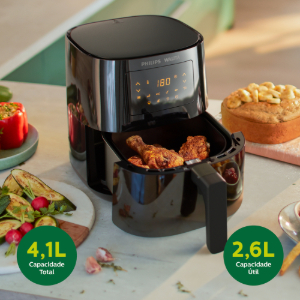
Figure 7: The removable airfryer basket being placed into a dishwasher, demonstrating its dishwasher-safe feature for easy cleaning.
Troubleshooting
| Problem | Possible Cause | Solution |
|---|---|---|
| The airfryer does not work. | The appliance is not plugged in. | Plug the mains plug into a grounded wall socket. |
| Food is not cooked evenly. | Too much food in the basket; food not shaken/turned. | Reduce food quantity; shake or turn food halfway through cooking. |
| White smoke comes out of the appliance. | Greasy residues from previous use; oil/fat dripping onto heating element. | Clean the pan and basket thoroughly after each use. Remove excess oil from food before air frying. |
| Fresh fries are not crispy. | Not enough oil used; incorrect potato type; not dried properly. | Add a little oil; use fresh potatoes suitable for frying; dry potato sticks thoroughly before adding oil. |
Specifications
- Model: RI9252/91
- Brand: Philips Walita
- Power: 1400 Watts
- Voltage: 127V (for this variant)
- Total Capacity: 4.1 Liters
- Useful Capacity: 2.6 Liters (approx. 0.8 kg)
- Temperature Range: 80°C - 200°C
- Timer: Up to 30 minutes with automatic shut-off
- Material: Plastic
- Dimensions (LxWxH): 35.5 x 35.5 x 38.5 cm
- Weight: 4.56 kg
Warranty and Support
This Philips Walita Airfryer Digital 3000 Series comes with a two-year international warranty, covering manufacturing defects and malfunctions under normal use. Please retain your proof of purchase for warranty claims.
For technical support, troubleshooting beyond this manual, or warranty service, please contact Philips Walita customer support in your region. Refer to the product packaging or the official Philips Walita website for specific contact details.
Related documentsRI9252/91


Ask a question about this manual
Ask about setup, troubleshooting, compatibility, parts, safety, or missing instructions. Manuals+ will review the question and use this page’s manual context to help answer it.