
Autel Autel Ikey Standard
Autel Universal 7-Button Smart Key User Manual
Model: Autel Ikey Standard
1. Introduction
This manual provides comprehensive instructions for the proper use, setup, and maintenance of your Autel Universal 7-Button Smart Key. This OE-quality, multi-frequency (315M/433M) programmable smart key is designed as a replacement key fob for a wide range of vehicles. It requires programming using compatible Autel tools, such as the KM100 tablet.

Image 1.1: The Autel Universal 7-Button Smart Key, showcasing its design and button layout.
2. Safety Information
- Keep the smart key away from water and extreme temperatures.
- Do not attempt to disassemble the smart key beyond battery replacement, as this may void the warranty and damage the device.
- Ensure proper battery polarity when installing or replacing the battery.
- Programming of this smart key requires specialized Autel tools. Attempting to program with incompatible devices may result in damage to the key or the vehicle's immobilizer system.
- Store the smart key in a safe place to prevent loss or theft.
3. Product Overview
The Autel Universal 7-Button Smart Key is engineered for reliability and broad compatibility. Key features include:
- OE-Quality Construction: Designed to meet original equipment standards.
- Multi-Frequency Support: Operates on 315M/433M frequencies.
- 7-Button Configuration: Provides comprehensive control for various vehicle functions.
- Extended Remote Range: Supports ultra-long range frequency transmission up to 40 meters (130 feet).
- KM100 Compatibility: Exclusively programmable with Autel KM100 and other compatible Autel tools.
- Wide Vehicle Coverage: Compatible with over 700 vehicle models (check specific compatibility before purchase).
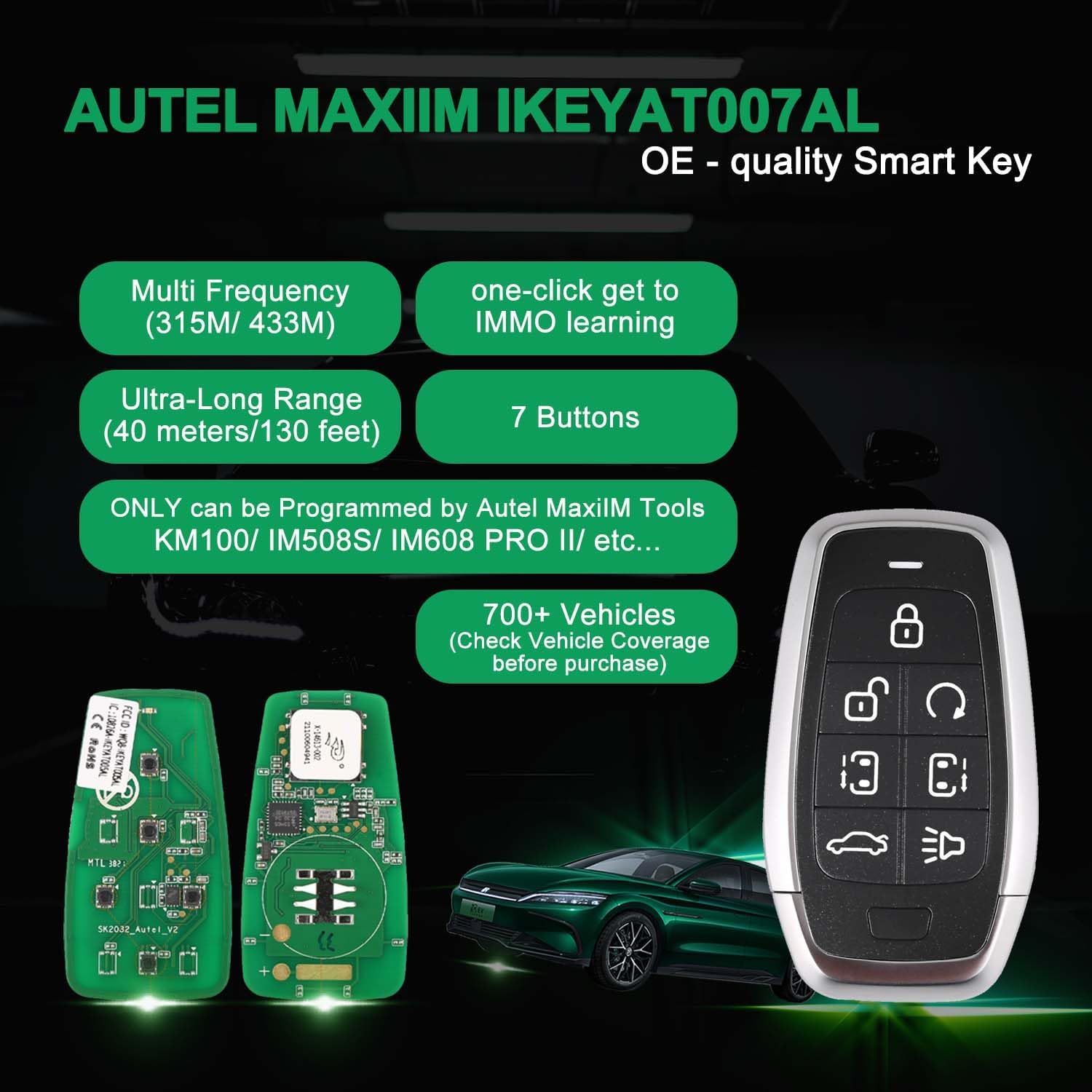
Image 3.1: An overview of the Autel Smart Key's key features, including multi-frequency, ultra-long range, and 7-button design.
3.1. Package Contents
The Autel Universal 7-Button Smart Key package typically includes:
- Smart Key Shell
- Circuit Board
Note: The CR2032 battery and emergency key blade are not included and must be purchased separately.

Image 3.2: Illustration showing the included smart key shell and circuit board, and the separately purchased battery and key blade.
4. Setup
4.1. Battery Installation (CR2032)
- Carefully open the smart key shell to expose the circuit board.
- Locate the battery compartment on the circuit board.
- Insert a new CR2032 battery, ensuring the positive (+) side faces upwards.
- Close the smart key shell securely.

Image 4.1: A detailed view of the smart key's circuit board, highlighting the battery socket for CR2032 installation.
4.2. Emergency Key Blade Installation
If your vehicle requires an emergency key blade, insert the cut blade into the designated slot within the smart key shell before fully assembling.
4.3. Programming the Smart Key
The Autel Universal 7-Button Smart Key must be programmed to your vehicle using an Autel KM100 tablet or other compatible Autel key programming tools. This process typically involves:
- Connect the Autel KM100 to your vehicle's OBD-II port.
- Place the Autel smart key into the KM100's key slot.
- Follow the on-screen instructions on the KM100 tablet to generate and match the remote key to your vehicle's immobilizer system.
- The programming process can take as little as one minute.
Important: Autel smart keys can only be programmed by Autel tools. Consult your Autel tool's manual for detailed programming steps specific to your vehicle model.

Image 4.2: The Autel smart key being inserted into an Autel KM100 device for programming, illustrating the key generation process.

Image 4.3: A diagram illustrating the complete key making process, from remote generation and battery installation to key blade cutting and vehicle matching.
5. Operating Instructions
Once programmed, your Autel Universal 7-Button Smart Key functions like your original vehicle key fob. The buttons typically control the following functions:
- Lock: Locks all vehicle doors.
- Unlock: Unlocks all vehicle doors.
- Trunk: Opens the vehicle's trunk or tailgate.
- Panic: Activates the vehicle's alarm system.
- Remote Start: Starts the vehicle remotely (if equipped and programmed).
- Sliding Door: Operates power sliding doors (if equipped and programmed).
- Auxiliary Function: The seventh button may control an additional function depending on vehicle make and model.
5.1. Remote Range
The smart key supports an ultra-long range frequency transmission of up to 40 meters (130 feet), allowing you to lock, unlock, and perform other functions from a significant distance.

Image 5.1: A visual representation of the smart key's 40-meter (130-foot) remote frequency transmission range to a vehicle.
6. Maintenance
6.1. Battery Replacement
When the smart key's range decreases or it becomes unresponsive, the CR2032 battery may need replacement. Follow the steps in Section 4.1 to replace the battery.
6.2. Care and Cleaning
- Wipe the smart key with a soft, dry cloth to remove dust and dirt.
- Avoid using harsh chemicals or abrasive cleaners.
- Do not expose the smart key to direct sunlight for extended periods or to excessive moisture.
7. Troubleshooting
- Key not responding: Check the battery. Ensure it is correctly installed and has sufficient charge. Re-attempt programming if necessary.
- Reduced remote range: Replace the CR2032 battery. Ensure there are no obstructions between the key and the vehicle.
- Vehicle not recognizing key: The key may need to be re-programmed. Ensure your Autel programming tool is up-to-date.
- Compatibility issues: Verify that your vehicle model is supported by the Autel Ikey Standard. Contact Autel support for specific vehicle compatibility inquiries.
For further assistance, please contact Autel support at mbdh2022@outlook.com.
8. Specifications
| Feature | Specification |
|---|---|
| Model Name | Autel Ikey Standard |
| OEM Part Number | AU6CL004AL |
| UPC | 792499186678 |
| Item Weight | 1.44 ounces |
| Package Dimensions | 3.62 x 2.05 x 0.98 inches |
| Manufacturer Part Number | Autel Ikey Standard |
| Color | black, silver |
| Material | Durable Plastic (e.g. ABS or TPU) |
| Brand | Autel |
| Vehicle Service Type | Car |
| Number of Buttons | 7 |
| Frequency | 315M/433M |
| Remote Range | Up to 40 meters (130 feet) |
| Battery Type | CR2032 (not included) |
9. Warranty and Support
For any questions, technical support, or warranty inquiries regarding your Autel Universal 7-Button Smart Key, please contact Autel directly at mbdh2022@outlook.com. Specific warranty terms and conditions may apply and are available upon request from Autel.
Ask a question about this manual
Ask about setup, troubleshooting, compatibility, parts, safety, or missing instructions. Manuals+ will review the question and use this page’s manual context to help answer it.