
1. Introduction
Welcome to the MESTEK EMF01 Electromagnetic Radiation Detector user manual. This device is designed to accurately measure electromagnetic fields (EMF) and ambient temperature, providing essential information for various environments. It helps identify potential sources of electromagnetic radiation in your surroundings.
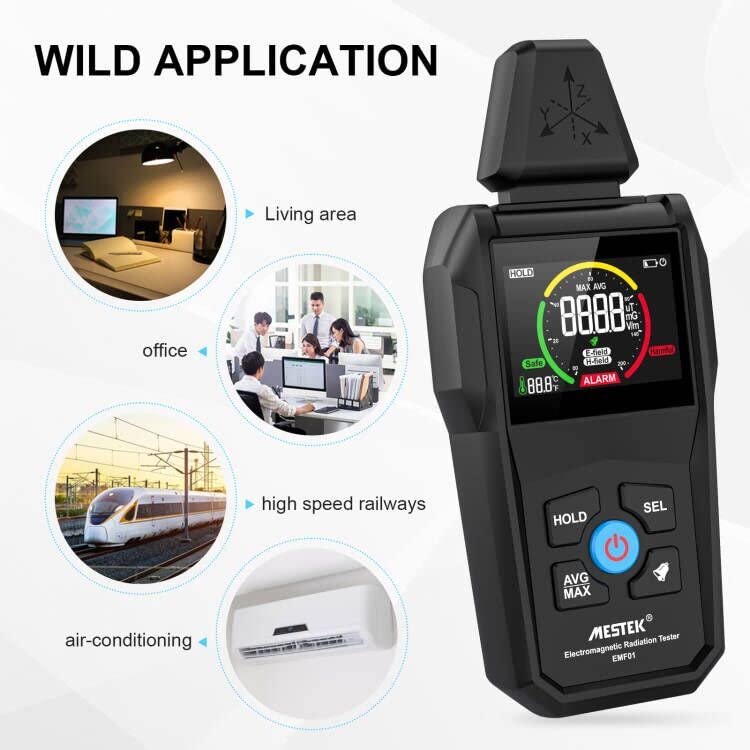
Image showing the MESTEK EMF01 detector in various application settings such as a living area, office, near high-speed railways, and air conditioning units, illustrating its versatile use.
The MESTEK EMF01 is suitable for use in homes, offices, and industrial settings to monitor electromagnetic radiation from common appliances and equipment. Please note that this device does not measure high-frequency (RF) radiation.
2. Safety Information
- This device measures electromagnetic fields and temperature. It does not measure high-frequency (RF) radiation.
- Do not attempt to open or modify the device. Unauthorized modifications may void the warranty and pose safety risks.
- Keep the device away from water, excessive moisture, and extreme temperatures.
- Use only specified AAA batteries. Ensure correct polarity during installation.
- Dispose of depleted batteries and the device according to local environmental regulations.
3. Product Overview
3.1. Components

Diagram of the MESTEK EMF01 Electromagnetic Radiation Detector with labels pointing to its key components: electromagnetic induction probe, screen, function conversion button, data hold button, power button, average/maximum value lock conversion button, and buzzer on/off button. Dimensions are also indicated.
The MESTEK EMF01 features an electromagnetic induction probe, a color LCD screen, and intuitive control buttons for various functions, all housed in a durable casing.
3.2. Display Features

Close-up of the MESTEK EMF01 detector's color LCD screen, showing a large digital reading for electromagnetic field strength, an analog bar graph indicating 'Safe' to 'Harmful' levels, and a temperature display. It highlights the visual alerts for signal strength and the clear indication of testing values for E-field, H-field, and ambient temperature.
The large color LCD provides clear readings for electromagnetic field strength (E-field and H-field) and ambient temperature. An analog bar graph visually indicates radiation levels from safe (green) to harmful (red).

Image displaying the MESTEK EMF01 detector alongside a list of its main features: Bandwidth 5-3500MHz, Data retention, Average test, Maximum test record, Automatic alarm function, Automatic shutdown after 10 minutes, and Ambient temperature measurement (℉/℃).
Key features include a wide bandwidth (5-3500MHz), data retention, average and maximum value testing, automatic alarm, and automatic shutdown after 10 minutes of inactivity.
4. Setup
4.1. Package Contents

Image showing the MESTEK EMF01 Electromagnetic Radiation Detector, its user manual, a small screwdriver, three AAA batteries, and a grey storage bag, representing the complete package contents.
Before first use, please verify that all the following items are included in your package:
- MESTEK EMF01 Detector
- User Manual
- Screwdriver
- 3 x AAA Batteries
- Storage Bag
4.2. Battery Installation
The device requires 3 AAA batteries for operation. Follow these steps to install them:
- Locate the battery compartment on the back of the device.
- Use the provided screwdriver to open the battery cover.
- Insert 3 AAA batteries, ensuring correct polarity (+ and - symbols).
- Close the battery cover and secure it with the screw.
5. Operating Instructions
5.1. Power On/Off
Press the Power button (typically a red circle with a line symbol) to turn the device on or off. The device will automatically shut down after 10 minutes of inactivity to conserve battery life.
5.2. Taking Measurements
Once powered on, the device will immediately begin detecting electromagnetic fields and displaying the ambient temperature. The display shows both electric field (E-field in V/m) and magnetic field (H-field in µT/mG) readings.

Three images demonstrating the MESTEK EMF01 detector's analog display with color indications. The first shows a 'Low' reading (green), the second a 'Moderate' reading (yellow), and the third a 'High' reading (red), illustrating how the device visually communicates radiation levels.
The analog bar graph changes color to indicate radiation levels: green for low, yellow for moderate, and red for high, providing a quick visual assessment.
5.3. Unit Switching
To switch between temperature units (Celsius ℃ and Fahrenheit ℉), press the SEL button. To switch between magnetic field units (µT and mG), press the SEL button.
5.4. Data Hold Function
Press the HOLD button to freeze the current readings on the screen. This is useful for recording specific measurements. Press it again to release the hold and resume live measurements.
5.5. Average and Maximum Value Display
Press the AVG/MAX button to cycle through current, average, and maximum measured values. This allows you to review peak radiation levels detected over a period.
5.6. Alarm Function

Image depicting the MESTEK EMF01 detector in use near a computer, with a visual representation of sound and light alarms. The screen shows 'Harmful' and an alarm icon, indicating that the device alerts the user when radiation levels exceed safe thresholds (e.g., >40V/m).
The device features an automatic alarm. If the electromagnetic intensity exceeds 4.0 mG / 0.4 µT or the electric field exceeds 40 V/m, the screen will display "Alarm" and "Harmful," and the buzzer will sound.
To mute the buzzer, press the Buzzer On/Off button (bell icon). This allows for silent testing when an audible alert is not desired.

A person in a meditative pose, with the MESTEK EMF01 detector in the foreground, illustrating the device's user-friendly design and mute function, which is beneficial for sensitive individuals.
6. Maintenance
- Clean the device with a soft, dry cloth. Do not use abrasive cleaners, solvents, or corrosive chemicals.
- Store the device in its storage bag in a cool, dry place, away from direct sunlight and extreme temperatures, when not in use.
- Remove batteries if the device will not be used for an extended period to prevent potential battery leakage and damage.
- Avoid dropping the device or subjecting it to strong impacts, which could damage internal components.
7. Troubleshooting
- Device does not power on: Check battery installation and ensure batteries are not depleted. Replace with fresh AAA batteries if necessary.
- Inaccurate or erratic readings: Ensure the device is not near strong magnetic fields or other sources of electromagnetic interference that could affect its operation. Move to a different location and retest.
- No alarm sound: Check if the buzzer is muted. Press the Buzzer On/Off button (bell icon) to activate it.
- Screen is blank or flickering: Low battery may be the cause. Replace batteries. If the issue persists after replacing batteries, contact customer support.
8. Specifications
| Model | EMF01 |
| Brand | MESTEK |
| Detection Range | Magnetic Field (H-field) and Electric Field (E-field) |
| Magnetic Field Units | mG / µT |
| Electric Field Units | V/m |
| Temperature Units | ℃ / ℉ |
| Bandwidth | 5-3500MHz |
| Alarm Threshold (Magnetic) | > 4.0 mG / 0.4 µT |
| Alarm Threshold (Electric) | > 40 V/m |
| Power Source | 3 x AAA Batteries (included) |
| Automatic Shutdown | After 10 minutes of inactivity |
| Dimensions (L x W x H) | 7.37 x 3.3 x 17.02 cm |
| Weight | 199.58 grams |
| Note | Does not measure high-frequency (RF) radiation. |
9. Warranty and Support
MESTEK provides a 24-month warranty for this product, covering manufacturing defects and malfunctions under normal use. For technical support, warranty claims, or any inquiries regarding your EMF01 detector, please contact MESTEK customer service.
Please refer to the contact information provided in your product packaging or visit the official MESTEK website for the most up-to-date support details and assistance.