
United LED24HS82A11
UNITED LED24HS82A11 24-inch HD Ready Smart Android TV User Manual
Model: LED24HS82A11
Introduction
This user manual provides comprehensive instructions for the setup, operation, maintenance, and troubleshooting of your UNITED LED24HS82A11 24-inch HD Ready Smart Android TV. Please read this manual thoroughly before using your television to ensure proper and safe operation.
The UNITED LED24HS82A11 is a versatile 24-inch HD Ready Smart TV powered by Android 11, offering a wide range of entertainment options. It features pre-installed applications, built-in Chromecast and Airplay for seamless content streaming, and full internet connectivity via Wi-Fi and Ethernet. It also supports DVB/T2/S2/C, MPEG-4, and HEVC Main 10 for various broadcasting standards.
Safety Information
Always observe the following safety precautions to prevent fire, electric shock, or injury:
- Do not expose the TV to rain or moisture.
- Do not block ventilation openings.
- Ensure the power cord is not pinched or walked on.
- Unplug the TV during lightning storms or when unused for long periods.
- Refer all servicing to qualified service personnel.
Setup
1. Unpacking and Stand Installation
Carefully remove the TV and all accessories from the packaging. Place the TV face down on a soft, clean surface to prevent screen damage.
Attach the two stand feet to the bottom of the TV using the provided screws. Ensure they are securely fastened.

Figure 1: Side view of the UNITED LED24HS82A11 TV, illustrating its slim profile and potential port locations.
2. Connecting Cables
- Power: Connect the power cord to the TV's power input and then to a wall outlet.
- Antenna/Cable: Connect your antenna or cable TV coaxial cable to the "RF In" port.
- HDMI Devices: Connect external devices like Blu-ray players, game consoles, or set-top boxes to the HDMI ports.
- Ethernet (Optional): For a wired internet connection, connect an Ethernet cable from your router to the TV's LAN port.
3. Initial Setup Wizard
Once powered on, the TV will guide you through the initial setup process. Follow the on-screen prompts to:
- Select your preferred language.
- Connect to your Wi-Fi network (if not using Ethernet).
- Sign in with your Google account (optional, but recommended for full Smart TV features).
- Scan for available TV channels (Antenna/Cable).
Operating
Remote Control Overview
Familiarize yourself with the buttons on the remote control for easy navigation and control of your TV's functions.
Basic TV Functions
- Power On/Off: Press the power button on the remote or TV.
- Volume Control: Use the Volume Up/Down buttons.
- Channel Selection: Use the Channel Up/Down buttons or number pad.
- Input Source: Press the "Source" or "Input" button to switch between HDMI, TV, and other inputs.
Smart TV Features (Android 11)
Your TV runs on Android 11, providing access to a vast ecosystem of apps and services.

Figure 2: The UNITED LED24HS82A11 TV showcasing its Android TV home screen, featuring popular streaming applications like YouTube, Prime Video, and Netflix.
- Home Screen: Navigate the home screen to access pre-installed apps (Netflix, YouTube, Prime Video), recommended content, and settings.
- Google Play Store: Download additional apps, games, and content from the Google Play Store.
- Chromecast Built-in: Cast content directly from your compatible smartphone, tablet, or computer to the TV. Look for the Cast icon in supported apps.
- Airplay: For Apple devices, use Airplay to stream videos, photos, and music from your iPhone, iPad, or Mac to the TV.
- Internet Connectivity:
- Wi-Fi: Go to Settings > Network & Internet to connect to your wireless network.
- Ethernet: If an Ethernet cable is connected, the TV will automatically use the wired connection.
Maintenance
Cleaning the TV
- Always unplug the TV before cleaning.
- Use a soft, lint-free cloth to gently wipe the screen. For stubborn marks, dampen the cloth slightly with water or a screen cleaner specifically designed for electronics.
- Wipe the TV casing with a soft, dry cloth. Avoid using abrasive cleaners or solvents.
Software Updates
Your TV may receive software updates to improve performance and add new features. You can check for updates via Settings > Device Preferences > About > System update.
Troubleshooting
If you encounter issues with your TV, refer to the following common problems and solutions:
| Problem | Possible Cause / Solution |
|---|---|
| No Power | Check if the power cord is securely plugged into the TV and the wall outlet. Try a different outlet. |
| No Picture / No Sound | Ensure the correct input source is selected (e.g., HDMI 1, TV). Check cable connections. For TV channels, perform a channel scan. |
| Cannot Connect to Wi-Fi | Verify your Wi-Fi password. Restart your router and the TV. Ensure the TV is within range of your Wi-Fi signal. |
| Remote Control Not Working | Check and replace the batteries. Ensure there are no obstructions between the remote and the TV's IR sensor. |
| Apps Not Loading / Slow Performance | Check your internet connection speed. Clear app cache (Settings > Apps > [App Name] > Clear cache). Restart the TV. |
Specifications
Below are the technical specifications for the UNITED LED24HS82A11 TV:
| Feature | Specification |
|---|---|
| Brand | United |
| Model Number | LED24HS82A11 |
| Screen Size | 24 Inches |
| Display Technology | LED |
| Resolution | 768p (1366 x 768 pixels) |
| Refresh Rate | 60 Hz |
| Operating System | Android 11 |
| Connectivity | Wi-Fi, Ethernet, HDMI, RF, USB |
| Special Features | Flat Screen, Chromecast Built-in, Airplay, Pre-installed Apps (Netflix, YouTube, Prime Video) |
| Aspect Ratio | 16:9 |
| Product Dimensions (L x W x H) | 12D x 60.5W x 43.2H centimeters |
| Included Components | 1 mini AV adapter cable, 1 remote control with 2 AAA 1.5V batteries |
| Energy Efficiency Class | F |
| Power Consumption (SDR) | 21.0 W |
| Power Consumption (HDR) | 21.0 W |
| Power Consumption (Stand-by) | 0.3 W |

Figure 3: The energy efficiency label for the UNITED LED24HS82A11 TV, indicating an 'F' energy class rating and 21 kWh per 1000 hours of operation.
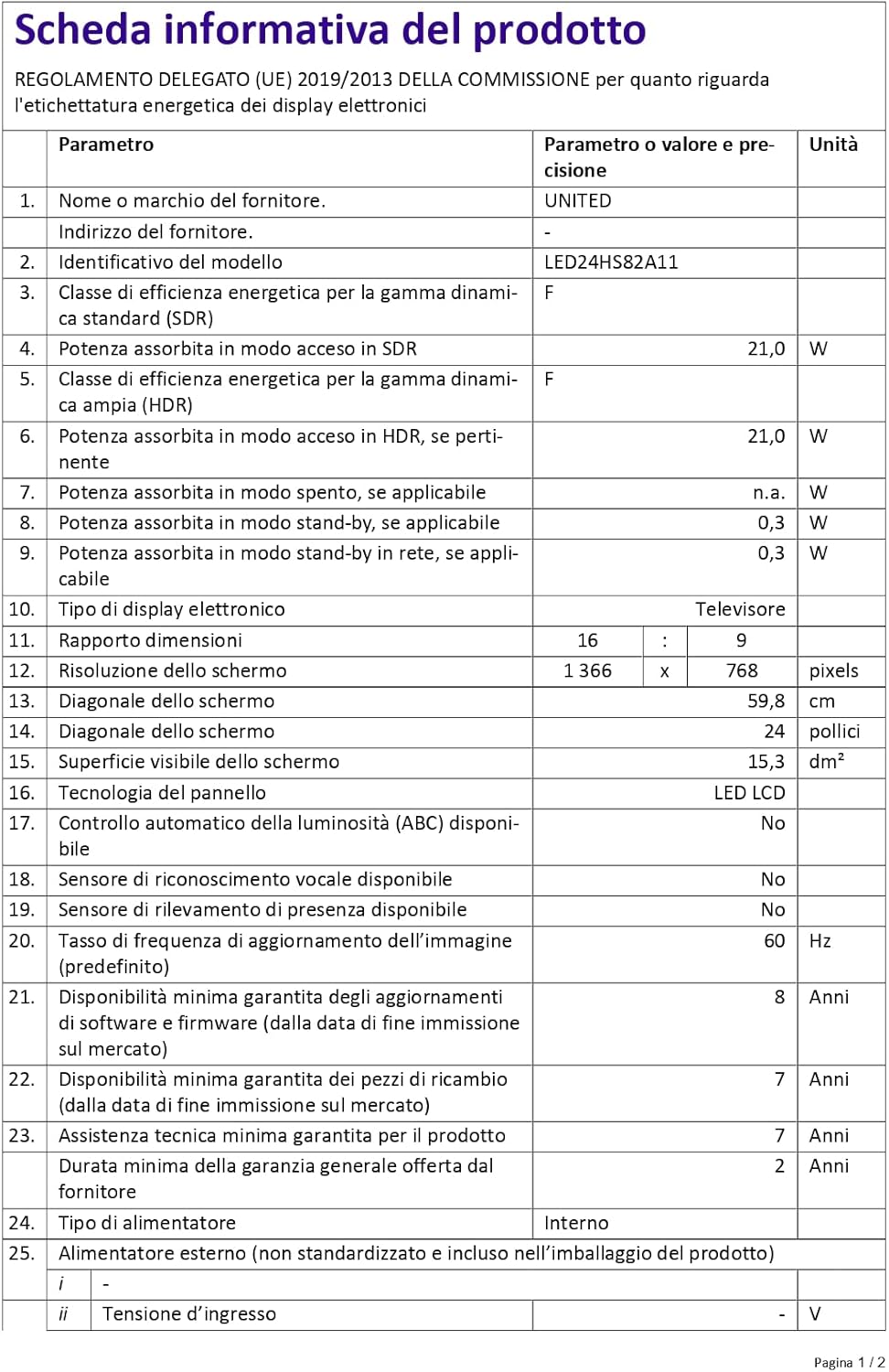
Figure 4: A detailed product information sheet for the UNITED LED24HS82A11 TV, providing comprehensive technical specifications and compliance details.
For more detailed information, please refer to the official EPREL database: https://eprel.ec.europa.eu/qr/1087921
Warranty and Support
Your UNITED LED24HS82A11 TV comes with the following support and warranty provisions:
- Minimum General Warranty: 2 Years
- Technical Assistance Availability: 7 Years
- Software Updates Guaranteed Until: 8 Years from market placement date
- Spare Parts Availability: 7 Years from market placement date
For technical support or warranty claims, please contact your retailer or the manufacturer's authorized service center. Keep your proof of purchase for warranty validation.
Related documentsLED24HS82A11


Ask a question about this manual
Ask about setup, troubleshooting, compatibility, parts, safety, or missing instructions. Manuals+ will review the question and use this page’s manual context to help answer it.