
1. Introduction
Thank you for choosing the Pinell Supersound 001. This compact and versatile radio offers a superior audio experience with its integrated equalizer, allowing you to customize the sound to your preference. The Supersound 001 supports DAB+ and FM radio reception, as well as audio streaming via Bluetooth 5.0 from your mobile devices. Designed for flexibility, it can be powered by either an AC adapter or batteries, making it suitable for both home and portable use.
2. Safety Information
- Power Source: Use only the specified power adapter. Ensure the voltage matches the requirements of your region.
- Battery Use: If using batteries, ensure they are inserted with correct polarity. Do not mix old and new batteries, or different types of batteries. Remove batteries if the unit will not be used for an extended period.
- Water and Moisture: Do not expose the unit to rain, moisture, or dripping/splashing liquids. Keep away from objects filled with liquids, such as vases.
- Heat: Do not place the unit near heat sources such as radiators, heat registers, stoves, or other apparatus (including amplifiers) that produce heat.
- Ventilation: Ensure adequate ventilation. Do not block any ventilation openings.
- Cleaning: Disconnect from power before cleaning. Use a soft, dry cloth. Do not use liquid cleaners or aerosol cleaners.
- Servicing: Do not attempt to service this product yourself. Refer all servicing to qualified service personnel.
3. Package Contents
Please check that all items are present:
- Pinell Supersound 001 Radio
- Power Adapter
- User Manual
4. Product Overview
Familiarize yourself with the controls and display of your Pinell Supersound 001 radio.
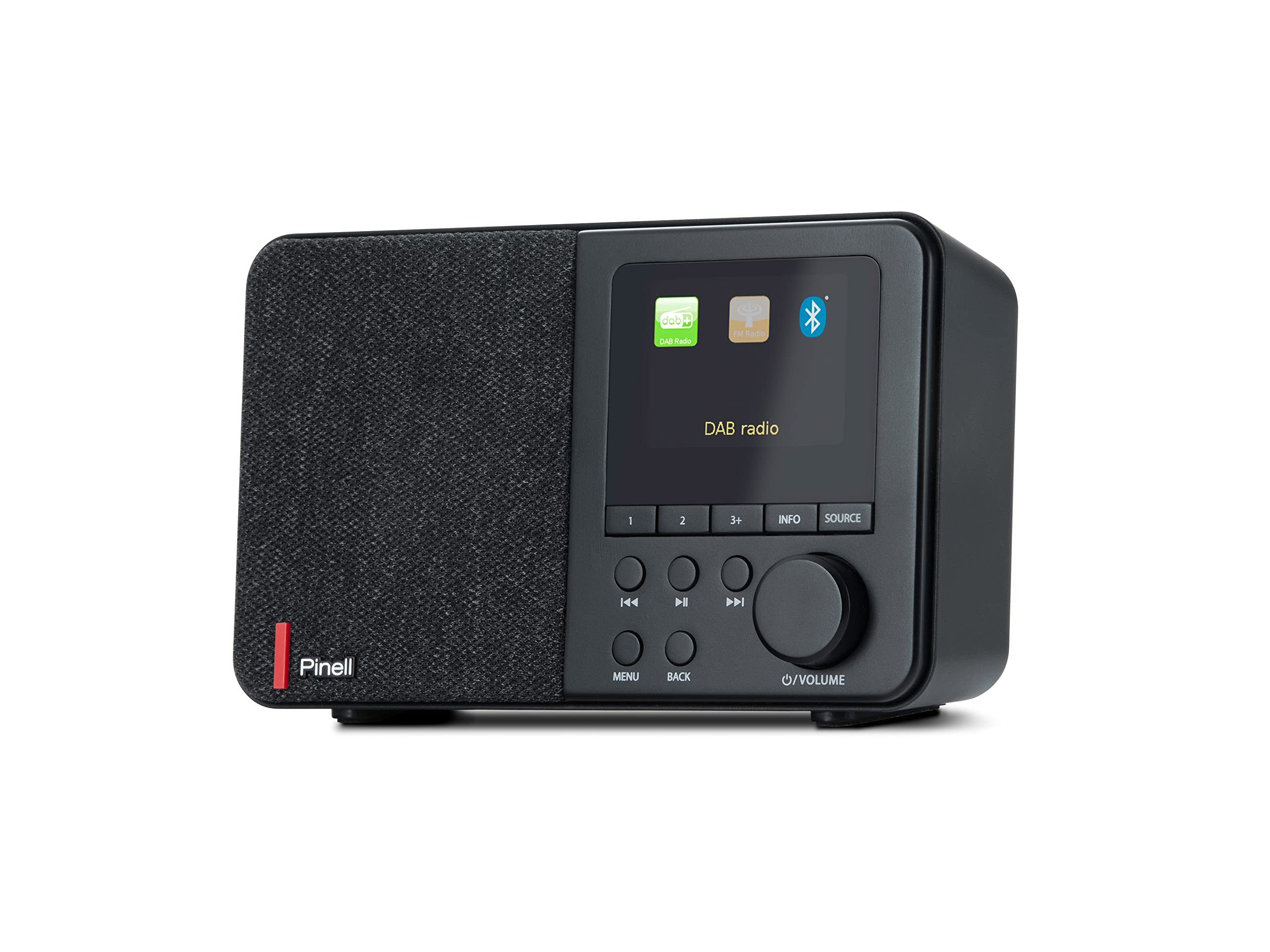
The image displays the front panel of the Pinell Supersound 001 radio. On the left is the speaker grille. The right side features a monochrome display showing 'DAB', 'NRK P1+', '11:03', and 'Distriktsnyheter', indicating DAB+ mode with station information. Below the display are several buttons: '1', '2', '3+', 'INFO', 'SOURCE', 'MENU', 'BACK', and navigation/playback controls (left, play/pause, right). A large rotary knob for volume and power is located on the bottom right.
Controls and Functions:
- Display: Shows station information, time, menu options, and settings.
- Speaker: Integrated 3W RMS speaker for audio output.
- 1, 2, 3+ Buttons: For quick access to stored radio station presets.
- INFO Button: Displays additional information about the current station or track.
- SOURCE Button: Switches between DAB+, FM, and Bluetooth input modes.
- Navigation Buttons (◀◀, ►►): Navigate through menus, stations, or tracks.
- Play/Pause Button (►█): Play or pause audio in Bluetooth mode.
- MENU Button: Accesses the main menu for settings and options.
- BACK Button: Returns to the previous menu or screen.
- Volume/Power Knob: Rotate to adjust volume. Press to power on/off the unit.
- Headphone Jack: Located on the back or side for private listening.
5. Setup
5.1 Power Connection
The Supersound 001 can be powered by the included AC adapter or by batteries (not included).
- AC Power: Connect the power adapter to the DC IN socket on the back of the radio, then plug the adapter into a wall outlet.
- Battery Power: Open the battery compartment (usually on the bottom or back). Insert the required number of batteries (e.g., AA or C, refer to the compartment label) ensuring correct polarity. Close the compartment securely.
5.2 Antenna
For optimal radio reception, ensure the telescopic antenna is fully extended and positioned vertically. Adjust its direction for the best signal quality.
6. Operating Instructions
6.1 Power On/Off
Press the Volume/Power knob to turn the radio on or off.
6.2 Selecting a Source
Press the SOURCE button repeatedly to cycle through available modes: DAB+, FM, and Bluetooth.
6.3 DAB+ Radio Mode
- First Use: When you first switch to DAB+ mode, the radio will automatically perform a full scan for available stations. This may take a few minutes.
- Station Selection: Use the ◀◀ and ►► buttons to browse through the list of available DAB+ stations. Press the Volume/Power knob to select a station.
- Information Display: Press the INFO button to cycle through different information displays, such as program type, signal strength, bit rate, and time/date.
6.4 FM Radio Mode
- Auto Scan: In FM mode, press and hold the ►► button to automatically scan for the next available station.
- Manual Tuning: Briefly press the ◀◀ or ►► buttons to fine-tune the frequency step-by-step.
- Information Display: Press the INFO button to view RDS (Radio Data System) information if available.
6.5 Bluetooth 5.0 Mode
- Pairing: Switch the radio to Bluetooth mode using the SOURCE button. The display will show 'Pairing' or 'Waiting for connection'. On your mobile device, enable Bluetooth and search for 'Pinell Supersound 001'. Select it to pair.
- Playback: Once paired, you can play audio from your device. Use the Play/Pause button on the radio or your device to control playback. The ◀◀ and ►► buttons can be used to skip tracks.
6.6 Storing and Recalling Presets
- Store: Tune to your desired station (DAB+ or FM). Press and hold one of the 1, 2, or 3+ buttons until the display confirms the station is saved.
- Recall: Briefly press the corresponding 1, 2, or 3+ button to instantly tune to the saved station.
6.7 Alarm Clock, Sleep Timer, and Snooze
Access these functions via the MENU button.
- Alarm: Navigate to 'Alarm' in the menu. Set the alarm time, source (DAB+, FM, or buzzer), and volume.
- Sleep Timer: Navigate to 'Sleep' in the menu. Set a duration (e.g., 15, 30, 60 minutes) after which the radio will automatically turn off.
- Snooze: When the alarm sounds, press the Volume/Power knob (or a designated snooze button if available) to temporarily silence it for a short period.
6.8 Equalizer Settings
The integrated equalizer allows you to adjust the audio output. Navigate to 'Equalizer' or 'Sound Settings' in the MENU. You can choose from preset equalizer modes or customize bass and treble levels to suit your listening preference.
6.9 Headphone Use
Connect standard 3.5mm headphones to the headphone jack for private listening. The main speaker will be muted automatically.
7. Maintenance
- Cleaning: Use a soft, dry, lint-free cloth to clean the radio's surface. Do not use abrasive cleaners, waxes, or solvents.
- Storage: If storing the radio for an extended period, remove the batteries to prevent leakage. Store in a cool, dry place.
- Antenna Care: Handle the telescopic antenna gently to avoid bending or breaking.
8. Troubleshooting
If you encounter issues, please refer to the following common problems and solutions:
- No Power:
- Check if the AC adapter is securely connected to both the radio and the power outlet.
- If using batteries, ensure they are correctly inserted and not depleted. Replace if necessary.
- Poor Radio Reception (DAB+/FM):
- Fully extend and adjust the telescopic antenna.
- Try moving the radio to a different location, away from potential interference sources (e.g., other electronic devices, thick walls).
- Perform a full scan for DAB+ stations in the menu.
- Bluetooth Pairing Issues:
- Ensure the radio is in Bluetooth pairing mode.
- Make sure Bluetooth is enabled on your mobile device and it is within range (typically 10 meters).
- Try unpairing and re-pairing the device.
- Ensure no other Bluetooth devices are actively connected to the radio.
- No Sound:
- Check the volume level on both the radio and your connected Bluetooth device.
- Ensure headphones are not connected if you expect sound from the speaker.
- Verify the correct source (DAB+, FM, Bluetooth) is selected.
9. Specifications
| Brand | Pinell |
| Model Name | Supersound 001 |
| Model Number | BP001 |
| Color | Black |
| Connectivity Technology | Bluetooth 5.0, Headphone Jack |
| Special Features | Integrated Clock, Portable, Equalizer |
| Compatible Devices | Headphones, Bluetooth-enabled devices |
| Power Source | AC Adapter, Batteries (not included) |
| Radio Bands Supported | FM, DAB+ |
| RMS Power Output | 3 W |
| Product Dimensions (L x W x H) | 7.1 x 17.5 x 10.6 cm |
10. Warranty and Support
Pinell products are designed for reliability and performance. For specific warranty details, please refer to the warranty card included with your purchase or visit the official Pinell website. If you require technical support or have questions not covered in this manual, please contact Pinell customer service through their official channels.


