
1. Introduction
This manual provides detailed instructions for the proper use, care, and maintenance of your OLEVS Couple Automatic Mechanical Watches. Please read this manual thoroughly before using your watches to ensure optimal performance and longevity. Keep this manual for future reference.
2. Product Overview
The OLEVS Couple Automatic Mechanical Watches are designed with precision and elegance. These watches feature an automatic self-winding mechanical movement, a durable stainless steel case and band, and a high-hardness coated glass mirror. They are water-resistant up to 30 meters.
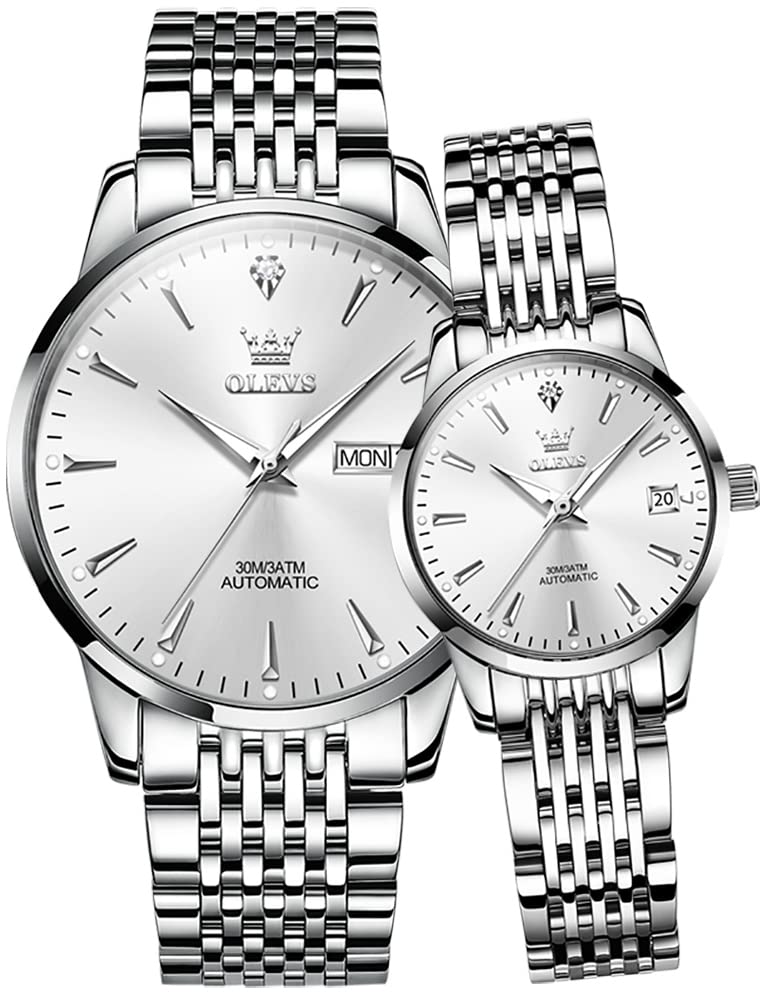
Image 2.1: OLEVS Couple Automatic Mechanical Watches (Silver Tone)

Image 2.2: Key Features of OLEVS Automatic Mechanical Watches
3. Setup and Initial Winding
3.1 Automatic Mechanical Movement
Your OLEVS watch is powered by an automatic mechanical movement. This means it is wound by the motion of your wrist. When worn regularly (approximately 8-10 hours a day), the watch will self-wind and maintain accurate time. If the watch is not worn for an extended period, it may stop.
3.2 Initial Manual Winding
If the watch has stopped or has not been worn for a while, it requires initial manual winding:
- Ensure the crown is in position 1 (fully pushed in).
- Turn the crown clockwise approximately 30-40 times. This will provide enough power reserve to start the watch.
- Gently shake the watch for a few seconds to engage the rotor.
3.3 Setting the Time and Date/Day
- Pull the crown to position 3: This is the outermost position. Turn the crown to set the time. Rotate the hands clockwise until the correct time is displayed. When setting the time, ensure the AM/PM is correctly set, especially when setting the date/day.
- Pull the crown to position 2: This is the middle position. Turn the crown to set the date and day. Rotate the crown clockwise to adjust the date and counter-clockwise to adjust the day. Avoid setting the date/day between 9 PM and 3 AM, as this is when the gears are engaged for automatic date change and manual adjustment can damage the movement.
- Push the crown back to position 1: Once the time, date, and day are set, push the crown firmly back into its original position (position 1) to ensure water resistance and to start the watch running.
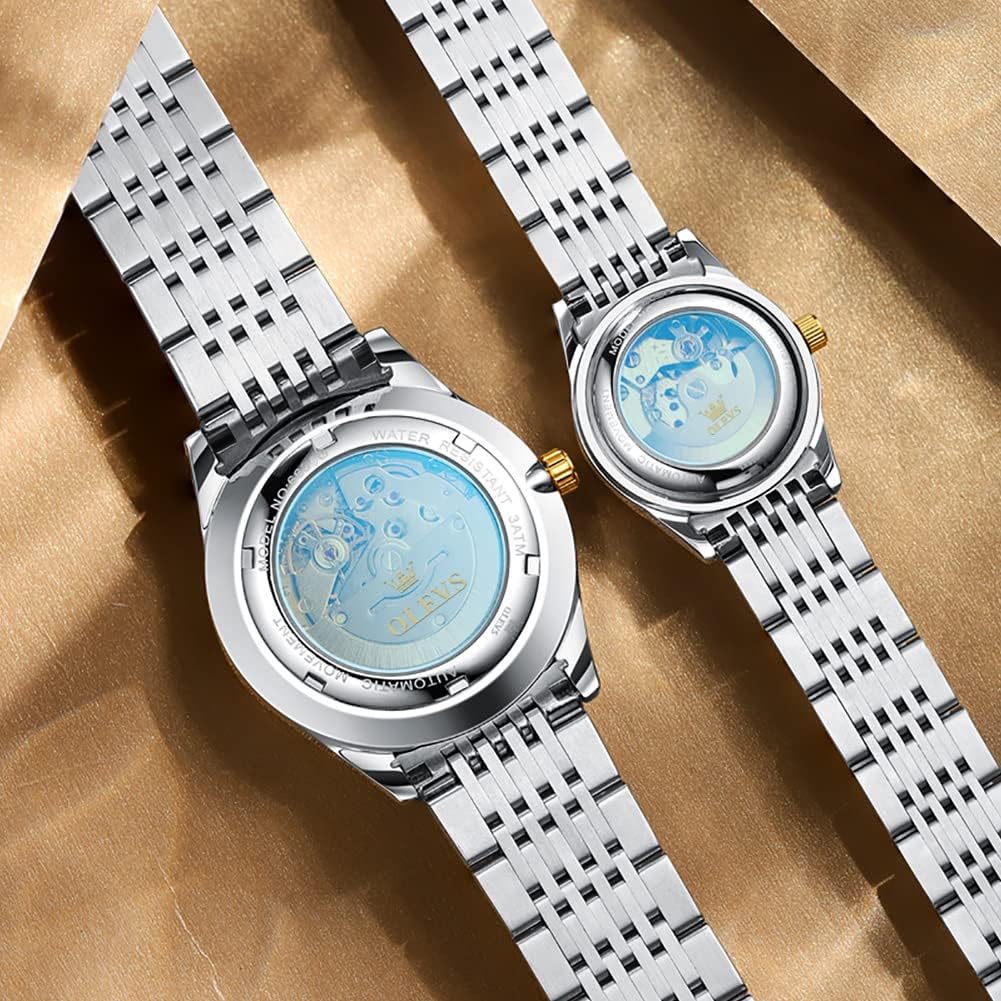
Image 3.1: Transparent Case Back Revealing Automatic Movement
4. Operating Your Watch
4.1 Wearing the Watch
Wear the watch snugly on your wrist. The natural motion of your arm will keep the automatic movement wound. If you wear the watch intermittently, you may need to manually wind it as described in Section 3.2.
4.2 Water Resistance
Your OLEVS watch is water-resistant up to 30 meters (3ATM). This means it is suitable for daily use, such as hand washing, rain, or accidental splashes. It is not suitable for swimming, diving, showering, or any activities involving prolonged water immersion or high-pressure water exposure. Always ensure the crown is fully pushed in before any contact with water.

Image 4.1: OLEVS Watches Worn on Wrists
5. Maintenance and Care
5.1 Cleaning
To clean your watch, wipe the case and band with a soft, dry cloth. For stainless steel bands, a slightly damp cloth can be used, followed by immediate drying. Avoid using harsh chemicals or abrasive materials.
5.2 Avoiding Magnetic Fields
Mechanical watches can be affected by strong magnetic fields, which may cause them to run inaccurately. Keep your watch away from strong magnets, such as those found in speakers, refrigerators, and certain electronic devices.
5.3 Temperature Extremes
Avoid exposing your watch to extreme temperatures, both hot and cold, as this can affect the lubricants and accuracy of the movement.
5.4 Storage
When not wearing your watch, store it in a cool, dry place, preferably in its original box or a watch winder if you wish to keep it continuously wound.
6. Troubleshooting
- Watch not running: If the watch has stopped, manually wind it as described in Section 3.2. Ensure it is worn regularly or placed on a watch winder.
- Time inaccuracy: Mechanical watches may have slight variations in accuracy. If the watch is consistently running too fast or too slow, it may require adjustment by a professional watchmaker. Ensure it is not exposed to strong magnetic fields.
- Date/Day not changing: Check if the time is set correctly, especially the AM/PM cycle. Avoid setting the date/day manually between 9 PM and 3 AM. If the issue persists, consult a professional.
7. Specifications
| Feature | Specification (Men's Watch) | Specification (Women's Watch) |
|---|---|---|
| Movement Type | Automatic Mechanical | Automatic Mechanical |
| Case Diameter | 40 mm | 27 mm |
| Case Thickness | 12 mm | 11.5 mm |
| Band Width | 20 mm | 14 mm |
| Water Resistance Depth | 30 Meters (3ATM) | 30 Meters (3ATM) |
| Additional Features | Glow In The Dark, Day/Date Display | Glow In The Dark, Date Display |
Video 7.1: Official product video demonstrating the features and appearance of the OLEVS Couple Automatic Mechanical Watches.
8. Warranty and Support
8.1 Limited Warranty
OLEVS provides a limited warranty against manufacturing defects for a period of [Insert Warranty Period, e.g., one year] from the date of purchase. This warranty does not cover damage resulting from improper use, accidents, unauthorized repairs, or normal wear and tear. Proof of purchase is required for all warranty claims.
8.2 Customer Support
For any questions, technical assistance, or warranty claims, please contact OLEVS customer support through the retailer where the product was purchased or visit our official website for contact information.