
1. Introduction and Overview
This manual provides detailed instructions for the operation and maintenance of your Philco Portable Bluetooth Boombox. This versatile audio system features a CD player, cassette player/recorder, Bluetooth wireless streaming, AM/FM radio, and a 3.5mm auxiliary input, offering multiple ways to enjoy your audio.

Front view of the Philco Portable Bluetooth Boombox, highlighting its compact design and stereo speakers.
The boombox is designed for portability, allowing you to enjoy music at home, in a workshop, or on the go. It can be powered by AC current or C-size batteries for flexible use.
2. Key Features and Controls
Familiarize yourself with the main components and controls of your boombox:
- CD Player: Supports Audio CD, CD-R/CD-RW, MP3, and WMA formats. Features programmable playback.
- Cassette Player/Recorder: Play and record audio cassettes.
- Bluetooth Connectivity: Wirelessly stream audio from compatible devices up to 30 feet away.
- AM/FM Radio: Built-in telescopic antenna for enhanced reception.
- 3.5mm Aux Input: Connect external audio devices via a standard audio cable.
- Headphone Jack: For private listening.
- Dual Power Options: Operates on AC power (110V for North America) or 6 "C" batteries (not included).
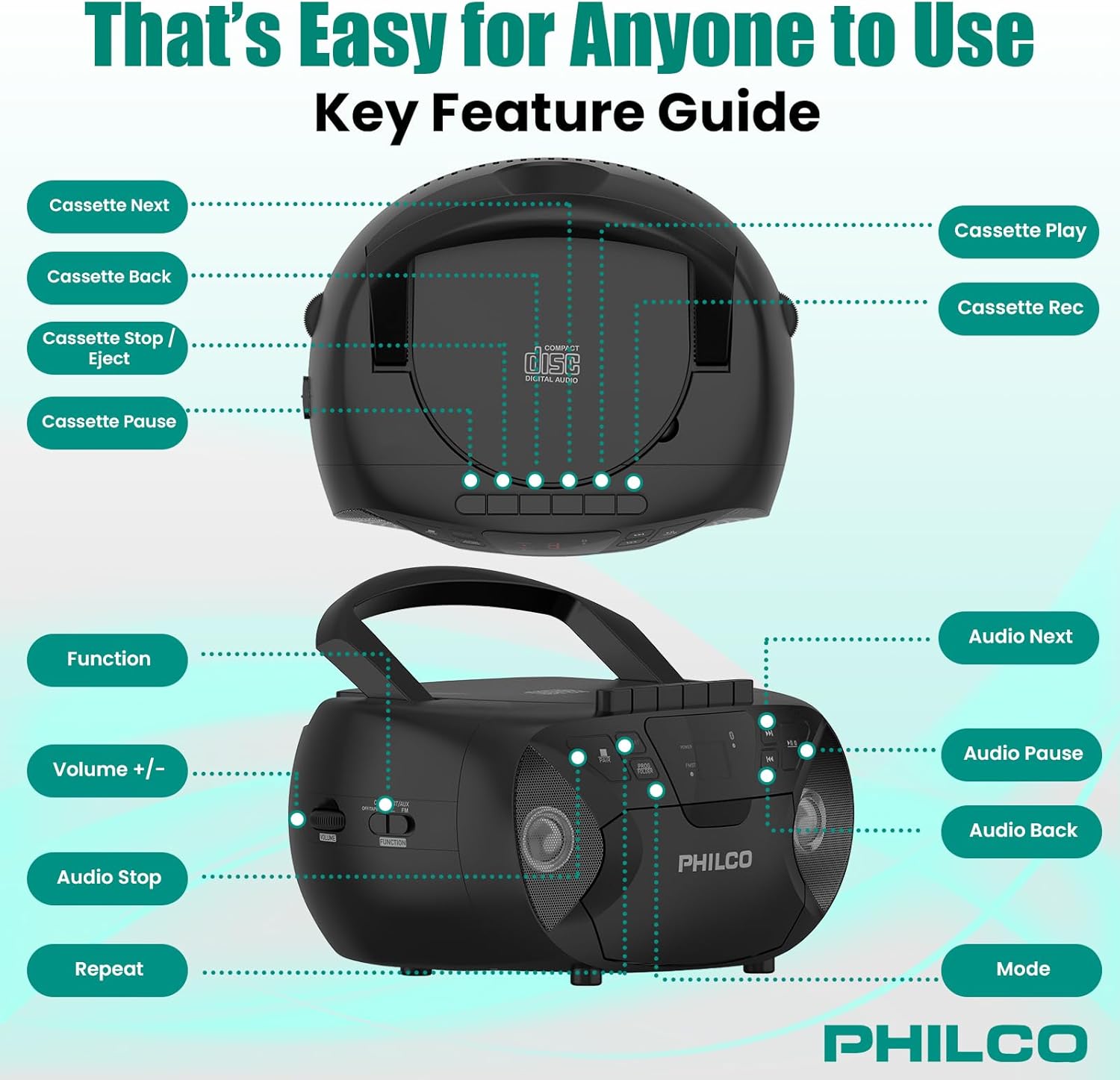
Detailed diagram of the Philco Boombox controls, including CD, cassette, and general audio functions.
3. Setup
3.1 Powering the Device
Your Philco Boombox can be powered by either AC current or batteries.

Illustration of the two power options: AC adapter for wall outlets and battery compartment for portable use.
AC Power Operation:
- Ensure the boombox is placed on a stable, flat surface.
- Locate the AC power input jack on the back of the unit.
- Insert the provided AC power cord into the jack.
- Plug the other end of the AC power cord into a standard 110V AC wall outlet.
- The unit is now ready for use with AC power.
Battery Power Operation:
For portable use, the boombox requires 6 "C" size batteries (not included).
- Turn the unit off and disconnect the AC power cord if connected.
- Open the battery compartment cover located on the bottom or back of the unit.
- Insert 6 "C" size batteries, ensuring correct polarity (+/-) as indicated inside the compartment.
- Close the battery compartment cover securely.
- The unit will now operate on battery power. Remove batteries if the unit will not be used for an extended period.
3.2 Antenna Setup
For optimal FM radio reception, fully extend the telescopic antenna. For AM reception, rotate the unit for the best signal, as the AM antenna is internal.
4. Operating Instructions
This section details how to use the various audio functions of your boombox.

The Philco Boombox supports multiple audio formats including CD, cassette, and Bluetooth streaming.
4.1 CD Playback
- Press the FUNCTION button to select CD mode.
- Open the CD compartment door by gently lifting it.
- Place a CD (Audio CD, CD-R/CD-RW, MP3, or WMA) onto the spindle with the label side facing up.
- Close the CD compartment door. The CD will begin to spin and play automatically.
- Use the PLAY/PAUSE button to pause or resume playback.
- Use the SKIP/SEARCH buttons (◀◀ / ▶▶) to skip tracks or fast forward/rewind.
- To program tracks, refer to the "Program Play" section in your detailed manual (if available).
4.2 Cassette Playback and Recording
Cassette Playback:
- Press the FUNCTION button to select TAPE mode.
- Press the STOP/EJECT button to open the cassette compartment.
- Insert a cassette tape with the open edge facing upwards.
- Close the cassette compartment.
- Press the PLAY button to start playback.
- Use the FAST FORWARD (FF) and REWIND (REW) buttons to navigate the tape.
- Press STOP/EJECT to stop playback and eject the tape.
Cassette Recording:
You can record from the CD player, radio, or auxiliary input onto a blank cassette tape.
- Insert a blank, recordable cassette tape into the compartment.
- Select the desired source (CD, FM/AM, or AUX) using the FUNCTION button.
- Start playback on the source (e.g., play a CD, tune to a radio station).
- Press the RECORD button (usually red) on the boombox. The PLAY button will also engage.
- To stop recording, press the STOP/EJECT button.
4.3 Bluetooth Pairing
- Press the FUNCTION button to select BT (Bluetooth) mode. The Bluetooth indicator light will flash, indicating it's in pairing mode.
- On your Bluetooth-enabled device (smartphone, tablet, etc.), enable Bluetooth and search for available devices.
- Select "PHILCO BOOMBOX" (or similar name) from the list of devices.
- Once paired, the Bluetooth indicator light will become solid, and you can now stream audio from your device to the boombox.
- Control playback (play/pause, skip tracks) either from your connected device or using the boombox's playback controls.
4.4 Radio Operation (AM/FM)
- Press the FUNCTION button to select RADIO mode.
- Use the AM/FM switch (if present) to select the desired band.
- Rotate the TUNING knob to find your desired radio station.
- Adjust the VOLUME knob to your preferred listening level.
- For better FM reception, extend and adjust the telescopic antenna. For AM, rotate the unit.
4.5 Auxiliary Input
- Press the FUNCTION button to select AUX mode.
- Connect one end of a 3.5mm audio cable (not included) to the AUX IN jack on the boombox.
- Connect the other end of the cable to the headphone jack or audio output of your external device (e.g., MP3 player, smartphone).
- Start playback on your external device. The audio will be routed through the boombox speakers.
- Adjust volume using the boombox's VOLUME knob and/or your external device's volume control.
4.6 Headphone Connection
For private listening, plug standard 3.5mm headphones (not included) into the HEADPHONE jack on the boombox. The speakers will automatically mute when headphones are connected.
5. Maintenance
- Cleaning: Use a soft, dry cloth to clean the exterior of the unit. Do not use abrasive cleaners or solvents. For the CD lens, use a specialized CD lens cleaner.
- CD Care: Handle CDs by their edges. Keep them clean and free of scratches. Store them in their cases when not in use.
- Cassette Care: Store cassette tapes away from direct sunlight and heat. Periodically clean the tape heads with a cotton swab lightly dampened with isopropyl alcohol.
- Storage: If the unit will not be used for a long period, remove the batteries to prevent leakage. Store in a cool, dry place.
6. Troubleshooting
Refer to the table below for common issues and their solutions.
| Problem | Possible Cause | Solution |
|---|---|---|
| No power | AC cord not connected; Batteries depleted or incorrectly inserted. | Ensure AC cord is securely plugged in. Replace batteries or check polarity. |
| No sound | Volume too low; Incorrect function mode selected; Headphones connected. | Increase volume. Select correct mode (CD, BT, Radio, AUX). Disconnect headphones. |
| CD skips or does not play | CD dirty or scratched; CD inserted incorrectly; Unit on unstable surface. | Clean CD. Re-insert CD correctly. Place unit on a stable surface. |
| Poor radio reception | Antenna not extended/adjusted; Weak signal. | Fully extend and adjust FM antenna. Rotate unit for AM reception. Try moving the unit to a different location. |
| Bluetooth not pairing | Boombox not in BT mode; Device Bluetooth off; Device too far. | Ensure boombox is in BT mode. Enable Bluetooth on your device. Move device closer to the boombox (within 30 feet). |
| Cassette playback issues (e.g., distorted sound, tape eating) | Tape heads dirty; Tape damaged; Incorrect tape insertion. | Clean tape heads. Try a different tape. Ensure tape is inserted correctly. |
7. Specifications
| Feature | Detail |
|---|---|
| Model Number | PBC2010BT-BK |
| Product Dimensions | 10.08 x 5.71 x 10.75 inches |
| Item Weight | 3.36 pounds |
| Power Source | AC 110V (North America only) or 6 x "C" Batteries (not included) |
| CD Compatibility | Audio CD, CD-R/CD-RW, MP3, WMA |
| Connectivity | Bluetooth, 3.5mm Aux Input, Headphone Jack |
| Radio Bands | AM/FM |
| Manufacturer | PHC Americas, LLC |
| Country of Origin | China |
8. Warranty and Support
Philco is committed to providing quality products and customer satisfaction. For warranty information, technical support, or service inquiries, please contact Philco customer support. Details can typically be found on the Philco official website or on the product packaging.
As a USA-based company, Philco's support team is available to assist you with any questions or issues you may encounter with your product.