
Introduction
This manual provides comprehensive instructions for the installation, operation, and maintenance of the DEWIN 32A 500V DC Circuit Breaker. This 1-in-1 out photovoltaic junction box is designed to protect solar PV systems by preventing overvoltage and overload, thereby extending the lifespan of your solar installation. Please read this manual thoroughly before installation and use to ensure safe and efficient operation.
Package Contents
Verify that all items listed below are present in the package:
- 1 x 32A 1-in-1 Out Combiner Box
- 4 x Plastic Expansion Plugs
- 4 x Mounting Screws
- 2 x MC4 Connectors
- 1 x Photovoltaic Special Wrench
- 1 x User Manual (this document)

Figure 1: Contents of the DEWIN DC Circuit Breaker package, including the combiner box, connectors, mounting hardware, and a special wrench.
Setup and Installation
The DEWIN DC Circuit Breaker is designed for straightforward installation. It acts as a critical protective component between your solar panels and inverters.
Installation Steps:
- Safety First: Ensure all power sources from the solar panels and inverter are disconnected before beginning installation.
- Mounting: Select a suitable location for the combiner box, preferably in an easily accessible area, protected from direct mechanical impact. Use the provided mounting screws and plastic expansion plugs to securely attach the box to a stable surface.
- Cable Entry: The combiner box features PG20 4mm² cable entries for both input and output. Ensure cables are properly routed and sealed to maintain the IP65/IP66 waterproof rating.
- Connecting Solar Panels: Connect the DC output cables from your solar panel array to the input terminals of the circuit breaker. The "Plug and Play" design with pre-assembled cables simplifies this process. Ensure correct polarity (positive to positive, negative to negative).
- Connecting to Inverter/Charge Controller: Connect the output terminals of the circuit breaker to the DC input of your solar inverter or charge controller. Again, verify correct polarity.
- Secure Connections: Use the provided photovoltaic special wrench to ensure all MC4 connectors are securely tightened, preventing loose connections and potential arcing.
- Final Check: Before restoring power, double-check all connections for correctness and tightness.

Figure 2: Illustrative wiring diagram showing the connection of the DEWIN DC Circuit Breaker between solar panels and a charge controller/battery system.
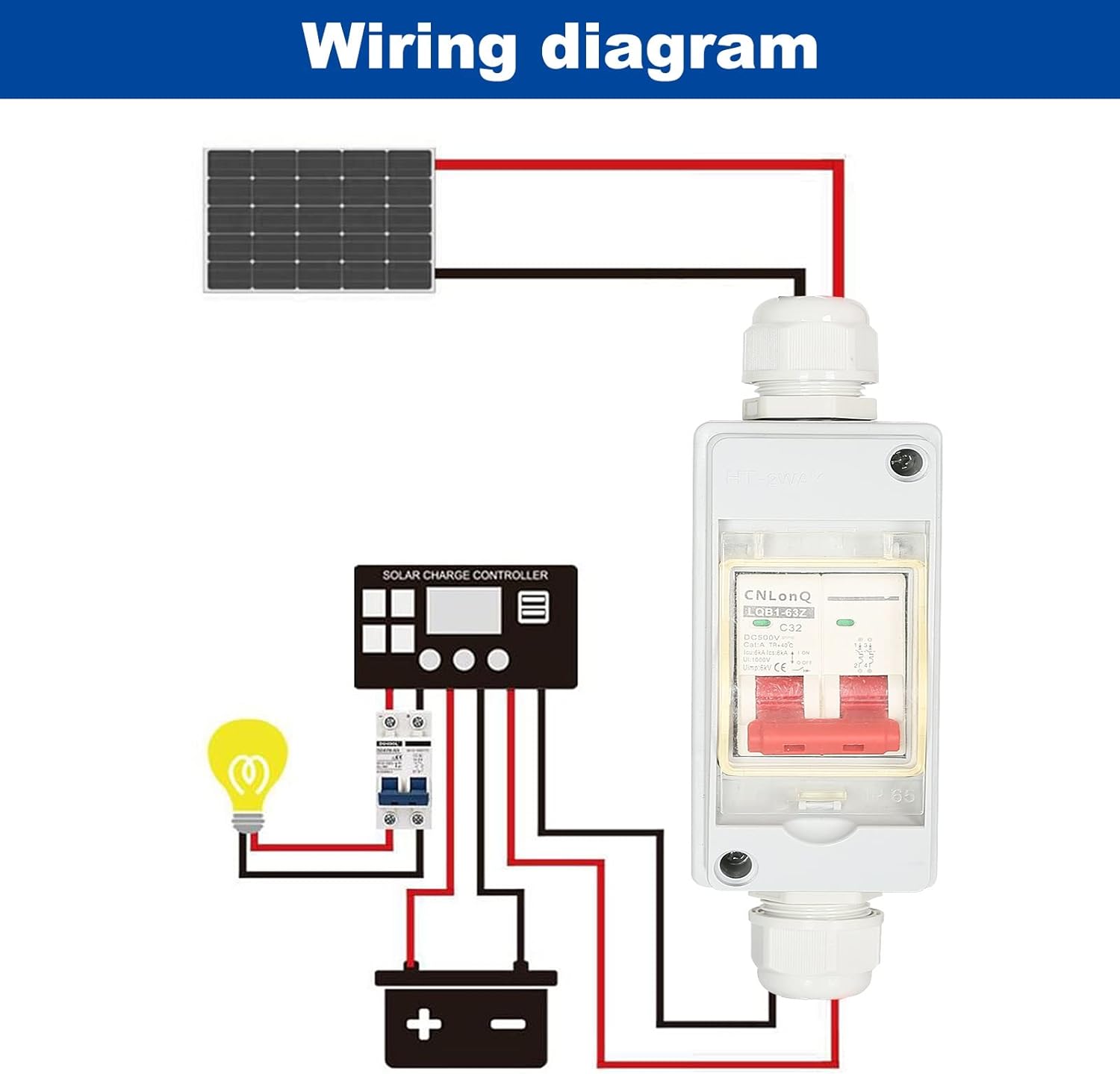
Figure 3: A more detailed wiring diagram demonstrating the integration of the DC Circuit Breaker into a solar power system, including solar panels, charge controller, battery, and load.
Operating Instructions
The DEWIN DC Circuit Breaker functions as a protective device within your solar PV system. Its primary role is to safeguard against overvoltage and overload conditions, which can damage solar components and reduce system longevity.
- Circuit Breaker Switch: The device features a visible switch (typically red) to manually disconnect or connect the DC circuit.
- ON Position: When the switch is in the 'ON' position, the circuit is closed, allowing DC current to flow from the solar panels through the breaker to the inverter/charge controller.
- OFF Position: When the switch is in the 'OFF' position, the circuit is open, interrupting the DC current flow. This is essential for maintenance, troubleshooting, or emergency shutdowns.
- Automatic Tripping: In the event of an overvoltage or overload condition exceeding the specified limits (500V, 32A), the circuit breaker will automatically trip to protect the connected equipment. If this occurs, investigate the cause of the fault before resetting the breaker.
Maintenance
Regular maintenance ensures the optimal performance and longevity of your DEWIN DC Circuit Breaker.
- Visual Inspection: Periodically inspect the combiner box for any signs of physical damage, corrosion, or loose connections.
- Cleanliness: Keep the exterior of the box clean and free from dust, dirt, or debris. Use a soft, damp cloth for cleaning. Do not use abrasive cleaners or solvents.
- Waterproof Integrity: The unit is rated IP65 for water and dust resistance. Ensure that all cable glands are tightly sealed and the enclosure cover is properly closed to maintain this protection. The product description also mentions IP66, indicating high resistance to environmental factors.
- Environmental Resilience: The product is designed for harsh weather conditions, including rain and sun, and operates effectively in ambient temperatures from -20°C to +70°C. Some product information indicates resilience up to +85°C and down to -25°C.

Figure 4: The DEWIN DC Circuit Breaker demonstrating its IP65 waterproof capability, suitable for outdoor installations.
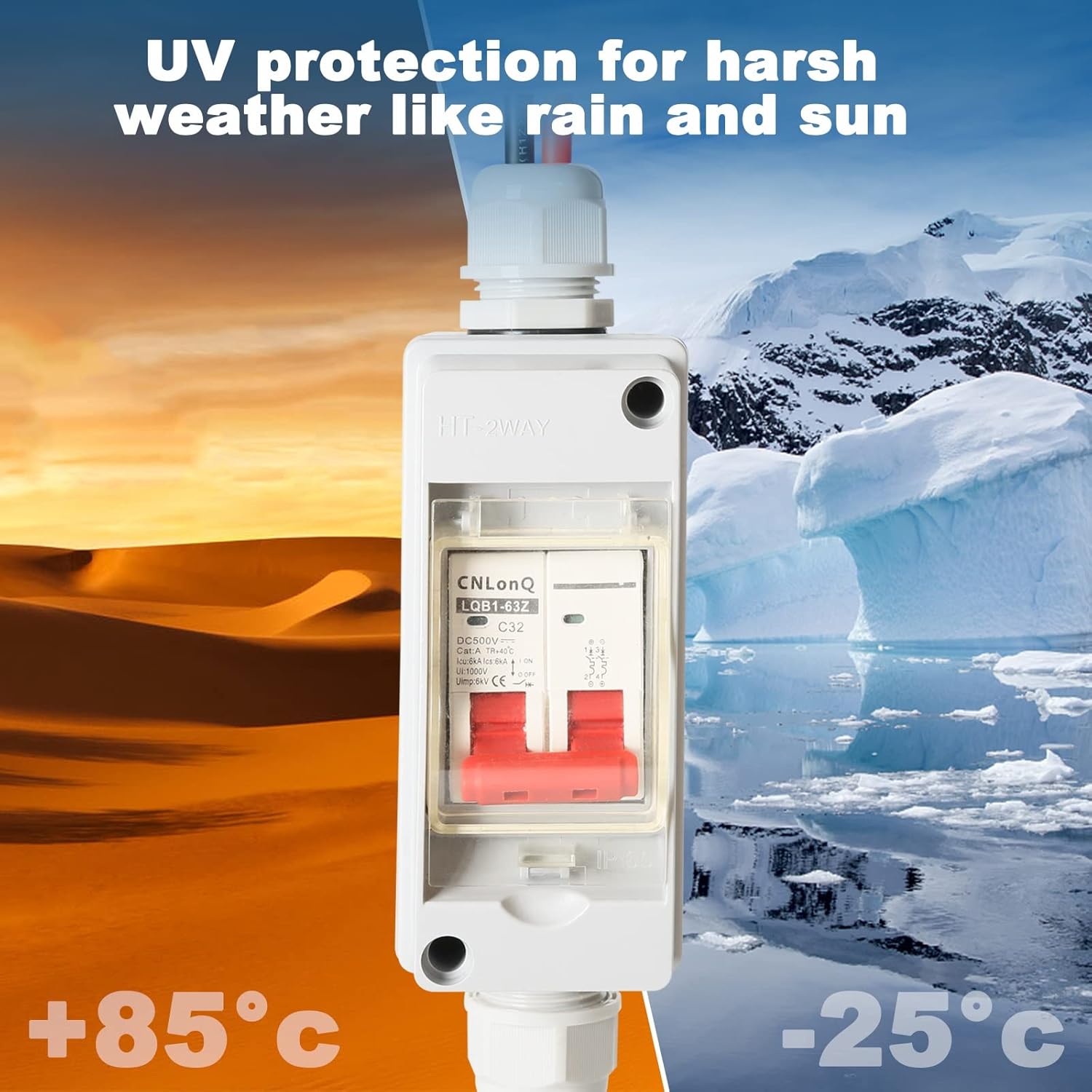
Figure 5: The circuit breaker is built with UV protection, capable of withstanding harsh weather conditions and extreme temperatures ranging from -25°C to +85°C.
Troubleshooting
This section addresses common issues you might encounter with your DC Circuit Breaker.
- No Power Output:
- Check if the circuit breaker switch is in the 'ON' position.
- Verify all cable connections are secure and correctly polarized.
- Inspect the solar panels for any issues preventing power generation.
- If the breaker has tripped, identify and resolve the cause of the overcurrent or overvoltage before resetting.
- Breaker Trips Frequently:
- This indicates an overcurrent or overvoltage condition. Check the load connected to the system.
- Ensure the total current from your solar panels does not exceed the breaker's 32A rating.
- Verify the system voltage does not exceed 500V.
- Inspect for short circuits in the wiring or connected components.
- Water Ingress:
- If water is found inside the enclosure, immediately disconnect power.
- Check all cable glands and the enclosure seal for proper installation and damage. Replace any compromised seals or glands.
If issues persist after following these steps, consult a qualified electrician or contact DEWIN customer support.
Specifications
Detailed technical specifications for the DEWIN DC Circuit Breaker.
| Feature | Specification |
|---|---|
| Material | Polycarbonate/ABS |
| Input | 1 set of connectors |
| Output | 1 set of connectors |
| Maximum Voltage | 500 V |
| Maximum DC Short-Circuit Current (Isc) per input | 32 A |
| Maximum Output Current | 32 A |
| Protection Rating | IP65 |
| Dimensions (L x W x H) | 120 x 55 x 90 mm |
| Cable Entry | PG20 4mm² |
| Output Cable Connector | PG20 4mm² |
| DC Circuit Breaker Model | LQB1 |
| Rated Insulation Voltage (Ui) | 500 V |
| Rated Current (Le) | 32 A |
| Maximum Supply Voltage (Ucpv) | 500 V |
| Rated Operating Voltage | 500 V |
| Ambient Temperature Range | -20°C to +70°C |

Figure 6: Visual representation of the product dimensions and a summary of key technical parameters.
Support
For further assistance, technical support, or inquiries regarding your DEWIN DC Circuit Breaker, please refer to the contact information provided with your purchase or visit the official DEWIN website. Ensure you have your product model number (BYQDXBQBY) available when contacting support.