
1. Introduction
This manual provides detailed instructions for the safe installation, operation, and maintenance of your ASD 25W 2300LM LED Outdoor Security Light with Motion Sensor. Please read this manual thoroughly before installation and retain it for future reference.
Key Features:
- Design: Dual-head LED security light with 360° rotatable light heads for directional lighting. Operates on 120V circuits.
- Flexible Settings: Built-in motion sensor with 180° detection angle and up to 70ft detection distance. Includes ON TIME, AUTO, and D2D (Dusk To Dawn) modes.
- Color Selectable: Choose between 3000K (warm white), 4000K (cool white), or 5000K (daylight) color temperatures.
- Durability: IP65 waterproof rating, suitable for wet locations. Long lifespan of 60,000 hours.

Image 1.1: The ASD 25W 2300LM LED Outdoor Security Light with Motion Sensor.
2. Safety Information
WARNING: Risk of electric shock. Disconnect power at the fuse or circuit breaker before installing or servicing.
- Ensure all electrical connections comply with local codes and ordinances, as well as the National Electric Code (NEC).
- If you are unfamiliar with proper electrical wiring connections, consult a qualified electrician.
- Do not install this fixture with wet hands or while standing on a wet or damp surface.
- This fixture is designed for outdoor use and is rated for wet locations.
- Do not attempt to modify the fixture. Any modifications may void the warranty and create safety hazards.
3. Package Contents
Verify that all components are present before beginning installation:
- LED Security Light (1 unit)
- Mounting Hardware (screws, wire nuts, gasket)
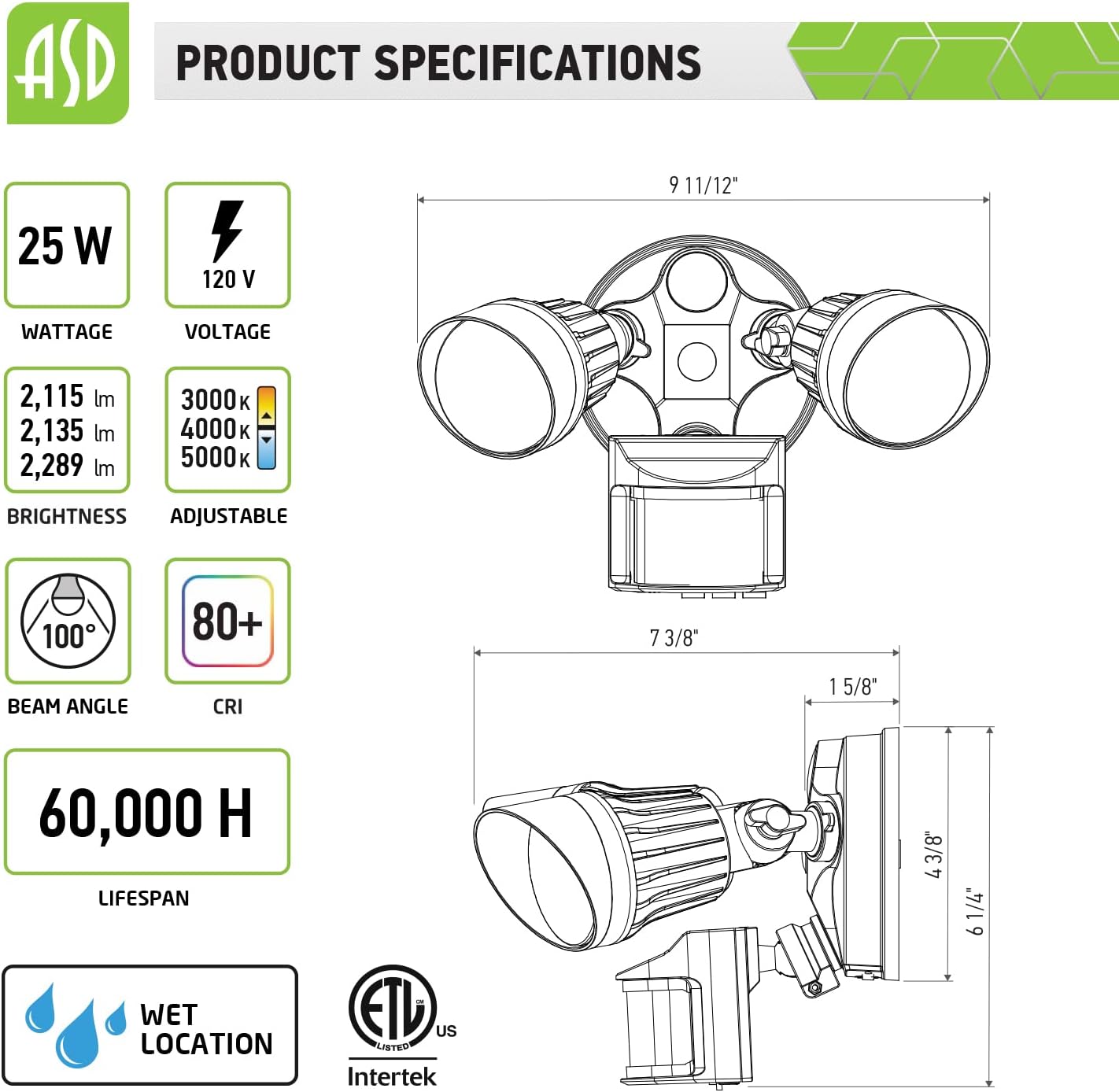
Image 3.1: The security light with its retail packaging, indicating included components.
4. Specifications

Image 4.1: Detailed product specifications and dimensional drawing.
| Feature | Specification |
|---|---|
| Brand | ASD |
| Model Number | A-LSR3-25AC-BK |
| Wattage | 25 watts |
| Brightness | 2300 lumens |
| Color Temperature | 3000K / 4000K / 5000K (Selectable) |
| Voltage | 120 Volts |
| Motion Sensor Angle | 180° |
| Motion Sensor Distance | Up to 70 feet |
| Lifespan | 60,000 hours |
| Water Resistance | IP65 Waterproof (Wet Locations Rated) |
| Material | Aluminum, Polycarbonate |
| Product Dimensions | 9.92"L x 6.3"W x 7.4"H |
| Installation Type | Wall Mount (Hardwired) |
5. Setup and Installation
Follow these steps for proper installation. Ensure power is disconnected at the circuit breaker before starting.

Image 5.1: Visual guide for the three-step installation process.
- Step 1: Attach Crossbar
Attach the crossbar to the outlet box using two mounting screws. - Step 2: Wire Connections and Color Temperature Selection
Thread the fixture wires through the gasket. Connect the wires according to the specification sheet (typically black to black, white to white, ground to ground). Before securing the fixture, locate the CCT (Correlated Color Temperature) switch on the fixture and set it to your desired color temperature (3000K, 4000K, or 5000K). - Step 3: Secure Fixture
Drive the bracket screw through the center hole of the fixture base to the crossbar and secure by tightening it. For outdoor locations, it is recommended to use silicone sealant (not included) around the fixture base to prevent water ingress.
Adjusting Light Heads and Sensor:

Image 5.2: Illustration of the flexible and adjustable design of the light heads.
The dual light heads are 360° rotatable, and the entire fixture allows for 180° adjustment (up/down, left/right) to direct light precisely where needed. Adjust the light heads and motion sensor to cover your desired area after installation.
6. Operating Instructions
Motion Sensor Settings:

Image 6.1: The motion sensor's detection range and angle.
The built-in motion sensor has a 180° detection angle and a maximum detection distance of 70 feet. The sensor offers three operating modes:
- ON TIME Mode: In this mode, the motion sensor and daylight sensor are deactivated. The light will remain continuously ON.
- AUTO Mode: When motion is detected in darkness, the lights will automatically turn ON. The duration the light stays on after motion ceases can typically be adjusted (refer to the sensor's specific controls, usually small dials on the sensor itself).
- D2D (Dusk To Dawn) Mode: This mode utilizes the photocell. The light will automatically turn ON at night (dusk) and turn OFF at daytime (dawn), regardless of motion.
Color Temperature Selection:

Image 6.2: Visual representation of the selectable color temperatures.
As mentioned in the installation section, the color temperature is selected via a switch on the fixture before final mounting. You can choose between 3000K (warm white), 4000K (cool white), or 5000K (daylight) to suit your preference and application.
Photocell Function:
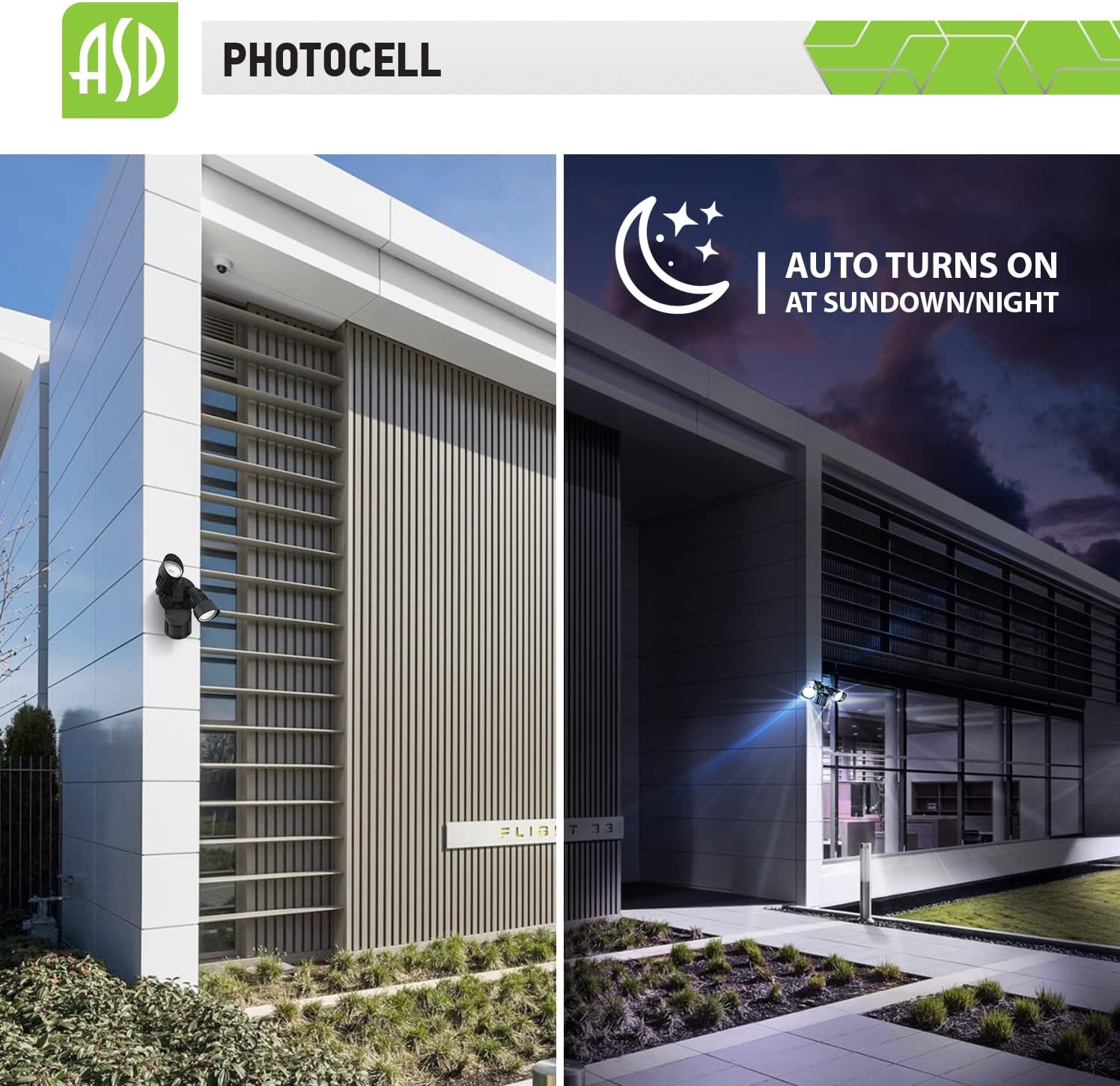
Image 6.3: The photocell automatically turns the light on at sundown/night.
The integrated photocell detects ambient light levels. In D2D mode, it ensures the light only operates during nighttime hours, conserving energy during the day.
7. Maintenance
This LED security light is designed for long-term, low-maintenance operation. To ensure optimal performance and longevity:
- Cleaning: Periodically clean the fixture with a soft, damp cloth to remove dirt, dust, or debris that may accumulate on the lens or sensor. Avoid abrasive cleaners or solvents.
- Inspection: Annually inspect the wiring and mounting hardware for any signs of wear, damage, or loosening. Ensure the silicone seal (if applied) remains intact.
- No User-Serviceable Parts: The LED components are integrated and not user-replaceable. Do not attempt to open the light heads.
8. Troubleshooting
If you experience issues with your security light, refer to the following common problems and solutions:
| Problem | Possible Cause | Solution |
|---|---|---|
| Light does not turn on | No power, faulty wiring, incorrect mode setting, photocell detecting daylight | Check circuit breaker. Verify wiring connections. Ensure mode is set to AUTO or ON TIME if testing during day. Cover photocell to simulate night. |
| Light stays on continuously | ON TIME mode selected, constant motion detected, sensor malfunction | Switch to AUTO or D2D mode. Ensure no objects are causing constant motion detection. |
| Light turns on too frequently or for no apparent reason | Motion sensor sensitivity too high, environmental factors (e.g., moving branches, small animals, car headlights) | Adjust motion sensor sensitivity dial (if available). Reposition light heads or sensor to reduce false triggers. |
| Light does not detect motion | Motion sensor blocked, sensitivity too low, incorrect angle | Clear any obstructions from the sensor. Increase sensitivity. Adjust sensor angle to cover desired area. |
| Light flickers | Loose wiring, power fluctuations, incompatible dimmer (this fixture is not dimmable) | Check wiring connections. Ensure stable power supply. Do not connect to a dimmer switch. |
9. Warranty and Support
ASD provides a 5-year limited warranty for this product, guaranteeing top-quality and safety. This warranty covers defects in materials and workmanship under normal use.
For warranty claims, technical support, or any questions regarding your ASD LED Outdoor Security Light, please contact ASD customer service through their official channels or the retailer where the product was purchased.
Please retain your proof of purchase for warranty validation.