
1. Introduction and Overview
This manual provides instructions for the Arducam ToF Camera Module B0410C. This module is a 0.43MP color rolling shutter camera designed for depth sensing applications using Time-of-Flight (ToF) technology. It is compatible with Raspberry Pi and Nvidia Jetson boards, offering powerful depth/distance measurement with pixel-level accuracy. The camera features a large working range of 2m/4m, with an optional 10-meter broader coverage using a cable extension kit. It is designed for outdoor use, minimizing interference from ambient light. The module supports various MV libraries and can be programmed using C, C++, or Python.

Figure 1: Arducam ToF Camera Module B0410C with its protective case.
2. Setup
2.1 Component Identification
The Arducam ToF Camera Module B0410C typically includes the camera board, a flexible flat cable (FFC), and a power cable. Ensure all components are present before proceeding with installation.

Figure 2: Top view of the Arducam ToF Camera Module showing its dimensions (38.00mm / 1.49 inches).
2.2 Connecting the Camera Module
- Connect the FFC: Carefully insert one end of the flexible flat cable (FFC) into the camera module's FFC connector. Ensure the blue tab on the FFC faces away from the camera board.
- Connect to Host Board: Connect the other end of the FFC to the CSI camera port on your Raspberry Pi or Nvidia Jetson board. Ensure the FFC is inserted correctly and securely.
- Power Connection: Connect the provided power cable to the camera module. The other end of the power cable should be connected to the 5V and GND pins on the GPIO header of your Raspberry Pi. CAUTION: Use a 5V/4A power adapter with Raspberry Pi to ensure stable operation.
- NVIDIA Jetson AGX Orin: For connection on the NVIDIA Jetson AGX Orin platform, an additional MIPI adapter board is required.

Figure 3: Detailed view of connecting the FFC to the camera module.
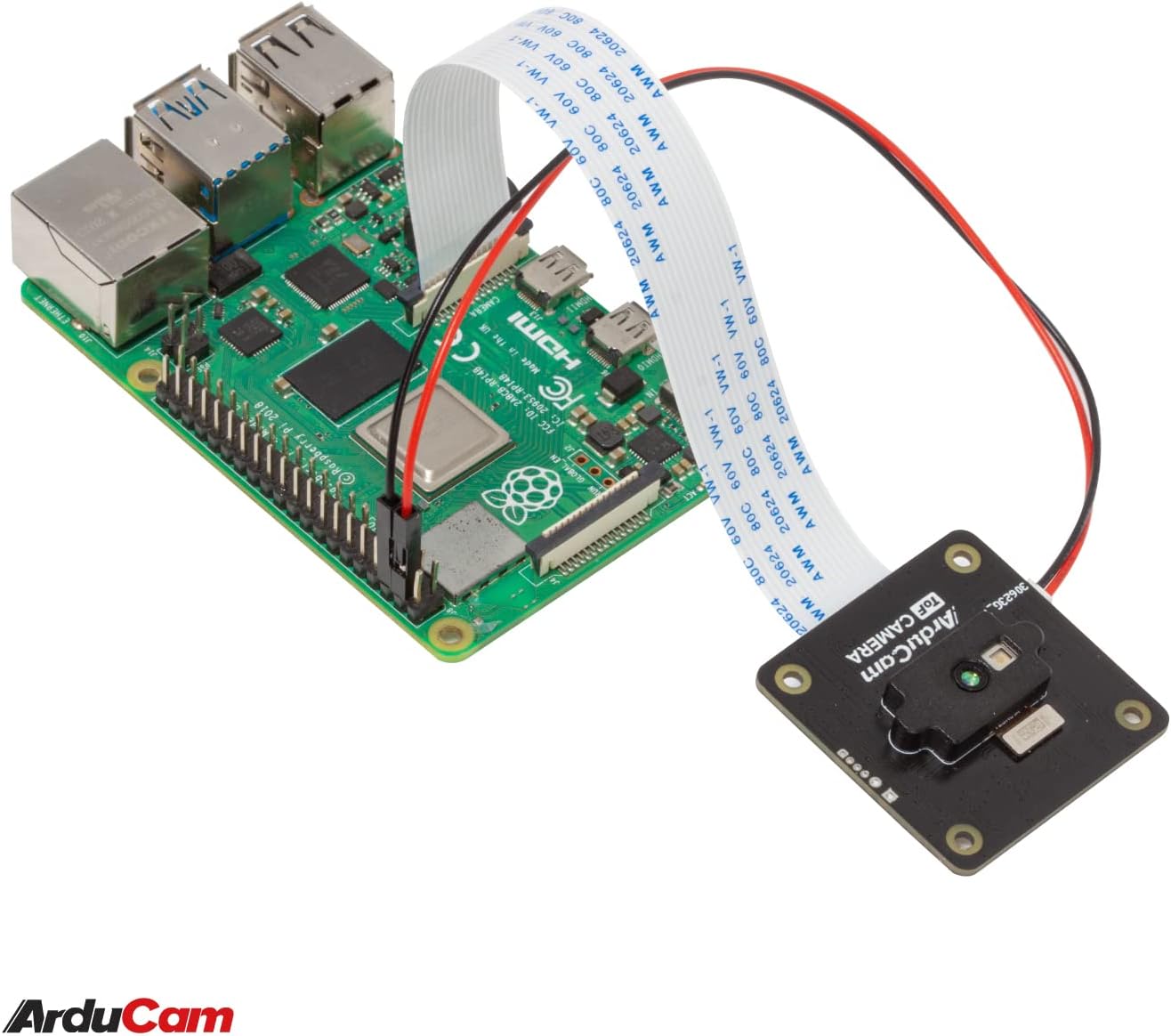
Figure 4: Arducam ToF Camera Module connected to a Raspberry Pi via FFC.

Figure 5: Wiring diagram for connecting the camera's power to Raspberry Pi GPIO pins.
2.3 Software Installation
The Arducam ToF Camera Module requires specific software libraries and drivers to function. Refer to the official Arducam documentation and GitHub repositories for detailed installation guides for Raspberry Pi OS, Ubuntu, and other Linux distributions. The camera supports various machine vision (MV) libraries and offers SDKs for C, C++, and Python.
3. Operating Instructions
Once the hardware is connected and software is installed, you can begin operating the ToF camera module for depth sensing and 3D imaging.
3.1 Basic Operation
The camera captures depth information by emitting infrared light and measuring the time it takes for the light to return. This data is processed to generate depth maps and point clouds.

Figure 6: Example of depth map visualization captured by the ToF camera.
3.2 Working Range
The standard working range of the ToF camera is 2 meters or 4 meters, depending on the specific configuration. This range can be extended up to 10 meters with the use of an Arducam cable extension kit.
3.3 Outdoor Use
The camera is designed to operate effectively outdoors, with reduced interference from ambient light, allowing for versatile deployment in various environments.
4. Maintenance
To ensure optimal performance and longevity of your Arducam ToF Camera Module, follow these general maintenance guidelines:
- Keep the camera lens and infrared emitter/receiver clean and free from dust or smudges. Use a soft, lint-free cloth for cleaning.
- Avoid exposing the module to extreme temperatures, high humidity, or direct water contact.
- Handle the flexible flat cable (FFC) with care to prevent damage to the connectors or cable itself.
- Store the camera in a dry, cool environment when not in use.
5. Troubleshooting
If you encounter issues with your Arducam ToF Camera Module, consider the following troubleshooting steps:
- No Image/Depth Data:
- Verify all cable connections (FFC and power) are secure and correctly oriented.
- Ensure the host board (Raspberry Pi/Jetson) is adequately powered, especially if using a 5V/4A adapter as recommended.
- Check that the camera module is enabled in your operating system's configuration (e.g., `raspi-config` on Raspberry Pi).
- Confirm that the necessary software drivers and libraries are correctly installed and up-to-date.
- Software/Example Code Issues:
- Ensure you are using the correct SDK and example code for your specific host platform and programming language (C, C++, Python).
- Consult Arducam's official documentation and community forums for known issues or specific installation steps for your setup, particularly for newer platforms like Raspberry Pi 5.
- Consider performing a firmware update if available, as this can resolve compatibility or performance issues.
- Poor Depth Accuracy:
- Ensure the camera lens and IR components are clean.
- Check for strong external infrared light sources that might interfere with the ToF sensor.
- Verify the object is within the optimal working range of the camera (2m/4m).
If problems persist, refer to the support section for further assistance.
6. Specifications
| Feature | Detail |
|---|---|
| Brand | Arducam |
| Model Number | B0410C |
| Connectivity Technology | Infrared |
| Operating System Compatibility | Raspberry Pi OS, Ubuntu, and other Linux distributions |
| Compatible Devices | Raspberry Pi, Nvidia Jetson Nano/NX |
| Processor Brand (Host) | NVIDIA or Broadcom |
| Wireless Compatibility | Infrared |
7. Warranty Information
The Arducam ToF Camera Module B0410C comes with a 6-month warranty from the date of purchase. This warranty covers manufacturing defects under normal use. For warranty claims or detailed terms and conditions, please contact Arducam customer support.
8. Support
For technical assistance, additional documentation, or to report issues, please visit the official Arducam website or contact their customer support team. Online resources often include detailed tutorials, FAQs, and community forums that can provide valuable information and solutions.
Arducam Official Website: https://www.arducam.com


