
Feihe 19 TV
Contents
Feihe 19 Inch HD LED Flat Screen TV User Manual
Model: 19 TV
1. Introduction
This user manual provides comprehensive instructions for the operation and maintenance of your Feihe 19 Inch HD LED Flat Screen TV. Designed for versatility, this TV is ideal for various settings including kitchens, RVs, caravans, and boats, offering a clear 1080p IPS display and multiple connectivity options.
2. What's in the Box
- 19 inch TV x 1
- Remote Control x 1
- AC Adapter x 1
- Car Charger Adapter x 1
- User Manual x 1

Image: The Feihe 19 Inch TV displayed with its accessories, including the remote control, AC adapter, car charger adapter, and user manual.
3. Setup Guide
The following video demonstrates the initial setup steps, including stand installation, power connection, antenna connection, and basic operation.
Video: A comprehensive guide demonstrating the unboxing, installation of the TV stand, connecting the power cord, attaching an antenna, performing a channel scan, connecting a TV box via HDMI, and playing media from a USB drive. It also highlights the wide viewing angle.
3.1. Stand Installation
Align the provided stand brackets with the screw holes on the bottom of the TV. Secure them firmly using the included screws and a screwdriver. Ensure both brackets are stable before placing the TV upright. (Refer to video for visual guidance).
3.2. Power Connection
Connect the AC adapter to the DC 12V input port on the back of the TV, then plug the adapter into a standard wall outlet. For RV or car use, utilize the provided car charger adapter by plugging it into the DC 12V input and your vehicle's 12V power source. (Refer to video for visual guidance).
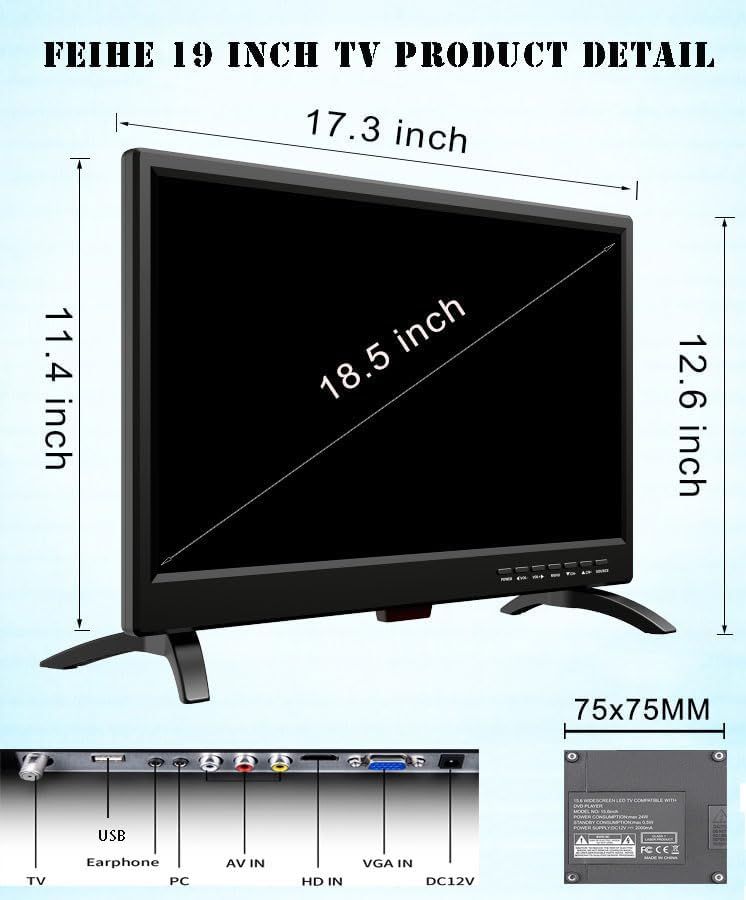
Image: A detailed view of the rear panel of the Feihe 19 Inch TV, highlighting the various input ports including USB, Earphone, PC, AV IN, HD IN (HDMI), VGA IN, and DC12V power input.
3.3. Antenna Connection for Local Channels
To receive over-the-air broadcasts, connect a digital antenna (not included) to the "TV" coaxial input port on the back of the television. For optimal signal reception, place the antenna as close to a window as possible. In areas with weaker signals, a larger outdoor antenna may be required. (Refer to video for visual guidance).

Image: The rear of the Feihe 19 Inch TV showing a small indoor antenna connected to the coaxial input, with text indicating "Built-In Digital ATSC Tuner" and a note about antenna placement.
4. Operating Instructions
4.1. Power On and Initial Setup
Press the power button on the remote control or the TV to turn it on. Upon first use, the TV may guide you through a setup wizard to select language and time zone. Follow the on-screen prompts. (Refer to video for visual guidance).
4.2. Channel Scan (ATSC Tuner)
After connecting your antenna, navigate to the "Channel" menu using the remote control. Select "Auto Scan" to search for available digital and analog channels. This process may take several minutes. Once complete, the TV will display the found channels. (Refer to video for visual guidance).
4.3. Connecting External Devices (HDMI/AV/VGA)
The TV supports various external devices such as TV boxes, DVD players, game systems, and computers. Connect your device to the appropriate port (HDMI, AV, or VGA) on the back of the TV. Then, press the "Source" button on the remote control and select the corresponding input (e.g., HDMI, AV, VGA) to display the content from your device. (Refer to video for visual guidance).
4.4. USB Media Playback
Insert a USB drive containing media files (photos, music, movies, text) into the USB port. Press the "Source" button on the remote and select "USB". You can then navigate through your files and select the desired media for playback. (Refer to video for visual guidance).
4.5. Remote Control Usage
The TV comes with a dedicated remote control for all functions. Please note that this TV is not compatible with universal cable remotes (e.g., Xfinity, Direct TV, Comcast, Verizon, Spectrum). You will need to use the included remote for TV functions (power, volume) and your cable box remote for channel changes if using a cable service.

Image: An illustration showing the Feihe 19 inch TV remote and various incompatible cable/universal remotes, emphasizing that only the included remote works with the TV.
4.6. Optimal Viewing
The 19-inch IPS display offers a 178° wide viewing angle, ensuring clear and sharp images from various positions. The TV supports Full HD 1366x768 resolution with a 16:9 aspect ratio for stunning visual quality. (Refer to video for visual guidance on viewing angle).

Image: The Feihe 19 Inch TV mounted under a cabinet in a kitchen, showing a woman preparing food, illustrating its suitability for small spaces.

Image: The rear of the Feihe 19 Inch TV, with blue circles highlighting the built-in speakers, indicating "Outstanding Sound Design" and "TV built-in clear and detailed sound box speaker."
5. Product Features
- Visual Enjoyment & Panoramic Viewing: 19-inch (18.5" diagonal) IPS display with 178° wide viewing angle for brilliant visuals from any angle.
- Endless Connectivity: Access over-the-air broadcasts via antenna, or connect cable boxes, computers, DVRs, Apple TV, Slingbox, Chromecast, WIFI Box, and DVD players.
- Bundle of Features: HDMI, VGA, and USB inputs for external audio/video playback. AV input for DVD players or game systems. Built-in speakers and headphone jack. Includes ATSC Tuner and remote control.
- Kitchen & RV TV: Wall-mountable design, suitable for small and compact areas like kitchens, RVs, caravans, and boats. Operates on 12 Volt DC power.
- Unique Remote Control: Easy-to-use remote with clear button functions. Note: Not compatible with Xfinity/Direct TV/Comcast/Verizon/Spectrum cable TV remotes; two remotes may be required.
6. Specifications
| Brand Name | Feihe |
| Model Number | 19 TV |
| Screen Size | 18.5 Inches (19 Inch Diagonal) |
| Display Technology | LED |
| Resolution | 1080p (1366x768) |
| Refresh Rate | 60 Hz |
| Aspect Ratio | 16:9 |
| Connectivity Technology | HDMI, USB, VGA, AV IN, Earphone, Coaxial |
| Voltage | 12 Volts (DC) |
| Output Wattage | 24 Watt Hours |
| Item Weight | 6.54 pounds |
| Product Dimensions | 1.57"D x 18.1"W x 13.7"H |
| Special Features | Computer Monitor, RV/Camper TV, Bedroom TV, Kitchen TV, Boat TV |
7. Maintenance
- Cleaning: Unplug the TV before cleaning. Use a soft, dry cloth to wipe the screen and exterior. For stubborn marks, lightly dampen the cloth with water or a mild, non-abrasive screen cleaner. Avoid harsh chemicals or abrasive materials.
- Ventilation: Ensure proper ventilation around the TV. Do not block ventilation openings. Maintain adequate space around the TV for air circulation.
- Storage: If storing the TV for an extended period, keep it in a cool, dry place, away from direct sunlight and extreme temperatures.
8. Troubleshooting
| Problem | Possible Cause / Solution |
|---|---|
| No Power |
|
| No Signal / Blank Screen |
|
| Remote Control Not Working |
|
| Poor Picture Quality |
|
9. Safety Information
- This TV is specifically designed for 12 Volt DC power. Only use it with compatible 12V DC power sources in RVs, campers, boats, trucks, or trailers.
- Do not expose the TV to rain or moisture to prevent fire or electric shock.
- Do not open the TV casing. Refer all servicing to qualified service personnel.
- Keep the TV away from direct sunlight, heat sources, and excessive dust.
- Ensure the TV is placed on a stable surface or securely mounted to prevent falling.
10. Warranty and Support
For warranty information and technical support, please refer to the warranty card included with your product or visit the official Feihe website. You may also contact Feihe customer service directly for assistance with product inquiries, troubleshooting, or service requests.
Feihe Store: https://www.amazon.com/stores/Feihe/page/CFCDDAE1-1212-4B5D-9603-48AD58166571
Ask a question about this manual
Ask about setup, troubleshooting, compatibility, parts, safety, or missing instructions. Manuals+ will review the question and use this page’s manual context to help answer it.