
Ertuly S03
Ertuly S03 Mini Wireless Ear Clip Bone Conduction Earbuds User Manual
Model: S03
1. Introduction
Thank you for choosing the Ertuly S03 Mini Wireless Ear Clip Bone Conduction Earbuds. These earbuds are designed to provide an open-ear listening experience, allowing you to enjoy audio while remaining aware of your surroundings. This manual provides detailed instructions to help you set up, operate, and maintain your earbuds for optimal performance.
2. Package Contents
Please verify that all items listed below are included in your package:
- Ertuly S03 Open Ear Headphones (Earbuds)
- Charging Case
- Type-C Charging Cable
- User Manual (This document)
- Packing Box
3. Product Overview
The Ertuly S03 earbuds feature an innovative ear clip design and bone conduction technology for comfortable, open-ear listening. The compact charging case provides convenient storage and recharges the earbuds.
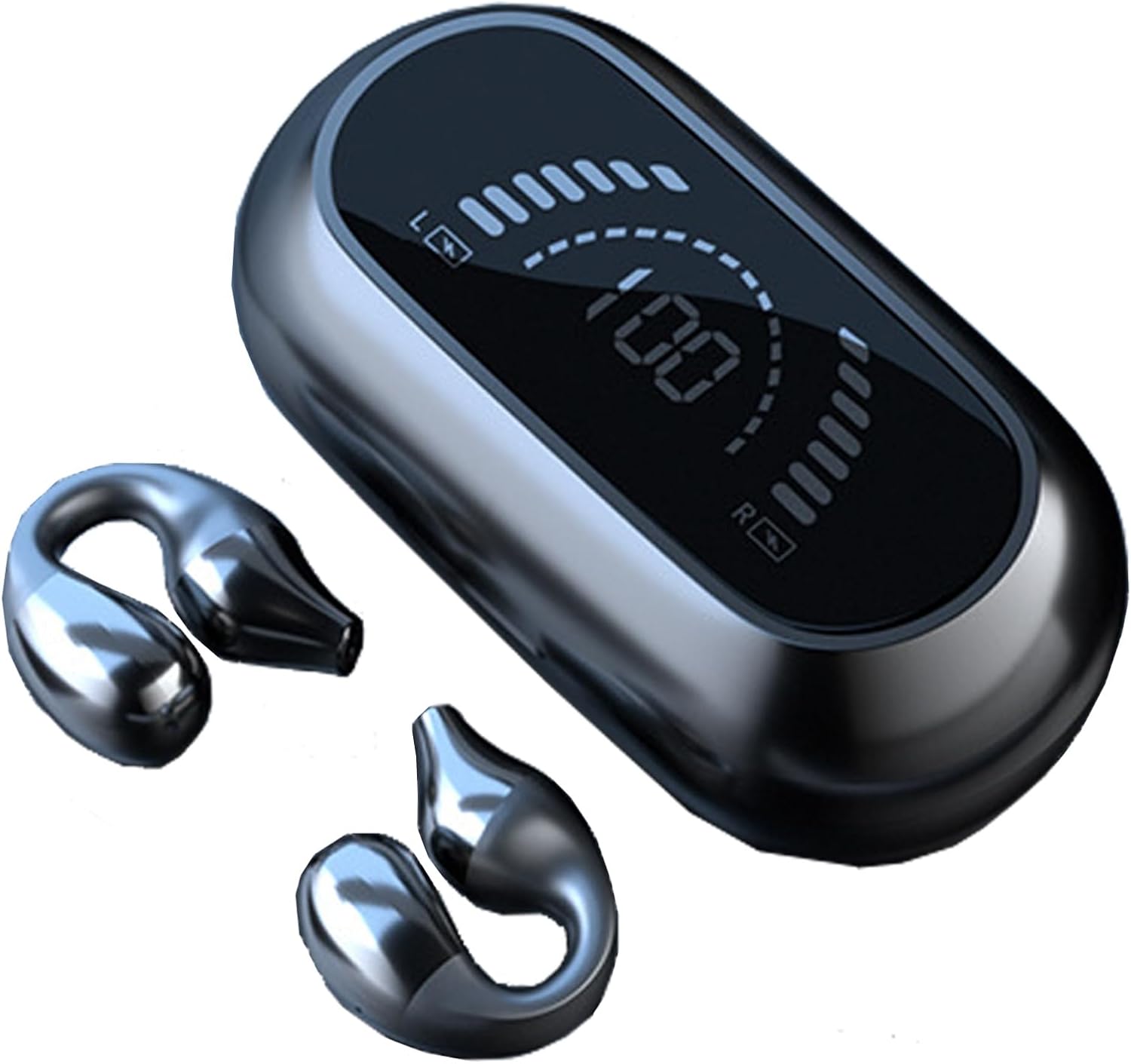
Figure 3.1: Ertuly S03 Earbuds and Charging Case. The image displays the two ear clip earbuds and their sleek charging case, which features a digital battery display.
The ear clip design ensures a secure and comfortable fit without entering the ear canal, making them suitable for extended wear and various activities.

Figure 3.2: Comfortable Fit. A woman is shown performing a yoga pose while wearing the Ertuly S03 earbuds, illustrating their secure and comfortable fit during physical activity.
The open-ear design allows you to hear your surroundings, enhancing safety during outdoor activities like cycling or running, and enabling communication in social settings.

Figure 3.3: Open Ear Design for Situational Awareness. This image depicts a cyclist wearing the earbuds, alongside people in a car, highlighting the ability to enjoy audio while remaining aware of the external environment.

Figure 3.4: Enhanced Awareness. A four-panel image illustrating how the open-ear design allows users to be aware of their surroundings, such as hearing children, traffic, conversations, and during exercise.
The earbuds are engineered to deliver clear stereo sound quality with a rich bass experience, utilizing advanced audio components.

Figure 3.5: Stereo Surround Sound Quality. A detailed diagram showcasing the internal components of the earbud, emphasizing features like "Space Sound 3D Panoramic," "13mm Super large drivers," and "360° Superior Sound."
4. Setup and Pairing
4.1. Charging the Earbuds and Case
Before first use, fully charge the earbuds and the charging case.
- Charging the Earbuds: Place the earbuds into the charging case. Ensure they are correctly seated. The indicator lights on the earbuds or the case display will show charging status. Earbuds have a 35mAH battery and take approximately 1 hour to fully charge.
- Charging the Case: Connect the provided Type-C cable to the charging port on the case and plug the other end into a USB power adapter (not included). The digital display on the case will indicate the battery level. The charging case has a 200mAH battery and can recharge the earbuds 4-5 times.
- Full Charge: Once fully charged, disconnect the charging cable.
4.2. Power On/Off
- Power On: The earbuds will automatically power on when removed from the charging case.
- Power Off: Place the earbuds back into the charging case to automatically power them off and begin charging.
4.3. Bluetooth Pairing
To connect your Ertuly S03 earbuds to a device:
- Step 1: Ensure the earbuds are charged and removed from the charging case. They will automatically enter pairing mode, indicated by a flashing light (refer to specific light indicators in the quick start guide if available).
- Step 2: On your device (smartphone, tablet, laptop), enable Bluetooth.
- Step 3: Search for available Bluetooth devices. Select "Ertuly S03" (or similar name) from the list.
- Step 4: Once connected, a voice prompt will confirm successful pairing, and the indicator light on the earbuds will change (e.g., stop flashing).
The earbuds use Bluetooth 5.2 for a stable connection up to 33 feet (10 meters) and are compatible with iOS, Android, and Windows devices.
5. Operation
5.1. Wearing the Earbuds
The Ertuly S03 earbuds are designed to clip gently onto your ears, resting outside the ear canal. This open-ear design provides comfort and allows for situational awareness.
- Identify the left (L) and right (R) earbuds.
- Gently open the ear clip and position it over your ear, ensuring the audio output rests comfortably near your ear canal without entering it.
- Adjust the earbud for a secure yet comfortable fit. The soft silicone material is designed to prevent discomfort even during prolonged use.
This design is compatible with wearing masks and glasses, reducing pressure on your ears.
5.2. Touch Controls
The Ertuly S03 earbuds feature touch-sensitive controls for managing audio playback and calls. Specific touch gestures may vary; refer to the quick start guide for detailed instructions on:
- Playing/Pausing music
- Skipping tracks (next/previous)
- Adjusting volume
- Answering/Ending calls
- Activating voice assistant
Note: Avoid accidentally touching the control area when adjusting the earbuds to prevent unintended actions.
6. Maintenance
Proper maintenance ensures the longevity and performance of your earbuds.
- Cleaning: Use a soft, dry, lint-free cloth to clean the earbuds and charging case. Do not use abrasive cleaners, alcohol, or chemical solvents.
- Water Exposure: While the earbuds are waterproof, avoid prolonged submersion in water. Dry them thoroughly if they get wet before placing them back in the charging case.
- Storage: When not in use, store the earbuds in their charging case to protect them from dust and damage. Store in a cool, dry place away from extreme temperatures.
- Charging Port: Keep the Type-C charging port free of dust and debris.
7. Troubleshooting
If you encounter issues with your Ertuly S03 earbuds, refer to the following common problems and solutions:
- Earbuds not pairing or connecting:
- Ensure Bluetooth is enabled on your device and the earbuds are removed from the case.
- Make sure the earbuds are charged.
- Turn off Bluetooth on your device, then turn it back on.
- Forget "Ertuly S03" from your device's Bluetooth list and attempt to pair again.
- Restart your device.
- No sound or low volume:
- Check the volume level on both your device and the earbuds.
- Ensure the earbuds are properly connected to your device.
- Re-pair the earbuds with your device.
- Confirm that the audio is playing from the correct output source on your device.
- Earbuds not charging:
- Ensure the charging cable is securely connected to both the case and the power source.
- Verify that the charging case itself has power.
- Clean the charging contacts on both the earbuds and inside the case with a dry cotton swab.
- Try a different charging cable or power adapter.
- Earbuds randomly disconnect or go inactive:
- Ensure the earbuds are within the 33-foot Bluetooth range of your device.
- Check for interference from other wireless devices.
- Place the earbuds back into the charging case for a few seconds, then remove them to reset the connection.
- Ensure the earbuds are sufficiently charged.
If the problem persists, please contact customer support.
8. Specifications
| Model | S03 |
| Bluetooth Version | 5.2 |
| Bluetooth Range | Up to 33 feet (10 meters) |
| Compatibility | iOS, Android, Windows |
| Earbud Battery Capacity | 35mAH |
| Charging Case Battery Capacity | 200mAH |
| Earbud Use Time | 3-4 hours |
| Charging Case Recharges | 4-5 times |
| Charging Time | Approximately 1 hour |
| Material | Plastic, Soft Silicone |
| Item Weight | Approx. 0.01 Pounds (4.5 grams) |
| Water Resistance | Waterproof |
| Control Type | Touch Control, Volume Control |
| Microphone | Built-In, Stereo |
| Product Dimensions (Case) | 7.7 x 3.4 x 12.8 cm |
9. Safety Information
Please read and follow these safety guidelines to ensure safe operation and prevent damage:
- Do not disassemble, repair, or modify the product. This may cause fire, electric shock, or complete damage to the product.
- Keep the product away from extreme temperatures, direct sunlight, and open flames.
- Avoid dropping or subjecting the product to strong impacts.
- Keep out of reach of children and pets. Small parts may pose a choking hazard.
- Do not use the product at excessively high volumes for prolonged periods, as this may cause hearing damage.
- Be aware of your surroundings when using the earbuds, especially in traffic or other potentially hazardous situations.
- Use only the provided Type-C cable for charging.
10. Warranty and Support
Ertuly is committed to providing quality products and customer satisfaction. If you encounter any product problems or require assistance, please contact our professional customer service team.
To reach customer support, please send a message via the platform where you purchased the product. Provide your order details and a clear description of the issue for prompt assistance.
Ask a question about this manual
Ask about setup, troubleshooting, compatibility, parts, safety, or missing instructions. Manuals+ will review the question and use this page’s manual context to help answer it.