
FANGOR SS-JP-BR143BK
Contents
FANGOR Portable Blu-ray Player User Manual
Model: SS-JP-BR143BK
Introduction
Thank you for purchasing the FANGOR Portable Blu-ray Player. This device offers a high-definition 14.1-inch TFT LCD screen (1366x768 resolution) with a 270-degree rotatable display, providing a vivid and immersive viewing experience. Equipped with Dolby Surround, it delivers powerful, high-quality sound. Its versatile connectivity options, including HDMI output and AV input, allow for flexible usage with external displays or as a standalone monitor. The built-in rechargeable battery provides up to 3 hours of continuous playback, making it ideal for on-the-go entertainment. This player supports a wide range of disc and media formats, including Blu-ray, DVD, and CD, and is region-free for DVDs, allowing playback of international content. It also supports CPRM for recorded digital broadcasts.

Image: The FANGOR Portable Blu-ray Player with its remote control, showcasing the main unit with the screen open, displaying a Blu-ray Disc logo.
Setup
1. Unpacking and Initial Inspection
- Carefully remove all components from the packaging.
- Verify that all accessories are present: AV cable, USB cable, car charger, remote control (batteries not included), and Japanese instruction manual.
- Inspect the player for any visible damage. If any damage is found, do not use the device and contact customer support.
2. Charging the Battery
Before first use, fully charge the built-in battery. The player supports three power sources: AC adapter, DC car charger, and the internal rechargeable battery.
- Using the AC Adapter: Connect the AC adapter to the player's DC IN port and plug it into a standard wall outlet.
- Using the Car Charger: Connect the car charger to the player's DC IN port and plug it into your vehicle's cigarette lighter socket.
The charging indicator light will typically show the charging status and turn off or change color when fully charged. A full charge provides approximately 3 hours of continuous playback.

Image: Illustration of the three power options for the FANGOR Portable Blu-ray Player: household adapter, internal 4000mAh battery, and car cigarette lighter socket.
3. Inserting Discs and Media
Open the disc tray by gently pressing the OPEN button or sliding the latch. Place the disc (Blu-ray, DVD, or CD) onto the spindle with the label side facing up and gently press down until it clicks into place. Close the disc tray. For digital media, insert a USB drive into the USB port or an SD card into the SD card slot.
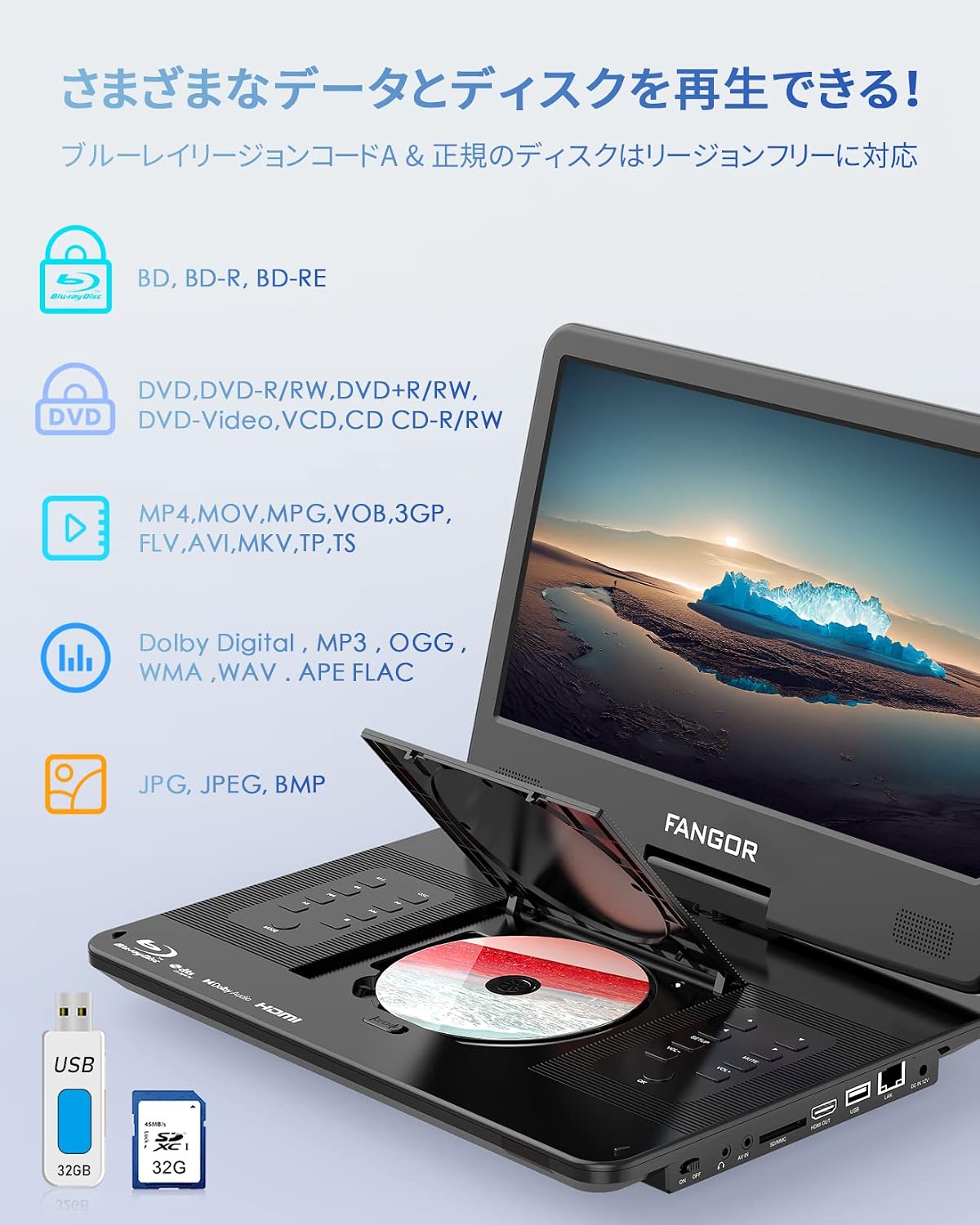
Image: The FANGOR Portable Blu-ray Player with its disc tray open, illustrating the insertion of a disc. Icons for supported media types like BD, DVD, various video/audio formats, and image formats are shown, along with USB and SD card slots.
Operating Instructions
1. Powering On/Off
- To power on, slide the power switch to the ON position.
- To power off, slide the power switch to the OFF position.
2. Basic Playback
- Once a disc is inserted or media is connected, the player will typically start playback automatically or display a menu.
- Use the PLAY/PAUSE button on the player or remote to start or pause playback.
- Use the STOP button to stop playback.
- Use the PREV/NEXT buttons to skip chapters or tracks.
- Adjust volume using the VOL+/- buttons.
3. Screen Rotation and Viewing Angles
The 14.1-inch LCD screen can rotate up to 270 degrees, allowing for various viewing angles and configurations, including folding flat like a tablet.

Image: The FANGOR Portable Blu-ray Player demonstrating its 270-degree screen rotation capability, showing the screen in various positions from fully open to folded flat.
4. Connecting to External Devices
The player features HDMI output and AV input ports for enhanced connectivity.
- HDMI Output: Connect an HDMI cable from the player's HDMI OUT port to an HDMI IN port on a TV, projector, or larger monitor to enjoy content on a bigger screen.
- AV Input: Use the provided AV cable to connect external devices (e.g., game consoles, older media players) to the player's AV IN port, allowing the player's screen to function as a display for these devices.
- Headphone Jack: Plug in headphones for private listening, especially useful in quiet environments like hospitals or libraries.

Image: The FANGOR Portable Blu-ray Player illustrating its connectivity options, including AV input for connecting to another player and HDMI output for connecting to a large screen TV or projector.
Maintenance
- Cleaning: Use a soft, dry cloth to clean the player's exterior. For the screen, use a screen-specific cleaning solution and a microfiber cloth. Avoid abrasive cleaners or solvents.
- Disc Care: Handle discs by their edges. Keep them clean and free of scratches. Store them in their cases when not in use.
- Storage: When not in use for extended periods, store the player in a cool, dry place away from direct sunlight and extreme temperatures.
- Battery Care: To prolong battery life, avoid fully discharging the battery frequently. If storing for a long time, charge the battery to about 50% every few months.
Troubleshooting
| Problem | Possible Cause / Solution |
|---|---|
| Player does not power on. |
|
| Disc does not play or skips. |
|
| No sound. |
|
| Remote control not working. |
|
| Image quality is poor. |
|
Specifications
| Feature | Detail |
|---|---|
| Model Number | SS-JP-BR143BK |
| Screen Size | 14.1 inches |
| Display Type | TFT LCD |
| Resolution | 1366 x 768 pixels |
| Screen Rotation | 270 degrees |
| Supported Disc Formats | BD-ROM, BD-R, BD-RE, DVD-ROM, DVD±R, DVD±RW, CD-R, CD-RW |
| Supported Media Types | MP4, MOV, MPG, VOB, 3GP, FLV, AVI, MKV, 1P, 1S, Dolby Digital, MP3, OGG, WMA, WAV, APE FLAC, JPG, JPEG, BMP (via USB/SD) |
| CPRM Support | Yes |
| Region Free (DVD) | Yes |
| Connectivity | HDMI Output, AV Input, USB Port, SD Card Slot, Headphone Jack |
| Power Sources | AC Adapter, DC Car Charger, Built-in Rechargeable Battery |
| Battery Life | Approx. 3 hours (continuous playback) |
| Weight | 1.5 kg (3.3 lbs) |
| Dimensions (Package) | 39.4 x 37.1 x 9.5 cm |
| Included Accessories | AV cable, USB cable, Car charger, Remote control (batteries not included), Japanese Instruction Manual |
Warranty and Support
This FANGOR product comes with a one-year warranty from the date of purchase. If you encounter any issues or have questions regarding the product, please do not hesitate to contact FANGOR customer support. Please refer to the contact information provided in your product packaging or on the official FANGOR website for assistance.
For the latest support information, FAQs, and driver downloads (if applicable), please visit the official FANGOR website.
Documents and downloads
Ask a question about this manual
Ask about setup, troubleshooting, compatibility, parts, safety, or missing instructions. Manuals+ will review the question and use this page’s manual context to help answer it.