
Introduction
The Satechi Slim X3 Bluetooth Backlit Keyboard is designed for Apple macOS users, offering an extended layout with a numeric keypad, navigational arrows, and dedicated macOS function keys. This keyboard supports multi-device connectivity, allowing seamless switching between up to four Bluetooth-enabled devices. It features illuminated keys with ten adjustable brightness levels and a rechargeable USB-C port for convenient power.
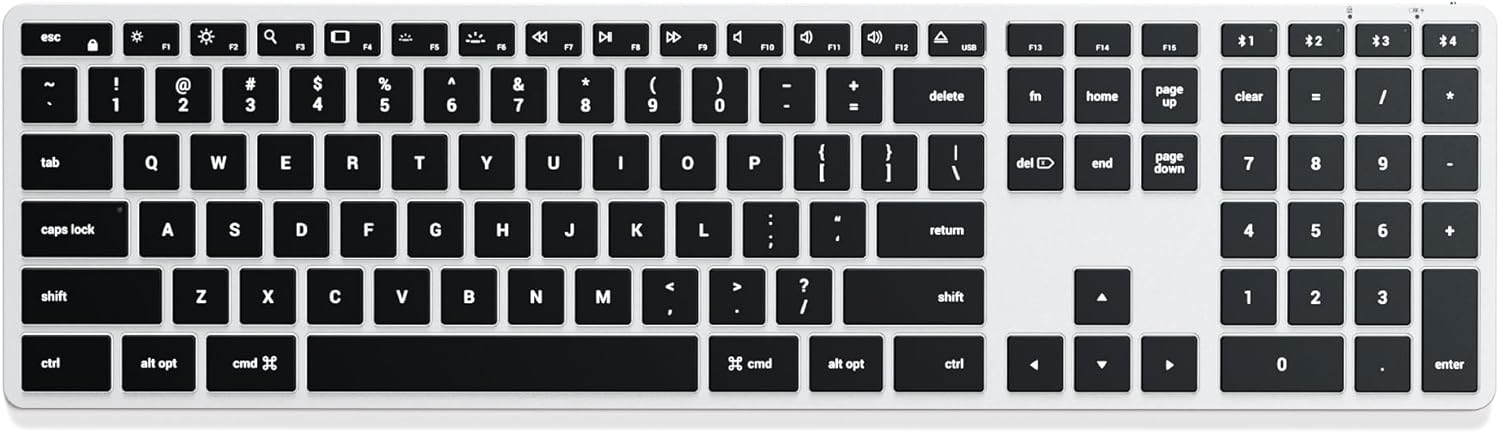
Image: Top-down view of the Satechi Slim X3 Bluetooth Backlit Keyboard, showcasing its full QWERTY layout and numeric keypad.
Setup
1. Charging the Keyboard
Before initial use, fully charge the keyboard. Connect the included USB-C charging cable to the keyboard's USB-C port and to a power source (e.g., computer USB port or USB wall adapter). The charging indicator light will show the charging status. A full charge typically takes 2-3 hours.

Image: A close-up view of the Satechi Slim X3 keyboard, showing the USB-C charging cable connected to its port.
2. Bluetooth Pairing
- Ensure the keyboard is powered on. The power switch is located on the side of the keyboard.
- Press and hold one of the Bluetooth keys (F1, F2, F3, or F4) for 3 seconds until the LED indicator above the key starts blinking. This indicates the keyboard is in pairing mode.
- On your device (Mac, iPad, iPhone), navigate to System Settings (or System Preferences) > Bluetooth.
- Select "Satechi Slim X3 Keyboard" from the list of available devices.
- Follow any on-screen prompts to complete the pairing process. The LED indicator will stop blinking and remain solid for a moment, then turn off, indicating successful pairing.

Image: A visual guide demonstrating how to pair the keyboard by holding the Fn key and a Bluetooth key for 3 seconds, with multiple devices in the background.
Operating Instructions
1. Multi-Device Switching
The keyboard can be paired with up to four Bluetooth devices. To switch between paired devices, simply press the corresponding Bluetooth key (F1, F2, F3, or F4) once. The keyboard will connect to the selected device automatically.
2. Backlight Control
The Satechi Slim X3 features illuminated keys with ten adjustable brightness levels.
- To increase brightness: Press the F5 key.
- To decrease brightness: Press the F4 key.
- To turn the backlight off: Continue pressing F4 until the backlight is off.

Image: A close-up view of the keyboard keys, highlighting their illumination.
3. MacOS Function Keys
The keyboard includes dedicated macOS function keys for quick access to common features:
- Esc: Escape
- F1-F4: Bluetooth Device Selection
- F4: Backlight Decrease
- F5: Backlight Increase
- F7: Previous Track
- F8: Play/Pause
- F9: Next Track
- F10: Mute
- F11: Volume Down
- F12: Volume Up
- F13: Screen Lock
- F14: Home
- F15: Page Up
- F16: Page Down
- F17: End
- F18: Clear
- F19: Eject (if applicable)
The keyboard is optimized for macOS, providing a familiar layout and functionality.

Image: An angled view of the Satechi Slim X3 keyboard, emphasizing its design for Mac with a full QWERTY layout.
Maintenance
- Cleaning: Use a soft, lint-free cloth to wipe the keyboard surface. For deeper cleaning, a slightly damp cloth with mild soap can be used, ensuring no liquid enters the keyboard.
- Battery Care: To prolong battery life, avoid fully discharging the keyboard frequently. Charge it when the battery indicator is low. If storing for an extended period, charge the keyboard to about 50% before storage.
- Storage: Store the keyboard in a cool, dry place away from direct sunlight and extreme temperatures.
Troubleshooting
| Issue | Solution |
|---|---|
| Keyboard does not turn on. | Ensure the keyboard is charged. Connect it to a power source using the USB-C cable. |
| Unable to pair via Bluetooth. |
|
| Keys are not responding or typing incorrectly. |
|
| Backlight is not working. |
|
Specifications
- Model Number: ST-BTSX3S
- Dimensions: 17.44 x 4.49 x 0.47 inches (44.3 x 11.4 x 1.2 cm)
- Item Weight: 13.2 ounces (374.2 grams)
- Connectivity: Bluetooth, USB-C (for charging and wired use)
- Battery: 1 Lithium Polymer battery required (integrated)
- Special Features: Backlit keys (10 levels), Multi-Device Sync (up to 4 devices), Rechargeable, Ultra Slim, Optimized for macOS
- Material: Aluminum
- Compatible Devices: MacBook Pro 14/16-inch (M4/M3/M2/M1), MacBook Air 13/15-inch (M4/M3/M2/M1), iPad Pro 11/13-inch (M4/M2/M1), iPad Air 11/13-inch (M3/M2/M1), iPad Mini (A17/6th Gen), iPhone 17/16/15/14/13/12 Series, Mac Mini (M4/M2/M1), iMac (M4/M3/M1), Mac Studio (M4/M3/M2/M1), and other Bluetooth-enabled devices.
Warranty and Support
Satechi products are covered by a 2-year limited warranty against defects in materials and workmanship under normal use. For warranty claims or technical support, please visit the official Satechi website or contact their customer service.
For further assistance, please refer to the Satechi Store on Amazon.


